2:01

Operon Solutions posted on LinkedIn
Operon · Industrials
Labric · May 2025 · 1:13 · Full motion · AI-annotated
Labric’s 1:13 launch film runs 15 scenes, about 4.9 s each. The product shows up at 0:12 and 6 features are revealed. The call to action lands at 1:02 (86% in), over a voiceover. The video alternates plain black claim cards with white UI panels floating on a blue-orange abstract gradient, each card handing the story to the next feature. Its signature moves are slow zooms into and out of interface panels and 3D lifts of device images, held at a relaxed pace of about 2.5 cuts per minute.
Is this your launch? to your site or press kit.
Films whose music sounds like this one, voice left out
Nexa Labs · Electronic
STASIS · Cinematic and modern electronic
Webflow · Electronic, Cinematic
A three-line white headline fades in on the left of a plain black background, then holds completely still for the remainder of the clip.
On-screen text: “Sophisticated labs often don't have sophisticated data systems”
Camera: Static
A dark blurred backdrop with a faint document shape holds three lines of gray text on the left. The text stays still, then fades out as the background brightens to a lighter blurred frame.
On-screen text: “Sophisticated labs often don't have sophisticated data systems”
Camera: Static
A Google Drive window on a colorful abstract background holds still while its CSV file list scrolls continuously, row after row, and a three-line headline about labs and data systems stays locked on screen.
On-screen text: “Sophisticated labs”, “often don't have”, “sophisticated data systems”
Camera: Static
A white outline logo of a rabbit head wearing a mask appears on black, fills solid white, holds, then shrinks as a blurred product interface fades in behind it.
Camera: Static
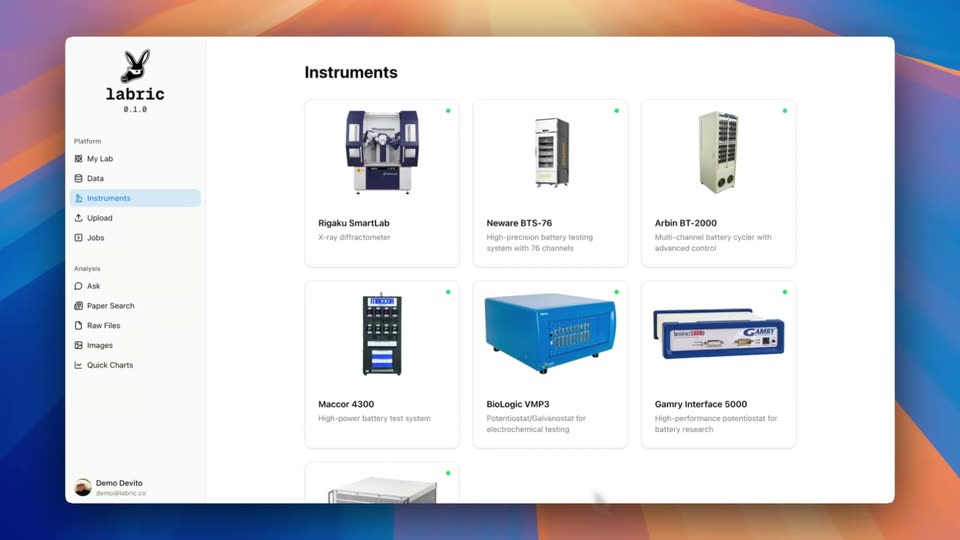
A white labric dashboard panel floats on a blue and orange gradient, listing instrument cards beside a sidebar. The view zooms into the grid as a cursor approaches the BioLogic VMP3 tile, whose blue device image lifts out of the card in 3D.
Techniques: Light sweep, UI zoom, Cursor demo, 3D mockup
Camera: Push in
The LabRIC instrument dashboard fills the frame, showing a blue BioLogic VMP3 device card above Logs and Recent Datasets panels. The view zooms toward the lower right corner as a cursor clicks the View button on a streaming notification toast.
Techniques: UI zoom, Cursor demo
Camera: Pan
Zoomed on a node graph linking two data files to a notebook, the view pulls back to the full Labric dashboard with sidebar and job list. The graph lines turn green as the job completes, then a cursor clicks Share, opening a dialog with a link and access list.
Techniques: UI zoom, Cursor demo
Camera: Pan
A black screen holds a two-line white headline, left-aligned, that fades in and stays locked. The word 'centralized' is set in italic while the rest is upright bold.
On-screen text: “Everything lives in one centralized hub”
Camera: Static
A blurred dashboard card sits on a warm orange and blue gradient background. A gray two-line headline reads Everything lives in one centralized hub, then fades out as the card brightens.
On-screen text: “Everything lives in one”, “centralized hub”
Camera: Static
A labric interface card rests on a multicolor gradient. The view zooms into the Quick Charts panel as a cursor ticks three sample checkboxes, then pulls back to reveal the line chart filling with blue, red and green peaks.
Techniques: UI zoom, Cursor demo
Camera: Pull out
A white labric app window on a blue and orange gradient background zooms into its Analysis Tools panel; a cursor clicks the Voids toggle, the view pulls back, and an orange box marks a detected defect on the grayscale microscope image.
Techniques: UI zoom, Cursor demo
Camera: Static
A flat labric interface sits on a colorful gradient background. A cursor hovers over a grayscale microscope image, then the view switches to the Ask panel, fading the image and revealing the prompt “Where do you want to dive in?” with two buttons.
Techniques: Cursor demo
Camera: Static
A white labric app window on a blue and orange gradient background. In the chat, a question about battery cycling tests is typed into the input bar, answers stream in, then a plot request draws a two-line voltage chart.
Techniques: Kinetic type
Camera: Static
A washed-out, overexposed view of the labric dashboard, showing the rabbit logo, left sidebar menu and a voltage versus capacity chart, fades out until the frame is plain white.
Camera: Static
A black-and-white donkey head mark beside the word 'labric' sits on a plain white background, easing from gray to black. A small tagline fades in below the logo and holds.
On-screen text: “request a demo on labric.co”
Camera: Static