0:48

OpenAI - Now in beta: Businesses in ChatGPT. Claim your business, manage your
OpenAI · AI · Nov 2026
Knock · Apr 2025 · 0:50 · AI-annotated
Knock’s 0:50 launch film runs 23 scenes, about 2.2 s each. The product is on screen from the first frame and 4 features are revealed. The call to action lands at 0:44 (88% in). The video is built from short typographic cards, typed code, and clean UI mockups on a flat pale gray field. Its pacing is brisk and precise, with signature moves like staggered text settling, red connector lines tracing workflows, scrolling tool pills, and quick zooms into the wireframe sphere.
Is this your launch? to your site or press kit.
OpenAI · AI · Nov 2026
Mercury · Finance · May 2024
On a pale gray background, small dark lowercase letters form the partial word in at left, with a faint plus mark near the top right.
On-screen text: “in”
Techniques: Kinetic type
Camera: Static
A plain light gray frame holds the word Introducing, its letters staggering and settling into solid black on the left. The line is then swapped for Knock agent toolkit in the same style, which holds static.
On-screen text: “Introducing”, “Knock agent toolkit”
Techniques: Kinetic type
Camera: Static
On a flat light gray field, black sans-serif text reads “Knock agent toolkit” off-center left. The text then shifts to center as “Your agent,” and a small circular star-patterned logo in orange and gray appears beneath it.
On-screen text: “Knock agent toolkit”, “Your agent”
Camera: Static
A black label “Your agent” sits centered on a light gray field above a circular orange wireframe sphere that rotates slowly. Near the end the view dives into the sphere, filling the frame with its dark faceted lines.
On-screen text: “Your agent”
Camera: Static
A syntax-highlighted code block types itself out on a black background. Orange keys and a yellow string fill in line by line, ending with a closing brace and a blinking cursor that holds.
Techniques: Kinetic type
Camera: Static
A syntax-highlighted code block on black shows a system prompt for an expense-management agent. The code then gives way to a dark low-poly wireframe sphere with a faint red glow, centered in the frame.
Camera: Static
A mock chat on a light gray field: a brown geometric avatar with the label Your AI agent product types “How can I help you today?” while a customer avatar on the right types a request for a new virtual card. The agent line is then replaced by a typed reply about approvers, and the scene fades to the knock wordmark with a red beam and a monospace status line.
On-screen text: “Your AI agent product”, “How can I help you today?”, “Your customer”, “I'd like to issue a new virtual card for our upcoming offsite.”, “Great. I'll get approval from the necessary approvers.”
Techniques: Kinetic type, Light sweep
Camera: Static
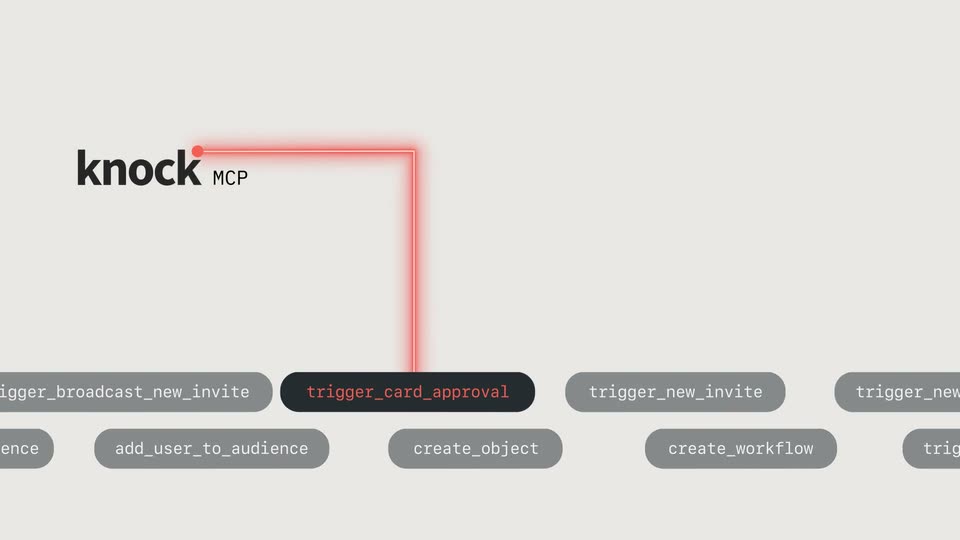
The knock MCP logo and a “Searching tools” caption sit top left on a light gray field as a red line redraws from vertical to horizontal and the loading dots become a green check. A row of dark pill labels scrolls left along the bottom, one in red.
On-screen text: “Searching tools”
Camera: Static
A dark pill with red monospace text slides over a light gray code editor panel with line numbers, reframing from a wider workflow graph of gray action labels.
Techniques: UI zoom
Camera: Static
A dark code-editor panel with a red tab label sits on a light gray field. Monospaced JSON types in line by line, filling a trigger_card_approval payload, then the panel shrinks toward the left as the clip ends.
Techniques: Kinetic type
Camera: Pull out
A dark rounded pill carrying the orange monospace label trigger_card_approval slides in from the left on a pale gray field. A glowing red L-shaped line draws itself beneath the pill, its corner and short dash completing the bracket.
On-screen text: “trigger_card_approval”
Techniques: Kinetic type
Camera: Static
A dark pill label reads trigger_card_approval at left while a red glowing rectangular path pulses around a phone lock screen and several approval cards. The cards and phone scale up, then shrink to tiny dots on a plain gray field.
On-screen text: “trigger_card_approval”
Camera: Static
A small dark pill holding orange code text floats on a plain light background. The camera zooms in rapidly, blurring the frame into a diagonal array of dark bars with repeated code.
Camera: Static
A black headline sits above four rows of dark pill tags with white monospace labels scrolling horizontally. The view then shifts to an orange wireframe sphere with motion-blurred horizontal bars and a blurred tagline.
On-screen text: “The power of Knock”, “Accessibly your Magic”
Techniques: Kinetic type
Camera: Pull out
A glowing orange wireframe sphere rotates slowly at left, its triangular facets shifting. Behind it, dark horizontal rows with white light streaks scroll rightward. Black bold text sits static at the top right.
On-screen text: “Accessible to your Al agent”
Camera: Static
A plain light gray field holds black sans-serif text left of center. The phrase 'Built in support for' is replaced in quick succession by 'Vercel AI SDK,' 'LangChain,' and 'OpenAI,' each appearing as a static swap in the same position.
On-screen text: “Built in support for”, “Vercel AI SDK”, “LangChain”, “OpenAI”
Techniques: Kinetic type
Camera: Static
The OpenAI wordmark sits left of center on a plain light gray field, then it is swapped for the smaller word Thinking followed by three red dots. The frame stays locked off throughout the short scene.
On-screen text: “OpenAI”, “Thinking ...”
Camera: Static
A white headline, “And an MCP server too.,” sits over a large black circle on a near-black field. The circle then disappears, leaving the text alone. A small Thinking label with red dots holds at the left edge.
On-screen text: “And an MCP server too.”
Camera: Static
A dark chat window types a prompt letter by letter and sends it; a cursor hovers, a generating indicator flashes, the reply types out, a tool chip with a green check appears, and a confirmation line fills in.
Techniques: Cursor demo
Camera: Static
On a plain light gray background, the bold black headline “Get started today” sits left of center. A monospace install command, npm install @knocklabs/agent-toolkit, appears to its right on the same baseline.
On-screen text: “Get started today”, “npm install @knocklabs/agent-toolkit”
Camera: Static
A single line of black monospace code, npm install @knocklabs/agent-toolkit, sits centered on a flat light gray background. The frame is locked off with no motion or animation.
On-screen text: “npm install @knocklabs/agent-toolkit”
Camera: Static
A monospace install command sits centered on a light gray field, then the frame gives way to the gray Knock wordmark with a coral dot.
On-screen text: “npm install @knocklabs/agent-toolkit”
Camera: Static
The knock wordmark, black lowercase letters capped by a small red dot, sits dead center on a flat light gray field. The frame is locked off and the mark holds perfectly still for the whole shot.
On-screen text: “knock”
Camera: Static