0:51

Anthropic - Turn written content into professional designs with Claude + @canva
Anthropic · AI · Jul 2025
Klavis AI’s 1:12 launch film runs 10 scenes, about 7.2 s each. The product is on screen from the first frame and 3 features are revealed. There is no explicit call to action; a voiceover carries the film. Founder-led launch cut: a talking head against a white wall hands off to screen recordings of the API docs, OAuth panels and chat UIs, each anchored by the circular webcam bubble. Pacing is steady at about seven cuts a minute, with slow zoom-ins on the Send button and side-by-side permission screens as the recurring signature moves.
Is this your launch? to your site or press kit.
Anthropic · AI · Jul 2025
Alara · B2B · Aug 2025
OpenAI · AI · Jan 2025
A man in a black varsity jacket sits centered against a plain white wall, speaking to camera. A name lower-third fades in on the left, then white label chips stack down the right as he counts points with his fingers. Subtitles run along the bottom.
On-screen text: “Xiangkai Zeng”, “Co-founder of Klavis AI”, “Hi, I'm Xiangkai from Klavis AI.”, “Klavis AI is building open source MCP integrations”, “for AI applications.”, “With more teams and enterprises starting”, “to adopt MCPs in production, we noticed a huge gap.”, “Current Gaps”, “Most of the MCP servers are”, “Personal projects, local use', 'personal projects, designed for local use,', 'lack stability and features.', 'Lack stability and features', 'You often need to' ”
Camera: Static
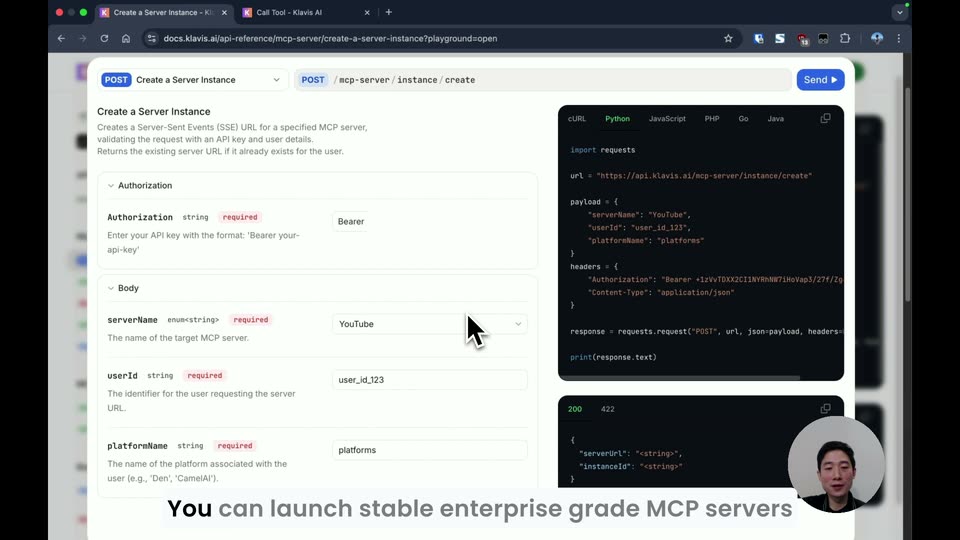
Screen recording of the Klavius API docs page: the Create a Server Instance form with filled fields beside a Python code panel. A cursor moves to click the blue Send button as the view zooms in. A presenter appears in a small circular webcam bubble at bottom right.
On-screen text: “We are changing this with Klavis AI.”, “You can launch stable enterprise grade MCP servers”, “Current Gaps”
Techniques: Cursor demo, UI zoom
Camera: Static
A dark code panel with language tabs sits inside a blurred browser window as the frame sharpens and settles. A hand cursor clicks a blue button that spins into a checkmark. A white caption runs along the bottom.
On-screen text: “You can launch stable enterprise grade MCP servers”
Techniques: UI zoom, Cursor demo
Camera: Push in
A browser window shows a product interface as a hand cursor clicks the blue Send button. A 200 OK response panel with a JSON body and language code tabs fills the center, a small presenter head sits in the corner, and white captions run along the bottom.
On-screen text: “You can launch stable enterprise grade MCP servers”, “instantly via our API.”
Techniques: Cursor demo
Camera: Static
Two OAuth pages sit side by side: an Atlassian access request on the left and a GitHub authorization panel on the right. A circular webcam of the speaker sits bottom right, and a white caption bar slides in along the bottom.
On-screen text: “Our hosted MCP servers”, “include build-in OAuth and user level authentication,”
Techniques: Split screen
Camera: Static
Two product screens sit side by side: a Notion access request on the left and a Supabase API authorization panel on the right, both listing Klavis AI permissions. A small circular webcam of the presenter sits bottom right, and a white caption on black runs along the bottom.
On-screen text: “include build-in OAuth and user level authentication,”, “eliminating security gaps and complexity.”
Techniques: Split screen
Camera: Static
A screen capture of the Klavis API docs page shows the Call Tool form beside a Python code panel. The view zooms onto the Send button, the cursor clicks it, and the panel switches to a 200 JSON response. A presenter's face sits in a circular inset at bottom right, with caption bars along the bottom.
On-screen text: “For existing function call infrastructure that”, “lacks native MCP support,”, “You can use our API to connect any remote”, “MCP servers from your existing backend.”, “Here is an example of calling a remote YouTube MCP server”, “directly using our API.”
Techniques: UI zoom, Cursor demo
Camera: Push in
A dark KlavisAI chat panel shows a video summary and a YouTube thumbnail on the left, while a circular webcam of a man speaking sits in the bottom right. A white caption bar at the bottom updates with the narration.
On-screen text: “For people building AI applications, you can easily”, “integrate with Klavis AI.”
Camera: Static
A static chat screenshot fills the frame: a user prompt from Zihao and four KlavisAI tool call cards on a light panel. A circular video of the presenter sits in the bottom right corner while subtitle lines cycle across the bottom.
On-screen text: “Integrate with Klavis AI.”, “Here some simple examples.”, “Our servers and clients are open source.”
Camera: Static
A locked-off black frame centers the KlavisAI logo, a purple-to-orange gradient tile with a white K next to the white wordmark. A small circular presenter cam anchors the bottom right while a caption bar spans the bottom.
On-screen text: “Feel free to check it out. Thank you.”
Camera: Static