0:48
Explore
Catalin Miron - keyframer.dev - Catastif is out on the App Store, and live on Product Hunt today 🎉 L
Keyframer · Nov 2026 · 0:56 · Full motion · AI-annotated
- Length
- 0:56
- Scenes
- 12 · 4.7 s avg
- Product on screen
- 0:00
- Features shown
- 7
- Call to action
- 0:52 · 93%
- Voiceover
- Yes
- Views
- 3.9K on X
as of November 23, 2026
00:00:00 / 00:56:15
- Length
- 0:56
- Scenes
- 12 · 4.7 s avg
- Product on screen
- 0:00
- Features shown
- 7
- Call to action
- 0:52 · 93%
- Voiceover
- Yes
- Views
- 3.9K on X
as of November 23, 2026
Keyframer’s 0:56 launch film runs 12 scenes, about 4.7 s each. The product is on screen from the first frame and 7 features are revealed. The call to action lands at 0:52 (93% in), over a voiceover. The video is a slow montage of single feature beats, each pairing a left aligned two line headline with a colored eyebrow and a live tilted 3D phone demo, joined by blur transitions and a dashed progress bar. It opens with the brand lockup, runs through feature reveals, an overview of list types, a cross device beat and a privacy card, then closes on the App Store call to action, all on the same pastel gradient and device mockup language.
No filming indicatedEstimated needs: 1 capture group — your screens or recordings · 1 official logo — reused across the film · 9 3D passages — build or supply
Is this your launch? to your site or press kit.
More like this


0:42


Shopify Editions Winter ’23 is live
Shopify · Business software · Feb 2023
0:57


Introducing Google AI Ultra: The best of Google AI in one subscription
Google · AI · May 2025
Similar soundtrack
Films whose music sounds like this one, voice left out
0:49

Introducing Microsoft Editor: Write confidently across your Office apps and favorite websites
Microsoft · Lo-fi hip-hop, chillwave, electronic
1:03


New agents for financial services | Claude Cowork + Claude Managed Agents
Anthropic · Lo-fi hip-hop
Catalin Miron - keyframer.dev - Catastif is out on the App Store, and live on Product Hunt today 🎉 L, scene by scene
· 12 scenes as text
01 · Product intro · 0:00–0:02
On a soft pastel gradient, a cream checklist app icon sits centered in a faint circle. The wordmark Catastif slides in beside it and a gray tagline fades in below. The lockup shifts left as a tilted 3D phone showing the list screen slides in from the right.
On-screen text: “Catastif”, “Every list your household keeps, together.”
Techniques: 3D mockup
Camera: Static
02 · Feature reveal · 0:02–0:08
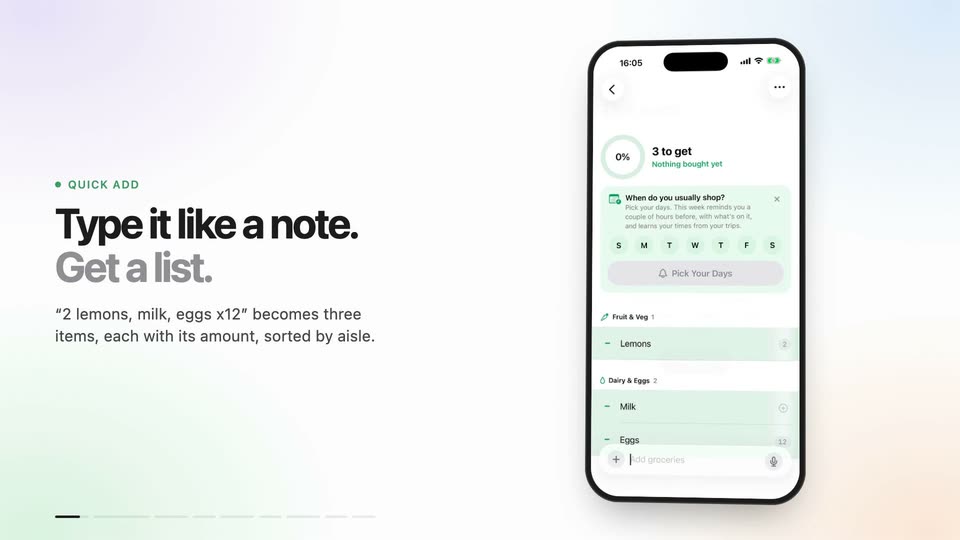
Left copy reads 'Type it like a note. Get a list.' beside a tilted iPhone mockup on a soft pastel gradient. Inside the app, text types into the input field, item chips appear, then the screen blurs into a sorted list. The scene fades out through a blur.
On-screen text: “QUICK ADD”, “Type it like a note.”, “Get a list.”, ““2 lemons, milk, eggs x12” becomes three items, each with its amount, sorted by aisle.”
Techniques: 3D mockup, Cursor demo
Camera: Static
03 · Feature reveal · 0:08–0:18
Left of a 3D phone mockup, a bold headline and body copy sit on a soft pastel gradient. In the app, a voice waveform transcribes spoken items line by line, a confirm card appears, and the grocery list adds the new items.
On-screen text: “SAY A LIST”, “Say it.”, “Each pause, an item.”, “Talk the way you would to someone heading to the shop. On your device, in English or Romanian.”
Techniques: 3D mockup
Camera: Static
04 · Feature reveal · 0:18–0:24
A phone mockup on the right shows a shared grocery list updating live as items are checked off and added. On the left, a blue TOGETHER label and a bold two-line headline fade in, then a body caption. The list scrolls to reveal new sections.
On-screen text: “TOGETHER”, “See what they add, as they add it.”, “Tick something off and Ana sees it. She adds lemons, and they're on your list.”
Techniques: Kinetic type, 3D mockup
Camera: Static
05 · Feature reveal · 0:24–0:28
On a soft gradient, a 3D phone mockup on the right shows a groceries list while a recipe sheet slides up from the bottom with ingredients and an Add 6 items button. On the left, an orange RECIPES label and two bold headlines fade in above a short caption.
On-screen text: “RECIPES”, “Bring a recipe.”, “Get its shopping.”, “From a link, a video or a photo: just the ingredients, in your language.”
Techniques: 3D mockup
Camera: Static
06 · Feature reveal · 0:28–0:34
A 3D phone mockup on the right displays a meal-planning calendar while the left headline block fades in. In the app input, 'pizza friday, tacos tonight' types out and the calendar drops Pizza and Tacos onto their days, then the frame fades out.
On-screen text: “MEALS”, “Plan the week.”, “Shop once.”, ““pizza friday, tacos tonight” lands on its day. Shop for These puts it all on one list.”
Techniques: 3D mockup
Camera: Static
07 · Feature reveal · 0:34–0:37
A tilted 3D phone mockup on the right swaps its screen from a groceries list to a settle-up tally, while on the left an orange label and a two-line headline fade in above gray body copy and a version pill.
On-screen text: “SPLIT THE COST”, “Who paid, who pays whom.”, “Whoever ticks it off paid for it. The Tally opens for anyone.”, “New in 1.0.1”
Techniques: 3D mockup
Camera: Static
08 · Demo · 0:37–0:38
A 3D phone mockup of a groceries bill screen starts at the right and slides left toward center. Behind it, a blurred wall of marketing headlines crosses the frame, the left copy softening out as a new headline fades in.
On-screen text: “* EVERY KIND OF LIST”, “Who paid, who pays whom.”, “Whoever ticks it off paid for it. The tally opens for anyone.”, “New in 1.0.1”, “One”
Techniques: 3D mockup, Parallax
Camera: Pull out
09 · Demo · 0:38–0:44
A bold headline fades in word by word above five phone screens that slide in one by one, each tagged with a list type. The screens stay live: text is typed into inputs, lists update, and a calendar scrolls.
On-screen text: “EVERY KIND OF LIST”, “One app for them all, each its own way.”, “Groceries by aisle”, “Shopping with prices”, “To-do with a time”, “Ideas voted on”, “Meals on their day”
Techniques: Kinetic type, Split screen, Cursor demo
Camera: Static
10 · Feature reveal · 0:44–0:48
A pastel gradient fills the frame as a Mac window, an iPhone, and a dark watch widget of the Catastif app settle at right. Left, the purple eyebrow EVERYWHERE and bold headline On every Apple device you have. slide in over a gray body line, then all fade out.
On-screen text: “EVERYWHERE”, “On every Apple device you have.”, “iPhone, iPad, Mac, and an Apple Watch app that works without your phone.”
Techniques: Kinetic type, 3D mockup
Camera: Static
11 · Other · 0:48–0:52
On a soft pastel gradient, a blue 'PRIVATE BY DESIGN' label sits above three lines that fade in one by one: 'No account.', 'No server.', 'No subscription.' in black and gray. Three white pill badges with check icons fade in below, then the scene blurs out.
On-screen text: “PRIVATE BY DESIGN”, “No account.”, “No server.”, “No subscription.”, “Your own iCloud”, “Everything on your device”, “Plus is one purchase”
Techniques: Kinetic type
Camera: Static
12 · CTA · 0:52–0:56
A soft pastel gradient holds the Catastif icon and wordmark at top. The bold headline fades in, then a black App Store pill and the URL beneath it appear, all on a locked-off frame.
On-screen text: “Catastif”, “Every list,”, “together.”, “Free on the App Store”, “catastif.app”
Techniques: Kinetic type
Camera: Static