
3:34
Explore
00:00:00 / 01:50:23
- Length
- 1:50
- Scenes
- 31 · 3.6 s avg
- Product on screen
- 0:00
- Features shown
- 1
- Call to action
- 1:32 · 84%
- Voiceover
- Yes
- Views
- 29 on YouTube
as of November 23, 2026
Juicebox’s 1:50 launch film runs 31 scenes, about 3.6 s each. The product is on screen from the first frame and 1 feature is revealed. The call to action lands at 1:32 (84% in), over a voiceover. A Halloween-themed launch video built as a studio talk show: a blurred logo open, a problem beat with animated Gmail cards, then the team introduces the Sequence Composer and a long 3D interface demo plays on a purple halftone field, closing on a URL card. The style is defined by locked-off live-action two-shots cut against floating UI panels, a recurring sheet-ghost and pumpkin motif, and a saturated purple palette with white type and halftone dot textures.
Footage neededEstimated needs: 1 capture group — your screens or recordings · 1 official logo — reused across the film · 17 filmed passages — shoot, supply or replace · 1 3D passage — build or supply
Is this your launch? to your site or press kit.
More like this

Similar soundtrack
Films whose music sounds like this one, voice left out
1:34

JewBuzz Love | L’amour au sein de la communauté juive | Vidéo motion design
JewBuzz Love · French voiceover with cinematic orchestral and electronic sound design
1:05

Talos (YC F26) Launch Video
Talos · Modern electronic
1:42
Stanley Wei - AI is already smart enough. Real-world tasks are still slow, expensi
Pine · Modern electronic corporate tech
Introducing Smarter Sequences from Juicebox, scene by scene
· 31 scenes as text
01 · Product intro · 0:00–0:02
The white Juicebox logo mark and wordmark reveal in the center over a blurred shot of two people seated at a table, then the tagline appears below in two lines.
On-screen text: “Introducing Smarter Sequences”
Techniques: Kinetic type
Camera: Static
02 · Problem · 0:02–0:03
A bearded host in a dark tee talks to camera in a Halloween-decorated studio with cobwebs, ghost props and an ON AIR sign. A white Gmail icon pops in at his left, then a red 30 notification badge drops onto its corner.
On-screen text: “Juicebox”, “Introducing Smarter Sequences”
Camera: Static
03 · Problem · 0:03–0:05
A bearded man talks to camera in a Halloween-decorated studio, an ON AIR sign and ghost props behind him. On the left, a Gmail icon with a 348 badge and floating dots shrinks and morphs into a message card whose email body fades in.
Techniques: Particles, Morph
Camera: Static
04 · Problem · 0:05–0:08
Two hosts sit at a table with pumpkins and ceramic ghost figurines in a spiderweb-draped studio; circular avatar bubbles with email app icons and notification counts drift across the frame, then clear.
Camera: Push in
05 · Problem · 0:08–0:13
A young man with round glasses in a white T-shirt speaks to camera in a dim room. On the right, Gmail message cards stack and scroll, one highlighted purple with outreach copy, the rest gray placeholder lines. The Juicebox logo sits top right.
On-screen text: “Juicebox”, “ON AIR”
Camera: Static
06 · Feature reveal · 0:13–0:15
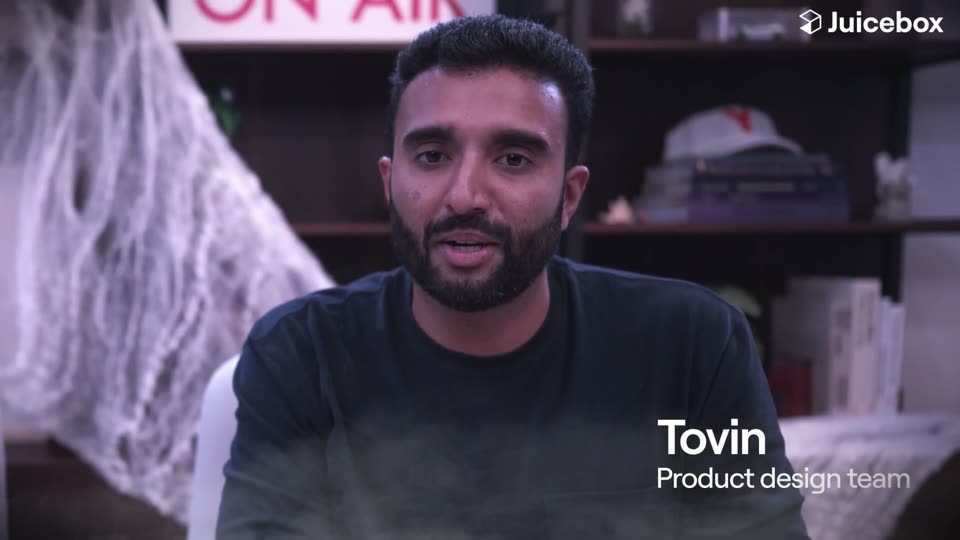
A bearded man in a dark t-shirt sits centered in an office with shelves and an ON AIR sign behind him, speaking to camera. A lower-third caption with his name and team fades in at the bottom right while the Juicebox logo stays in the top corner.
On-screen text: “Juicebox”, “Tovin”, “Product design team”
Camera: Static
07 · Feature reveal · 0:15–0:18
A man with round glasses and a white t-shirt sits in a dim room with bookshelves and hanging string lights, talking to the camera. A white lower-third caption appears at the bottom left with his name and team; the Juicebox logo stays in the top right.
On-screen text: “Kai”, “Product team”
Camera: Static
08 · Feature reveal · 0:18–0:21
Two hosts sit at a table with Halloween props: spider webs, ghost figurines and jack-o'-lanterns. A translucent purple pill with the headline scales in at the bottom. Locked-off shot, hosts talk to camera.
On-screen text: “Smarter Sequences”, “Kai”, “Product team”
Techniques: Kinetic type
Camera: Push in
09 · Feature reveal · 0:21–0:22
Two men sit at a table with two ghost figurines and two jack-o'-lanterns between them, cobwebs and an ON AIR sign behind. The man on the left speaks to camera while the man on the right listens, hands clasped on the table.
On-screen text: “Juicebox”
Camera: Static
10 · Feature reveal · 0:22–0:26
A bearded man in a dark shirt speaks to camera in front of a shelf with an ON AIR sign and spider webs. The shot cuts wider to reveal a second man in a white T-shirt at a table with two pumpkins and two white ghost figurines.
On-screen text: “Juicebox”, “ON AIR”
Camera: Pull out
11 · Feature reveal · 0:26–0:26
Two men in straw hats sit at a desk flanking a tall white ghost figure, with two small ghosts and carved pumpkins on the desk and a sheet backdrop behind. A VHS scanline glitch shimmers over the set as the red ON AIR sign scales up.
On-screen text: “ON AIR”, “Juicebox”
Camera: Pan
12 · Feature reveal · 0:26–0:30
A static glitch opens on two hosts at a table behind a white ghost prop in a Halloween studio. The shot tightens on the man in black as he speaks; a lower-third name caption fades in at lower right.
On-screen text: “Minchu”, “Engineering team”
Camera: Push in
13 · Feature reveal · 0:30–0:31
A man in a black shirt sits at a laptop, talking, with a white sheet ghost on his left and a Halloween shelf behind. A white lower-third caption reads his name and team at bottom right; the Juicebox logo sits top right.
On-screen text: “Minchu”, “Engineering team”
Camera: Pan
14 · Feature reveal · 0:31–0:37
A man in a brown jacket sits beside a white ghost costume in a web-decorated office, speaking to camera. The shot widens to include a second person, then splits, with a purple graphic panel carrying a Best practices label on the right.
On-screen text: “Jmo”, “Engineering team”, “Sequence Composer”
Techniques: Split screen
Camera: Pull out
15 · Feature reveal · 0:37–0:40
A split screen pairs a presenter at a Halloween-decorated desk with a purple graphic panel. The '10M+ emails' stat and a row of email cards slide out, a best-practices checklist slides in, then the panel slides right to widen the left frame.
On-screen text: “10M+”, “emails”, “Best practices”
Techniques: Split screen, Kinetic type
Camera: Static
16 · Feature reveal · 0:40–0:43
Two men sit at a desk flanking a sheet ghost, in a Halloween set with cobwebs, pumpkins and an ON AIR sign. A caption fades in at the bottom. The man on the left turns to look at the other.
On-screen text: “you never get ghosted again 👻”
Camera: Static
17 · Feature reveal · 0:43–0:46
A purple dotted backdrop frames the Sequences dashboard as the camera zooms in on the overview metrics and bar chart. A cursor then drifts in and hovers the purple New sequence button.
On-screen text: “Juicebox”, “ON AIR”, “you never get ghosted again”
Techniques: UI zoom, Cursor demo
Camera: Push in
18 · Feature reveal · 0:46–0:46
A white interface panel floats on a purple dotted backdrop. The view cuts from an analytics row with a bar chart to a new sequence form listing roles, while a cursor glides from the top button toward the right.
Techniques: Cursor demo
Camera: Static
19 · Feature reveal · 0:46–0:49
A white New sequence panel opens in 3D perspective over a purple halftone background, then flattens to a front-on view. A cursor glides down the project list and hovers over Account Executive.
Techniques: 3D mockup, UI zoom, Cursor demo
Camera: Pan
20 · Feature reveal · 0:49–0:57
A white Composer app window sits in 3D perspective on a purple dotted backdrop. Skeleton placeholders shimmer, the status moves from Thinking to Worked, a step card and email composer fill in, and a four-option question card appears as the view zooms closer.
On-screen text: “[email protected]”
Techniques: 3D mockup, UI zoom
Camera: Push in
21 · Feature reveal · 0:57–1:00
A white question card settles into the center of a purple backdrop, listing four numbered options for a follow-up. A cursor glides to option 2, where a ring briefly highlights the choice.
Techniques: Cursor demo
Camera: Push in
22 · Feature reveal · 1:00–1:02
A white composer card on a purple pixel-map background poses a compensation-range question with three numbered options. The text crossfades in, then a black cursor glides down and clicks Skip, which gains a circular highlight.
Techniques: Cursor demo
Camera: Static
23 · Feature reveal · 1:02–1:14
A tilted Composer window floats over a purple dotted grid, opening zoomed in on the email field before pulling back to the full interface. The sidebar updates to a written summary, five step cards populate, and email bodies type out as the right column scrolls through the sequence.
Techniques: UI zoom, 3D mockup
Camera: Pull out
24 · Feature reveal · 1:14–1:18
A black cursor types “Add in a recent podcast with our CEO. And make it spooky!” into the prompt field, then the frame pulls back to reveal the full sequence steps and the email editor on the right.
Techniques: Cursor demo, UI zoom
Camera: Pull out
25 · Feature reveal · 1:18–1:19
A static product screen on a purple gradient: a left panel lists five dated sequence steps with Add step and Generate buttons, and a right panel shows a composed email with subject line and body copy.
Camera: Static
26 · Feature reveal · 1:19–1:21
A man in a black vest sits in a white chair, smiling and talking, in a studio with a pumpkin and an ON AIR sign on a shelf behind him. A jagged purple lightning bolt flashes across the frame and vanishes, with a faint haze drifting at the edges.
Camera: Push in
27 · Feature reveal · 1:21–1:29
A white app window floats over a purple pixel field. The cursor clicks a purple arrow button, a thinking spinner spins, and a paragraph of AI-written notes streams in. The camera pans right across the sequence steps and email editor, then zooms in as the cursor clicks Done.
Techniques: Cursor demo, UI zoom
Camera: Push in
28 · Feature reveal · 1:29–1:32
A contact table fills with purple checkmarks as a cursor selects the rows, then a bottom action bar slides in. The scene cuts to two men in a studio as a Gmail icon with a red dot pops up between them.
Techniques: Cursor demo
Camera: Pull out
29 · CTA · 1:32–1:45
Two hosts sit at a table with ghost and pumpkin props in a cobwebbed studio, cutting between a wide two-shot and close-ups. A Gmail icon with a red 1 badge pops in center and slides up out. Captions type in: “every Juicebox customer”, then “stop getting ghosted”.
On-screen text: “Juicebox”, “every Juicebox customer”, “stop getting ghosted”
Techniques: Kinetic type
Camera: Pull out
30 · CTA · 1:45–1:45
A white rounded pill with bold dark-purple text sits centered on a purple background with a dotted halftone pattern on the left. The label switches from MASTER SEQUENCES TODAY to TRY SMARTER SEQUENCES TODAY as the pill shrinks toward the center.
On-screen text: “MASTER SEQUENCES TODAY”, “TRY SMARTER SEQUENCES TODAY”
Techniques: Kinetic type
Camera: Static
31 · CTA · 1:45–1:50
A purple halftone field holds a white pill reading TRY SMARTER SEQUENCES TODAY above a small cursor icon. The pill morphs into a thin white ring, the copy swaps to juicebox.ai, and the ring dissolves, leaving the URL centered with the cursor icon at its right.
On-screen text: “TRY SMARTER SEQUENCES TODAY”, “juicebox.ai”
Techniques: Morph
Camera: Static