0:48
Explore
Cole Le - Introducing James, a Super Intelligence (SI) employee for business ow
James · Oct 2026 · 1:16 · AI-annotated
- Length
- 1:16
- Scenes
- 31 · 2.5 s avg
- Product on screen
- 0:04
- Features shown
- 8
- Call to action
- 1:10 · 92%
- Voiceover
- No
00:00:00 / 01:16:47
James’s 1:16 launch film runs 31 scenes, about 2.5 s each. The product shows up at 0:04 and 8 features are revealed. The call to action lands at 1:10 (92% in). A pale, airy launch film built on a single repeating layout: a bold headline with one gradient phrase sits above a flat or gently tilted UI mockup that animates in place, with checkmarks, progress bars, and a sparkle cursor doing the acting. It opens on a fast-cut historical montage that hard-resets into the calm product world, then walks feature by feature at a steady, unhurried pace before landing on price and a typed-out URL.
Footage neededEstimated needs: 7 capture groups — your screens or recordings · 1 official logo — reused across the film · 3 filmed passages — shoot, supply or replace · 8 3D passages — build or supply
Is this your launch? to your site or press kit.
More like this


Cole Le - Introducing James, a Super Intelligence (SI) employee for business ow, scene by scene
· 31 scenes as text
01 · Hook · 0:00–0:00
A sepia X-ray plate of a hand wearing a ring, stamped 1895, hard-cuts to a grainy black-and-white view of the Wright Flyer resting on a flat sand field, a man standing at right, stamped 1903.
On-screen text: “1895”, “1903”
Camera: Static
02 · Hook · 0:00–0:00
A black-and-white worker on steel girders dissolves into an aerial city view with a bridge under construction, then a double exposure of a room full of equipment racks and a standing woman. The year 1936 holds in the lower left corner.
On-screen text: “1936”
Camera: Push in
03 · Hook · 0:00–0:01
A 3D Earth floats over a gray lunar surface with the year 1968 in the lower left. The clip cuts to a Saturn V rocket lifting off in smoke, then to a top-down lunar plain with a rover, the year ticking to 1969.
On-screen text: “1968”, “1969”
Camera: Static
04 · Hook · 0:01–0:01
A rendered Earth with white cloud swirls fills the frame on black, then cuts to a space station with golden solar panels above the blue planet. A white year caption sits in the lower left, changing with each shot.
On-screen text: “1969”, “1972”, “2006”
Camera: Static
05 · Hook · 0:01–0:02
A hard cut jumps from a surgeon in teal scrubs and mask working a robotic surgical console to a wide shot of a Mars rover on rocky, hazy terrain. White year labels sit in the lower-left corner of each shot.
On-screen text: “2020”, “2021”
Camera: Static
06 · Hook · 0:02–0:03
A black frame holds the small centered caption “and then...” in a light gray sans-serif. The text stays locked in place for the whole shot, setting up a pause before the next beat.
On-screen text: “and then...”
Camera: Static
07 · Hook · 0:03–0:04
The white number 2026 holds center frame with a soft blue glow while the background fades from dark gray to pure black. The text stays locked in place throughout the shot.
On-screen text: “2026”
Camera: Static
08 · Product intro · 0:04–0:05
A blue circular smiley icon with pulsing concentric rings sits centered above two lines of text on a soft white background. The dark headline and the gray subhead, with “for anything” in a blue-purple-orange gradient, fade in and hold on a locked-off frame.
On-screen text: “Introducing James,”, “an AI employee for anything.”
Camera: Static
09 · Product intro · 0:05–0:08
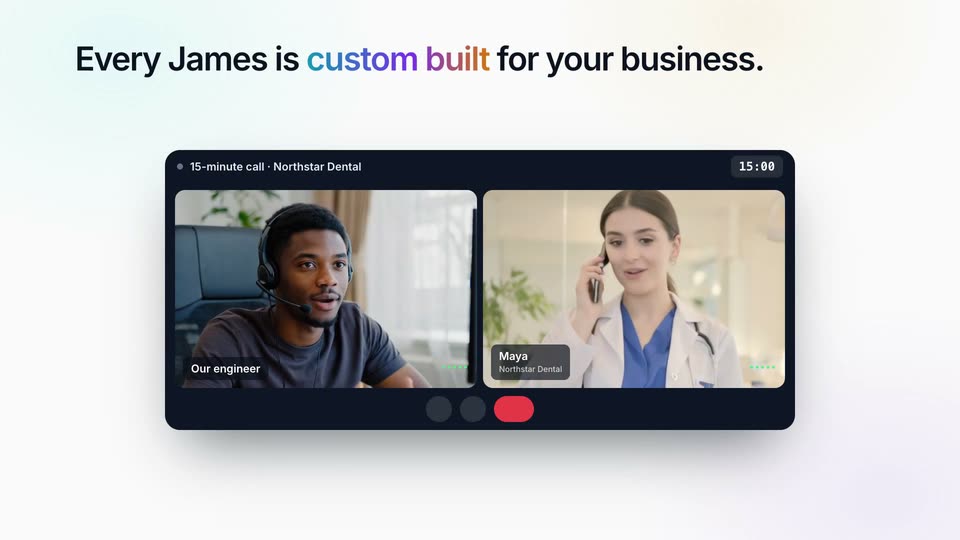
Under the headline “Hire James for any job.”, a fan of rotated job cards spreads wider, the gold-bordered center card lifting to the front. The scene cuts to a dark video-call window showing two participants, under the new headline “Every James is.”
On-screen text: “Hire James for any job.”, “Every James is.”
Techniques: 3D mockup
Camera: Static
10 · Feature reveal · 0:08–0:09
A dark video-call window with two participant tiles sits centered under a headline on a light background. The call timer jumps from 06:26 to 15:00 while the name tag for Maya slides into place on the right tile.
On-screen text: “Every James is custom built for your business.”
Camera: Pull out
11 · Feature reveal · 0:09–0:13
A headline and subtitle sit above a video-call mockup of an engineer and a dentist, beside a white status card. The card's progress bar fills to full green, its checkmarks pop in and a Ready badge appears, while two checklist chips rest below the call window.
On-screen text: “Every James is custom built for your business.”, “One 15-minute call. Our engineers do the rest.”, “How the job is done today”, “You see the price”
Techniques: 3D mockup
Camera: Static
12 · Feature reveal · 0:13–0:15
A headline sits above two side-by-side mockups: a task checklist card on the left where items get checked off one by one, and a browser window on the right that starts with a smiley and a schedule label, then fills with a Gmail invoice view.
On-screen text: “Each job becomes a flowchart.”, “Each step. Each check. Each place he asks you first.”
Techniques: Split screen
Camera: Static
13 · Feature reveal · 0:15–0:17
A headline sits above two flat panels: a job flowchart on the left and a browser window on the right. Steps check off in sequence as the right panel crossfades from a Gmail draft to a QuickBooks invoice list, a cursor hovering the send-reminder menu.
On-screen text: “Each job becomes a flowchart.”, “Each step. Each check. Each place he asks you first.”
Techniques: Split screen, Cursor demo
Camera: Static
14 · Feature reveal · 0:17–0:22
A split layout pairs a left 'Chase late invoices' checklist with a right QuickBooks screen; steps tick green in turn as a reminder note pops in. Below, green checkmarks fill left to right while a counter climbs to '10 of 10 passed'.
On-screen text: “Each job becomes a flowchart.”, “Each step. Each check. Each place he asks you first.”, “Rehearsed 10 times in a row before he starts.”, “Rehearsal 3 of 10”, “Rehearsal 5 of 10”, “Rehearsal 7 of 10”, “10 of 10 passed”
Techniques: Split screen
Camera: Static
15 · Feature reveal · 0:22–0:26
A flat browser mockup of the product sits under a bold headline. The view zooms into the left job panel as a cursor clicks Run now, steps tick off, and an invoice table fills the center. The headline swaps to a second line as the job pauses.
On-screen text: “Your James page: every step, and his screen, live.”, “Nothing goes out without your OK.”
Techniques: Cursor demo, UI zoom
Camera: Static
16 · Feature reveal · 0:26–0:28
A bold headline sits above a light browser mockup of the James AI inbox. A cursor moves from the Take over control to the Send them button in the payment reminder card.
On-screen text: “Nothing goes out without your OK.”
Techniques: Cursor demo
Camera: Static
17 · Feature reveal · 0:28–0:34
A flat browser mockup of the james.ai dashboard sits under a bold headline on a pale mint background. The task list ticks to done, the chat fills with messages, a Recent work card slides in, then the screen fades to white as a LinkedIn view fades in.
On-screen text: “Nothing goes out without your OK.”
Camera: Static
18 · Feature reveal · 0:34–0:35
A front-facing browser window shows a LinkedIn Sales Navigator lead list beneath a bold headline. A mouse cursor moves down the list and clicks the Save button on a row, which flips to a checkmarked Saved state while the other rows stay still.
On-screen text: “On his own computer, in the tools you already use.”
Techniques: Cursor demo
Camera: Static
19 · Feature reveal · 0:35–0:37
A headline sits above a flat browser mockup of Gmail on a light background. The open compose window disappears, a dark Message sent toast pops in at the lower left, and a cursor with a blue sparkle glides down onto the HubSpot inbox row.
On-screen text: “On his own computer, in the tools you already use.”
Techniques: Cursor demo
Camera: Static
20 · Feature reveal · 0:37–0:38
Under a static headline, a tilted 3D mockup of a HubSpot deals table shows a cursor with an emoji face moving down the list. It clicks each Log follow-up button in turn; the buttons switch to Logged with a check and the stage cells fill in Followed up in teal.
On-screen text: “On his own computer, in the tools you already use.”
Techniques: 3D mockup, Cursor demo
Camera: Static
21 · Feature reveal · 0:38–0:39
A browser window shows a Slack-like channel in a dark theme. A cursor clicks the send button and the drafted message posts as a new entry from James, the compose box clearing. A static headline sits above the window.
On-screen text: “On his own computer, in the tools you already use.”
Techniques: Cursor demo
Camera: Static
22 · Feature reveal · 0:39–0:41
A browser window shows a support inbox beneath a static headline. A cursor clicks the Reply buttons down the list, flipping each status pill from Open to Answered and the waiting time to Just now, while a Reply sent toast pops up at the bottom.
On-screen text: “On his own computer, in the tools you already use.”
Techniques: Cursor demo
Camera: Static
23 · Feature reveal · 0:41–0:48
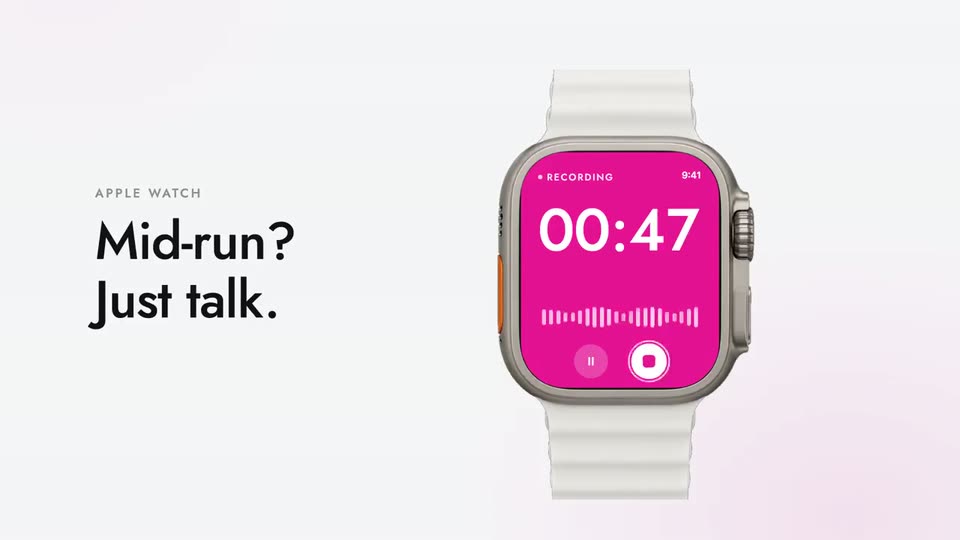
A tilted phone mockup on the right shows an iMessage thread with James, where blue and gray bubbles pop in one by one. On the left, a static headline reads “Between jobs, text him like a colleague.” with a gradient on the second line, set on a pale background.
On-screen text: “Between jobs, text him like a colleague.”
Techniques: 3D mockup
Camera: Pull out
24 · Feature reveal · 0:48–0:55
A headline fades in over a pale gradient as a 'What James knows' card fills row by row with tagged facts. A blue smiley avatar links by lines to six app icons, then the headline crossfades to 'He learns more every week.' and a new row slides to the top.
On-screen text: “Bring what ChatGPT or Claude already knows about your business.”, “Slack, Gmail, Google Drive, Notion, HubSpot, QuickBooks and hundreds more”, “He learns more every week.”
Camera: Static
25 · Feature reveal · 0:55–0:56
A pale gradient background fades to full color as a bold headline reads “He works in your accounts. Carefully.”, the last word in a blue-to-orange gradient. Four white cards with small icons appear below, each pairing a title with a short privacy note.
On-screen text: “He works in your accounts. Carefully.”
Camera: Static
26 · Feature reveal · 0:56–1:00
A centered heading sits above a 2x3 grid of white cards, each with a small line icon, bold title, and gray body copy. The cards settle into place at the start, hold, then the whole layout fades to white.
On-screen text: “He works in your accounts. Carefully.”, “He asks before anything that matters”, “Spending money, sending to a new list, signing, refunds, deleting. Your OK covers that one action, once.”, “Card numbers never reach the AI”, “You approve each purchase with Stripe Link. A single-use card, capped at that amount, is typed by a locked-down vault and thrown away.”, “Logins through a one-time link”, “Never typed into a chat. Your passwords sit in a separate vault that James himself cannot read.”, “Private by default”, “Nothing you share trains any AI model, ours or anyone else's, unless you choose to. Our AI providers' terms forbid it.”, “A computer of his own, separate from every other business's.”
Camera: Static
27 · Feature reveal · 1:00–1:05
Left: the headline 'Something wrong? Chat with the engineers who built him.' fades in, second line in a blue-to-orange gradient, and four green-check bullets appear in sequence. Right: a chat card shows a dark user bubble, then a reply bubble labeled 'Your engineer'.
On-screen text: “Something wrong? Chat with the engineers who built him.”, “A person answers”, “They see what went wrong”, “Fixed for you”, “The answer finds you”
Techniques: Kinetic type, Split screen
Camera: Static
28 · Pricing · 1:05–1:10
A fan of role cards tilts in 3D perspective across the frame as the center Executive assistant card rises and settles, a teal ring drawing around its price box. The bold headline and gray subheadline fade in above, then the whole composition fades out.
On-screen text: “From $500 a month.”, “Free for 7 days from the day he starts. No credit card.”
Techniques: 3D mockup
Camera: Push in
29 · CTA · 1:10–1:11
On a pale gradient backdrop, a black headline types out letter by letter on the left under a small teal eyebrow, while three tilted profile cards fan out on the right, the gold Legendary card lifted above the others.
On-screen text: “AN AI EMPLOYEE”, “Hire James, an AI employee”
Techniques: Kinetic type, 3D mockup
Camera: Static
30 · CTA · 1:11–1:13
A pale-mint hero layout: a black headline types its last line, 'for anything.', in a blue-to-orange gradient as the subtext and button fade in. On the right, three tier cards fan in 3D perspective and settle, a cursor appearing at the bottom.
On-screen text: “AN AI EMPLOYEE”, “Hire James, an AI employee”, “for anything.”
Techniques: Kinetic type, 3D mockup
Camera: Static
31 · CTA · 1:13–1:16
A soft gradient background holds a centered headline, then a white search pill types out the URL jamesai.si with a blinking cursor, and a dark CTA button fades in below.
On-screen text: “Your next hire starts with a 15-minute call.”, “jamesai.si”, “Try James free”
Techniques: Kinetic type
Camera: Static