0:43
Explore
00:00:00 / 01:10:00
- Length
- 1:10
- Scenes
- 43 · 1.6 s avg
- Product on screen
- 0:00
- Features shown
- 5
- Voiceover
- Yes
- Views
- 1.6M on YouTube
as of November 17, 2026
iPad Air’s 1:10 launch film runs 43 scenes, about 1.6 s each. The product is on screen from the first frame and 5 features are revealed. There is no explicit call to action; a voiceover carries the film. A student's day is cut as a montage to a 122 BPM pulse, alternating locked-off lifestyle shots, 90-degree rotated frames and slow-motion macro beats, with short feature callouts in centered white type over the action. The signature moves are the glossy reflective Apple logo card, the recurring blue-nailed hand driving every UI action, and the closing 3D tumble that lands the lavender iPad on a desk with the 'Just landed' title.
Footage neededEstimated needs: 2 capture groups — your screens or recordings · 1 official logo — reused across the film · 32 filmed passages — shoot, supply or replace · 6 3D passages — build or supply
Is this your launch? to your site or press kit.
More like this


Similar soundtrack
Films whose music sounds like this one, voice left out
1:09
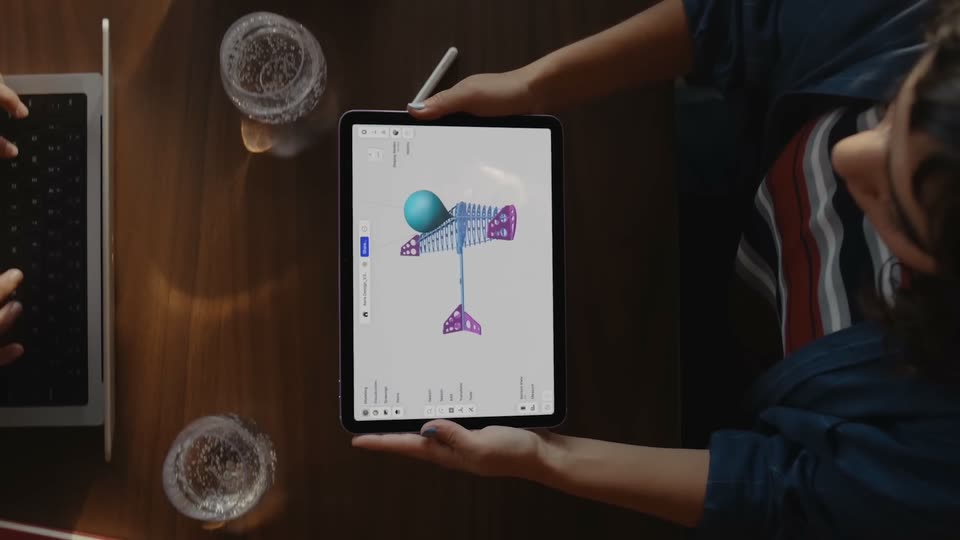

Introducing iPad Air with M4
Apple · Cinematic score, video game music, and vocal performance
2:11
NVIDIA cuPhoton Brings Real-Time Black Hole Science to GPUs
NVIDIA · Cinematic electronic
1:22
Soham Chakraborty - Backed by YC and tested by NBA star Moses Moody, our glasses tell you
STASIS · Cinematic and modern electronic
iPad Air with M4, scene by scene
· 43 scenes as text
01 · Product intro · 0:00–0:02
In a sunlit cafe, a hand lifts a lavender iPad Air vertically out of a red backpack resting on a chair. Other patrons sit at tables in the background. White centered text reads “Introducing the new iPad Air” over the locked-off shot.
On-screen text: “Introducing the new iPad Air”
Camera: Static
02 · Product intro · 0:02–0:03
A close-up of a clear water glass with small bubbles rising through the liquid, set against a dark, out-of-focus background. The frame is locked off and still; the only motion is the slow drift of bubbles. A static headline sits over the shot.
On-screen text: “Introducing the new iPad Air”
Camera: Static
03 · Product intro · 0:03–0:04
Through an out-of-focus wine glass in the foreground, a person in a dark jacket holds up a white Apple device, its logo visible on the back, hands with blue nail polish gripping the edges. The dim room and a blurred figure sit behind.
Camera: Static
04 · Product intro · 0:04–0:05
A top-down locked-off shot frames a tablet held over a wooden table, its screen showing a 3D model with a blue sphere and purple panels, while another person types on a laptop at the left.
Camera: Pan
05 · Feature reveal · 0:05–0:08
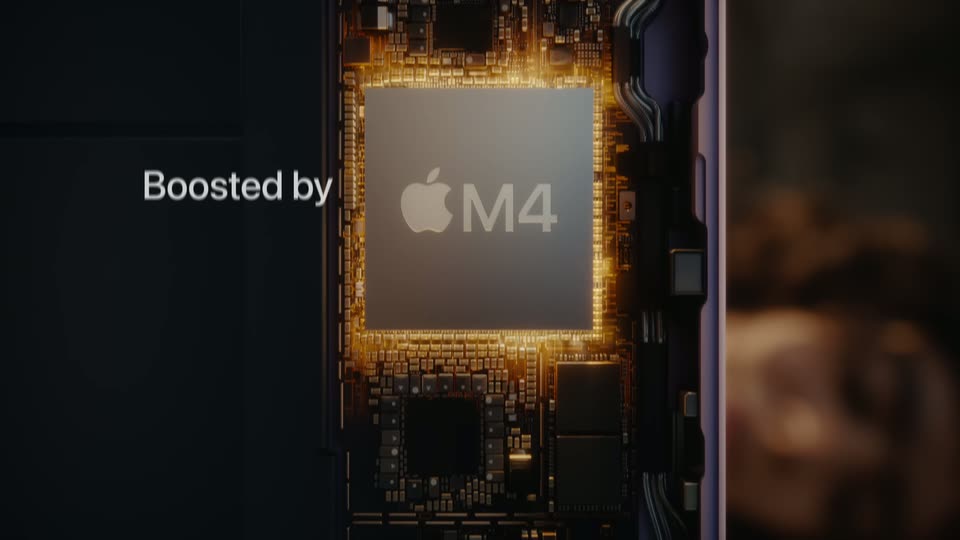
A close-up 3D render of a logic board scrolls upward, bringing the Apple M4 chip into view, framed by glowing gold traces, while a white “Boosted by” caption slides up on the left over a dark, blurred background.
On-screen text: “Boosted by”
Techniques: Parallax
Camera: Pan
06 · Other · 0:08–0:10
Close-up of a barista's hands seating a copper portafilter into an espresso machine while steam billows from the wand. The left hand steadies a small ribbed glass cup of espresso. Shallow focus, locked-off frame, blurred cafe and shelf of upside-down cups behind.
Camera: Static
07 · Other · 0:10–0:12
A macro shot holds on a single espresso drop stretching from a portafilter spout against a warm, blurred counter. The stream thins and breaks as the drop falls. The scene cuts to a hand holding a ribbed glass of espresso, steam curling upward.
Camera: Static
08 · Other · 0:12–0:13
A hand raises a small ribbed glass tumbler holding a dark espresso shot, keeping it steady in the center of frame. The warm interior and window stay softly out of focus behind, with a saucer resting on the table below.
Camera: Static
09 · Feature reveal · 0:13–0:15
A hand holds a white stylus over a tablet, dragging a 7 mm dimension arrow above a blue 3D model on a CAD screen; the left toolbar crossfades between tool states, then the shot cuts to the stylus resting on white cloth.
Techniques: Cursor demo
Camera: Pan
10 · Feature reveal · 0:15–0:16
A close-up shows a hand with blue nails holding an orange object, an Apple Pencil resting above. The pencil slides up out of frame, then the shot cuts to a top-down view of a person holding the pencil on a concrete floor. The centered caption stays locked.
On-screen text: “Pencil Pro precision”
Camera: Static
11 · Other · 0:16–0:18
A high-angle tracking shot follows a person in a blue shirt and gray pants walking across concrete, holding a laptop and a red backpack. A sharp shadow stretches ahead on the ground. The frame is rotated 90 degrees, so the walker moves along the left edge.
Camera: Push in
12 · Other · 0:18–0:20
Inverted wide shot from below: a person in grey trousers and a red backpack walks past a pink building, holding a phone. The camera rolls and tilts as they move, a lens flare streaking the opening frame.
Camera: Pan
13 · Feature reveal · 0:20–0:21
A person holds a tablet in a dim subway car, its screen showing several open app windows, while the other hand gestures across the glass. White text reading 'Seamless multitasking' sits at center and scales in over the locked-off frame.
On-screen text: “Seamless multitasking”
Techniques: Kinetic type
Camera: Static
14 · Feature reveal · 0:21–0:23
A hand with blue nails holds a tablet in a dark room. The screen shows one app window, then several windows open side by side in a multitasking layout. The finger taps the video controls, then taps the 3D model window.
On-screen text: “Seamless multitasking”
Camera: Pan
15 · Feature reveal · 0:23–0:23
A macro close-up keeps a fingertip sharp against a defocused purple interface. The small numeral 2 slides across the frame while the hand stays centered.
On-screen text: “2”
Techniques: Kinetic type
Camera: Pull out
16 · Feature reveal · 0:23–0:25
A woman in profile holds a tablet up to a sunlit window, tapping the screen with her finger. The tilted low-angle frame keeps her in silhouette against green trees and a lawn outside.
Camera: Pan
17 · Feature reveal · 0:25–0:26
Close-up of an angled iPad on a dark background. A finger with gray polish taps an icon in the dock, and white file-name labels appear and refresh in the center over a wireframe diagram.
Camera: Pan
18 · Feature reveal · 0:26–0:27
A finger with blue nail polish presses a white card bearing a hand-drawn blue ladder topped by a ball. A green circular plus button and faint blue and red formula doodles plus a pink lightbulb sketch sit on a dark dotted backdrop. The focus sharpens from a soft blur.
Camera: Push in
19 · Feature reveal · 0:27–0:28
A backlit hand in silhouette pinches a small glowing pink sphere, lifting it slightly against a soft-focus street with trees and a traffic light.
Camera: Pan
20 · Feature reveal · 0:28–0:29
A shadowed hand cradles a small translucent sphere that glows and shifts from pale to deep pink, its surface catching a bright highlight. The blurred foliage and light in the background stay soft and still.
Camera: Pan
21 · Feature reveal · 0:29–0:30
A slow drift through a tight cluster of glossy balloons in red, pink, purple and white against a black background. The red balloon holds the center of frame while the surrounding balloons slide past at different depths.
Techniques: Parallax
Camera: Pan
22 · Feature reveal · 0:30–0:31
Two hands with blue nail polish hold a tablet displaying a photo of red and pink balloons. The white caption 'Liquid Retina display' sits centered over the image while the hands keep the device steady.
On-screen text: “Liquid Retina display”
Camera: Pull out
23 · Feature reveal · 0:31–0:32
A hand with light blue nails taps a tablet held over grass, then lifts away. The screen shows a dark design app with white line sketches, yellow wireframe balloons and a vertical hand-drawn title, as the camera settles on the canvas.
Camera: Static
24 · Other · 0:32–0:34
A large dark teal Apple logo sits on a plain light background, acting as a glossy window through which a reflected hand gestures, lowering a phone and opening its fingers. A bright highlight glides across the top of the logo as a large text line slides across the locked-off frame.
On-screen text: “SPRING SEMESTER PROJECT”
Techniques: Kinetic type, Light sweep
Camera: Static
25 · Other · 0:34–0:35
A white dog leaps straight up to catch an orange disc in mid-air. Green bushes and a sunlit grassy slope fill the background. The jump plays in slow motion, the dog's body stretched vertically as its open mouth reaches toward the disc.
Camera: Pan
26 · Other · 0:35–0:37
A close-up of a hand with blue nails holds a white stylus over a tilted tablet, writing white equations and a yellow value on a dark screen while a blue curve traces a parabola on a grid. The camera pulls back to reveal the full graph.
Camera: Push in
27 · Other · 0:37–0:39
Upside-down close-up of a person in a striped shirt and denim jacket holding a purple iPad, back facing the camera with the Apple logo centered, while a blue plate of food is held at the side. The market stalls behind are soft and out of focus.
Camera: Pan
28 · Other · 0:39–0:40
A blue plate held overhead tilts, its contents a lime wedge, red sauce and chopped green herbs; loose herb leaves fall through the air in slow motion against a blurred kitchen backdrop of jars and a glass of amber liquid.
Camera: Pull out
29 · Other · 0:40–0:41
A close-up finger with light-blue nail polish presses a white vertical pill shape on a reflective glass pane. Blurred autumn trees fill the left side while the person's reflection appears on the right. The shot holds steady with shallow focus.
Camera: Static
30 · Other · 0:41–0:42
Two hands with blue nail polish hold a tablet in landscape outdoors, the screen playing a soccer clip. A player in a blue and red jersey and yellow socks kicks a ball past a stadium ad board. The framing is tight and tilted.
Camera: Pan
31 · Feature reveal · 0:42–0:43
A low-angle shot looks up through a black iron lattice, its cross-braced bars framing a warm amber glow at the center. The camera pushes forward through the grid, the bars sliding past and the pattern compressing toward the light.
Techniques: Parallax
Camera: Push in
32 · Feature reveal · 0:43–0:45
A dim 3D render shows a dark-haired figure crouched behind a black iron lattice gate, lit by warm amber light. The shot cuts to a hand holding a tablet in landscape, its screen showing a robed character on a wooden platform with game HUD and touch controls.
Techniques: 3D mockup
Camera: Pull out
33 · Feature reveal · 0:45–0:47
Two hands with blue nail polish hold a tablet in landscape, showing a mobile game where a red-clad character swings on a rope across a rocky cliff. A white caption sits centered over the screen while the game plays.
On-screen text: “All-day-loooong battery”
Camera: Static
34 · Other · 0:47–0:48
A dim workshop interior: a small vertical metal knob stands on a wooden ledge between two round discs, above a metal window frame with a latch. The camera tilts down slowly, revealing a blue object in the gap below.
Camera: Static
35 · Other · 0:48–0:49
A dim shelf holds a woven pot with a green plant and a stack of books at left. A small metallic object with a chain hangs in mid-air as an open hand rises from below, fingers spreading to catch it.
Camera: Static
36 · Other · 0:49–0:51
A person lies on a bed in a dim bedroom, holding an open laptop whose lid shows the Apple logo, gazing at the screen. The frame is rotated sideways, the night sky visible through a window. The shot holds steady.
Camera: Static
37 · Other · 0:51–0:53
A person lies in a dim room at dusk, cradling a closed silver laptop to their chest. The frame is rotated sideways: a large window shows a blue evening sky, a lamp glows, and a board game rests nearby. The figure stays nearly still.
Camera: Static
38 · Outro · 0:53–0:55
A tablet with a purple abstract wallpaper drifts upward through a dim, blurred room, a hand reaching from the bottom edge, as the white headline scales in beneath it on a locked-off frame.
On-screen text: “The new iPad Air”
Techniques: Kinetic type
Camera: Static
39 · Outro · 0:55–0:56
An iPad Air with a white keyboard case sits angled in a dim room, its purple abstract wallpaper glowing. The white caption The new iPad Air scales up over the lower screen while the frame stays locked off.
On-screen text: “The new iPad Air”
Techniques: Kinetic type, 3D mockup
Camera: Static
40 · Outro · 0:56–0:57
An iPad Air with a keyboard hangs from the edge of a desk in a dim workshop set. Its screen shows a purple abstract wallpaper. The white headline is centered on the screen and scales in. The frame stays locked off.
On-screen text: “The new iPad Air”
Techniques: 3D mockup, Kinetic type
Camera: Static
41 · Outro · 0:57–1:01
A purple-screened iPad Air tumbles through a dim room, spinning in 3D, then settles upright on a wooden desk with its keyboard. A white centered title reads 'The new iPad Air' at the start, then 'Just landed' holds after it lands.
On-screen text: “The new iPad Air”, “Just landed”
Techniques: 3D mockup, Kinetic type
Camera: Pan
42 · Outro · 1:01–1:05
A white Apple logo holds centered on a black field, then fades out to black. A line of small gray legal text sits at the bottom edge throughout the hold.
On-screen text: “Stream Ted Lasso on Apple TV with a subscription. Battery life varies by use and configuration. Apps are available on the App Store. Accessories sold separately”
Camera: Static
43 · Outro · 1:05–1:10
A solid black frame holds for the entire clip. No content, text, or motion appears; the screen stays uniformly dark from start to finish.
Camera: Static