1:30

FullSeam Launch Video
FullSeam · B2B · Feb 2026
Inventive AI · Aug 2024 · 1:31 · Full motion · AI-annotated
Inventive AI’s 1:31 launch film runs 29 scenes, about 3.2 s each. The product is on screen from the first frame and 4 features are revealed. There is no explicit call to action; a voiceover carries the film. The video runs logo open, a 3D-document problem statement, a product intro, then four feature blocks, each announced by a white pill title card over a field of tumbling 3D shapes whose palette shifts hue per feature. Pacing is brisk at roughly 155 BPM, built from tilted 3D UI mockups that orbit, zoom, and crossfade over pastel gradients, with the shapes spiraling back into the pinwheel logo at the close.
Is this your launch? to your site or press kit.
FullSeam · B2B · Feb 2026
Pitch · Productivity · May 2026
Peko · Oct 2026
Films whose music sounds like this one, voice left out
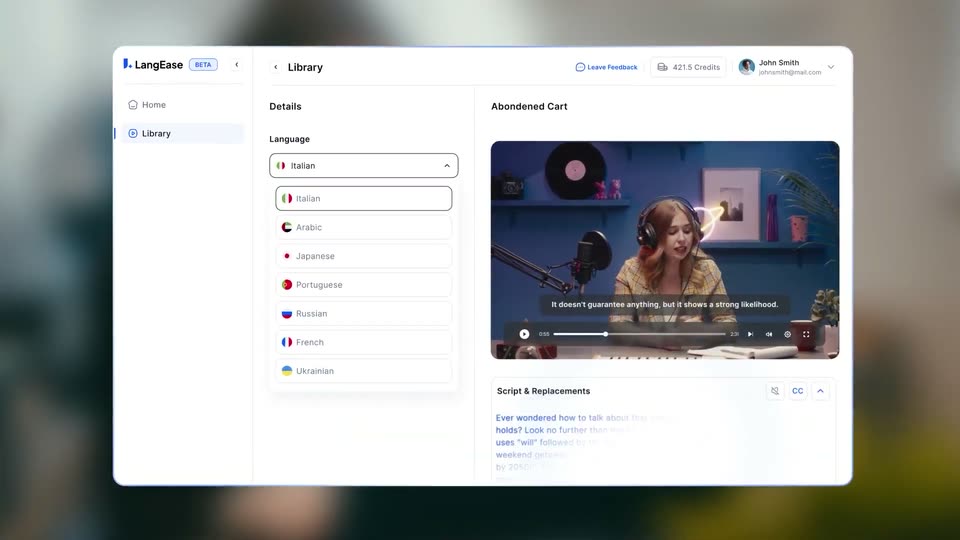
LangEase · Upbeat electronic
beehiiv · Upbeat electronic
Clueso · Upbeat electronic and indie rock
A soft pastel gradient fills the locked-off frame. The dark teal inventive wordmark sits beside a multicolored pinwheel icon, then the wordmark fades out and the icon shrinks toward the center.
On-screen text: “inventive”
Camera: Push in
A soft pastel gradient fills the frame. A blue mail icon sits at center, rotating from a folded 3D flap into a face-on envelope with a small red dot. Around it, colored 3D bookmark shapes tumble and float in perspective.
Techniques: 3D mockup
Camera: Static
Pastel gradient void with floating 3D shapes in green, pink, blue, purple, orange. A blue 3D envelope at center flattens into a blue envelope icon inside a white circle as the surrounding shapes drift and blur.
Techniques: Morph
Camera: Static
A white email client card floats over a soft pink blurred background and comes into focus, its top toolbar icons sliding in. The open message reads 'Urgent: RFP due in 1 week' with a CSV attachment.
Camera: Push in
An email window titled Urgent: RFP due in 1 week slides up out of frame over a blurred pink background as a spreadsheet window with an RFP questions table slides in from below.
Techniques: UI zoom
Camera: Pan
A tilted 3D questionnaire sheet fills the frame, its rows of questions and Critical tags drifting down as the camera glides across. The text ghosts into doubled layers mid-move, then the view tightens on the row of tab labels along the bottom edge.
Techniques: 3D mockup, Parallax, UI zoom
Camera: Push in
A tilted document mockup in 3D perspective on a soft blue background. The camera pulls back to reveal a table of questions with Critical labels and a green highlighted row, with tab labels along the bottom edge.
Techniques: 3D mockup
Camera: Pull out
A green spreadsheet sits centered on a light blue field while app icons, avatar headshots, and white label cards pop in around it, joined by dashed connector lines. The camera then scrolls down to reveal a second identical diagram.
On-screen text: “RFPDemo Corp Debt Management Plan”, “Question 1 RFPDemo Corp, Inc., the...”, “Question 2 The primary use case(s) for...”, “support.rfpdemo.com rfpdemo.com/about-us”
Camera: Pull out
A 3D laptop in a soft blue office tilts upright, its screen showing a multicolor pinwheel logo. A white pill banner expands across the frame as the text types in, then the logo's colored segments pop out as floating purple 3D shapes.
On-screen text: “Welcome to Inventive AI”
Techniques: 3D mockup, Kinetic type
Camera: Pan
Extruded purple-and-pink shapes, arrows, a speech bubble and banners, drift and tumble in a loose ring around a white rounded bar. Inside the bar, the tagline assembles word by word while the shapes keep rotating slowly.
On-screen text: “Welcome to Inventive AI”, “The Most Powerful RFP & Questionnaire Response Platform”
Techniques: Kinetic type
Camera: Static
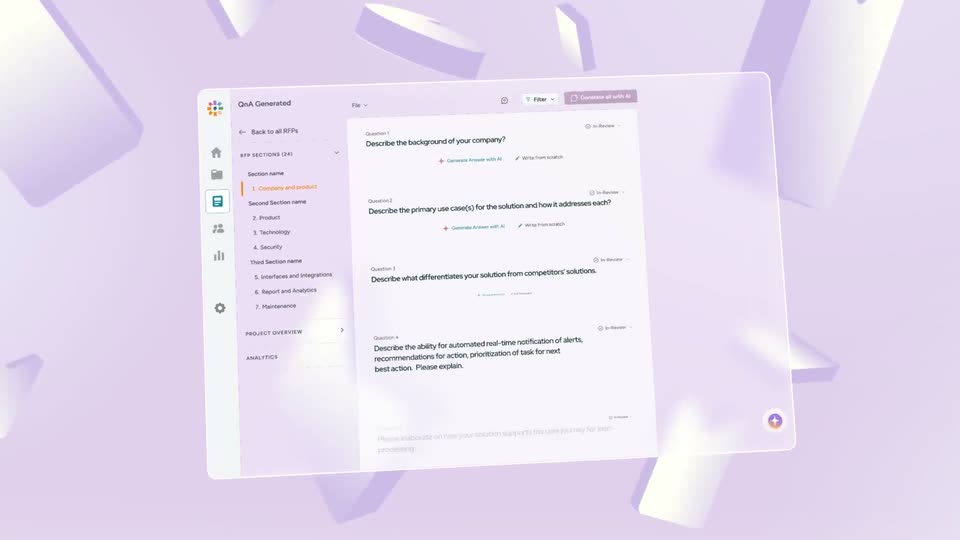
A frosted-glass interface panel tilts in 3D over a pale purple abstract backdrop. Its left column lists RFP sections while the right column populates with question cards, each carrying a Generate Answer with AI button.
On-screen text: “The Most Powerful RFP & Questionnaire Response Platform”
Techniques: 3D mockup
Camera: Push in
A tilted 3D mockup of a Q&A interface floats on a soft purple backdrop. The left sidebar lists RFP sections while the main panel shows numbered questions with Generate and Write options. The camera eases back, sharpening the panel.
Techniques: 3D mockup
Camera: Static
A 3D mockup of the product's QnA editor floats tilted against a lavender abstract background, then the view widens to the full window with its left sidebar. Generated answers fill the document as a rounded badge scales in at the center reading 10X faster drafts.
On-screen text: “10X faster drafts”
Techniques: 3D mockup
Camera: Pull out
A tilted tablet floats in 3D perspective over a soft purple backdrop. The document view shows a supporting-file popup, then a comments panel opens where a mention field types @Chris Page and checks the assign box. A blue-outlined pill caption reads Grounded in your Knowledge Hub.
On-screen text: “Grounded in your Knowledge Hub”
Techniques: 3D mockup
Camera: Pull out
Orange 3D shapes drift and rotate on a cream background while a white pill wipes open to reveal the headline. A tilted Knowledge Hub interface then fades in behind the text.
On-screen text: “Single Hub for All Your Knowledge Sources”
Techniques: Masking, 3D mockup
Camera: Pull out
In a tilted 3D view, the Knowledge Hub dashboard crossfades as two file rows, a red PDF and a green CSV, slide into the Supporting documents card with a progress bar. The camera pans right to settle on the Integrations card.
Techniques: 3D mockup, Parallax, UI zoom
Camera: Pull out
A tilted 3D view of the Knowledge Hub interface. The empty integrations panel fills with app icons for Google Drive, SharePoint, Notion, Confluence, Jira, Slack and salesforce, popping in one by one, then the camera pulls back to show the full dashboard.
Techniques: 3D mockup, UI zoom
Camera: Pull out
An angled 3D view of a pastel dashboard with shallow depth of field. Two question cards populate the Q&A Library panel, then the camera pans right and pushes in on the Websites panel as a URL entry slides in.
Techniques: 3D mockup, Parallax, UI zoom
Camera: Pan
Blue 3D shapes, including a speech bubble, a large cursor arrow and small blocks, drift and rotate around a central white pill on a light blue gradient. The pill widens from left to right, uncovering the dark title “AI-Assisted Content Management”.
On-screen text: “AI-Assisted Content Management”
Techniques: Masking
Camera: Static
A white pill holding the title 'AI-Assisted Content Management' floats over a blurred document UI ringed by angular blue 3D shapes. The shapes drift out as the camera pushes into the document, settling on the red 'Conflicts (2)' badge.
On-screen text: “AI-Assisted Content Management”
Techniques: 3D mockup, UI zoom
Camera: Push in
A white document-comparison panel tilts in 3D space as the camera orbits it, ringed by drifting blue blocks. A thin arc links the two documents, whose conflicting figures are boxed in red; the right document then fades out, leaving one panel flat.
Techniques: 3D mockup, Parallax
Camera: Push in
A pale pink field of extruded 3D shapes (arrows, a speech bubble, blocks) slowly rotates in place around the edges. A white rounded pill holds the static title centered, while the shapes drift and turn at a gentle, continuous pace.
On-screen text: “AI Agents for Competitive Advantage”
Camera: Pull out
Pink 3D abstract shapes float in a soft gradient field. A white pill holds the centered title, then a product QnA panel scales into the middle and sharpens while the shapes blur behind it.
On-screen text: “AI Agents for Competitive Advantage”
Techniques: Parallax, 3D mockup
Camera: Push in
A 3D-tilted app window floats over a pink abstract background with ribbon shapes. The camera slowly zooms into the QnA interface, the background blurs and drifts, focus lands on the Improve with Agents button, then the frame softens and fades out.
Techniques: 3D mockup, Parallax, UI zoom
Camera: Static
A tilted 3D document editor floats against pink abstract prisms. The camera zooms into the agent dropdown as it expands, the Brainstorming Agent row lifts with a blue outline and is selected, then the menu collapses to show the new choice.
Techniques: 3D mockup, UI zoom
Camera: Static
A tilted 3D view of a writing app shows a question document on the left and a Brainstorming Agent panel on the right against a pink backdrop. Suggestion cards slide up into place, the lower one ending with an Insert & Replace button.
Techniques: 3D mockup
Camera: Pull out
A tilted 3D deck of white interface panels scrolls upward over a soft pink gradient, flanked by rounded 3D shapes. The top prompt card swaps content as it rises, while the Brainstorming Agent panel holds its response paragraph, tone buttons and Insert & Replace control in place.
Techniques: 3D mockup
Camera: Pull out
A soft pastel gradient fills the frame while colorful 3D shapes in green, red, blue, purple and orange scale up and drift into view, each rotating slowly on its own axis.
Camera: Pan
Colorful 3D bookmark shapes fly in from the frame edges and spiral into a pinwheel around a small teal circle. The cluster scales down to the brand mark on the left as the wordmark inventive animates in beside it, then the lockup holds.
On-screen text: “inventive”
Techniques: Kinetic type
Camera: Pull out