1:21

Introducing Claude Design by Anthropic Labs
Anthropic · AI · Apr 2026
beehiiv · Sep 2023 · 0:47 · AI-annotated
beehiiv’s 0:47 launch film runs 25 scenes, about 1.9 s each. The product is on screen from the first frame and 3 features are revealed, with social proof. There is no explicit call to action; a voiceover carries the film. The video is built as a logo title card, a counting proof beat, then a continuous 3D camera walk through line-art UI mockups that narrate the ad workflow step by step, closing on a tagline and logo. Its signature moves are the fixed blue caption pill synced to the voiceover, flat white space with pink-to-blue gradient accents, and playful card flips, zooms and perspective pushes.
Is this your launch? to your site or press kit.
The beehiiv logo scales up at center, then shrinks and rises while the words Ad Network type in below it. A blue pill caption, The beehiiv Ad Network, stays fixed at the bottom on a white background.
On-screen text: “Ad Network”, “The beehiiv Ad Network”
Techniques: Kinetic type
Camera: Static
On a white background, the beehiiv logo and a large black “Ad Network” title scale into place at center, while a blue pill caption reading “The beehiiv Ad Network” sits locked at the bottom.
On-screen text: “Ad Network”, “The beehiiv Ad Network”
Techniques: Kinetic type
Camera: Static
A white rounded card holds the beehiiv logo and a large black 'Ad Network' headline. The card fills with gray as the logo and headline scale and fade out, while a blue pill caption reading 'is only a few months old' stays locked below.
On-screen text: “Ad Network”, “is only a few months old”
Techniques: Kinetic type
Camera: Static
A flat phone mockup sits center, its black screen showing the beehiiv Ad Network logo, as it scales down while pink and blue ribbons radiate outward from behind it. Dollar-sign coins pop in on either side and a blue pill caption at the bottom cycles through three phrases.
On-screen text: “is only a few months old”, “but has already paid out”, “nearly $500,000”
Camera: Static
A white card with a black display sits center frame, a pink dollar amount building on it as pink dollar coins float and spin over a gray dollar-text pattern. A blue pill below reads 'nearly $500,000' then 'And as of today'; the card slides up out of frame.
On-screen text: “nearly $500,000”, “And as of today”
Techniques: Kinetic type
Camera: Static
A flat three-column list of advertisement cards, each with a pink-to-blue gradient header and a video icon, scrolls upward. A blue pill caption reading “you can browse,” sits fixed at the bottom center.
On-screen text: “you can browse,”
Camera: Pan
Three vertical columns of ad cards, each with a pink-to-blue gradient header and pink icons, scroll upward in parallel. A fixed blue pill at the bottom center displays the caption “you can browse,”.
On-screen text: “you can browse,”
Techniques: Split screen
Camera: Pan
A white payout card with a black outline sits centered over three scrolling columns of blurred inbox cards. The dollar figure counts up to $XXXXX.00 while a blue caption pill at the bottom switches from preview to and schedule premium advertisements.
On-screen text: “preview”, “and schedule premium advertisements”
Techniques: Parallax
Camera: Push in
A white card centered over a dimmed ad interface flips between a large $XXXXX.00 estimated payout and a weekly schedule grid of gray dots. The card then rotates in 3D perspective, a second card peeking behind it. A blue pill caption sits at the bottom.
On-screen text: “and schedule premium advertisements”
Techniques: 3D mockup
Camera: Static
A white phone mockup in slight 3D perspective shows a schedule screen with day letters and a grid of toggle pills, one active in pink, set over a blurred feed of ad cards. A blue rounded caption pill at the bottom updates with the narration.
On-screen text: “and schedule premium advertisements”, “directly from the”
Techniques: 3D mockup
Camera: Pan
A line-art schedule card with a calendar grid drifts up and left while a beehiiv account card slides in from the bottom right, both outlined in black on a plain white field. A blue pill caption reading 'directly from the' sits at the bottom over a faded ad-list background.
On-screen text: “directly from the”
Camera: Static
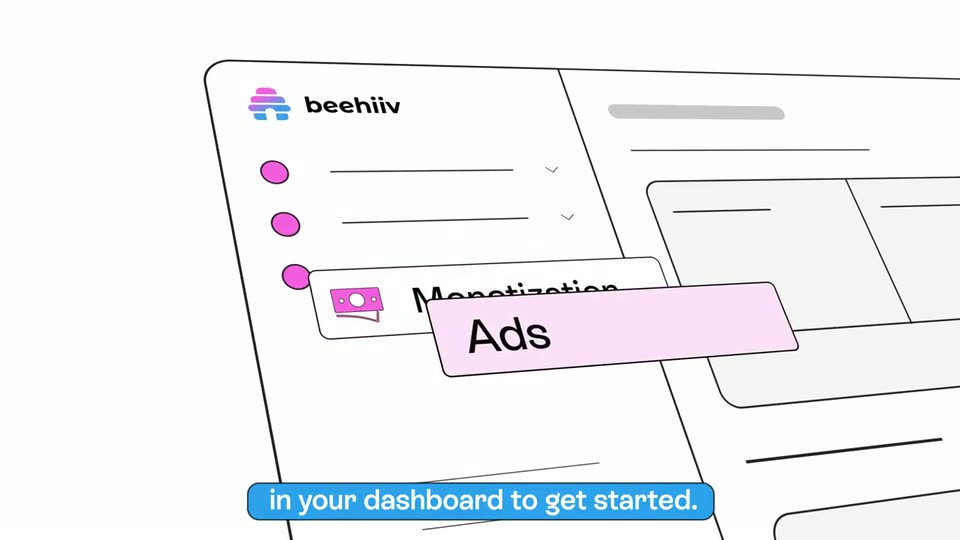
A line-art beehiiv dashboard sits beside a schedule card as the camera pans right and zooms into the sidebar. A pink highlight lands on the Monetization row, then the Ads tab pops out in perspective while blue caption pills swap at the bottom.
On-screen text: “beehiiv platform.”, “Just visit the ads tab”, “located under monetization”, “in your dashboard to get started.”, “There you'll be able to”
Techniques: UI zoom, 3D mockup
Camera: Pull out
A hand-drawn beehiiv dashboard wireframe sits tilted in 3D perspective. The view pushes in on the ads panel as the Ads label grows, while a blue pill caption at the bottom swaps from “There you'll be able to” to “view all incoming ad opportunities”.
On-screen text: “There you'll be able to”, “view all incoming ad opportunities”
Techniques: 3D mockup, UI zoom
Camera: Pan
A hand-drawn dashboard of opportunity cards, each with a pink-to-blue gradient header and a $X.00/click line, sits tilted in 3D perspective. The view pans left across the cards while a blue caption pill at the bottom spells out the voiceover.
On-screen text: “view all incoming ad opportunities”, “from premium brands.”
Techniques: 3D mockup
Camera: Pan
A tilted dashboard of gradient ad cards sits in 3D perspective. A detail panel slides in over the grid, revealing a large payout amount, while a blue caption pill updates at the bottom edge.
On-screen text: “from premium brands.”, “Click to preview the ad placement”
Techniques: 3D mockup
Camera: Pan
A tilted 3D mockup of an ad dashboard shows a row of pink placement cards above line-drawn copy. The view zooms onto a white card reading $XXXX.00 estimated payout while a checkmark pops onto the selected card. A blue caption bar at the bottom states the step.
On-screen text: “Click to preview the ad placement”, “and the estimated payout.”, “Then accept and schedule”
Techniques: UI zoom
Camera: Pan
A pink card layout and a tilted calendar mockup sit in 3D perspective on white. The view zooms onto the calendar, then a toast with a green check, “placement scheduled,” slides in as the frame pulls back. A blue caption pill at the bottom cycles the phrase.
On-screen text: “Then accept and schedule”, “the placement for an”, “upcoming newsletter.”
Techniques: 3D mockup, UI zoom, Parallax
Camera: Push in
A wireframe interface mockup in 3D perspective, a tilted panel of toggles and input fields. The camera reframes onto the 'editor >' tab as a slash appears beneath it. A blue caption pill reads 'It'll be available to', then 'upcoming newsletter.'.
On-screen text: “It'll be available to”, “upcoming newsletter.”
Techniques: 3D mockup, UI zoom
Camera: Static
A tilted dark editor panel with placeholder lines and pink and blue dots on a white background zooms in, an Advertisement chip scales in, then the view pulls back as captions update.
On-screen text: “add to your post”, “with just a single click”, “directly in the editor.”
Techniques: 3D mockup, UI zoom
Camera: Pull out
A tilted 3D mockup of an editor screen, with a column of toggle switches on the right. The camera tracks left across the layout, revealing a payout panel, as a pink Ad tag slides in and a blue caption holds at the bottom.
On-screen text: “directly in the editor.”
Techniques: 3D mockup
Camera: Push in
Small payment cards with pink-blue headers scatter on white, then fly inward around a central beekeepers card, flanked by chart cards. A blue cursor arrow points at it before drifting off; a blue pill caption below reads the tracking, reporting, then and payments for you.
On-screen text: “the tracking, reporting”, “and payments for you.”
Techniques: Cursor demo, UI zoom
Camera: Push in
A white field of flat illustrated dashboard cards, pink charts and gradient list tiles, drifts slowly upward while a blue rounded pill caption stays locked at the bottom center. A blue triangle rises into the lower right corner as the cluster of cards shifts.
On-screen text: “and payments for you.”
Techniques: Parallax
Camera: Static
A blue cursor taps a central card holding a pink dollar coin; the card bobs upward while pink segmented bars drop and scatter into a pile at the bottom, with small ad cards floating on a white background. Bottom captions cycle through the message.
On-screen text: “So you can sit back,”, “relax, and watch”, “the ad revenue pile up.”, “Making monetization easy”
Techniques: Cursor demo
Camera: Static
Bold words 'making' and 'monetization easy' flank a blue dollar coin on white. They snap from gray to black as 'easy' slides in with a motion trail and a pink cursor hops right, while a blue pill caption below switches from 'Making monetization easy' to 'only on beehiiv.'
On-screen text: “Making monetization easy”, “making $ monetization easy”, “only on beehiiv.”
Techniques: Kinetic type
Camera: Static
On black, the beehiiv logo assembles at center: the wordmark letters spin into place, the hive icon fills with a purple-blue gradient, and a pink arc sweeps above it. A tagline reads 'making monetization easy, $ only on beehiiv.'
On-screen text: “making”, “monetization easy”, “$”, “only on beehiiv.”
Techniques: Kinetic type
Camera: Static