1:17

Reconero: Supercharge your police force with AI
Reconero · Government · Oct 2026
Inflight’s 1:22 launch film runs 17 scenes, about 4.8 s each. The product shows up at 0:15 and 3 features are revealed, with social proof. The call to action lands at 1:17 (94% in), over a voiceover. The video is one continuous live-action demo: two presenters alternate at their desks while translucent wireframe panels and a dark activity panel float over the footage, revealing features in order (scattered comments, toolkit setup, video walkthrough, reviewer comments, next steps). Pacing is steady at about 126 bpm with quick UI pops, light-sweep transitions, and a white-out reveal into the animated paper-plane logo and URL.
Is this your launch? to your site or press kit.
Reconero · Government · Oct 2026
ByteAsk · B2B · Nov 2026
RamAIn · B2B · Feb 2026
Films whose music sounds like this one, voice left out
Astra · Electronic, Post-Rock
EasyDMARC · Electronic
Phaze · Modern electronic
A man in a black T-shirt sits at a table with a laptop, gesturing as he talks. A translucent wireframe browser window overlays the shot; labeled cursors Kyle and Tommy select elements, then white #design-review comment cards pop in, piling up around him.
Techniques: Cursor demo
Camera: Pull out
A man in a black T-shirt sits at a desk in a bright room. White #design-review chat cards fly in and scatter on the left, then clear away to reveal a gray wireframe browser window, while a dark Activity panel on the right fills with comment rows.
Techniques: Light sweep
Camera: Pull out
A man in a black T-shirt sits at a table gesturing, behind a translucent wireframe UI overlay. A white input pill slides in left, typing “Set up Inflight for this project” as a cursor moves over the controls, then a light sweep crosses and the overlay fades.
Techniques: Cursor demo, Light sweep
Camera: Static
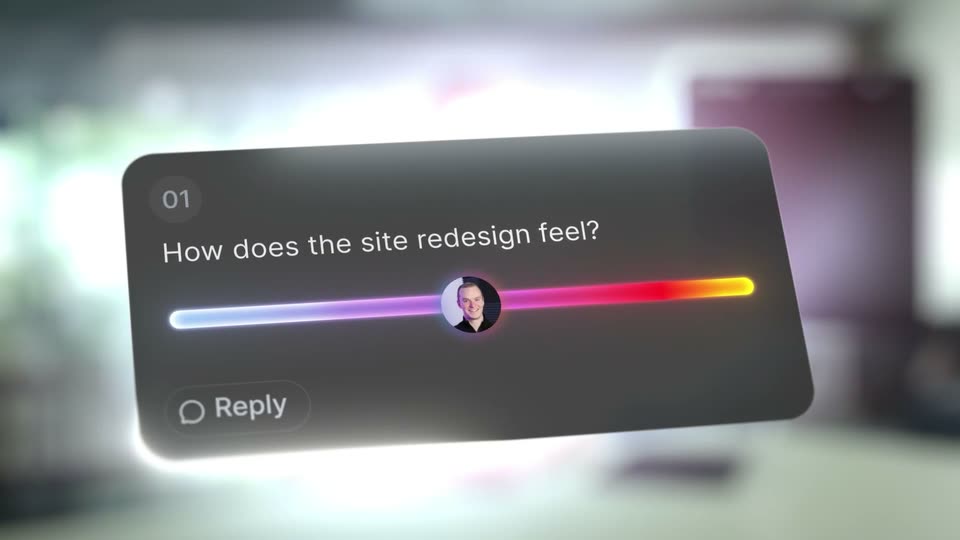
A dark survey card with a question, a blue-to-orange gradient scale bar and a face avatar floats in 3D over a blurred office, scaling up toward the camera. A person sits at a desk with a laptop and a dark monitor behind it.
Techniques: 3D mockup
Camera: Pull out
A man sits at a desk with a laptop. A dark UI card with a question and a gradient slider flies from the center into a list panel on the right. The panel updates to show a second question and a text input field.
Techniques: 3D mockup
Camera: Static
A man at a table sits under a translucent app window. A dark side panel lists a question and options; a recording card with a pink Start recording button appears, the cursor clicks it, the panel exits, and a timer bar with a red dot and 0:00 count appears below.
Techniques: Cursor demo
Camera: Pull out
A frosted-glass video window with a man at a desk sits over a blurred office. The camera pulls back as the window shrinks toward center, revealing a dark activity panel with two questions on the right and a sticker-covered laptop on the left.
Techniques: UI zoom
Camera: Pull out
A man in a backwards cap sits at a desk with a laptop, talking and gesturing. A translucent prototype window and a dark activity panel overlay the shot. A cursor types a comment into the prototype and drops a pin, while the panel scrolls.
Techniques: Cursor demo
Camera: Static
A man in a backwards cap works at a laptop while a translucent wireframe panel floats on the left and a dark Activity panel with two questions and a gradient bar sits on the right. The shot then clips into a rounded window on white.
Techniques: Masking
Camera: Pull out
A man in a black t-shirt sits at a table in a bright, plant-filled room. A translucent design-tool interface floats over him: a placeholder canvas on the left and a dark Activity panel on the right holding a short comment. A circular avatar and a cursor with a small glow sit near his shoulder.
Techniques: Cursor demo
Camera: Static
A man in a black T-shirt sits at a desk talking to camera, with a translucent wireframe window and a dark activity panel overlaid. A cursor clicks the Next Steps tab, turning comments into a checklist, then clicks Copy for agent as the items fly out as glowing 3D cards.
Techniques: Cursor demo, 3D mockup, Light sweep
Camera: Static
A man in a cap talks at a desk with a laptop, translucent browser wireframes floating behind him. A dark Next Steps checklist on the right fills with checked rows one by one, then slides away as the wireframe splits into three side-by-side panels.
Techniques: Split screen
Camera: Static
A man in a black t-shirt sits at a white table with a dark laptop, speaking to camera and gesturing with his hands. Behind him, floor-to-ceiling windows show a green wooded yard. The camera slowly pushes in on him.
Camera: Static
A man in a black t-shirt sits at a table with a laptop, speaking to camera in a bright room with greenery behind him. A large translucent white wing-shaped form rises from the bottom edge and scales up, partially covering his torso.
Camera: Static
A man in a black t-shirt sits at a desk with an open laptop, speaking to camera in a bright room with green windows. A translucent white angular shape rotates in front of him, rising from a soft white mist.
Camera: Static
A smiling presenter in a dark tee stands center frame in a bright office and dissolves out, while a white 3D paper-plane mark drifts from his right shoulder toward the upper-right corner on a plain white background.
Camera: Static
Two gray arrow shapes drift and rotate across a white field, then snap together at center into the black Inflight mark. The wordmark Inflight.co fades in to its right and holds.
On-screen text: “Inflight.co”
Camera: Static