1:21

@Everyone Merch Collection Now Available
Discord · Consumer · Dec 2021
Infinity · Mar 2022 · 0:19 · AI-annotated
studio What a Story · director Kalpajit · director Shailendra · director Yogendra · director & VO Artist · producer Ivan Spasojevic · director Tushar · director Music Team
Infinity’s 0:19 launch film runs 12 scenes, about 1.6 s each. The product shows up at 0:04. The call to action lands at 0:15 (81% in), over a voiceover. A 19-second SaaS promo built as one unbroken flow: a promise card, a live-action office shot, a floating 3D interface tour driven by a tapping hand cursor, and a logo-plus-CTA end card. Its style is defined by drifting circular app badges, pastel gradient orbs, and mockups that tilt in 3D before snapping flat toward the camera.
Is this your launch? to your site or press kit.
Discord · Consumer · Dec 2021
Ramp · Finance · Oct 2026
Films whose music sounds like this one, voice left out
Stacktrace · Upbeat, modern electronic music
Netlify · Upbeat electronic dance music with funk and nu-disco influences
Skydive · Upbeat electronic
A pale lavender background holds app icons in white circular badges (Dropbox, Google Drive, Excel, Trello, Calendar) that drift around the edges, while a centered dark headline fades in. Soft gradient orbs and thin circle outlines float in the corners.
On-screen text: “Forget switching between multiple tools!”
Camera: Push in
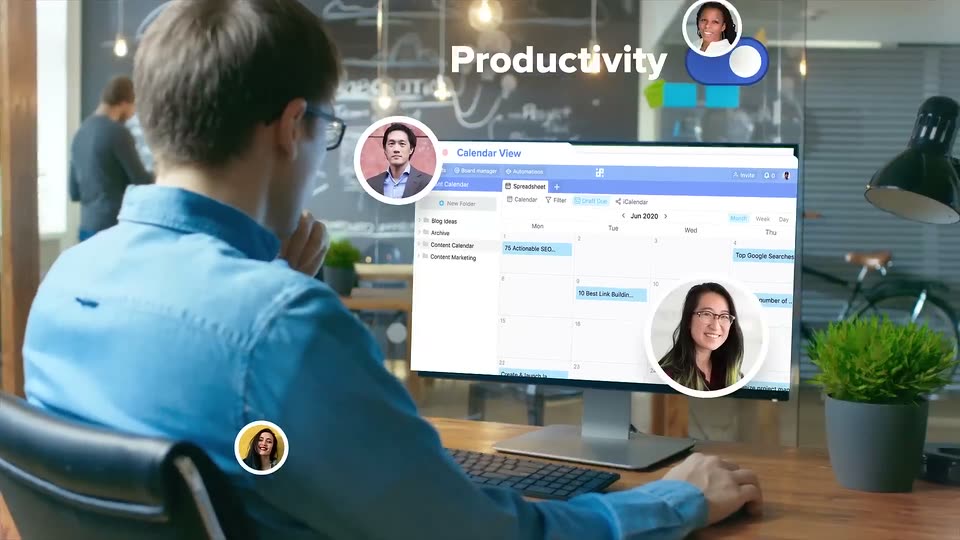
A man in a blue shirt works at a desk in a bright office, a calendar app open on his monitor. White circular badges holding app icons and two headshots float and drift around him at varying depths, while the word Productivity holds at the top.
On-screen text: “Productivity”
Techniques: Parallax
Camera: Static
A man in a blue shirt sits at an office desk facing a monitor showing a calendar app. Circular avatar bubbles and a toggle switch float around the screen. The window lifts off the monitor into a floating 3D card as the office blurs behind it.
On-screen text: “Productivity”
Techniques: 3D mockup
Camera: Push in
A 3D-angled calendar app window floats over a soft purple gradient. The calendar switches from month to week view, the round avatars shrink, and a hand cursor slides to hover over a yellow chart button.
Techniques: 3D mockup, Cursor demo
Camera: Pull out
A 3D-tilted project management board floats over a purple gradient as a white hand cursor taps the yellow columns icon. The board settles into focus while a blue “Columns View” caption fades in above the window.
On-screen text: “Columns View”
Techniques: Cursor demo, 3D mockup
Camera: Static
A floating 3D mockup of a kanban board with a yellow header and three priority columns scales down over a blurred gradient. A white hand cursor points at the yellow view icon in a bottom toolbar.
Techniques: 3D mockup
Camera: Pull out
A Gantt chart window titled Gantt View fades in from blur at center over a soft purple gradient, sharpening as a white hand cursor taps a purple list icon in a bottom dock. The cursor then slides to a green icon and the window drifts up.
Techniques: Cursor demo
Camera: Pan
Two floating app windows sit on a soft purple-and-blue gradient. A white hand cursor taps the green icon, then the red one, swapping the front window from a timeline chart to a personal to-do list.
Techniques: Cursor demo
Camera: Pull out
A task list view floats centered on a soft blue-to-pink gradient, flanked by blurred copies of the same interface. A white hand cursor taps the green list icon below the window, then slides right to the pink calendar icon.
Techniques: Cursor demo, Parallax
Camera: Static
A white app window floats on a soft pastel gradient. A white hand cursor taps the red grid icon at the bottom, and the interface switches from a green to-do list to a red spreadsheet table of employee rows.
Techniques: Cursor demo
Camera: Pan
A tilted 3D window of a red-headed spreadsheet app floats over a soft blue gradient as a red hand cursor taps a grid icon. The window rotates flat toward the camera, the doubled text sharpening into a clean employee database table with avatars and contact rows.
Techniques: 3D mockup, Cursor demo
Camera: Pull out
A purple gradient logo mark scales up at the center of a pale lavender background, the wordmark INFINITY reveals letter by letter, and a purple button with a white hand cursor appears below the URL as blurred blue-magenta orbs drift slowly.
On-screen text: “www.startinfinity.com”, “Get Lifetime Membership”
Techniques: Kinetic type, Cursor demo, Particles
Camera: Pull out