
0:20
Explore
00:00:00 / 00:30:01
- Length
- 0:30
- Scenes
- 9 · 3.3 s avg
- Product on screen
- 0:00
- Features shown
- 7
- Call to action
- 0:26 · 88%
- Voiceover
- No
- Views
- 140 on YouTube
as of November 24, 2026
HyReveal’s 0:30 launch film runs 9 scenes, about 3.3 s each. The product is on screen from the first frame and 7 features are revealed. The call to action lands at 0:26 (88% in). The video is a numbered feature tour (01 to 07) where each beat is a locked-off browser mockup on a dark or light stage with a bold caption below, opening on a dark title card and closing on a centered end card. Its signature moves are the black/white stage flips, the orange accent word inside each caption, and slow crossfades that keep the interface the hero.
No filming indicatedEstimated needs: 8 capture groups — your screens or recordings
Is this your launch? to your site or press kit.


IORIGIN - The decision tool from basin to field scale, scene by scene
· 9 scenes as text
01 · Product intro · 0:00–0:03
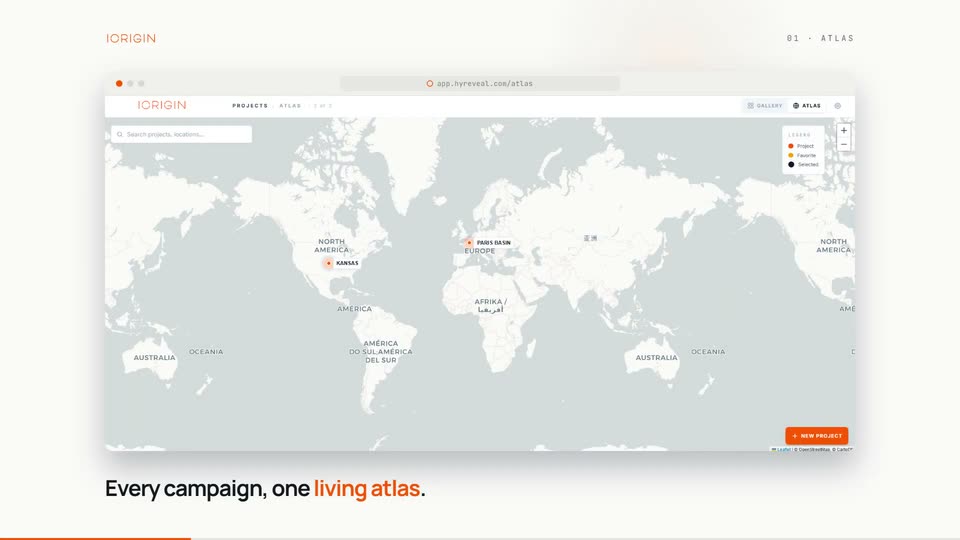
A dark IORIGIN title card with an orange rule, gas chips and a growing corner progress bar holds, then crossfades to a light browser mockup of a world map interface, with the headline 'Every campaign, one living atlas.' below.
On-screen text: “IORIGIN”, “THE DECISION TOOL — FROM BASIN TO FIELD SCALE”, “A HYREVEAL PRODUCT”, “01 · ATLAS”, “app.hyreveat.cos/atlas”, “Every campaign, one living atlas.”
Camera: Static
02 · Feature reveal · 0:03–0:06
A flat browser mockup displays a gray world map with orange pins over Kansas and Europe, a legend, and an orange New Project button. A black caption below reads Every campaign, one living atlas, the last two words in orange. The shot is locked off and static.
On-screen text: “IORIGIN”, “01 - ATLAS”, “Every campaign, one living atlas.”
Camera: Static
03 · Feature reveal · 0:06–0:09
A flat browser mockup of the IORIGIN app fades in over a faint world map on a pale slide. It opens on a dimension-chooser screen with two cards, then dissolves into a two-panel log-and-files view. A bold caption below reads Pick a dimension, 1D, 2D or 3D, and gains the words from your data.
On-screen text: “IORIGIN”, “02 - ENVIRONMENT”, “Pick a dimension — 1D, 2D or 3D.”, “from your data.”
Camera: Static
04 · Feature reveal · 0:09–0:12
A dark browser window showing a stratigraphy app fades in from a grayed-out onboarding modal. The left layer log and right time-scale panel stay fixed while the empty center fills with a colorful 3D stratigraphic volume. A white headline with one orange word sits below the window.
On-screen text: “03 · STRATIGRAPHY”, “Build the chronostratigraphy from your data.”
Camera: Static
05 · Feature reveal · 0:12–0:16
A flat browser mockup of the 3D modeling app holds on a black background, its viewport showing a colorful 3D basin surface with a deep central trough and grid floor. A left layer panel and a bottom step bar frame the model, while a white headline with an orange 3D sits below.
On-screen text: “Model the full basin volume in 3D.”
Camera: Static
06 · Feature reveal · 0:16–0:19
A flat browser window on a dark background shows a geological cross-section app with colorful strata bands, labeled fault lines and a step tracker. A white launch-simulation panel with toggle lists pops over the interface at the end.
On-screen text: “IORIGIN”, “05 - CROSS-SECTION”, “Resolve cross-sections, faults & aquifers.”
Camera: Static
07 · Feature reveal · 0:19–0:22
A flat browser mockup of a dashboard sits on a pale gray stage, a Launch Simulation modal listing subsurface processes over a blurred chart view. The modal then closes to reveal the full chart dashboard, while a black-and-orange headline stays fixed below.
On-screen text: “IORIGIN”, “06 · SIMULATE”, “Simulate every subsurface process.”
Camera: Static
08 · Feature reveal · 0:22–0:26
A flat browser window shows the IORIGIN results dashboard: a sidebar tree and a grid of eight line charts on a light background, with a headline below it. A dark overlay fades in, revealing a centered end card with the IORIGIN logo, tagline and URL.
On-screen text: “IORIGIN”, “Decision-ready results, fluid by fluid.”, “IORIGIN”, “One engine.”, “Every subsurface fluid.”, “hyreveal.com”
Camera: Static
09 · CTA · 0:26–0:30
A dimmed analytics dashboard fades to solid black behind a centered text lockup that holds still. The lockup shows the IORIGIN wordmark, the lines One engine. and Every subsurface fluid., a thin rule, and the URL hyreveal.com with a contact line below. A soft orange glow lingers top right.
On-screen text: “IORIGIN”, “One engine.”, “Every subsurface fluid.”, “hyreveal.com”, “[email protected] - BOOK A DEMO”
Camera: Static