
1:07
Explore
Storio(Previously HeartByte) 30s Introduction
HeartByte · Mar 2024 · 0:27 · Full motion · AI-annotated
- Length
- 0:27
- Scenes
- 11 · 2.5 s avg
- Product on screen
- 0:00
- Features shown
- 3
- Voiceover
- Yes
- Views
- 703 on YouTube
as of November 26, 2026
00:00:00 / 00:27:22
- Length
- 0:27
- Scenes
- 11 · 2.5 s avg
- Product on screen
- 0:00
- Features shown
- 3
- Voiceover
- Yes
- Views
- 703 on YouTube
as of November 26, 2026
HeartByte’s 0:27 launch film runs 11 scenes, about 2.5 s each. The product is on screen from the first frame and 3 features are revealed. There is no explicit call to action; a voiceover carries the film. Built as a linear explainer: a watercolor title card, a two character problem vignette, then a guided tour of the interface that pairs each feature with one voiceover line, closing on a converging four step list. The look is flat vector illustration and crisp UI on near white, with slow crossfades, scrolling generated text, and a bold serif headline voice.
No filming indicatedEstimated needs: 4 capture groups — your screens or recordings · 1 official logo — reused across the film · 4 graphic passages — draw or supply
Is this your launch? to your site or press kit.
More like this

Similar soundtrack
Films whose music sounds like this one, voice left out
2:10

Dialogus (YCS26)
Dialogus · Modern corporate electronic
1:18
Cola - Today is my first day awake. I'm Cola. The First OS with Soul. Most
Cola · Cinematic, Electronic, Jazz, Indie Folk
2:41

Y Combinator - Golpo (@GolpoAI) is the most powerful AI video generator for explaine
Golpo · Electronic, Tech Promo
Storio(Previously HeartByte) 30s Introduction, scene by scene
· 11 scenes as text
01 · Product intro · 0:00–0:01
A watercolor book with an orange heart on its cover sits tilted on the right of a white background, while the black serif headline “What is HeartByte?” holds still on the left. A small HeartByte heart logo marks the top-left corner.
On-screen text: “What is HeartByte?”
Camera: Static
02 · Problem · 0:01–0:02
A tilted watercolor book with an orange heart sits right of the gray serif title on white. The title and book fade out as a cartoon girl with a top bun slides up from the bottom, sitting at a green table holding a blank paper, frowning.
On-screen text: “What is HeartByte?”
Camera: Static
03 · Problem · 0:02–0:04
A worried woman in a red shirt holds a blank sheet of paper on the left. On the right, a smiling woman with glasses writes in a notebook beside a potted plant, fading into view. Both figures sit at small green tables on a plain off-white background.
Camera: Static
04 · Problem · 0:04–0:04
Two flat illustrations hold side by side on a plain white field. Left, a frowning girl in a red shirt grips a blank sheet. Right, a smiling woman with glasses writes in an open notebook beside a potted plant and large leaves. The figures stay static.
Camera: Static
05 · Demo · 0:04–0:06
Two flat character illustrations on white crossfade into the HeartByte web interface, a story-generation form with a filled summary field and an orange Generate button. A chapter outline card appears below the form.
Camera: Static
06 · Feature reveal · 0:06–0:12
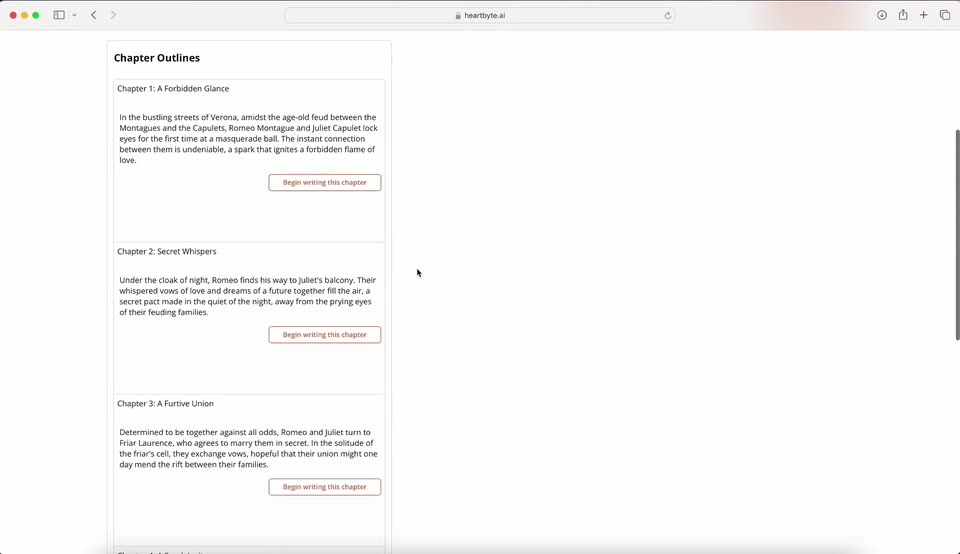
A browser window on heartbyte.ai shows the HeartByte story page. The view scrolls down past the story summary and Generate button, revealing a vertical list of chapter outline cards, then a cursor hovers over a Begin writing this chapter button.
On-screen text: “heartbyte.ai”
Techniques: Cursor demo
Camera: Pan
07 · Feature reveal · 0:12–0:20
A browser window shows a chapter editor. A cursor types a plot note into a text box, then clicks the Refactor button. The view reframes onto the buttons and two side-by-side panels as the Proposed Version fills with generated prose.
On-screen text: “heartbyte.ai”
Techniques: Cursor demo, UI zoom
Camera: Static
08 · Feature reveal · 0:20–0:21
A three-pane writing interface settles into place: a Chapter Outlines column on the left, an Expanded Chapter Editor in the center, and a Full Novel column on the right, each packed with dense novel body text. A top bar carries an Edit full novel label and a red Generate button.
Camera: Static
09 · Feature reveal · 0:21–0:25
A white modal titled Full story is centered over a dimmed editor showing chapter outlines and a story panel. Inside the modal, a long chapter of generated prose scrolls upward, new paragraphs rising into view as the clip runs.
Camera: Pan
10 · Feature reveal · 0:25–0:26
A white 'Full story' modal fills the center with generated novel text, flanked by a chapter outlines panel left and an edit panel right. The left panel swaps from outline paragraphs to a summary view with a generate button. A cursor rests at the modal edge.
Camera: Static
11 · Other · 0:26–0:27
On a plain off-white background, four step lines converge from overlapping positions into an evenly spaced list. The first line, Step 1. Summary, is coral; the rest are black. The block settles by the second half of the clip.
On-screen text: “Step 1. Summary”, “Step 2. Chapter Outline”, “Step 3. Revised and Enriched Chapter Outline”, “Step 4. Full Novel”
Techniques: Kinetic type
Camera: Static