
0:41
Explore
00:00:00 / 00:32:25
- Length
- 0:32
- Scenes
- 13 · 2.5 s avg
- Product on screen
- 0:22
- Features shown
- 1
- Call to action
- 0:23 · 70%
- Voiceover
- No
- Views
- 5.5M on X
as of November 15, 2026
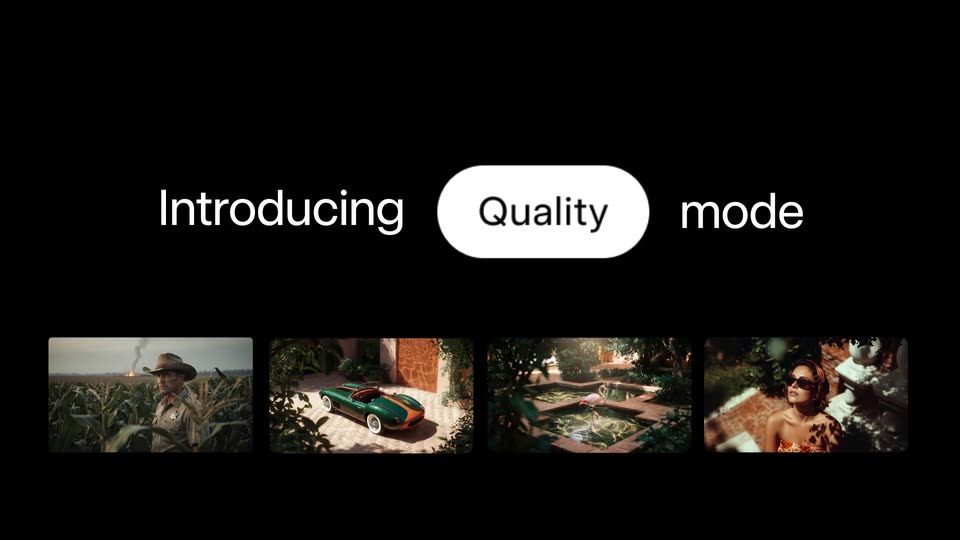
Grok’s 0:32 launch film runs 13 scenes, about 2.5 s each. The product shows up at 0:22 and 1 feature is revealed. The call to action lands at 0:23 (70% in). The video is built as a fast cinematic montage that collapses into UI cards to introduce Quality mode, then demos the feature with a prompt bar and a pull-back to a full image grid before a slow logo sting. Its signature look is a pure black canvas with white sans-serif type, pill-shaped controls and rounded image cards, with pacing that snaps between stills and settles into long holds for the brand.
Footage neededEstimated needs: 1 capture group — your screens or recordings · 1 official logo — reused across the film · 4 filmed passages — shoot, supply or replace · 1 graphic passage — draw or supply · 2 3D passages — build or supply
Is this your launch? to your site or press kit.
More like this



SpaceX Super Intelligence - Introducing Quality mode on Grok Imagine – powered by our most advanc, scene by scene
· 13 scenes as text
01 · Hook · 0:00–0:00
A woman in a black leather jacket and sunglasses stands beside a black horse under red and green light, then cuts to a bearded man in a leather jacket with arms crossed, both lit red against dark smoke.
Camera: Static
02 · Hook · 0:00–0:01
A man in glasses and a brown jacket leans over an open book on a marble desk in a dark library, a red lamp on the right casting light across the page. Bookshelves fill the background, faint haze drifts in the air. The shot holds steady on his reading pose.
Camera: Static
03 · Hook · 0:01–0:01
A woman with short dark hair, tortoiseshell sunglasses and an orange headscarf holds a still pose in warm sunlight, leaf shadows dappling her bare shoulder. She looks off to the side against a brick wall, greenery and a white stone pedestal.
Camera: Static
04 · Hook · 0:01–0:02
A pink flamingo stands in a sunlit garden pool framed by dark leaves, then dissolves into a glossy green vintage convertible parked on the brick courtyard, the bird's ghost still fading on the right.
Techniques: Morph, 3D mockup
Camera: Static
05 · Hook · 0:02–0:02
A green and orange vintage roadster rests on a sunlit brick courtyard, framed by leafy branches. Rippling water-light patterns play across the terracotta wall behind. The high-angle shot holds steady with no movement.
Camera: Static
06 · Hook · 0:02–0:03
A man in a cowboy hat and sheriff badge stands among corn stalks, a fire and smoke column on the horizon behind him. The shot then shrinks into a rounded rectangle card on a black background.
Techniques: Masking
Camera: Pull out
07 · Feature reveal · 0:03–0:06
On a black background, “Introducing” and “mode” flank a white “Quality” pill while four film stills slide in as a row of cards below. The headline then swaps to “Choose for detail and precision” around the highlighted pill.
On-screen text: “Introducing”, “Quality”, “mode”, “Choose”, “for”, “detail and precision”
Techniques: Kinetic type
Camera: Pan
08 · Feature reveal · 0:06–0:09
A rounded 9:16 screen shows a 3D-rendered damaged sphere with drifting debris. The headline Choose Quality for detail and precision slides in, Quality set in a white pill. A top toolbar with Video, Image, Speed and 9:16 appears, then the view reframes to the full sphere.
On-screen text: “Choose Quality for detail and precision”
Techniques: Kinetic type, Particles, UI zoom
Camera: Pan
09 · Feature reveal · 0:09–0:22
A dark prompt bar with a Quality callout sits over a black screen, then four vertical basketball-dunk images fade in behind it. The bar clears, the words Or choose and a Speed/Quality pill appear, followed by for fast exploration, and the camera pulls back to a full grid of generated images.
On-screen text: “Quality”, “Or choose”, “Speed”, “Quality”, “for fast exploration”, “for detail and precision”
Techniques: Kinetic type, Masking
Camera: Pull out
10 · Product intro · 0:22–0:23
A grid of basketball action photos frames a black center where the Grok Imagine wordmark brightens from dark gray to light gray, holding a locked-off composition.
On-screen text: “Grok Imagine”
Camera: Static
11 · CTA · 0:23–0:26
A dim grid of basketball images frames the white Grok Imagine wordmark, then fades to black. The wordmark holds center, then dims as two lines of end-card text fade in beneath it.
On-screen text: “Grok Imagine”, “Try it in the Grok app”, “and on grok.com/imagine”
Camera: Static
12 · CTA · 0:26–0:28
A black screen holds two lines of centered white text, then the lines fade out to black.
On-screen text: “Try it in the Grok app”, “and on grok.com/imagine”
Camera: Static
13 · Outro · 0:28–0:32
A silver ring logo with a diagonal slash sits centered on black, turning slowly as a bright glint crosses it and it flares to white, then settles back to gray. Two lines of white text hold still around the mark.
On-screen text: “Try it in the Grok app”, “and on grok.com/imagine”
Techniques: Light sweep
Camera: Static