1:26


Claude - Introducing Claude Science, a new app designed with every stage of re
Anthropic · AI · Jun 2026
Google’s 2:26 launch film runs 76 scenes, about 1.9 s each. The product shows up at 0:09 and 8 features are revealed. The call to action lands at 2:12 (90% in), over a voiceover. The video alternates clean 3D product renders on a pale gray field with warm live-action rooms and tight UI close-ups, paced at about 113 bpm with a cut every three seconds. Its signature moves are the orbiting device turntable, the recurring bird lock-screen wallpaper, and lowercase sans-serif caption cards that name each feature as the demo begins.
Is this your launch? to your site or press kit.
Anthropic · AI · Jun 2026
Anthropic · AI · Jun 2026
Perplexity · AI · Mar 2026
Films whose music sounds like this one, voice left out
Genspark · Upbeat electronic, funk, and disco
Userlens · Corporate electronic
Canva · Upbeat electronic pop
A smooth matte beige surface, the rounded corner of a device, fills the lower right of a pale gray frame. The camera drifts slowly to reveal the soft curve. A small dark gray disclaimer line sits centered along the bottom edge.
On-screen text: “Screen images may be simulated and sequences shortened. Subscriptions may be required for certain content.”
Camera: Static
A close-up of a device's rounded top corner with a cream bezel and dark screen, angled in 3D on a plain light gray background. The frame stays locked off while small disclaimer text runs along the bottom edge.
On-screen text: “Screen images may be simulated and sequences shortened. Subscriptions may be required for certain content.”
Techniques: 3D mockup
Camera: Static
A beige phone is shown in 3D, its back corner and single camera lens filling the frame against a pale gray backdrop. The device tilts and rotates slowly as the camera drifts around it.
On-screen text: “Screen images may be simulated and sequences shortened. Subscriptions may be required for certain content.”
Techniques: 3D mockup
Camera: Static
A white tablet on a stand faces the camera in 3D perspective on a plain light background, its lock screen showing a grayscale bird wing and yellow clock digits. The camera pushes in as the wallpaper tints green.
Techniques: 3D mockup
Camera: Push in
A hand with a pale green watch tilts a tablet propped on a desk, its screen showing a green parrot illustration. Thread spools sit blurred in the foreground as the tablet rocks slightly.
Camera: Static
A hand grips the top edge of a tablet resting on a desk stand, its lock screen showing a bird photo and the time 09:30. The hand tilts the tablet slightly toward camera as the screen shifts to a close-up of the bird.
Camera: Static
A hand in a black knit sleeve tilts a white tablet on a stand, its lock screen showing a parrot photo and a yellow clock. A woven yarn ball rests on the dark table to the left.
Camera: Pull out
A white tablet on a triangular stand spins against a plain light gray background, turning from the lock screen to the back, the thin side, and back to the front.
Techniques: 3D mockup
Camera: Static
A white tablet on a stand rotates against a plain light background, then the view pushes in to a tight close-up of its perforated side edge with a thin yellow accent line.
Techniques: 3D mockup
Camera: Static
A macro view of the cream tablet edge leaning on its dock. The camera glides along the side, revealing a single dark button and the perforated speaker grille, all set against a pale gray background.
Camera: Static
A cream tablet stands on a matching fabric speaker dock against a white background. The view opens tight on the dock's embossed Google logo, status LED and camera lens, then pulls back and rotates to reveal the tablet angled upright on the dock.
Techniques: 3D mockup
Camera: Pull out
A white tablet rotates from a blurred tilt into a front-facing rest on a low white dock. The screen shifts from a 09:30 lock screen with a parrot wallpaper to a home screen with weather, calendar, and clock widgets over a row of app icons.
Techniques: 3D mockup, Speed ramp
Camera: Push in
A white tablet on a charging dock sits against a plain light background, angled slightly in 3D. Its screen shows a dark home-control dashboard with tiles for cameras, lighting, climate, Wi-Fi, and live camera feeds. The frame is locked-off and the interface is static.
Camera: Static
A white tablet on a stand faces the camera, its screen showing a photo of two people and a 9:30 clock widget. The device then rotates in 3D, turning to show a bird wallpaper and finally its plain white back.
Techniques: 3D mockup
Camera: Static
A white tablet on a stand sits at right, its lock screen showing a bird photo and the time 09 30. The bold caption 11 inch screen appears at left and a small disclaimer line fades in at the bottom, all on a locked-off light gray background.
On-screen text: “11” screen”, “Screen has rounded comers. When measured diagonally as a rectangle, screen is 11 inches. Actual viewable area is less.”
Techniques: 3D mockup
Camera: Static
Overhead close-up of a beige perforated speaker grille. Thin white concentric rings ripple outward from the center while the lowercase caption room filling sound scales in at the middle. A small legal line sits along the bottom edge.
On-screen text: “Screen has rounded comers. When measured diagonally as a rectangle, screen is 11 inches. Actual viewable area is less.”, “room filling sound”
Techniques: Kinetic type
Camera: Static
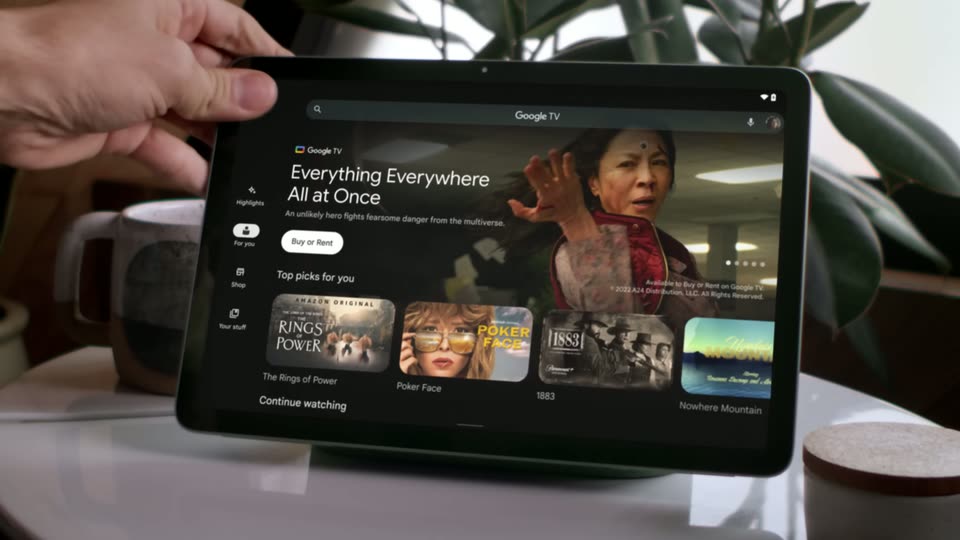
A hand lowers a tablet onto a white table, angled toward camera, its screen showing the Google TV home screen with a featured title and a row of picks. Blurred plants and a mug sit behind it. A small caption scales in over the frame.
On-screen text: “room filling sound”
Camera: Push in
A person in a tie-dye sweatshirt reclines on a gray couch, holding a tablet and glancing at its screen. A wooden wall, bookshelves and potted plants fill the background as the camera drifts slowly across the room.
Camera: Push in
A person with long hair reclines on a dark couch, holding a teal tablet and smiling while tapping its screen, a bowl of snacks resting on their lap. The camera drifts slowly across the wood-paneled room, past a bookshelf and a window plant.
Camera: Push in
A dark streaming interface scrolls down through rows of show and movie tiles, then cuts to a 3D perspective of the display device on a wooden desk, framed by a green plant and a warm lamp.
Techniques: 3D mockup
Camera: Pan
A hand with a white watch tilts a tablet on a stand from a side angle toward the camera. The lock screen shows a green parrot and the time 9:30. Thread spools sit on the white desk.
Camera: Push in
A woman in a white blouse leans over a craft-studio desk, smiling as she taps a tablet propped on a stand. The locked-off frame holds on her and the cluttered table, with a lips painting and a clothing rack behind.
On-screen text: “T”
Camera: Push in
A landscape tablet shows a live doorbell feed of a courier holding a pizza box. A finger taps the screen, sliding up a panel with three quick-reply phrases, then taps one. A small disclaimer line fades in along the bottom edge.
On-screen text: “Requires the Google Home app and compatible smart devices (sold separately). Google Assistant is not available in certain countries and languages; see g.co/助理/l”
Techniques: Cursor demo
Camera: Static
A tablet on a wooden surface displays the Google Home dashboard with device cards and live camera feeds, framed in 3D perspective against a beige wall. The camera slowly pushes in on the screen while a small legal caption runs along the bottom edge.
On-screen text: “Requires the Google Home app and compatible smart devices (sold separately). Google Assistant is not available in certain countries and languages; see g.co/assl”
Techniques: 3D mockup
Camera: Static
A beige tablet leans on a fabric speaker base, shown from the back. The assembly orbits slowly on a plain white background, revealing the side ports and the small G logo on the speaker.
Techniques: 3D mockup
Camera: Static
A silver tablet on a stand turns from a left angle to face the camera, its lock screen showing a grayscale wings wallpaper and a yellow 09 30. A black command bar slides up at the bottom reading Play classical music, above a thin rainbow light strip.
Techniques: 3D mockup
Camera: Static
A tablet on a stand sits in 3D perspective against a light gray background, its screen showing the Music app with album art and a track title. The play button at the bottom switches to a pause icon as playback begins.
On-screen text: “Play classical music”
Techniques: 3D mockup
Camera: Static
A tablet on a stand renders the Music app playing a track; a dark assistant bar slides up with the command Turn off the lights, then the screen cross-fades into a lights control grid.
Techniques: 3D mockup
Camera: Static
A white smart display on a stand, centered on a pale gray background, shows a dark Living room lights screen. A large pill on the left and three device tiles all read Off, beside a grid of warm and cool color swatches. The frame is locked off and static.
Camera: Static
Over-the-shoulder shot of a person at a desk in a dim room, lit by a glowing neon rose in blue, green, pink and yellow. A blue desk lamp and a tablet with a green image sit on the desk while the camera holds a locked-off frame.
Camera: Push in
A dim workshop with exposed wooden beams, its wall lit by red, green and blue neon shapes. A person in a pale top stands at a workbench, holding a phone up to film the signs, then lowers into a crouch. A small desk lamp glows nearby.
Camera: Static
A person in a pink top holds a phone toward a wall of glowing neon signs in a dark workshop, then turns and walks away from the workbench. The neon shapes, an apple, hand, rose and star, glow in red, green, blue and yellow under wooden ceiling beams.
Camera: Static
A hand holds a smartphone aimed at a glowing neon sign on a dark desk, the phone's camera viewfinder framing the colored light outlines. A laptop to the right shows the same neon image, and the hand tilts the phone slightly.
On-screen text: “Requires compatible Chromebook or Android device (sold separately).”
Camera: Static
A hand holds a phone showing a photo of a colorful neon sculpture while a second hand holds a tablet displaying a green game map. A glowing neon sculpture sits on the left in the dim room. The caption stays fixed at the bottom.
On-screen text: “Requires compatible Chromebook or Android device (sold separately).”
Camera: Static
Two hands hold a phone and a tablet, both open to the same neon light-design app. The phone foreground shows a gallery of glowing designs that resolves into a single design detail, while the tablet shows a green dragon artwork with a control panel. A neon sculpture glows at left.
On-screen text: “Requires compatible Chromebook or Android device (sold separately).”
Camera: Static
A person holds a phone in the left hand and a tablet in the right, angled toward the camera, with a colorful neon light glowing in the background. The phone displays a Nearby Share screen and the tablet shows a loading spinner over a parrot wallpaper.
On-screen text: “Requires compatible Chromebook or Android device (sold separately).”
Camera: Static
A hand holds a tablet showing a dimmed app view; a centered dialog switches from a receiving progress ring to a received card with a colorful app thumbnail, and a finger taps the Open button.
On-screen text: “Requires compatible Chromebook or Android device (sold separately).”
Camera: Static
A hand holds a tablet in a dim, neon-lit workshop. The tablet screen fades from black to a photo of glowing neon flower and flame signs, while the blurred workbench and green neon glow stay in the background.
Camera: Push in
A phone photo app fills the frame with a vertical image of glowing neon rose sculptures on a workbench, wall art behind. The bottom toolbar of round icons sits still, then a tap ripple highlights the document icon.
Techniques: Cursor demo
Camera: Static
A dark app interface fills the frame: a large green block on the left, a dim neon-sign photo in the middle, and a dark panel on the right, with round icon buttons hovering over the panels and a bottom toolbar of app icons. The middle photo panel narrows from the right while the dark panel widens, and the floating icons slide left.
Camera: Static
A locked-off split screen of a tablet app: the left half holds a presentation slide titled Past Work with a blank white canvas, the right half shows a photo of glowing neon roses and a hand sign on a workshop wall.
Techniques: Split screen
Camera: Static
Split screen: a slide editor on the left, a neon workshop photo on the right. On the slide, a small neon thumbnail is dragged to center and enlarged as blue selection handles snap around it. The right pane holds the full glowing neon photo.
Techniques: Split screen
Camera: Static
A split-screen photo app view holds static. The left panel shows a slide canvas with the heading Past Work and a neon-rose image boxed by blue selection handles; the right panel shows the same image enlarged above a bottom toolbar.
Techniques: Split screen
Camera: Static
A low-angle close-up of two men on a dock joining hands cuts to a wide shot as they leap together into a lake at sunset, splashing, while a person on a red tube watches. The sky carries a radial blur.
Camera: Static
A tablet mockup shows the Google Photos editor over a sunset photo of two people jumping off a dock. A red inflatable boat is outlined and erased, then the editing controls fade away and the photo expands to fill the screen.
On-screen text: “Requires Google Photos app. Magic Eraser may not work on all image elements.”
Techniques: UI zoom
Camera: Push in
A Google Photos edit view frames a photo of three women splashing in water, with a slider at 100 and a Done button beneath. The image slices into three vertical strips that drift apart, then the camera zooms into the photo, dropping the interface for a full-frame shot.
Techniques: UI zoom
Camera: Push in
A woman and a young girl at a dock hold shoes and laugh as they splash water, while an older woman stands in the shallows with hands raised. Water droplets hang in the air around them.
Camera: Static
A tablet on a wooden table shows a photo slideshow crossfading from two women by a lake to a group on steps, as the camera slowly pulls back to reveal a plant and a vase on either side.
Camera: Pull out
A tablet stands on a wooden table between a leafy plant and a tan vase. Its screen shows a photo of three smiling people by a lake, with a clock and weather widget at the bottom. The image crossfades in from a prior photo, then holds steady.
Techniques: Morph
Camera: Pull out
A woman in a white T-shirt and black dress stands at a table in a craft studio, folding blue fabric while a tablet in a stand faces her. Behind her, a corkboard, sewing machine, and garment rack fill the room. She smiles and lifts the fabric.
Camera: Pull out
A tablet on a wooden table plays a Google Meet call, framed over a blurred shoulder. Two women in a clothing room lift a blue dress while a third woman sits in a corner window. The on-screen camera pans to follow them as they move.
Camera: Push in
A smiling woman in a yellow sari and blue dupatta talks in a tailor's studio as a tailor in a white top gestures beside her. Sketches on a corkboard, a sewing machine and hanging fabrics fill the background; the camera drifts gently.
Camera: Pull out
A tablet on a stand shows a Google Meet call: a smiling woman, a small inset of two people top right, and a control bar at the bottom. The tablet rests on a table with thread spools and greenery blurred behind. The frame is locked off.
Techniques: 3D mockup
Camera: Static
A woman sits cross-legged on a bed in a wood-paneled bedroom, holding a silver laptop and tilting it toward the camera. She smiles as she lifts the device. Low locked-off angle; shelves, a cork board and wall posters fill the background.
On-screen text: “Google Meet”
Camera: Static
A hand holds a tablet on which a notes app fills a new note by voice. The screen pulls from soft blur into focus as a listening indicator gives way to a lit microphone icon. A small disclaimer caption runs along the bottom edge.
On-screen text: “Not available in all languages or countries. See go/assistant/voicetyping for details.”
Camera: Pan
A white tablet on a desk stand is filmed at an angle beside a woven ball. Its screen shows a notes app with the keyboard up, the note text filling in word by word under a Listening indicator.
On-screen text: “Not available in all languages or countries. See g.co/assistant/voicetyping for details.”
Camera: Static
A tablet on a desk shows a notes app in split view: a list on the left, a dictated note on the right, and a keyboard with a voice-input bar below. The camera holds a steady angled shot of the screen.
Camera: Static
A tablet rests on a wooden desk, angled in 3D perspective against a blurred room with a plant. Its screen shows an email compose view where the body text finishes typing while the on-screen keyboard holds a Listening prompt and a lit microphone icon.
Techniques: 3D mockup
Camera: Static
A tablet on a desk stand displays a messaging app in a softly lit room, with thread spools to the left and blurred curtains behind. A typed line moves from the input field into a chat bubble as the field updates.
Camera: Static
A finger taps a phone held before a tablet on a warm-lit desk; the tablet's wing lock screen switches to a green music player, then the hand sets the phone down and the scene cuts to a wide living room with a walking woman.
Camera: Pull out
A man reaches for a tablet on the coffee table as a woman walks past a piano in a warm, wood-paneled living room. The caption “Never My Love” slides in, then “This Tablet” scales in over the locked-off shot.
On-screen text: “Never My Love”, “This Tablet”
Camera: Static
An elderly couple in a warm, dimly lit living room face each other, smiling and moving their hands together as if dancing. The man in a grey cardigan holds the woman's hands. Soft lamp light and a blurred plant and framed picture fill the background.
Camera: Pan
An older man in a gray cardigan and a woman in a cream sweater face each other in a warmly lit room, their fingers interlaced. They move their joined hands up and down in a gentle, rhythmic motion, both smiling.
Camera: Static
A hand reaches in and tilts a tablet resting on a stand, adjusting its angle on a white table. The lock screen with a bird wing wallpaper and the time 09:30 stays in frame.
Camera: Static
A green rounded speaker sits on a white table between a speckled mug and a lidded ceramic jar, houseplants soft in the background. A translucent magazine cover crossfades out over the top left, leaving the still product shot.
Camera: Static
A beige tablet corner rotates on a light gray backdrop. The camera orbits the device, moving from a steep three-quarter view to a flatter angle, revealing the black camera lens and the silver power and volume buttons along the edge.
Techniques: 3D mockup
Camera: Static
A cream tablet on a matching stand spins from its plain back to the front, the screen lighting up to a lock screen with a black and white bird photo and a large yellow clock.
Techniques: 3D mockup
Camera: Static
A white tablet on a stand sits centered against a light gray backdrop. Its lock screen shows a close-up bird photo with a yellow 09:30 clock. The frame is locked off, holding the device in a static 3D render.
Techniques: 3D mockup
Camera: Static
A plain light gray field holds the word Fixed in dark gray. The words on Pixel fade in beside it, completing the centered line Fixed on Pixel.
On-screen text: “Fixed on Pixel”
Techniques: Kinetic type
Camera: Static
A watch, earbuds case, tablet, and three phones sit in a row on a light gray surface, angled in 3D perspective. The tablet lock screen shows a bird photo and a yellow clock. The devices ease into a straight lineup; a small disclaimer caption stays fixed at the bottom.
On-screen text: “Pixel phone, earbuds, and watch sold separately.”
Techniques: 3D mockup
Camera: Static
A cream fabric speaker stands centered on a plain white background while a white tablet drifts diagonally into the upper right corner, softly out of focus. The title Google Pixel Tablet sits centered in dark gray sans-serif.
On-screen text: “Google Pixel Tablet”
Techniques: 3D mockup
Camera: Static
A beige wedge-shaped speaker sits on a light gray surface with a tablet floating above it, its screen showing a yellow clock. The pair is shown in 3D perspective with a slight rotation. Dark gray text reads across the center.
On-screen text: “Google Pixel Tablet”
Techniques: 3D mockup
Camera: Static
A white tablet on a stand rotates from a steep tilt to face the camera, its lock screen showing a bird photograph and a stacked yellow clock. The plain light background stays static as the device turns in 3D perspective.
Techniques: 3D mockup
Camera: Static
A dark gray sentence holds centered on a plain white background, then cuts to four small dots in blue, red, yellow and green arranged in a horizontal row at the center.
On-screen text: “The only tablet engineered by Google.”
Camera: Static
On a plain white field, the four colored arcs of the Google G begin scattered and slightly deformed, then drift inward and snap together into the centered mark.
Camera: Static
A light-gray end screen holds a black subscribe circle on the left and two black video boxes on the right, with social handles in the corners. In the center, a Pixel Tablet on its stand scales up and settles, its lock screen showing a bird photo and a yellow clock.
On-screen text: “@MadeByGoogle”, “@GooglePixel”, “Subscribe”, “Video You Might Like”, “Playlist You Might Like”
Techniques: 3D mockup
Camera: Static