1:26

Introducing Claude Science (now in beta)
Anthropic · AI · Jun 2026
Comet Enterprise · Mar 2026 · 1:18 · AI-annotated
Comet Enterprise’s 1:18 launch film runs 31 scenes, about 2.5 s each. The product shows up at 0:02 and 3 features are revealed. There is no explicit call to action. A cream-and-teal product film built from flat, soft-shadowed UI cards that float on a pale field, punctuated by large serif taglines that swap in as chapter markers. The structure is a single continuous sales workflow (alert, filter, research, email, call, proposal) played as a slow sequence of typed prompts and streaming answers, closed by a wordmark lockup.
Is this your launch? to your site or press kit.
Anthropic · AI · Jun 2026
Claude Science · Jun 2026
ChatGPT for Financial Services · Sep 2026
A Slack-style notification card fades in at the center of a pale gray field, showing a multicolor icon, the sender name and a two-line message. The card holds still, then a green-to-white gradient washes across the background as the scene ends.
Camera: Static
A centered app dock rests on a dark bar as the teal backdrop fades to black and the dock solidifies. A black tile with a white wave mark sits between a compass and a green speech bubble, flanked by a blue face, a colored-dot grid, an envelope, and a map.
Camera: Static
A gray macOS Dock bar with rounded corners holds a row of app icons (Finder, Launchpad, Safari, a black radio-wave icon, Messages, Mail, Maps, Photos) on a black background. The icons enlarge slightly, mimicking the hover magnify effect.
Camera: Static
A black rounded-square app icon with a white arc mark sits centered on a cream field, blurs and shrinks away, then a two-line serif tagline fades in and scales to rest at center.
On-screen text: “The browser that works for you”
Techniques: Kinetic type
Camera: Static
Centered serif text on a cream field reads 'The browser that works for you' in dark and teal. A pale browser interface panel with a sidebar and a small desk photo slides in from the left.
On-screen text: “The browser that works for you”
Camera: Static
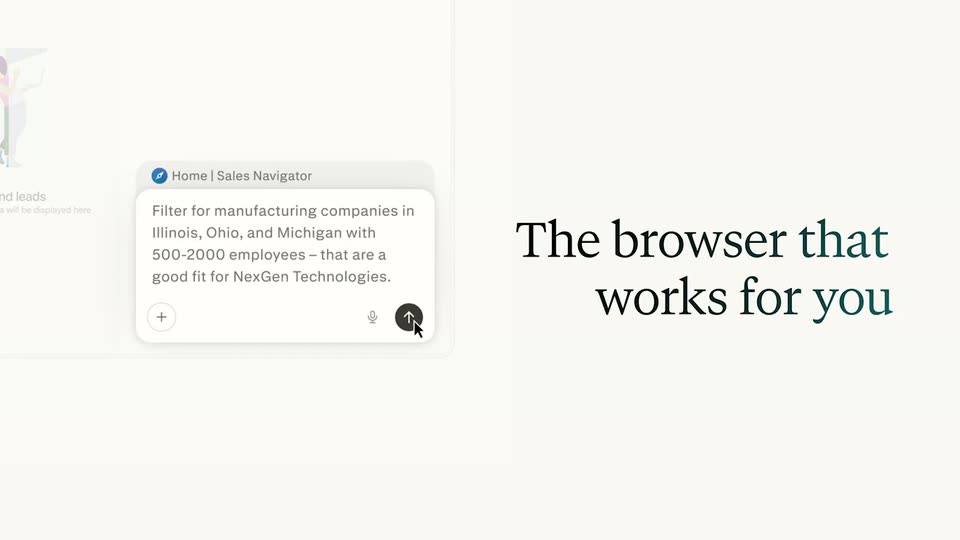
A flat browser mockup reframes onto an assistant card where a filter query types itself and a cursor clicks send. The scene dissolves to a teal-washed checklist of assistant steps as the right-side serif headline swaps from “works for you” to “navigates for you.”
On-screen text: “The browser that works for you”, “The browser that navigates for you”
Techniques: UI zoom, Cursor demo
Camera: Pan
A flat white activity panel with a browser input bar sits on a teal gradient that lightens to white. A large dark teal serif headline stands on the right. The panel and headline slide right with motion blur, exiting the frame.
On-screen text: “The browser that navigates for you”
Camera: Pull out
A cream screen shows a task inbox on the left, three company cards in the center, and a gray serif tagline on the right. The side panels fade out; checkboxes appear, a cursor clicks them, and the Northbridge row lifts into a white card.
On-screen text: “The browser that navigates for you”
Techniques: Cursor demo
Camera: Pull out
A LinkedIn-style company card with a checked box and a gray-gold triangular logo sits on a plain off-white background. The card slides upward as a search bar with placeholder text, a plus button and a send button fades in below it.
Camera: Static
A company profile card and a chat input box sit on a plain background. A research prompt types into the field, then a cursor clicks the black send button.
Techniques: Cursor demo
Camera: Static
A cream profile view for Patrick W. Fogarty, CFO of ApexCore, with a circular headshot and a paper-plane icon. The name scales in, then the bio, business model and tech-stack bullets fade in line by line, top to bottom, on a locked-off frame.
Techniques: Kinetic type
Camera: Static
A profile card with a headshot, name and title starts centered, then slides right as a message card with an input field, plus and mic icons and a round send button slides in from the left on a pale cream background.
Camera: Static
A chat composer card types a prompt to draft an outreach message to Patrick, beside his contact card with photo and title. A cursor appears, then a cut to a new message view where the recipient is set and a reply starts typing above a Typing pill.
Techniques: Cursor demo
Camera: Static
A light chat screen on a cream background. Under a New Message header and a profile card, a message types out line by line above a dark typing indicator, which then clears as a short reply drops in below.
Techniques: Kinetic type
Camera: Static
A flat browser window fades in from white in the lower right of an off-white background. It shows a Perplexity tab, the address bar perplexity.ai, and a page with the APEXCORE logo above the heading Investor Center.
Camera: Static
A 3D browser mockup on a cream background, angled right, rotates to face the viewer and reveals an ApexCore Investor Center page. The view then zooms into the page while a chat box at the lower right types out a summarization prompt.
Techniques: 3D mockup, UI zoom
Camera: Pull out
A floating prompt widget sits on a cream field over a financial document. A query types out, an @ mention opens a dropdown of integrations and browser tabs, a tab is picked as a chip, then a cursor clicks the send button.
Techniques: Cursor demo
Camera: Static
A word-processor window fills the frame as a white wash lifts off it. The frame then pulls back, shrinking the window and revealing a two-line serif headline above it. The page content stays still.
On-screen text: “The browser that understands your context”
Camera: Pull out
A document editor sits below the serif headline, then the view switches to a Perplexity browser window showing a two-person video call beside a chat panel with a green lower band.
On-screen text: “The browser that understands your context”
Camera: Static
A front-facing browser window displays a dark video-call interface with a man and a woman side by side. The frame zooms into the call tiles, cropping the browser chrome, while a meeting card and a chat input with a cursor rest on the right.
Techniques: UI zoom
Camera: Push in
A video call tile of a woman in a beige turtleneck sits left while a chat panel right types a question to the assistant, then reframes to show a long answer document streaming in above the input field.
Techniques: Split screen, UI zoom
Camera: Pull out
A browser window on the left shows a NetSuite integration document while a cursor drags across a paragraph, highlighting the selected line. On the right, a large serif headline fades in from pale gray to dark teal.
On-screen text: “The browser that's always there for you”
Techniques: Cursor demo
Camera: Static
A browser window assembles on a light gray field: the left video-call pane slides in from the left, covering a serif tagline, then locks into a centered two-pane view with the call on the left and a highlighted document on the right.
On-screen text: “The browser that's always there for you”, “11:48 AM | Design Chat”, “Meet - Apex Core Discovery Call”
Camera: Pull out
A centered white prompt card on a cream background types out a request to create a sales proposal, letter by letter, with a blinking caret at the end. The header row, plus, mic, and send controls stay fixed.
Camera: Static
A light UI mockup shows a list of tabs scrolling upwards on the left, next to a chat box on the right where text is being typed.
On-screen text: “ApexCore Prep Doc/Meeting notes”, “Review my meeting notes to create a Sales Proposal from @Sales”
Camera: Static
A cursor clicks the send button on a white prompt box, which then slides upward to reveal a sales proposal document in the background.
Techniques: Cursor demo
Camera: Static
A document editor screen crossfades into a sales proposal being generated. The page scrolls down as text fills in, placeholder fields resolve to client names, and the pricing table amounts populate, then the Generating Text badge fades out.
Camera: Pull out
A faded document editor dissolves into a centered to-do list on an off-white background. A small gray label APEXCORE TO DO sits above three white rounded cards, each with a teal checkmark and a task, fading in with a soft blur.
Camera: Static
A flat to-do list of four checked white cards sits on a cream background. The last item's checkmark gains a teal ring, then the whole list fades out as a centered serif tagline fades in over the empty background.
On-screen text: “Get more you out”
Camera: Static
A line of black serif type reads “Get more you out of you” on a cream field. The trailing words fill in from a pale teal, the line holds, then it fades to a blank frame.
On-screen text: “Get more you out of you”
Techniques: Kinetic type
Camera: Static
A dark disc resolves into a crescent comet mark as the word comet fades in beside it. The lockup fades out and perplexity enterprise fades in at center, holds, then fades to a blank cream field.
On-screen text: “comet”, “perplexity enterprise”
Techniques: Morph
Camera: Static