
0:29
Explore
00:00:00 / 00:22:00
- Length
- 0:22
- Scenes
- 9 · 2.4 s avg
- Product on screen
- 0:00
- Features shown
- 1
- Call to action
- 0:18 · 86%
- Voiceover
- Yes
- Views
- 51K on YouTube
as of November 27, 2026
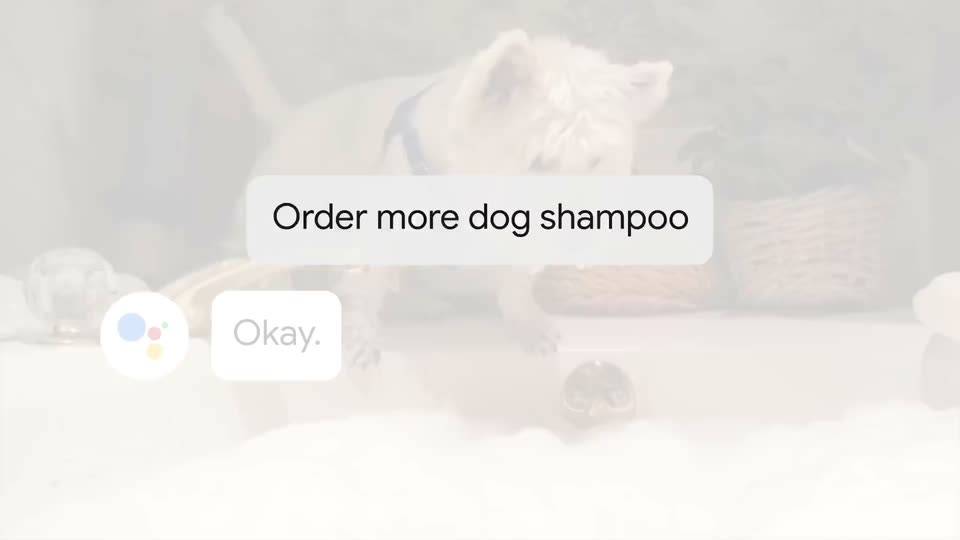
Google’s 0:22 launch film runs 9 scenes, about 2.4 s each. The product shows up at 0:00 and 1 feature is revealed. The call to action lands at 0:18 (86% in), over a voiceover. Locked-off white cards carry the whole pitch: centered lines type or scale in, hold, then swap, with the Hey Google card scaling until it overflows the frame. One warm live-action bath scene breaks the monochrome, and the four-dot logo, the Okay. bubble and product cards slide over it so the interface stays legible.
Footage neededEstimated needs: 1 capture group — your screens or recordings · 1 official logo — reused across the film · 1 filmed passage — shoot, supply or replace
Is this your launch? to your site or press kit.
More like this

1:23

Wispr Flow for iPhone
Wispr Flow · Jun 2025
0:30
Muse Takes Care of Your Holiday Details
Muse · Nov 2026
Similar soundtrack
Films whose music sounds like this one, voice left out
0:50
Superapp AI - Introducing Selfdrive. The AI growth team for your iOS app that gets
Superapp · Modern rock with hip-hop and pop-punk influences
1:28
Introducing Fitbit Versa 2
Fitbit · Electronic, Hip-Hop, Funk, Rock
1:09
Introducing DRAMA | The AI Emotion Expression Editor
SyncMonster.AI · High-energy instrumental rock with funk and new wave influences
Pet lovers: Introducing Actions for your Google Assistant, scene by scene
· 9 scenes as text
01 · Hook · 0:00–0:00
A plain white field holds centered gray text that types out from left to right, completing the line and holding still on a locked-off frame.
On-screen text: “Hey pet lovers”
Techniques: Kinetic type
Camera: Static
02 · Product intro · 0:00–0:01
A plain white frame holds centered gray text reading Hey pet lovers, then the line is replaced by The Google Assistant has, with the brand name in blue, as it scales into place.
On-screen text: “Hey pet lovers”, “The Google Assistant has”
Techniques: Kinetic type
Camera: Static
03 · Product intro · 0:01–0:06
Centered text on a plain white background scales in line by line, stating a Google Assistant statistic, then swaps to a new two-line phrase and to a single line. The frame stays locked off throughout.
On-screen text: “The Google Assistant has”, “over 1 million Actions”, “So if you need help”, “with those little guys”, “Just say”
Techniques: Kinetic type
Camera: Static
04 · Product intro · 0:06–0:07
Black sans-serif text reading 'Hey Google' is centered on a plain white background, then scales up until the line overflows the frame and the first and last letters are cropped.
On-screen text: “Hey Google”
Techniques: Kinetic type
Camera: Push in
05 · Demo · 0:07–0:12
A pale gray rounded pill sits centered on white, cycling through example voice commands; each phrase slides in, holds, then fades as the next one arrives. A small caption, “Sequences shortened and simulated,” stays fixed at the bottom.
On-screen text: “Find a nearby dog park”, “Sequences shortened and simulated”, “Show me pictures of Fluffy”, “Add a vet appointment to my calendar”, “What do hamsters eat?”, “Play lizard videos”
Techniques: Kinetic type
Camera: Static
06 · Feature reveal · 0:12–0:13
A gray rounded button labeled Order widens into a pill reading Order more dog shampoo on a white background. The Google Assistant logo and a white Okay. reply bubble then slide in from the left beneath the pill.
Techniques: Morph
Camera: Static
07 · Feature reveal · 0:13–0:15
A white dog in a blue harness tumbles into a foam-filled bathtub. On the left, a Google Assistant logo and a chat bubble type out Okay. while faint text Order more dog shampoo sits behind the dog.
Camera: Pull out
08 · Feature reveal · 0:15–0:18
A hand scrubs a small dog in a bubble-filled tub while a white chat bubble slides up at the top left and three shampoo product cards with prices and star ratings fade in across the frame.
On-screen text: “Okay.”
Camera: Pan
09 · CTA · 0:18–0:22
The Google Assistant mark, four dots in blue, red, green and yellow, drifts gently on a white background above the static gray wordmark and URL, while a small caption, Okay., slides in.
On-screen text: “Okay.”, “Google Assistant”, “assistant.google.com”
Camera: Static