
3:07
Explore
Introducing Google One AI Premium
Google · Feb 2024 · 0:42 · Full motion · AI-annotated
- Length
- 0:42
- Scenes
- 20 · 2.1 s avg
- Product on screen
- 0:00
- Features shown
- 3
- Call to action
- 0:38 · 91%
- Voiceover
- No
- Views
- 244K on YouTube
as of November 20, 2026
00:00:00 / 00:42:03
- Length
- 0:42
- Scenes
- 20 · 2.1 s avg
- Product on screen
- 0:00
- Features shown
- 3
- Call to action
- 0:38 · 91%
- Voiceover
- No
- Views
- 244K on YouTube
as of November 20, 2026
Google’s 0:42 launch film runs 20 scenes, about 2.1 s each. The product is on screen from the first frame and 3 features are revealed. The call to action lands at 0:38 (91% in). The video alternates flat kinetic-type cards on pale lavender-to-white gradients with dark 3D product renders, cut at a brisk pace of about six cuts per minute. Signature moves: letter-by-letter typing reveals, blur-to-focus racks, and tilted 3D cards that rotate flat to face the camera before the next beat.
No filming indicatedEstimated needs: 1 official logo — reused across the film · 1 graphic passage — draw or supply · 9 3D passages — build or supply
Is this your launch? to your site or press kit.
More like this

0:53

Factory - Introducing AutoWiki in Factory.
Factory · Jun 2026
0:50
Munito AI: open models in the EU for every use-case
Munito AI · B2B · Nov 2026
Similar soundtrack
Films whose music sounds like this one, voice left out
1:15

Unitree Go2 New Upgrade
Unitree · High-energy instrumental funk-rock and electronic fusion
0:52

Meet Granola – the AI notepad for people with back-to-back meetings
Granola · Electronic, hip-hop/trap, funk/disco
1:04

October 2026 Launch: Omni
Airtable · Electronic dance, funk, alternative rock, pop-rock
Introducing Google One AI Premium, scene by scene
· 20 scenes as text
01 · Product intro · 0:00–0:02
A title card on a light background fades in: gray “Introducing” above the multicolor Google logo and gray “One”, with “AI Premium” below. The card holds, then zooms in with motion blur to exit.
On-screen text: “Introducing”, “Google One”, “AI Premium”
Camera: Push in
02 · Product intro · 0:02–0:03
The gray “Google One Premium” text blurs and fades over a faint circle outline, which fills with a soft blue-to-pink gradient. The word “Supercharge” then types out letter by letter in the center of the circle.
On-screen text: “Google One”, “Premium”, “Supercharge”
Techniques: Kinetic type
Camera: Push in
03 · Product intro · 0:03–0:09
Large black sans-serif headline on a soft white-to-lavender gradient: 'Supercharge' sharpens in, then 'your creativity' and 'and productivity' stack below. The block swaps to 'with Google's most capable AI', the second line shifting from pink to blue with a pink sparkle, then the frame fades to dark purple.
On-screen text: “Supercharge”, “your creativity”, “and productivity”, “with Google's”, “most capable AI”
Techniques: Kinetic type
Camera: Pull out
04 · Feature reveal · 0:09–0:10
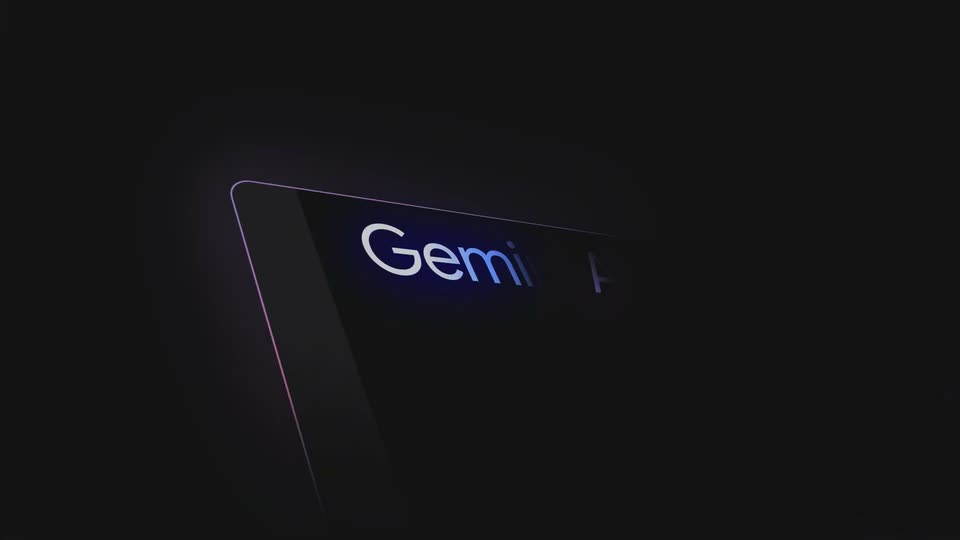
A dark rounded card sits in 3D perspective, its edge lit with a pink-purple glow. White text with a blue bloom reveals across its surface reading Gemini Adv, on a black background.
On-screen text: “Gemini Adv”
Techniques: 3D mockup, Kinetic type
Camera: Static
05 · Feature reveal · 0:10–0:11
A dark panel with a glowing pink edge tilts in 3D perspective, showing the Gemini Advanced dropdown label with a menu icon and plus button. The panel then shifts right as the large headline Get access to slides in from the left across the frame.
On-screen text: “Get access to”
Techniques: 3D mockup, Kinetic type
Camera: Static
06 · Feature reveal · 0:11–0:14
On a near-black background, text lines slide in from the left one after another: white “Get access to”, then “reasoning, coding,” with “coding” in purple, then “and more” in purple. The completed block holds briefly, then blurs and fades out.
On-screen text: “Get access to”, “reasoning,”, “coding,”, “and more”
Techniques: Kinetic type
Camera: Pull out
07 · Feature reveal · 0:14–0:17
A dark greeting interface titled “Hello, Lisa.” sits in 3D perspective; the camera pans right across a row of tilted suggestion cards for problem solving, code, fantasy images and role play, each blurring then sharpening as it passes center. Large overlay text slides in over the scene.
On-screen text: “Get access to”, “reasoning, coding,”, “and more”
Techniques: 3D mockup, Parallax
Camera: Pull out
08 · Feature reveal · 0:17–0:18
A dark chat interface floats in 3D perspective, tilted and blurred at the edges, showing prompt cards and a role-play reply. A white flash with a red glow bursts across the frame, then the view settles into a flatter, frontal angle.
Techniques: 3D mockup, Masking
Camera: Pull out
09 · Feature reveal · 0:18–0:20
A light gradient background holds a black headline that builds line by line, finishing with an ellipsis. The frame then defocuses into a scatter of blurred Google app icons, Gmail, Meet, Docs, Sheets and Slides, drifting out of focus.
On-screen text: “Plus, get access to Gemini in...”
Techniques: Kinetic type
Camera: Static
10 · Feature reveal · 0:20–0:23
On a plain white background, five colorful Google app icons float out of focus, then sharpen as they drift. The Gmail M settles left beside the gray word 'ail' and a video icon, while a blue document and a yellow presentation icon hold position on the right.
Camera: Static
11 · Feature reveal · 0:23–0:24
A blurry Gmail logo snaps into sharp focus, then the text fades out as the colorful M transitions into a blue 3D coin with a quill pen icon that rotates in space.
On-screen text: “Gmail”
Techniques: Morph, 3D mockup
Camera: Static
12 · Feature reveal · 0:24–0:26
A light blue pill button with a pencil-and-sparkle icon and the label “Help me write” floats on a pale lavender gradient. It starts tilted in 3D perspective and rotates to face the camera, settling flat and centered.
Techniques: 3D mockup
Camera: Static
13 · Feature reveal · 0:26–0:29
A white compose card tilted in 3D rotates from a steep angle toward a flat view. The prompt pill swaps from a 'Help me write' chip to a typed line reading 'Invitation to a 80's themed party' with a blinking cursor.
Techniques: 3D mockup
Camera: Pull out
14 · Feature reveal · 0:29–0:30
A white card showing a party invitation prompt and blue lines tilts in 3D perspective over a pale gradient. The camera pushes into the bottom bar, settling on a Cancel link beside a blue Creating... button.
Techniques: 3D mockup, UI zoom
Camera: Static
15 · Feature reveal · 0:30–0:31
A tilted dialog card in 3D perspective opens zoomed in on its Cancel and blue Creating... buttons, then pulls back to show the whole card, a prompt line and two small top icons on a pale background.
Techniques: 3D mockup, UI zoom
Camera: Static
16 · Feature reveal · 0:31–0:33
A white email card for an 80s party invitation, headed by the name Elisa Becket, tilts in 3D over a soft gradient, then rotates flat to face the camera and holds. A second card stacked behind it fades out as the front card sharpens.
Techniques: 3D mockup
Camera: Pull out
17 · Feature reveal · 0:33–0:34
A tight, blurred crop of black headline letters on a white field racks into focus while zooming out, settling on the centered two-line statement. The motion is a single smooth focus-and-scale reveal, ending on sharp, static type.
On-screen text: “With 2TB of cloud storage”
Techniques: Kinetic type
Camera: Pull out
18 · Feature reveal · 0:34–0:36
A two-line black headline, left-aligned on a plain white field, slides in with a brief horizontal motion blur on its right edge, then settles and holds still for the rest of the clip.
On-screen text: “With 2TB of”, “cloud storage”
Techniques: Kinetic type
Camera: Static
19 · Feature reveal · 0:36–0:38
Two lines of lowercase text sit on a plain white background, left aligned. The letters fade from a pale lavender to a dark charcoal over the clip while the frame stays locked off.
On-screen text: “and more”, “features”
Camera: Static
20 · CTA · 0:38–0:42
A white card shows the Google One logo centered. AI Premium fades in below, then the price line, then the URL; the lines settle and hold static.
On-screen text: “Google One”, “AI Premium”, “$19.99 $0/month for 2 months”, “one.google.com”
Techniques: Kinetic type
Camera: Static