1:40

Sketch Helper, AI copilot for CAD by @HestusInc.
Hestus, Inc. · B2B · Oct 2025
GitHub · Jun 2026 · 3:28 · Full motion · AI-annotated
GitHub’s 3:28 launch film runs 15 scenes, about 14 s each. The product is on screen from the first frame and 3 features are revealed. The call to action lands at 3:24 (98% in), over a voiceover. A continuous screen-recording feature tour of GitHub Copilot in a JetBrains IDE, cut into short beats by a single glitch transition and a closing 3D mascot swing. The style is a static dark-UI capture with a single white cursor and a steady explanatory voiceover, so the only motion comes from the cursor, the streaming chat text, and the two brand animations that bookend the demo.
Is this your launch? to your site or press kit.
Hestus, Inc. · B2B · Oct 2025
Creatify AI · May 2026
A screen recording of a code editor with the Copilot chat panel on the right. A cursor clicks through the panel, asks how to start an app, watches the agent list file reads and answer, then types a deployment plan, approves it, and opens the model picker.
Techniques: Cursor demo
Camera: Static
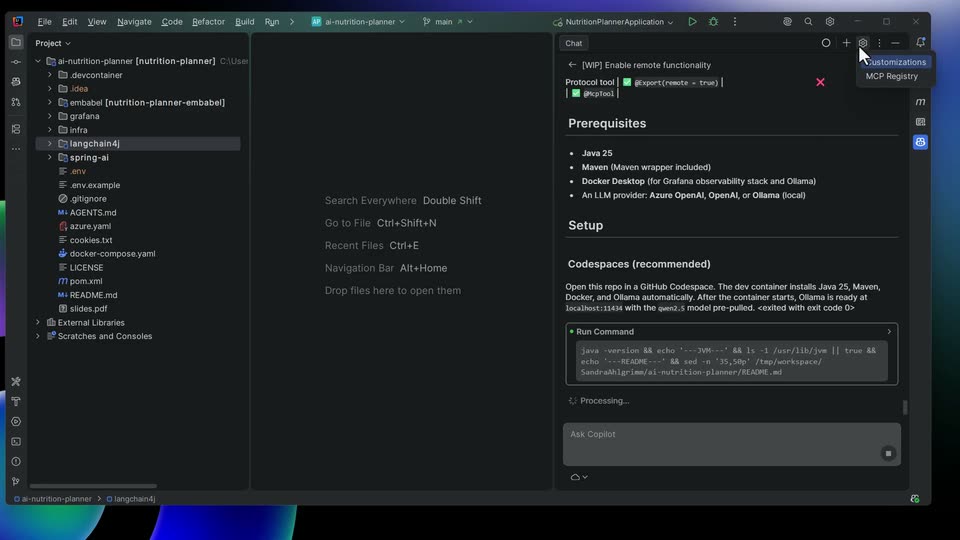
A dark IDE window fills the frame, a chat panel on the right listing command blocks. The cursor slides to the gear icon top right and opens a two-item menu, then the panel swaps to a setup guide.
Techniques: Cursor demo
Camera: Static
A dark IDE displays an Agent Customizations dialog. A cursor hovers over the option cards, clicks the Agent tab, and the Plan agent's definition opens and scrolls down its text. The cursor then moves to the red close button.
Techniques: Cursor demo
Camera: Static
In an IDE screen recording, a cursor opens dropdowns in the chat panel, selects Copilot CLI, then opens the Agent Debug Panel. Clicking a session reveals a table of prompts, token counts and tool calls that scrolls up and down.
Techniques: Cursor demo
Camera: Static
A dark IDE window fills the frame with three panels: a file tree, an agent debug log list, and a chat showing a review plan box. A cursor rests over the log. The image then tears into horizontal glitch lines as a transition.
Camera: Static
A VS Code window shows a commit panel, a search dropdown, and a Copilot chat listing three issues. The cursor moves across the panels, then a Copilot chat settings dialog opens over the window.
Techniques: Cursor demo
Camera: Static
A dark VS Code settings dialog titled Tools, GitHub Copilot, Chat scrolls down through checkbox options while a mouse cursor hovers beside them. Behind it, the source control panel lists changed files and a commit message box.
Techniques: Cursor demo
Camera: Static
A dark IDE settings dialog lists Copilot Chat toggles, with a tooltip open on the Enable Copilot CLI Remote row. A white cursor drifts down to rest on that checkbox.
Techniques: Cursor demo
Camera: Static
In a dark IDE, a cursor ticks the Enable Copilot CLI Remote checkbox in a settings dialog, the dialog closes, and the command /remote on is typed into the chat input box on the right.
Techniques: Cursor demo
Camera: Static
A settings dialog closes over the IntelliJ IDE, then the Copilot chat panel on the right receives the typed command /remote on and scrolls to a Remote control is enabled message with a QR code and an Open on GitHub button, which the cursor moves toward.
Techniques: Cursor demo
Camera: Static
A GitHub Agents session page loads in a browser, the chat fills with the agent's review, then the page scrolls down to a numbered list of issues. The cursor moves to the message field at the bottom and types a new task, which then clears.
Techniques: Cursor demo
Camera: Static
A dark IDE window fills the frame; its right chat panel streams a Copilot agent's work. New tool-call lines for Search and Apply patch appear and the feed scrolls, ending on a completion message and a 2 files changed bar. The left commit list and center editor stay still.
Camera: Static
A browser window shows the GitHub Agents task page with a CLI session message confirming a German tutorial was added and linked. The mouse cursor moves to the file path and drags to select a word, while the message input box at the bottom loses its blue focus ring.
Techniques: Cursor demo
Camera: Static
A small glossy purple device with two dark lenses and a teal light swings on a thin looping wire against a black background. It enters with heavy motion blur from the left, then settles to the center, the wire forming a loose loop beneath it.
Techniques: Speed ramp
Camera: Static
On black, the GitHub Copilot icon starts small and centered, then scales up and shifts left as the white wordmark appears to its right, settling into a centered lockup. A thin rounded pill below holds the URL, fading from gray to white.
On-screen text: “gh.io/copilot”
Camera: Static