1:23

How an Anthropic engineer uses Claude Docs
Anthropic · AI · Oct 2026
dari.dev’s 1:22 launch film runs 17 scenes, about 4.9 s each. The product is on screen from the first frame and 2 features are revealed. The call to action lands at 1:09 (84% in), over a voiceover. The video alternates a talking-head host with fast, small UI clips: a terminal deploy demo, then a rapid tour of the session dashboard, all over a blue abstract backdrop with blur-to-focus transitions. Its visual language is monospace-on-black with camera pushes into the interface, bookended by the host and a glowing logo card.
Is this your launch? to your site or press kit.
Films whose music sounds like this one, voice left out
Cova · Indie folk and corporate electronic
Akool Inc · Electronic
A young man with glasses in a black t-shirt speaks into a large black microphone at the left edge. He faces the camera in a locked-off medium shot, gesturing with his right hand, a thumb then counting fingers, in a softly lit home office.
Camera: Static
A blurred live-action shot of a man defocuses into a dark terminal window with a green title label and a white cursor arrow, set over a soft blue abstract background. The frame stays locked and out of focus throughout the short transition.
On-screen text: “DARI”
Camera: Static
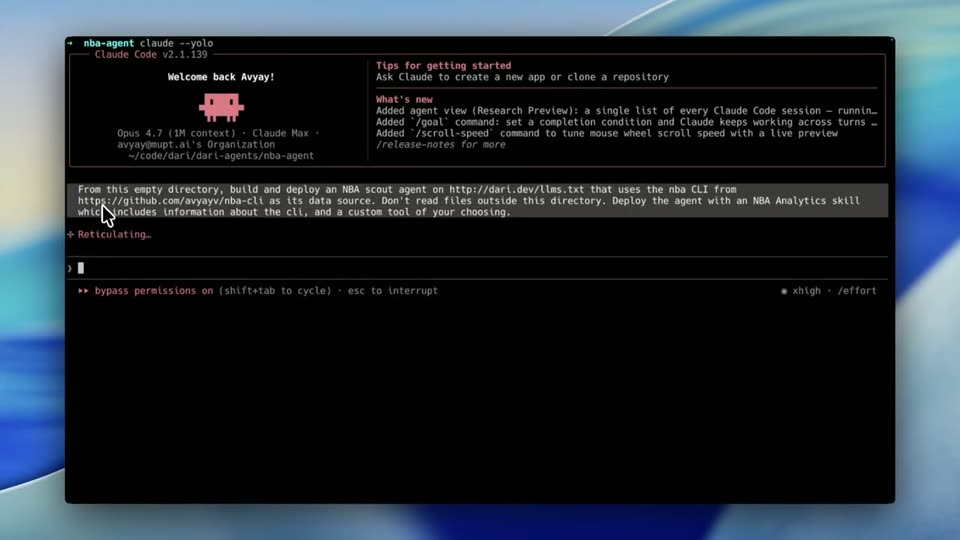
A black terminal window over a blurred blue backdrop: the camera pushes into the corner where a white cursor types the claude command, then pulls back as the welcome screen appears. A long prompt is typed and highlighted, and Reticulating output lines list fetch and bash commands.
Techniques: UI zoom, Cursor demo
Camera: Static
A dark terminal window over a blue abstract wallpaper shows an AI agent building and deploying an NBA scout agent. Commands, file writes and a task checklist scroll up continuously as checkboxes tick off, then the window fades out to the wallpaper.
Camera: Pan
A dark terminal and a web dashboard sit side by side on a blue backdrop, sharpening from a blur into focus. A cursor types a session command in the terminal, then the view zooms in as the cursor clicks the matching agent ID highlighted on the dashboard.
Techniques: Cursor demo, UI zoom
Camera: Push in
A dark developer dashboard loads from a partial code panel into a full three-column layout with a left sidebar and an agent detail view. A white cursor arrow glides across the screen as the panels fill in, while a thin blue arc sits along the top edge.
Techniques: Cursor demo
Camera: Static
A dark dashboard interface sits in 3D perspective against a blue gradient. A hand cursor hovers over a session row in the right panel while a code panel and navigation sidebar fill the left.
Techniques: 3D mockup, Cursor demo
Camera: Static
A dark dashboard fills the frame, its left sidebar listing menu items and the main panel showing the nba-scout session with CLI and CURL tabs. A hand cursor hovers over the CURL tab while JSON code peeks in from the left edge.
Techniques: Cursor demo
Camera: Static
A dark dashboard fills the frame, with a code panel on the left and a session detail view on the right. A white hand cursor hovers over the CURL tab. The layout stays static throughout the short clip.
Techniques: Cursor demo
Camera: Static
A dark dashboard shows a code panel, a navigation sidebar, and a session detail view. A hand cursor drifts to the CURL tab and clicks it, switching the command display.
Techniques: Cursor demo
Camera: Static
A dark dashboard fills the frame, a left sidebar listing Agents and API keys beside a session panel titled nba-scout. A white cursor rests on the CLI and URL tabs above a curl command block, while a code snippet peeks in from the left edge.
Techniques: Cursor demo
Camera: Static
A dark dashboard interface fills the frame: a left sidebar lists navigation items, the main panel shows a session named nba-scout with a curl command block, and a mouse cursor hovers over the CURL tab. Code text runs along the left edge.
Techniques: Cursor demo
Camera: Static
A dark product dashboard fills the frame, a terminal log on the left and a session panel on the right. A cursor clicks the CLI tab, the code block swaps from a multi-line curl command to a single-line CLI command.
Techniques: Cursor demo
Camera: Static
A dark dashboard window sits on a desktop; in the session panel's CLI tab a command types out letter by letter, ending with a quoted greeting, while a JSON column and a navigation sidebar stay static.
Techniques: Cursor demo
Camera: Static
A dark three-pane interface: terminal, dashboard sidebar, agent session. The camera starts tight on the terminal, where a cursor types a CLI command, then pulls back to reveal the window over a blurred blue background. JSON streams as the reply, with a leaderboard table, types out in the right pane.
Techniques: Cursor demo, UI zoom, 3D mockup
Camera: Pull out
A young man in glasses and a black t-shirt sits at a desk, speaking directly to the camera. A studio microphone frames the left edge and a closed laptop with a sticker sits in the foreground, with a kitchen visible behind him. The shot is locked off and static.
Camera: Static
A white truss-bridge icon sits in a dark circle at the center of a black screen, ringed by a soft white glow. The label 'dari.dev' holds still directly below it. The frame is locked and unchanged for the full shot.
On-screen text: “dari.dev”
Camera: Static