1:28

Ekpa Demo Video
Ekpa · Fintech · Jul 2026
Supermemory · Jul 2024 · 1:28 · AI-annotated
Supermemory’s 1:28 launch film runs 24 scenes, about 3.7 s each. The product is on screen from the first frame, with social proof. The call to action lands at 1:18 (88% in), over a voiceover. A single talking-head host carries the whole cut, switching between full-frame bedroom shots and a split screen that pins him on the right beside a dark UI on the left. Floating screenshot cards (landing page, star chart, tweets, stats) fade in over his shoulder while bold white lowercase captions carry the key phrases, and the close rests on the supermemory.ai URL caption.
Is this your launch? to your site or press kit.
A young man with glasses speaks to the camera in a locked-off medium close-up, standing in a bedroom with a bed at right. A white URL caption reads supermemory.ai at the bottom center.
On-screen text: “supermemory.ai”
Camera: Static
A young man with glasses speaks to the camera in a bedroom, gesturing with his hands, while a dark screenshot of the supermemory.ai landing page fades in on the left. White lowercase captions sit at the bottom center.
On-screen text: “supermemory.ai”, “ai second brain for your saved stuff”
Camera: Static
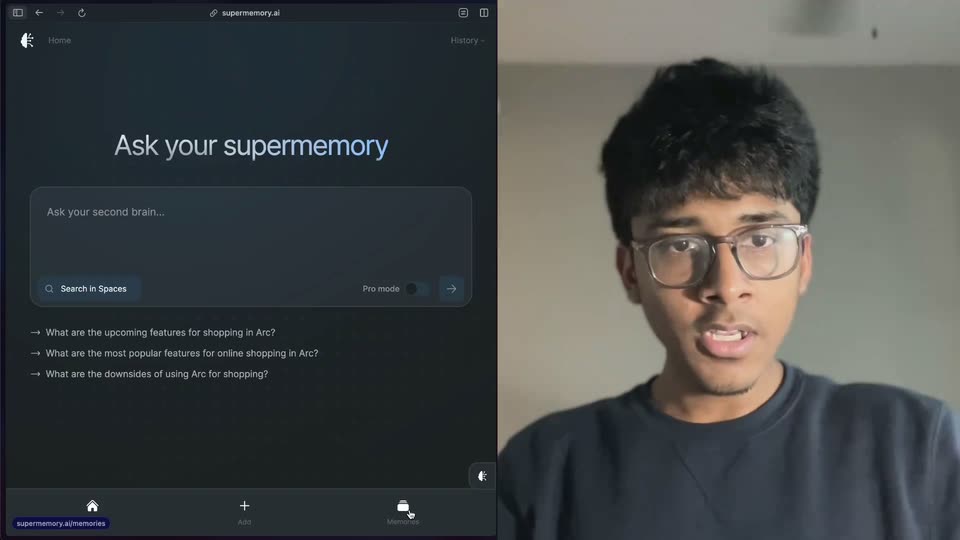
A split screen pairs the supermemory.ai browser page on the left with a bespectacled host talking on the right. A cursor glides down the dark interface toward the bottom navigation bar while the host speaks.
Techniques: Split screen, Cursor demo
Camera: Static
Split frame: left shows the dark supermemory app, switching from the Ask your supermemory home to a Your Memories grid of cards; right shows a bespectacled man in a grey shirt talking to camera in a dim room.
Techniques: Split screen
Camera: Static
Split screen: the supermemory.ai interface on the left, a bespectacled presenter talking on the right. The memory grid scrolls quickly, the cursor clicks Home, and the Ask your supermemory screen appears as a suggested question types itself into the search box.
Techniques: Split screen, Cursor demo
Camera: Pull out
A split-screen frame shows a dark supermemory.ai chat on the left, an answer typing out beneath a shopping-features question with memory cards filling in, and a bespectacled man on the right talking and gesturing to camera.
Techniques: Split screen
Camera: Static
Split screen: a browser window on the left loads an X post by Josh Miller about shopping, replacing a black spinner, while a man in glasses and a gray shirt talks to the camera on the right. The cursor hovers over the reply field.
Techniques: Split screen
Camera: Static
Split screen: a dark supermemory.ai interface on the left, a man with glasses in a grey tee talking to camera on the right. A small add-note popup with a space selector and an add button fades into the lower right of the UI while he speaks.
Techniques: Split screen
Camera: Static
A split screen shows a man with glasses talking on the right and the supermemory app on the left. The home view fades into an Add memory modal, then a cursor opens the spaces field and a dropdown of space names appears.
Techniques: Split screen, Cursor demo
Camera: Static
Split screen: left shows a dark web interface with an Add memory dialog and an open dropdown of space names; the cursor slides down and highlights dhruvya. Right shows a man with glasses speaking to the camera.
Techniques: Split screen, Cursor demo
Camera: Static
A young man with glasses speaks to the camera on the right side of the frame. On the left, a phone screen shows a static Telegram chat with the Supermemory bot, displaying purple user messages and gray bot replies.
Techniques: Split screen
Camera: Static
A young man with glasses and a dark shirt stands in a bedroom, speaking directly to the camera. The background shows a bed and a light switch on the wall. The camera is mostly static, with slight handheld movement.
Camera: Static
A flat dark SuperMemory web page is overlaid on a blurred shot of a person seated in a bedroom. The page shows a brain icon, a search field, a purple bar and two cards, while a cursor drifts across the top of the screen.
Techniques: Cursor demo
Camera: Static
A young man with glasses and a dark sweatshirt speaks directly to a locked-off camera in a bedroom with gray and peach walls. A small name caption, Dhravya Shah, stays fixed on screen while he talks.
On-screen text: “Dhravya Shah”
Camera: Static
A young man with glasses and a dark t-shirt talks to the camera in a bedroom, gesturing with his hands. Three centered white text blocks sit over him for the first half, then clear. The shot is a static medium close-up.
On-screen text: “struggled to make a good product”, “had to figure out how to do good & cheap AI”, “redesigned everything over and over”
Camera: Static
A static screenshot of a Twitter post by Dhruvya Shah fills the frame over a blurred interior. The post praises the supermemory repository and shows a GitHub link card with its icon and stats.
On-screen text: “This repository is probably worth a couple million dollars”, “im giving it for free anyways. check out supermemory”
Camera: Static
A man with glasses and a dark sweatshirt talks to camera in a bedroom, raising one hand to gesture. A white Star History line chart overlay with a rising red curve sits in the top left corner.
Camera: Static
A man in glasses sits at a desk talking to camera, softly focused, with static screenshots layered over him: a tweet with an architecture diagram, a star-history chart showing a spiking red line, a second tweet, and a dark supermemory card.
Camera: Static
A dark GitHub repository panel overlays a blurred live-action shot of a person in a room. The panel shows a search bar, Insights and Settings tabs, and buttons including a green Code button and a Starred 4k badge. The person's head and shoulders shift slightly behind the panel.
Camera: Static
A young man with glasses talks to the camera on the right, gesturing with his hand, while a Twitter thread about a Supermemory contributor fills the left half of the frame. The thread fades in from transparent at the start, then holds static while he speaks.
Techniques: Split screen
Camera: Static
A young man with glasses speaks to the camera in a plain room, raising a fist in a small gesture. A dark tweet card with white text appears at the lower right.
On-screen text: “Chirag”, “@Chirag10x”, “@Supermemoryai is quite sick, simple and very elegant @DhravyaShah 🚀”
Camera: Static
A young man with glasses talks to the camera in a bedroom. Two black tweet cards and a white database stats card float over the frame, with a white caption in the top right. The tweets and caption drop out, leaving the stats list beside him.
On-screen text: “and lots of love!”
Camera: Static
A young man with glasses talks to the camera in a room with gray and peach walls. A three-line numbered list appears at the left edge, holds, then exits, and the URL supermemory.ai appears below his chest as he points and gestures.
On-screen text: “1. mobile app”, “2. not be shitty”, “3. growth to 10k”, “supermemory.ai”
Camera: Pull out
A young man with glasses and a dark shirt sits in a bedroom, facing the camera with small head movements. The URL supermemory.ai is overlaid in white at the lower center. The handheld camera drifts slightly.
On-screen text: “supermemory.ai”
Camera: Pan