
0:54
Explore
GitHub Copilot X
GitHub · Mar 2023 · 1:05 · Full motion · AI-annotated
- Length
- 1:05
- Scenes
- 34 · 1.9 s avg
- Product on screen
- 0:53
- Features shown
- 8
- Call to action
- 1:01 · 93%
- Voiceover
- No
- Views
- 876K on YouTube
as of November 25, 2026
00:00:00 / 01:06:00
- Length
- 1:05
- Scenes
- 34 · 1.9 s avg
- Product on screen
- 0:53
- Features shown
- 8
- Call to action
- 1:01 · 93%
- Voiceover
- No
- Views
- 876K on YouTube
as of November 25, 2026
GitHub’s 1:05 launch film runs 34 scenes, about 1.9 s each. The product shows up at 0:53 and 8 features are revealed. The call to action lands at 1:01 (93% in). Built as a rapid capability montage on a near-black field: a glowing logo sting and a promise open it, then eight gradient headline cards each hand off to a UI or 3D demo of one Copilot task, and a wordplay beat resolves into the Copilot X lockup before a single URL card closes it. The signature moves are the purple-to-mint gradient type that reveals letter by letter, the rounded prompt pill that types the user's request, and the slow push/blur that snaps a flat chat card into focus over a defoc
No filming indicatedEstimated needs: 7 capture groups — your screens or recordings · 1 official logo — reused across the film · 4 graphic passages — draw or supply · 3 3D passages — build or supply
Is this your launch? to your site or press kit.
More like this




Similar soundtrack
Films whose music sounds like this one, voice left out
0:41
0:35

3D Transforms are now in Figma
Figma · Eurodance / Italo House
0:30
Exa - Introducing Exa Agent: frontier web research at less than half the co
Exa Agent · Electronic, Synthwave
GitHub Copilot X, scene by scene
· 34 scenes as text
01 · Hook · 0:00–0:01
On a black background, a soft violet glow fades in, then a circular badge with a glossy purple 3D robot face scales up at center, ringed by a blue-green neon halo. A thin light streak arcs in from the top right as the face sharpens.
Techniques: Light sweep
Camera: Pull out
02 · Hook · 0:01–0:02
A glowing purple robot face sits centered in a cyan-rimmed circle on black. Light streaks burst outward from the center in all directions, pulsing and rotating as the circle brightens.
Techniques: Particles, Light sweep
Camera: Static
03 · Hook · 0:02–0:03
A black circle with a glowing gradient ring surrounds the text, then the circle and ring vanish to reveal the full headline on a soft purple gradient background.
On-screen text: “Your AI pair”, “programmer is”, “leveling up”
Techniques: Masking
Camera: Static
04 · Feature reveal · 0:03–0:07
A purple-to-white gradient headline fades in on a dark background, is replaced by a second line, then a chat input field with a send icon slides in as a GitHub Copilot window rises from the bottom edge.
On-screen text: “Your AI pair programmer is leveling up”, “With context-aware conversations”
Techniques: Kinetic type
Camera: Static
05 · Feature reveal · 0:07–0:08
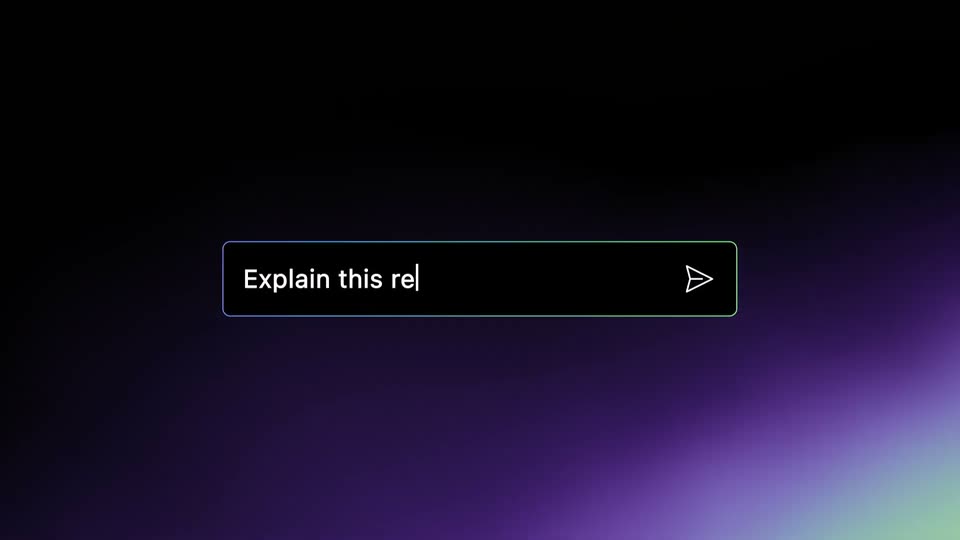
A rounded prompt bar labeled 'Explain this regex' floats at the top of a dark, purple-glowing background. Below it, a VS Code window slides up and brightens, showing a Copilot chat pane on the left and a Python regex file on the right.
Camera: Static
06 · Feature reveal · 0:08–0:10
A dark, blurred code editor fills the background. A GitHub Copilot card in the foreground streams its regex explanation, the text scrolling upward. The whole composition, including the “Explain this regex” command chip, pans slowly up the frame.
Camera: Pan
07 · Feature reveal · 0:10–0:12
On a near-black background, the phrase reveals left to right in two lines, the letters shifting from solid purple to a purple-to-teal gradient as they appear. Thin vertical purple glows frame the edges.
On-screen text: “Finding and”, “fixing bugs”
Techniques: Kinetic type, Masking
Camera: Static
08 · Feature reveal · 0:12–0:13
A rounded prompt box with a blue-to-green gradient border sits centered on a dark field. The text 'Help me debug the selected code' types out character by character beside a send arrow, while a caption 'fixing bugs' holds still.
On-screen text: “fixing bugs”
Techniques: Kinetic type
Camera: Static
09 · Feature reveal · 0:13–0:16
A bordered prompt chip reading 'Help me debug the selected code' holds at left on a dark field while the GitHub Copilot chat panel at right scrolls upward, the assistant's reply typing out a numbered list of bugs and corrected code beside the open editor.
On-screen text: “Help me debug the selected code”
Camera: Static
10 · Feature reveal · 0:16–0:18
A gradient headline 'Helping generate tests' holds center on a dark purple field. The edge prompt box and code panel slide out, then a new input field with a send arrow settles in below the text while diagonal light beams cross the background.
On-screen text: “Helping”, “generate tests”
Techniques: Light sweep
Camera: Static
11 · Feature reveal · 0:18–0:19
A black rounded input box sits centered on a diagonal purple-to-blue gradient. White text types out the prompt word by word with a blinking caret, while a small white line icon rests at the box's right edge.
Techniques: Kinetic type
Camera: Static
12 · Feature reveal · 0:19–0:20
A dark code editor with two panels fills the frame over a purple gradient. A black rounded prompt card reading the user request sits centered above it, scaling down and settling into place.
On-screen text: “Write unit tests for this function”
Camera: Pan
13 · Feature reveal · 0:20–0:24
A tilted 3D view of a code editor on a purple gradient blurs as a flat GitHub Copilot card snaps into focus at the center, its Python test code typing out line by line. A black prompt pill reading 'Write unit tests for this function' hovers at the top.
On-screen text: “Write unit tests for this function”
Techniques: 3D mockup, UI zoom
Camera: Pan
14 · Feature reveal · 0:24–0:26
A blurred dark purple gradient with a diagonal light band fills the frame. The headline “Even facilitating” slides in from the left and settles above the static word “learning”.
On-screen text: “Even facilitating”, “learning”
Techniques: Kinetic type
Camera: Pan
15 · Feature reveal · 0:26–0:27
On a black-to-purple diagonal gradient, a rounded input field with a thin blue-green border holds a typed query. The question types in letter by letter behind a blinking caret, an outlined arrow sits at the right edge of the box.
On-screen text: “How does variable visibility work in python?”
Techniques: Kinetic type
Camera: Pan
16 · Feature reveal · 0:27–0:30
A dark VS Code window with the Copilot chat panel; the assistant's answer about variable scope types out line by line, code block included, while the question sits in a floating box above the editor. The scene opens with a crossfade from the previous shot.
On-screen text: “How does variable visibility work in python?”
Techniques: Kinetic type
Camera: Static
17 · Feature reveal · 0:30–0:31
A dark background with a purple diagonal glow holds the headline on the right while a grid of dark tiles slides in from the left, showing editor marks: a blue VS Code, a JetBrains wordmark on a white square, a purple VS Code and a green N. The camera pulls back to reveal the full grid.
On-screen text: “All in your”, “favorite editor”
Techniques: Kinetic type
Camera: Pan
18 · Feature reveal · 0:31–0:32
A 2x2 grid of dark tiles on the left holds the Visual Studio Code, JetBrains, and Neovim logos, each sliding into place, while a light blue headline on the right reads All in your favorite editor, the top line scaling up.
On-screen text: “All in your favorite editor”
Techniques: Kinetic type
Camera: Pan
19 · Feature reveal · 0:32–0:33
A grid of dark rounded logo tiles, one bearing a blue-green N mark, drifts toward the lower left on black while a two-line headline sits to its right and scales up.
On-screen text: “All in your”, “favorite editor”
Techniques: Kinetic type
Camera: Static
20 · Feature reveal · 0:33–0:35
Flat product UI panels (code editor, file tree, git history, terminal) frame a centered gradient headline on black. The panels cycle through states, a code block scrolls and a button label updates, while the headline stays fixed.
On-screen text: “And integrated into every part of your workflow”
Camera: Pull out
21 · Feature reveal · 0:35–0:37
A centered gradient headline on black dissolves from “And integrated into every part of your workflow” into “Powering docs that feel tailored to you” as a soft green glow blooms behind it. A white browser window mockup with three dots then slides up from the bottom edge.
On-screen text: “And integrated into every part of your workflow”, “Powering docs that feel tailored to you”
Techniques: Kinetic type
Camera: Static
22 · Feature reveal · 0:37–0:42
A 3D browser mockup of the MDN search page floats on a blue-green gradient. The camera zooms into the search field as the query types out, then pulls back as a cursor hovers the Search button.
Techniques: 3D mockup, UI zoom, Cursor demo
Camera: Pan
23 · Feature reveal · 0:42–0:45
A browser window on a blue gradient shows an MDN article about centering a div. A ghosted chat panel dissolves out as the page scrolls down through code and prose, then the window pans right to reveal a documentation sidebar.
Techniques: UI zoom
Camera: Push in
24 · Feature reveal · 0:45–0:46
A flat browser window on a soft blue gradient shows CSS code on the left and a documentation panel on the right. The content scrolls upward through both panes while a small cursor hovers over the body text.
Camera: Static
25 · Feature reveal · 0:46–0:47
A code editor window slides down out of frame over a dark backdrop as a soft green-blue gradient blob drifts across. The headline 'And creating' scales in at center, then 'pull requests that tell' appears below it.
On-screen text: “And creating”, “pull requests that tell”
Techniques: Kinetic type
Camera: Static
26 · Feature reveal · 0:47–0:48
A dark frame with a diagonal purple gradient band and a green circle at the bottom right. The line 'And creating' scales in above two static lines reading 'pull requests that tell a story', all in a soft purple-to-mint gradient. The camera stays locked off.
On-screen text: “And creating pull requests that tell a story”
Techniques: Kinetic type
Camera: Static
27 · Feature reveal · 0:48–0:49
A centered purple-to-green gradient headline sits on a black field with soft green and purple glows. A dark file-browser interface panel fades in and slides up over the text, which scales and fades out as the panel fills the frame.
On-screen text: “And creating pull requests that tell a story”
Techniques: Kinetic type
Camera: Static
28 · Feature reveal · 0:49–0:49
A dark GitHub repository view sits in 3D perspective over a black backdrop with soft green and blue shapes. The tilted panel eases upward while a white cursor rests at the right edge. The file list and commit header stay sharp.
Techniques: 3D mockup
Camera: Static
29 · Feature reveal · 0:49–0:50
A dark GitHub file list sits on a green and blue gradient. A cursor hovers the green Compare & pull request button, then the view reframes into a pull request card titled Add edges for type assignability, the list blurring behind it.
Techniques: Cursor demo, UI zoom
Camera: Pull out
30 · Feature reveal · 0:50–0:53
A dark pull request interface card floats over blurred green and purple shapes. The view zooms into the comment thread and reaction box, then reframes on the card's lower-left corner, where a white X appears beside the purple border.
Techniques: UI zoom
Camera: Push in
31 · Product intro · 0:53–0:59
On a black background, white text is typed with a blinking cursor: 'X marks the spot' is written, backspaced, and replaced by 'X marks the future.' Sparkle particles with blue-green trails fly out, and a glowing neon ribbon forms a large 3D X behind the fading text.
On-screen text: “X marks the spot”, “X marks the future”
Techniques: Kinetic type, Particles, Morph
Camera: Pull out
32 · Product intro · 0:59–1:00
A neon X logo built from two crossing capsules glows in cyan and purple on a black field. The gray wordmark GitHub Copilot X fades in centered beneath it, then holds still on a locked-off frame.
On-screen text: “GitHub Copilot X”
Camera: Static
33 · Product intro · 1:00–1:01
A glowing X mark built from two crossed rounded bars sits centered on a black field, the gradient wordmark GitHub Copilot X resting beneath it. The frame is locked off and holds still for the full shot.
On-screen text: “GitHub Copilot X”
Camera: Static
34 · CTA · 1:01–1:05
On black, a gradient-outlined pill holds the URL GH.IO/COPILOTX in the center, with a gray GitHub mark and the line Let's build from here beneath it. The card holds still, then the frame fades to black.
On-screen text: “GH.IO/COPILOTX”, “Let's build from here”
Camera: Static