0:50
Sundar Pichai - Gemini 4 Argon is here. It’s available globally today for developers
Google · AI · Oct 2026
Google’s 0:50 launch film runs 51 scenes, about 1.0 s each. The product is on screen from the first frame and 1 feature is revealed. There is no explicit call to action; a voiceover carries the film. The video opens on a sketch-to-prompt intro, then runs a rapid montage of split-screen pairs that match live footage against a 3D simulation, an annotation overlay, or a generated table, cutting every one to two seconds on a fast beat. Its signature moves are the black-and-white UI framing, the thin white callout lines and wireframe meshes laid over the renders, and the saturated color pops inside the 3D panels, all held in a clean sans-serif type system.
Is this your launch? to your site or press kit.
Google · AI · Oct 2026
Google · AI · Oct 2023
Split layout: a top-down filmed hand opens a black notebook on a wooden desk beside a yellow pencil, revealing a pencil sketch of mountains with arrows, while a dark rounded pill reading Ask Gemini sits on the black right panel and then vanishes as a hand cursor icon appears on the page.
Techniques: Split screen, Cursor demo
Camera: Static
On a black background, a white card with a pencil sketch slides from the left to the center as a dark pill-shaped “Ask Gemini” button slides in from the right. A hand cursor glides from the card onto the button.
Techniques: Cursor demo
Camera: Pull out
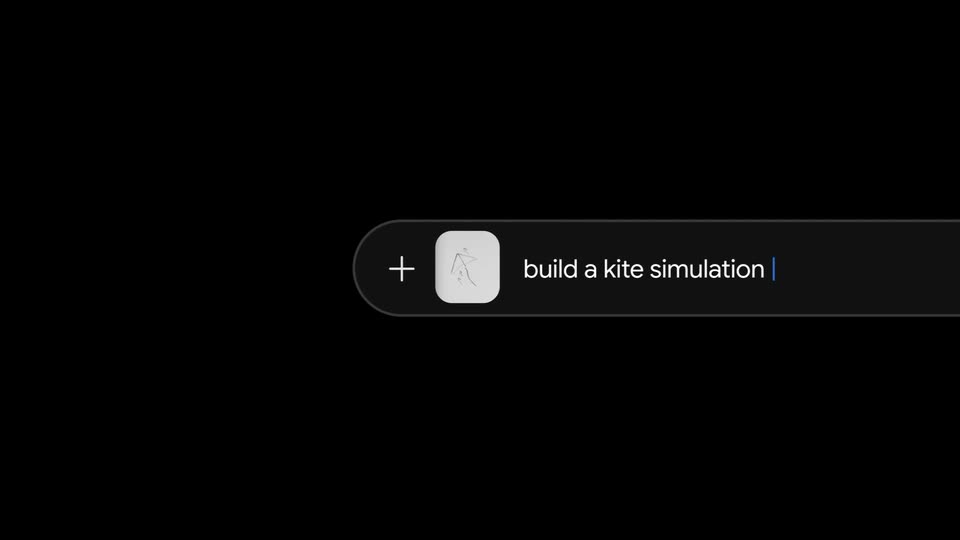
A hand cursor taps a white rounded icon with a kite line drawing, then the view pulls back to a dark prompt bar. The prompt types out letter by letter with a blue caret as the bar slides left to make room.
Techniques: Cursor demo, UI zoom, Kinetic type
Camera: Static
A dark prompt bar shows typed text with a blinking cursor, then cuts to a recording view of a child seen from behind against a blue sky, with a vertical column of circular controls, the middle one a red stop square.
Camera: Pan
Live footage of a child's head against a blue sky, a striped kite at left, plays inside a camera viewfinder. A vertical column of three circular icons runs down the left edge, the center one a red stop square.
Camera: Push in
Split screen: left, a child watches a rainbow kite with a long tail tumble in a blue sky. Right, on black, a white wireframe of the same kite tumbles with blue trajectory lines, a circular arc and a small XYZ axis gizmo.
Techniques: Split screen
Camera: Static
Split screen: a hand draws a circle on white paper with a yellow pencil on the left, while a 3D Earth showing Europe and Africa sits in black space on the right, its silhouette matching the drawn circle.
Techniques: Split screen
Camera: Static
A split screen pairs a red moon against a black sky on the left with a hand sketching a circle on white paper using a yellow pencil on the right.
Techniques: Split screen
Camera: Static
Split screen: left, a hand marked with blue motion-capture dots and lines opens from a fist to a flat palm; right, an orange dahlia blooms from a closed bud while white annotation labels slide in to name its parts.
On-screen text: “01 - BUD”, “BRACTS PEEL BACK”, “DISC FLORETS”, “GREEN CENTRE, STILL CLOSED”, “RAY FLORETS”, “OPEN FROM THE OUTSIDE IN”, “FLOWER HEAD”, “A COMPOSITE OF MANY FLORETS”, “STEM”, “LONG, BARE AND HOLLOW”
Techniques: Split screen
Camera: Static
Split screen: left, a finger traces a trail on a paper topographic map; right, the same terrain rendered in 3D with red elevation tags and a pulsing location pin.
Techniques: Split screen, 3D mockup
Camera: Static
A split screen holds two panels. The left, on black, shows a hand turning a striped beetle while a crosshair and measurement readout track it. The right panel morphs from a topographic map with red trail markers into a close-up of a grey bird, with annotation callouts pinned to its head and chest.
Techniques: Split screen, Morph
Camera: Static
A split screen holds a tabby cat at a window on the left and a gray jay in profile on the right. Thin white callout lines and small text boxes mark the bird's crest, eyes, beak and chest. Both shots stay static.
Techniques: Split screen
Camera: Static
Split screen: a tabby cat with a green collar lies by a window on the left; on the right, a 3D viewport shows a blue plane and a white feather model that follows the cat's head as the camera angle shifts.
Techniques: Split screen
Camera: Static
Split screen. Left, a tabby cat with a green collar sits by a window, gazing out. Right, a sunset sky with a flock of birds and thin white wireframe markers, diamonds and hexagons, drifting across them. The overlay shifts subtly.
Techniques: Split screen
Camera: Static
Split screen. Left: a pelican glides over a blue sea, then banks and dives toward the water. Right: a flock of birds against orange clouds, overlaid with thin white geometric lines (diamonds, hexagons, zigzags) that shift position.
Techniques: Split screen
Camera: Static
A hazy underwater close-up drifts through pale, cloudy water. Thin reddish-brown strands and patches of yellow-green algae pass by as the focus sharpens, with tiny specks suspended in the current.
Camera: Static
A hand presses into wet sand as shallow water washes over it. At one second the frame splits down the middle; the right half shows a grainy multicolor depth map of the same hand, green, yellow and red around a dark shape.
Techniques: Split screen
Camera: Static
A split screen pairs a coral fragment turning on a white surface, left, with a person in a blue shirt holding a dark rock at the water's edge, right.
Techniques: Split screen
Camera: Static
Split screen. Left, a top-down shot of a single rock on white paper swaps between two specimens. Right, the Beach Finds spreadsheet fills row by row, the blue selection highlight stepping down the list as new entries appear.
Techniques: Split screen
Camera: Static
Two hands hold a cream spiral shell in tight close-up against a white surface, the fingers turning it slightly to reveal the coiled apex. A second shell sits out of focus in the upper left corner.
Camera: Pan
A split screen holds two images side by side: a spiral nebula set against a starfield on the left, and a close-up of fingers turning a pale coiled shell on the right. The matching spiral shapes stay aligned as the shell rotates slightly.
Techniques: Split screen
Camera: Static
A spiral galaxy fills the frame, its bright core and brown dust lanes swirling around a glowing center. Purple star clouds and scattered stars sit on a black field. The galaxy drifts slowly, holding a wide, centered composition.
Camera: Static
A split-screen pairs a cream diagram of concentric planet orbits on the left with a dark chart of curved asteroid paths on the right, where a hand cursor hovers near the center.
Techniques: Split screen, Cursor demo
Camera: Static
A top-down shot shows a hand slapping down onto a white lined sheet resting on a gray grid cutting mat. The blurred motion settles into a flat, open-palm pose as the fingers spread across the paper.
Camera: Static
Top-down shot of two hands folding a corner of white lined paper on a gray grid mat. The right thumb presses the triangular fold flat while the left hand holds the sheet steady. The paper is creased in half, with red margin lines visible.
Camera: Static
Top-down view of two hands folding a white lined sheet on a gray grid cutting mat. A thumb presses a diagonal crease while the other hand holds the corner, the paper shifting slightly between frames.
Camera: Static
A wireframe model of a folded paper wing hovers over a pale grid plane. The camera drops to a low angle as thin crease lines spread across the ground, while a flat control bar with sliders and color dots stays fixed along the bottom edge.
Techniques: 3D mockup
Camera: Static
A split screen pairs a close profile of a man in a blurred office on the left with a white wireframe mesh on the right. The man's mouth moves as he speaks, and the wavy grid surface shifts slightly.
Techniques: Split screen
Camera: Pull out
A first-person view looks down at a hand holding a large, pale, cracked object shaped like a chess piece over a wooden floor. The hand tilts the object to reveal its fluted base and a small crack at the bottom.
Camera: Static
A hand sets a gray concrete vase on a wooden shelf beside a red figurine, a Rubik's cube with a wooden hand, and a giraffe, then repeatedly reaches in to lift it. The shelf holds a potted plant at the left edge.
Camera: Pull out
A cream wall shows two small mounting holes and two dark dots. A light wooden board, with a hand and a yellow tool at its lower edge, slides down out of frame, leaving the bare wall.
Camera: Static
A split screen shows a hand holding a drill and a screw against a wall on the left. On the right, a 3D cross-section of a wall reveals a green scissor mechanism expanding outward from a hole.
On-screen text: “SCE_M_W (AMBER)”
Techniques: Split screen, 3D mockup, Morph
Camera: Static
Two hands grip the ends of a flat green strip, holding it level across the frame against a plain white background. The fingers tighten and the strip stretches slightly as the hands pull apart.
Camera: Static
A 3D mixing console sits in perspective on a dark stage. Its front panels materialize from a translucent ghost into a solid white and gray faceplate with red and black knobs, a row of faders, and a glowing orange waveform on the right.
Techniques: 3D mockup
Camera: Pull out
A split screen shows a hand pointing at breakers on an electrical panel on the left, while a circuit schedule table populates row by row on the right.
On-screen text: “QO-40M Electrical Panel Schedule (200A)”, “Left”, “Circuit”, “Circuit”, “Right”
Techniques: Split screen
Camera: Static
A split screen shows a hand adding a marker stroke to blue and green rectangles on white paper at left, and a 3D white room where translucent blue and green panels fade in and reflect on the floor at right.
Techniques: Split screen, 3D mockup
Camera: Static
Split screen: left, a hand with a blue pencil lays translucent blue and green rectangles on white paper over a ruler; right, the same composition floats in a white 3D gallery room with floor reflections.
Techniques: Split screen
Camera: Static
A white 3D room holds suspended blue and green glass panels on thin wires, clustered vertically above a tiled grid floor. The camera pans right, revealing the corner and shifting the relative depth of the panels.
Techniques: Parallax
Camera: Static
A yellow pencil held in a hand draws a thin line on white paper, looping it above a graphite row of small figures. The line closes into a horizontal oval as the hand shifts position.
Camera: Static
A helix of white and black piano keys coils into a tight spiral on a dark, reflective floor, its edges glowing soft white. A low camera angle holds steady as the keys rotate and lock into the spiral form.
Camera: Static
A 3D loop of piano-key segments on a black background cuts to a first-person view of a hand reaching toward a child seated on a tire swing among green foliage.
Camera: Pull out
A split screen compares live footage of a person swinging on a rope in a leafy yard on the left with a dark 3D pendulum simulation on the right. The right side shows a teal ball on an orange disc, colored force vectors, a white trajectory curve, and bottom cards reading speed and angle that update as the swing progresses.
Techniques: Split screen, 3D mockup
Camera: Static
Split screen: a ballerina in a pink leotard and grey skirt turns and extends her arms in a bright studio on the left, while on the right a cluster of glossy 3D paint strokes in pink, teal, white, purple and yellow stretches upward on a black field. A small unit label sits in the corner.
On-screen text: “m/s”
Techniques: Split screen, Particles
Camera: Static
Split screen: a ballerina in a pink leotard and grey skirt leaps across a bright studio on the left, while colorful 3D paint strokes in pink, teal, yellow and purple swirl and reform on a black field on the right.
Techniques: Split screen, Morph
Camera: Static
Outdoors against a bright sky, two hands gesture and arrange floating 3D letterforms built from Chrome logos, stars and white A's, with thin node lines on the fingers. The letters then reflow into rows of rainbow swirls and smiley faces spelling G4 as a woman stands at a laptop on the beach.
Techniques: Particles, Morph
Camera: Static
Two women stand on a sunlit rooftop with arms outstretched as a wavy ribbon of G logos, smiley faces, rainbows and purple flowers drifts across the frame. The camera holds a locked-off wide shot.
On-screen text: “ACGYCC”
Techniques: Particles
Camera: Static
Top-down view of a white tablet lying on a gray concrete surface, its black screen filled with scattered white monospace characters that scramble and rearrange between frames. The background cuts to a pink field with a large red headline, then to a red field with a big red circle beside the tablet.
On-screen text: “ACGYCC”, “4”
Camera: Static
A white tablet lies flat on a painted surface, its black screen showing a pixelated numeral 4 built from white monospaced letters. The colorful abstract backdrop shifts behind the steady device.
On-screen text: “4”
Camera: Static
Top-down view of a white tablet resting on a textured surface. Its dark screen shows white monospace text forming a triangle, then a large 4, as the background swaps from gray asphalt with a yellow stripe to a red wall and the tablet tilts.
Techniques: 3D mockup
Camera: Static
A white tablet lies at a slight angle on a textured surface that rapidly cycles between blue denim, green paint and dark red. On its dark screen a number 4 is built from tiny repeating characters, held steady while the backdrop swaps.
Techniques: 3D mockup
Camera: Static
A solid black frame fills the screen for the full duration, with no visible elements, text, or motion. It reads as a blank hold or a transition between scenes.
Camera: Static