0:22
Freename - Freename AI is live. It starts with your identity, and AI handles th
Freename AI · Apr 2026
Fuchsia’s 1:15 launch film runs 41 scenes, about 1.8 s each. The product shows up at 0:49. There is no explicit call to action; a voiceover carries the film. The video opens with a flat white serif title card, then runs a long, fast-cut comedic montage of one founder drowning in compliance paperwork and phone calls, before settling on a calm spokesperson on a couch and a clean white UI tour that ends on a static logo. Signature moves are rapid jump cuts of the same actor with new props, top-down flat-lays on a green cutting mat with morphing app icons, and a high-contrast serif type system that bookends the live action.
Is this your launch? to your site or press kit.
Freename AI · Apr 2026
Cognition · Sep 2026
SKUVE · Sep 2026
Films whose music sounds like this one, voice left out
Kortix · Electronic, Jazz
Mave Health · Upbeat electronic
boot.dev · Comedic tech parody with cinematic and corporate elements
On a plain white field, centered serif words enter one by one to build a sentence, the first word fading in gray before the rest snap in black, the final two words crowding together.
On-screen text: “SO”, “you have a”, “hardware product?”
Techniques: Kinetic type
Camera: Static
A wide locked-off shot of a man at a wooden table in a brick room. He wears a white VR headset, then lifts it off to reveal a gray cap, holding a small white device and a black case. White captions run along the bottom.
On-screen text: “You probably spent months in R&D,”, “but you still can't start selling”, “hardware product?”
Camera: Static
A man in a gray cap and black vest sits at a wooden table, holding a white VR controller and examining it. A white headset and blue headphones rest on the table; brick walls and a bright window fill the background. A white caption sits at the bottom.
On-screen text: “but you still can't start selling”
Camera: Static
A man in a black vest sits at a wooden table in a brick room, holding a VR strap. He lifts a white headset onto his head, eyes down at his hands. Other headsets lie on the table. White subtitles read at the bottom.
On-screen text: “but you still can't start selling”, “You need to make”
Camera: Static
A man in a gray cap sits at a wooden table in a brick-walled studio, holding a white VR headset, then a black panel with two antennas. Headphones and a white dome device sit on the table. White subtitles caption his voiceover at the bottom.
On-screen text: “You need to make”, “sure your product is compliant.”
Camera: Static
A man in a brick-walled room sits at a wooden table scattered with VR headsets and a router. He lifts a white headset off his face and holds it up, examining it while wearing a gray cap.
On-screen text: “sure your product is compliant.”
Camera: Static
A man in a gray cap and black vest sits at a wooden table in a brick-walled room, holding a small black device. The tabletop props, a white VR headset, gray headphones and a white dome, jump to new positions between two cuts. A subtitle sits at the bottom.
On-screen text: “sure your product is compliant.”
Camera: Static
A man in a black cap sits at a wooden table in a brick loft, holding a black drone controller with two antennas, then lifts a white drone body. A white drone and goggles rest on the table. White subtitles read at the bottom.
On-screen text: “sure your product is compliant.”, “How do you do that?”
Camera: Static
A small caption reads “How do you do that?” above the large word “well” in black serif, centered on a plain white field. Both lines hold still on a locked-off frame while the voiceover answers the question.
On-screen text: “How do you do that?”, “well”
Camera: Static
A man in a gray cap and dark vest sits at a wooden desk in a brick-walled room, writing in an open book beside a small white device. Another man in a cap walks through the background holding a book. White subtitle lines appear at the bottom center.
On-screen text: “well”, “After building your product,”, “you figure-out what”, “standards apply, and suddenly”, “there are dozens of them.”, “Different regions,”
Camera: Static
Top-down shot of hands unfolding a vintage paper world map on a green grid cutting mat. The map opens from a narrow folded strip to a flat sheet showing the Americas and Africa, with a white caption at the bottom.
On-screen text: “there are dozens of them.”, “Different regions,”
Camera: Static
A vintage world map lies flat with a brass magnifying glass over India. Focus pulls from a soft blur to a sharp lens, the surrounding map staying out of focus. A white caption sits centered at the bottom.
On-screen text: “Different regions,”, “different industries,”
Camera: Static
Top-down locked-off shot of a green cutting mat with grid and protractor lines. A cream headset sits at left, a torn map at top. A paper strip reading requirements lies in the center while white captions swap at the bottom.
On-screen text: “different industries,”, “different requirements.”
Camera: Static
A wide locked-off shot of a brick-walled study room with three people in matching dark caps and vests at wooden desks, one perched on a desk in the back. They write in open books while a white caption sits at the bottom.
On-screen text: “So you start collecting documents”, “90”, “120”, “requirements”, “different requirements.”
Camera: Static
A man in a cap and dark vest sits at a wooden desk in a brick-walled loft, reaching toward a stack of papers near a window. A white caption sits centered at the bottom of the frame throughout the shot.
On-screen text: “So you start collecting documents”
Camera: Pull out
A man in a dark cap sits at a wooden table with his feet up, reading a book. Scattered papers fill the low foreground against a brick wall and a bright window. A white caption sits at the bottom of the frame.
On-screen text: “So you start collecting documents”, “then more documents and more and more.”
Camera: Static
A young man in a dark cap and blue jacket sits at a table in a brick room with large windows, flipping through a law dictionary. The wide-angle lens curves the walls and window panes. A subtitle sits at the bottom.
On-screen text: “then more documents and more and more.”
Camera: Static
A top-down shot of a wooden desk shows hands pressing a stack of yellowed papers beside a legal pad and envelope. The view cuts to a side angle as the person lifts a small black object with an orange display and two legs. A white subtitle sits at the bottom.
On-screen text: “then more documents and more and more.”
Camera: Static
A young man in a cap sits cross-legged holding an open law dictionary, then the view cuts to a close-up of hands writing on a pink sticky note at a desk. Handheld framing, natural light. A locked subtitle line sits at the bottom.
On-screen text: “then more documents and more and more.”
Camera: Static
A person in a black cap sits on a white bench in a brick loft, holding an open book and a white handheld scanner, shot on a wide-angle lens. A white caption line sits along the bottom edge of the frame.
On-screen text: “then more documents and more and more.”
Camera: Static
A brick-walled workspace with wooden desks; three people sit working while a man in a dark suit walks across the blurred foreground, right to left. White caption lines appear at the bottom.
On-screen text: “then more documents and more and more.”, “You chase consultants,”, “manufacturers and suppliers”
Camera: Static
A man in a black blazer types on a laptop at a wooden desk, an open binder of handwritten notes and a stack of papers beside it. Wide-angle locked-off shot of the office with brick walls.
On-screen text: “manufacturers and suppliers”
Camera: Static
A wide-angle shot of a man in a black blazer talking on a phone in a brick-walled room with a large window. He holds the phone to his ear and speaks, his expression shifting. White caption text sits at the bottom center of the frame.
On-screen text: “manufacturers and suppliers”, “across time zones”
Camera: Static
Top-down flat lay on a green gridded cutting mat, framed by a book, a folded map, and a laptop keyboard. A white die-cut sticker in the center swaps between app icons while small white captions update below it in sync with the voiceover.
On-screen text: “and across”, “time zones”, “WeChat”, “Email”
Techniques: Morph
Camera: Static
A top-down flat lay of a green cutting mat holds a book, folded map, and laptop keyboard around a paper-cut app icon. The icon morphs from a green speech bubble to a green handset while the caption below swaps from Messages to Phone call.
On-screen text: “Messages”, “Phone call”
Techniques: Morph
Camera: Static
Close side view of a person's hands typing on a silver laptop keyboard, dark suit sleeve in frame, blurred brick wall and small potted plants behind. A white caption holds at the bottom center while the fingers keep moving.
On-screen text: “But it doesn't end there.”
Camera: Static
A man in a black blazer looks down at a crumpled white paper in his hand, framed by a red brick wall and a bright window. A tan folder edge sits in the foreground. The camera holds on him with a slight drift as he studies the object.
On-screen text: “But it doesn't end there.”
Camera: Push in
A high-angle wide shot frames a person in a black blazer seated at a wooden desk, head bowed over an open notebook. Their hand taps the pages as a laptop and a stack of notebooks sit either side, brick walls and a blue panel behind.
On-screen text: “But it doesn't end there.”, “you have to connect”
Camera: Static
A man in a black blazer types on a laptop at a wooden desk, shot low with a wide-angle lens against a brick wall. A binder of handwritten notes sits to the right. White captions run along the bottom.
On-screen text: “you have to connect”, “with the right testing labs”
Camera: Static
A man in a black suit types on a laptop at a wooden desk, shot from a high wide-angle view in a brick-walled room. An open binder and a stack of dark booklets sit on the desk as white captions appear at the bottom.
On-screen text: “you have to connect”, “with the right testing labs”
Camera: Static
A man in a black blazer sits at a cluttered wooden desk against an exposed brick wall, turning the pages of a colorful booklet. A laptop, crumpled paper, and tall stacks of documents frame him. Captions read at the bottom center as he works.
On-screen text: “with the right testing labs”, “which is an”
Camera: Static
A locked-off wide shot of a brick study room shows several people seated at wooden tables reading or writing, while one person walks behind a blue counter. White caption text appears at the bottom center as the voiceover continues.
On-screen text: “which is an”, “entirely different story.”
Camera: Static
A man in a beige sweater walks in from the left and stops center frame in a brick-walled classroom with rows of wooden desks and black chairs, then speaks to camera. The camera is locked off while white subtitles swap in at the bottom in sync with his speech.
On-screen text: “entirely different story.”, “Today, hardware companies”, “spend months”, “navigating regulations, codes”, “and certifications,”, “and it slows everything down.”, “But it doesn't have to”
Camera: Static
A man in a cream sweater sits centered on a dark blue couch in front of a red brick wall, speaking to camera. White serif captions cycle at the bottom of the frame. Green plants frame the set on both sides.
On-screen text: “But it doesn't have to”, “With fuchsia”, “hardware compliance”, “gets done in weeks, not months.”
Camera: Static
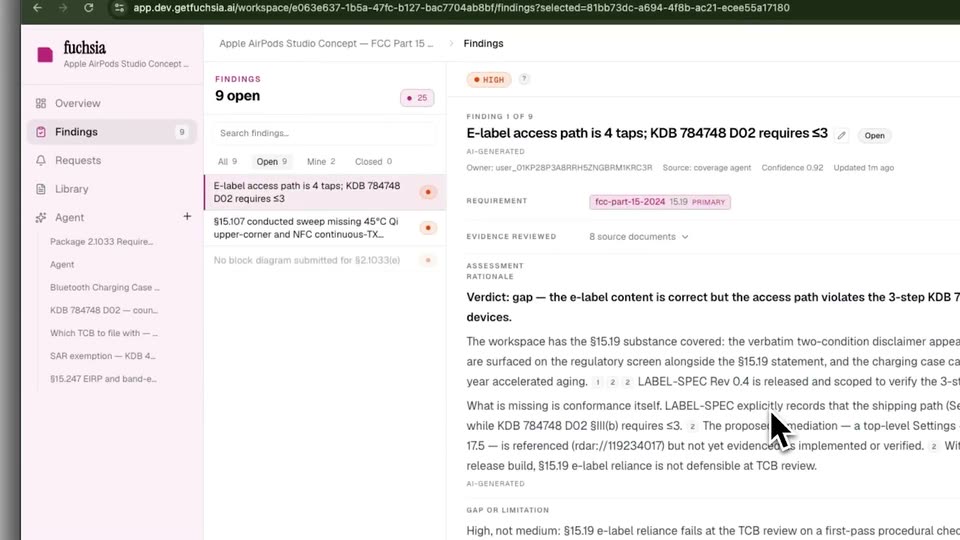
A tilted browser window of the fuchsia findings dashboard flattens into a front-facing screen on a white background. The cursor glides over the right-hand detail panel while the findings list scrolls down a few rows.
On-screen text: “gets done in weeks, not months.”
Techniques: 3D mockup, Cursor demo
Camera: Pull out
A close-up of compliance body text in a browser window zooms out to reveal the full app layout, with a left sidebar, an issue list, and a review panel on the right, while a cursor hovers near the Agent menu.
Techniques: UI zoom
Camera: Pull out
A screen recording of the fuchsia compliance app: the cursor moves through the document library and detail panels, then the window shrinks to a corner. It cuts to a man on a white couch against a brick wall as 'One platform' appears below him.
On-screen text: “One platform”
Techniques: Cursor demo
Camera: Push in
A man in a beige sweater sits centered on a navy couch against a red brick wall with a blue lower band, green plants framing both sides. He speaks to camera in a locked-off medium shot while white serif captions cycle at the bottom of the frame.
On-screen text: “One platform”, “for every requirement,”, “every document”, “and every status update”
Camera: Push in
A man in a beige sweater sits centered on a dark blue couch against a red brick wall, speaking to camera. The frame stays locked-off as white serif captions swap at the bottom, one after another.
On-screen text: “and every status update”, “Building hardware is hard.”, “Compliance should not slow you down.”
Camera: Static
A magenta folder-shaped icon and the black serif wordmark fuchsia hold center on a white background, completely static; in the final second the background fades to gray and the logo dims.
On-screen text: “fuchsia”, “Compliance should not slow you down.”
Camera: Static
The fuchsia wordmark in black serif letters sits beside a deep purple folder icon, centered on a flat gray field. The frame then fades to near black, dimming both the icon and the type.
Camera: Static