3:36

Arc Browser | Introducing Live Captures on Easel with Rosey
The Browser Company · Productivity · Dec 2022
Framer’s 2:18 clip runs 13 scenes, about 11 s each. The product is on screen from the first frame and 3 features are revealed. A single screen-capture on a pink-purple gradient desktop, cut at under one cut per minute and structured as three back-to-back property demos, each pairing a problem shown in preview with a one-click fix in the editor. Signature moves are the editor-to-preview flips, zoom-ins on the right-hand panel, and the closing fade to a centered logo on black.
Is this your launch? to your site or press kit.
The Browser Company · Productivity · Dec 2022
Akai · Oct 2025
Alara · B2B · Aug 2025
A Framer window centered on a blurred pink-purple wallpaper shows an Accordion page with four collapsed rows. The view flips to preview mode, a cursor clicks the first row to expand and collapse its answer, then the editor returns with the wrapper layer selected.
Techniques: Cursor demo
Camera: Static
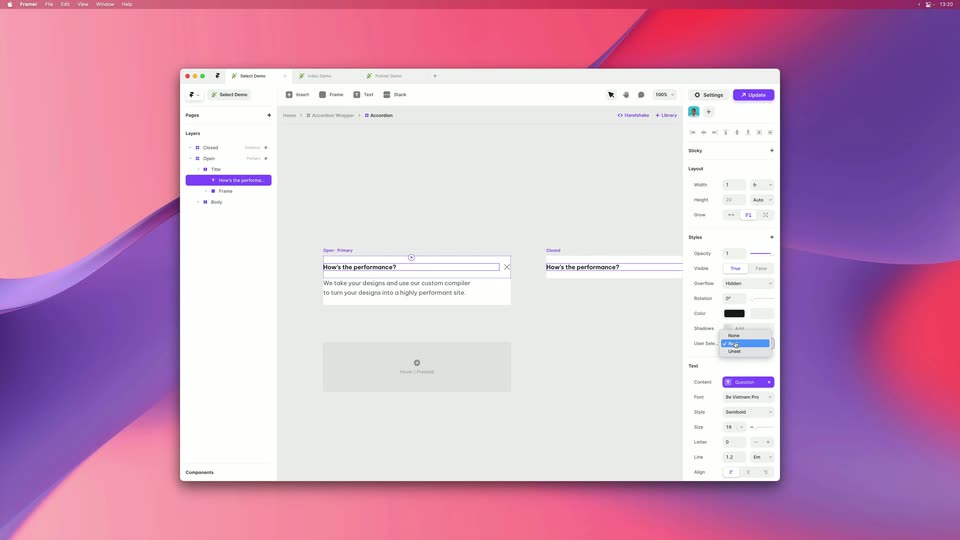
A Framer editor window sits on a pink-purple gradient desktop. The cursor selects an accordion row as the view zooms in. Open and closed component states sit side by side. The cursor opens a dropdown, sets User Selects to None, and the view zooms back out to the full page.
Techniques: UI zoom, Cursor demo
Camera: Static
A Framer window on a pink desktop: a cursor taps an accordion row to expand and collapse it, the view flips to the editor, then a Targets page scrolls down past sticky sidebar items to a black footer.
Techniques: Cursor demo
Camera: Static
A Framer editor on a pink desktop: the cursor clicks a plus icon in the right panel, an Index row appears, and 2 is typed. The view switches to a responsive preview that scrolls to a dark footer while the canvas width is dragged from 800 to 1068.
Techniques: Cursor demo
Camera: Static
A Framer editor window on a pink desktop switches from the Index tab to the Pointer Demo tab. The canvas shows a fixed gradient topbar above a grid of gray cards; the cursor selects the topbar while the content scrolls beneath it.
Techniques: Cursor demo
Camera: Static
A design-tool window on a pink gradient desktop shows a purple-to-pink top bar over gray placeholder cards. The cursor switches to the editor, sets pointer events to none, then zooms into the top bar component to re-enable them.
Techniques: Cursor demo, UI zoom
Camera: Static
A browser window frames a web app with a purple-to-pink top bar over a grid of gray placeholder cards. A cursor hovers the cards to light up hover states, the side panels collapse, and the top bar expands into a full-width gradient panel titled Home.
Techniques: Cursor demo
Camera: Static
A browser window shows a purple-to-pink gradient page with a centered vertical menu reading Home, Features, Updates, About. The navigation toggles: the background fades to pale lavender as four faint rounded cards appear, then returns to the saturated gradient.
Camera: Static
A browser window on a pink desktop shows a page with a purple-pink gradient header and four gray cards. The header expands downward, revealing a centered vertical menu of four white links, then collapses back to its original size.
Camera: Static
A flat browser window on a pink-purple desktop displays a purple-to-pink gradient page. A white vertical menu list, Home, Features, Updates, About, sits centered and drifts downward as a pale panel rises along the bottom edge.
Camera: Static
A browser window on a pink and purple desktop shows a web page with a purple-to-pink gradient header over a two-by-two grid of gray placeholder cards. The gradient band shrinks to a thin bar in the first second, then holds. The Framer logo sits top-left.
Camera: Static
A dimmed code editor window on a dark red backdrop fades to black, revealing a small gray geometric logo mark centered in the frame.
Camera: Static
A small white geometric mark, two angular flag-like shapes, sits centered on a black field. It starts dim gray, then brightens to full white around the one-second mark and holds steady for the rest of the clip.
Camera: Static