
0:18
Explore
00:00:00 / 01:20:27
- Length
- 1:20
- Scenes
- 46 · 1.7 s avg
- Product on screen
- 0:00
- Features shown
- 10
- Voiceover
- No
- Views
- 89K on X
as of November 22, 2026
Flowith’s 1:20 launch film runs 46 scenes, about 1.7 s each. The product is on screen from the first frame and 10 features are revealed. There is no explicit call to action. The video opens with a 3D title card, then walks through one feature at a time on a white dotted canvas, each announced by a two-line headline with an italic accent word, and closes on a black pricing card and logo lockup. Signature moves include the hopping teal egg mascot, cursor driven UI demos with pill buttons, a cyan wipe from clay to render, and camera pushes that blur the background.
Footage neededEstimated needs: 12 capture groups — your screens or recordings · 1 official logo — reused across the film · 1 filmed passage — shoot, supply or replace · 2 graphic passages — draw or supply · 9 3D passages — build or supply
Is this your launch? to your site or press kit.
More like this


Similar soundtrack
Films whose music sounds like this one, voice left out
2:12

Introducing Craft for iPhone, iPad, and Mac
Craft · Indie rock / Alternative rock
0:37

Introducing the Street View Trike
Google · Instrumental rock
0:56

Qwen - 🎁 A New Year gift from Qwen — Qwen-Image-2512 is here. 🚀 Our Decembe
Qwen · Upbeat instrumental funk, soul, and pop-rock
Flowith - introducing Flowith 3.0. the ultimate canvas for human-ai creation., scene by scene
· 46 scenes as text
01 · Product intro · 0:00–0:00
A white dotted corridor lined with floating photos recedes in 3D perspective, the flowith 3.0 lockup held at the top and a large Introducing headline centered. The camera pushes in, the surrounding photos blur out of focus, and a thin blue circle draws itself around the wordmark as 3.0 fades in.
On-screen text: “INTRODUCING”, “flowith 3.0”, “Everything in it”, “Introducing”
Techniques: 3D mockup, Parallax, UI zoom
Camera: Static
02 · Product intro · 0:00–0:02
The centered headline “Introducing flowith 3.0” sits locked on a pale dotted grid, the version number set in teal, while blurred photo thumbnails drift slowly around the borders.
On-screen text: “Introducing”, “flowith 3.0”
Techniques: Parallax
Camera: Push in
03 · Demo · 0:02–0:05
A white canvas on a dotted gray background hosts a teal gradient egg mascot with dot eyes that hops around the frame. A dark headline scales in above a gray intro paragraph. The view scrolls down to a chat input, where a prompt is typed behind a caret, and a second input box with the mascot slides in below.
Techniques: Kinetic type, Cursor demo
Camera: Static
04 · Feature reveal · 0:05–0:06
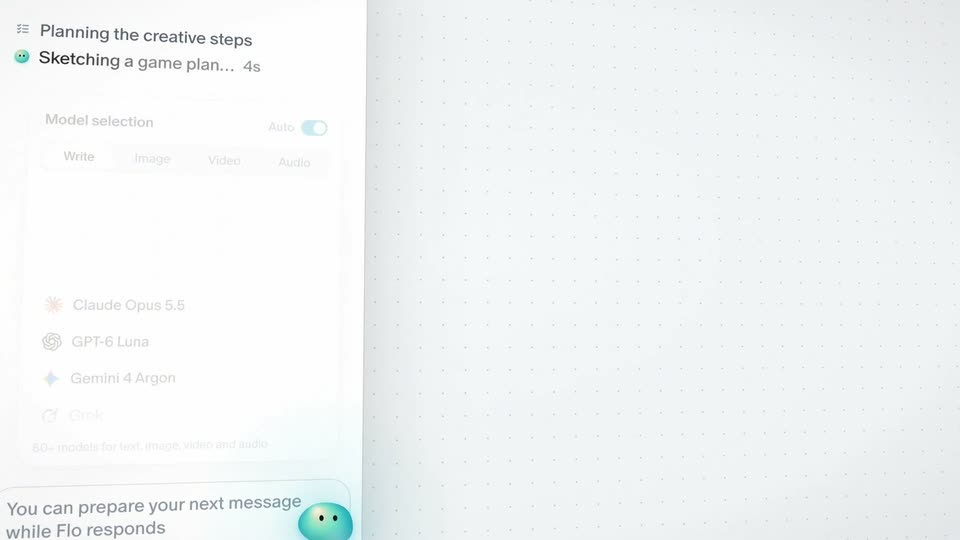
A white chat panel on the left scrolls upward, revealing a Model selection card with a list of AI models, while a blurred word and line of text appear on the dotted background to the right.
Camera: Static
05 · Feature reveal · 0:06–0:07
A product interface panel on the left scrolls its model list upward while a two-line headline on the right fades in, the word all set in italic, against a light dotted grid.
On-screen text: “The models you'd pick”, “are all here”
Camera: Static
06 · Feature reveal · 0:07–0:13
A light gray storyboard canvas holds five shot cards in two rows; pink-teal gradient placeholders fill with generated images one by one as a small teal smiley cursor hops between them, while the view pans right to center the board. A chat panel exits left and the tagline types in at the bottom.
On-screen text: “Ask once. Flo builds it”
Techniques: UI zoom, Cursor demo, Kinetic type
Camera: Push in
07 · Feature reveal · 0:13–0:15
A dotted white canvas shows a grid of video thumbnails. The frame zooms onto the Supercar card, which takes a blue selection ring and a toolbar above it. A cursor clicks a toolbar button, opening a dropdown menu of edit actions.
Techniques: UI zoom, Cursor demo
Camera: Push in
08 · Feature reveal · 0:15–0:15
A close-up of a light dotted-grid interface shows a 'Shot 4 · Supercar' card with a red car in neon light. A cursor slides down from the card and rests on the 'Golden hour' pill, which highlights. A second card, 'Shot 5 · Top down', sits to the right.
Techniques: Cursor demo
Camera: Pan
09 · Feature reveal · 0:15–0:16
A product screen on a dotted grid shows a Relight card with a car clip and a row of lighting pills; a cursor glides across the pills as the headline Change the light assembles word by word below.
On-screen text: “Change the light”
Techniques: Cursor demo, Kinetic type
Camera: Static
10 · Feature reveal · 0:16–0:17
A product interface displays a video panel of a red car on a neon-lit street, with lighting option pills below. A cursor clicks the Blue hour pill. A second panel shows a woman in gold. The headline Change the light sits at the bottom.
On-screen text: “Change the light”
Techniques: Cursor demo
Camera: Static
11 · Feature reveal · 0:17–0:20
A product interface shows a relight panel above a 'Change the light' headline. A cursor clicks the Golden hour pill, swapping a black-and-white car for a neon before/after slider. The view reframes onto the toolbar, then a cursor opens a dropdown of edit options.
On-screen text: “Change the light”
Techniques: Cursor demo, UI zoom
Camera: Pull out
12 · Feature reveal · 0:20–0:21
A white Angles card on a dotted gray background shows a sphere diagram whose blue marker swings from right to left. Two video thumbnails slide up at the top, a cursor moves to the 4-angle set button, and the caption or the angle fades in below.
On-screen text: “or the angle”
Techniques: Cursor demo
Camera: Pull out
13 · Feature reveal · 0:21–0:22
Image cards of a red car and a woman in a gold dress slide into two aligned rows on a white canvas, thin connector lines drawing between them. A cursor rests at the lower right. The caption “or the angle” holds at the bottom.
On-screen text: “or the angle”
Camera: Static
14 · Feature reveal · 0:22–0:24
A flat screen recording of a 3D storyboard editor. The central viewport plays a low-poly white convertible with an orange driver driving toward the camera down a tiled palm-lined boulevard. Side panels list scene props and camera properties; the timeline playhead advances from 0.9 s to 2.4 s.
Camera: Pull out
15 · Feature reveal · 0:24–0:27
Inside the editor's 3D viewport, a white car with a red figure on its hood drives toward the camera down a grayscale street lined with palm trees and buildings. The headline holds top-left while the cursor slides to the top-right button.
On-screen text: “Block it in 3D”
Techniques: 3D mockup, Cursor demo
Camera: Static
16 · Feature reveal · 0:27–0:27
The editor screen shows a gray clay blockout of a car and palm trees with a grid overlay and the headline on the left. A cursor clicks the top-right button, then a vertical cyan wipe sweeps across, replacing the clay model with the final sunset beach render.
On-screen text: “Block it in 3D”
Techniques: Cursor demo, Masking, 3D mockup
Camera: Static
17 · Feature reveal · 0:27–0:30
A vintage convertible drives toward the camera on a wet, neon-lit street at dusk, palm trees and glowing buildings flanking the road. The camera pushes in on the grille as pink and white light streaks flash past the sides. The headline builds at top left.
On-screen text: “Shoot it with AI”
Techniques: Kinetic type
Camera: Pull out
18 · Feature reveal · 0:30–0:31
The Pro editor interface fills the frame, its preview showing a neon-lit car at night under a large white italic headline “Shoot it with AI”. A cursor moves across the screen and a clip thumbnail drags onto the timeline.
On-screen text: “Shoot it with AI”
Techniques: Cursor demo
Camera: Push in
19 · Feature reveal · 0:31–0:32
A video editor interface fills the frame, with a thumbnail panel on the left, a neon night street playing in the center preview, and a timeline below. The cursor glides from the preview to a media thumbnail as the playhead advances along the track.
Techniques: Cursor demo
Camera: Static
20 · Feature reveal · 0:32–0:34
A video editor interface fills the screen. A neon night-drive clip plays in the central preview while the playhead travels right along the timeline. A cursor hovers over the media thumbnails, then rests on the music track.
Techniques: Cursor demo
Camera: Static
21 · Feature reveal · 0:34–0:35
A video editor interface fills the frame, with a jet ski jumping over ocean waves at sunset in the central preview. A cursor moves from the Cut panel on the right to the Export button at the top right corner.
Techniques: Cursor demo
Camera: Static
22 · Feature reveal · 0:35–0:36
The Pro editor fills the frame with a cursor over the Export button. The view zooms into the center preview, expanding it into a full-screen shot of a person on a jet ski at sunset. A caption slides in at the bottom left.
On-screen text: “A full editor, built in”
Techniques: Cursor demo, UI zoom, Kinetic type
Camera: Static
23 · Feature reveal · 0:36–0:37
A silhouetted rider on a jet ski arcs through the air against an orange sunset sky, with the camera locked off. White text reading 'A full editor, built in' slides in at the bottom left.
On-screen text: “A full editor, built in”
Techniques: Kinetic type
Camera: Static
24 · Feature reveal · 0:37–0:39
A white prompt bar on a pale dotted background, with a token-usage card above it. The prompt “Make a 1:18 collectible of a 3D stage: car” types itself over the placeholder text, then the cursor moves to the black send button, clicks it, and the field clears.
On-screen text: “A full editor, built in”
Techniques: Kinetic type, Cursor demo
Camera: Pan
25 · Feature reveal · 0:39–0:40
A white chat card sits centered on a dotted light background. Its body text updates in place: the working timer ticks, task lines type in one by one, the token and credit counters climb, and a green checkmark lands on the last line.
Camera: Pan
26 · Feature reveal · 0:40–0:41
A white Claude Code task card slides to the left edge and shrinks while a dark video player opens on the right, showing a teal 3D car inside a glass display case; the cursor moves onto the car.
Techniques: 3D mockup, Cursor demo
Camera: Pull out
27 · Feature reveal · 0:41–0:42
An orange wireframe convertible sits on a gray grid floor in 3D perspective. A translucent UI panel on the left and a dark card behind the car fade out, leaving the model full frame.
Techniques: 3D mockup
Camera: Push in
28 · Feature reveal · 0:42–0:42
An orange wireframe mesh of a classic convertible car rests on a dark gray grid floor marked with green and red axis lines. The model holds a static three-quarter front view inside a 3D viewport.
Camera: Static
29 · Feature reveal · 0:42–0:43
A white clay 3D model of a classic convertible car rests on a dark glossy platform. A wireframe at the rear dissolves while teal light lines sit in the dark background. The frame stays locked off on the model.
On-screen text: “8”
Techniques: 3D mockup
Camera: Static
30 · Feature reveal · 0:43–0:44
A teal vintage convertible scale model sits on a glossy black display base against a dark gradient. The shot opens soft and tight on the front end, then the camera pulls back and racks focus to reveal the full car and a brass plaque on the base edge.
Techniques: 3D mockup
Camera: Pull out
31 · Feature reveal · 0:44–0:46
On a light grey backdrop, a Claude Code task card sits left, linked by a thin line to a media card right showing a teal 1:18 convertible in a glass display case. Below, the headline resolves as the last word blurs in from a soft focus.
On-screen text: “Claude Code, on the canvas”
Techniques: Kinetic type
Camera: Pull out
32 · Feature reveal · 0:46–0:51
A dense grid of content thumbnails fills the frame as the cursor selects a character card, which highlights and enlarges. The view zooms into the card, then the surrounding grid fades to white, leaving the card centered under a breadcrumb.
Techniques: Cursor demo, UI zoom
Camera: Pull out
33 · Feature reveal · 0:51–0:52
A light gray canvas shows a small character card centered. A black cursor moves to the grid icon in the top-left toolbar and clicks it, opening a left panel that slides in with category tabs and asset cards.
Techniques: Cursor demo
Camera: Static
34 · Feature reveal · 0:52–0:54
A flat library panel sits on the left; a cursor clicks the Studio North chip, swapping the card grid. On the right, a large two-line headline fades in, then fades out.
On-screen text: “One library”, “The whole team”
Techniques: Cursor demo
Camera: Static
35 · Feature reveal · 0:54–0:57
A grid of photo thumbnails on a dotted gray background. A cursor hovers at the Invite button top right as five colored avatar circles pop in. Colored outlines and name tags appear around several photos, then the camera pushes in on the grid.
Techniques: Cursor demo, UI zoom
Camera: Push in
36 · Feature reveal · 0:57–0:58
On a dotted gray canvas, a cursor taps a red comment badge on a night-shoot video clip. A white comment card scales in over the second clip, showing a two-line reply. The left clip tilts and the canvas drifts down, revealing the tops of more cards.
Techniques: Cursor demo
Camera: Pull out
37 · Feature reveal · 0:58–0:59
A white canvas holds a loose grid of photo thumbnails, each outlined in a member's color and tagged with a name, while a comment bubble animates in at center. The canvas then blurs and a white team-plan card slides in over it.
Camera: Pull out
38 · Feature reveal · 0:59–1:00
A white plan card titled Studio floats over a grid of project thumbnails. The card fades from translucent to solid and slides right while the thumbnail grid pans left, exposing colored member tags.
Techniques: Parallax
Camera: Pan
39 · Feature reveal · 1:00–1:03
On the left, the black headline “One team / Same canvas” fades in from a soft blur over a white dot grid. On the right, a small video thumbnail cycles through night scenes while five colored name tags with arrows orbit around it on a circular path.
On-screen text: “One team”, “Same canvas”
Camera: Static
40 · Demo · 1:03–1:04
A video player card showing a neon-lit street at night sits at the center of a white canvas. The view pulls back to reveal surrounding cards, a portrait labeled Zoe on the right, and a row of thumbnails with an audio waveform below.
Techniques: UI zoom
Camera: Pull out
41 · Demo · 1:04–1:08
A white collaboration canvas fills the frame, its shot panels, video player and thumbnail grid linked by thin lines, while colored collaborator cursors sit over each item. The view zooms out to fit the full layout, then a tagline fades in at the bottom.
On-screen text: “One canvas. Everything in it”
Techniques: UI zoom
Camera: Pull out
42 · Pricing · 1:08–1:10
A black Flowith card mockup rotates from an angled 3D view to a flat front face on a black background, a soft light sweep glides across its surface. Below, the white price line reads in as the gold figure completes.
On-screen text: “Starts at $9.99”
Techniques: 3D mockup, Light sweep
Camera: Static
43 · Pricing · 1:10–1:10
A black Flowith membership card mockup floats in 3D over a dark void, a diagonal sheen crossing its surface. A grid of video thumbnails fades in behind it as the caption below shifts from the price to a single word.
On-screen text: “Starts at $9.99”, “That's”
Techniques: 3D mockup, Light sweep
Camera: Pull out
44 · Pricing · 1:10–1:15
A wall of video thumbnails opens large and soft, then pulls back into a sharp dense mosaic under a white caption. A round teal character pops into the center as the grid tilts into a receding 3D perspective.
On-screen text: “That's 600 videos a month”, “130”
Techniques: UI zoom, 3D mockup
Camera: Pull out
45 · Outro · 1:15–1:16
A glowing cyan orb with two dark eyes sits in black space, ringed by curved arcs of small square particles. The arcs dissolve as the orb becomes a small figure, an egg-shaped head on an oval body, on a bright halo. A white flash then expands to fill the frame.
Techniques: Particles, Morph, Masking
Camera: Static
46 · Outro · 1:16–1:20
A small glowing teal orb with a face drifts across a plain light background, then shrinks to become the decimal point of the version number. The black logo mark scales in at center, and the wordmark flowith 3.0 assembles beside it, the 3.0 set in teal 3D type.
On-screen text: “3.0”
Techniques: Kinetic type
Camera: Static