2:13

Joe Devoy - Introducing Tempo: The world’s first AI Head of Growth. AI can now s
Tempo · B2B · May 2026
Flowith · May 2025 · 1:20 · AI-annotated
Flowith’s 1:20 launch film runs 63 scenes, about 1.3 s each. The product is on screen from the first frame and 3 features are revealed, with social proof. The call to action lands at 1:04 (79% in), over a voiceover. A tech launch film built as a rapid montage: a cinematic agent persona and glitch type open it, then short title cards hand off to long dark UI fly-throughs that prove each claim. Signature moves are circle and pill masks revealing text, interfaces tilting into 3D perspective, and split-screen grids of generated Matrix footage.
Is this your launch? to your site or press kit.
A man in a black suit, white shirt, black tie and dark aviator sunglasses stands centered in a white studio, speaking to camera. Two light stands frame the backdrop on either side.
Camera: Static
The flowith logo, a small angular mark beside a lowercase wordmark, sits centered on a black background, locked off and static for the full shot.
Camera: Static
A white logo mark and the lowercase wordmark 'flowith' sit centered on a black background. The frame is locked-off and the logo holds still for the full shot.
Camera: Static
A man in a black suit, white shirt, black tie, and dark sunglasses stands centered against a pale studio wall, speaking directly to the camera. The locked-off frame keeps his chest and head in view while his mouth moves.
On-screen text: “I. flowith”
Camera: Static
A young man in a gray hoodie sits at a cluttered desk in a dim room, staring at a laptop. He turns his head slightly and speaks with a puzzled expression as a white subtitle appears at the bottom of the frame.
On-screen text: “What even is Flowith?”
Camera: Static
A young man in a dark hoodie sits at a desk in a dim room, gazing at a laptop at the right edge. Books and a radio sit blurred on the desk behind him. A white subtitle reads his question at the bottom of the frame.
On-screen text: “What even is Flowith?”
Camera: Static
On black, white blocks slide in to build the headline “Meet flowith” over a faint flow logo, then a large outlined “AGENT NEO” stamps in on the right.
On-screen text: “What even is Flowith?”, “Meet flowith”, “AGENT NEO”
Techniques: Kinetic type
Camera: Pull out
A giant white NEO slides left across a black frame while a row of vertical bars shifts, revealing a distorted multicolored swirl pattern on the right. Cut-off white words NFINIT and ENT slide out at the left edge.
On-screen text: “NFINIT”, “ENT”, “NEO”
Techniques: Kinetic type, Masking
Camera: Pull out
The word NEO in huge white type slides left across a black frame, carrying a soft offset shadow, while a horizontal band of wavy rainbow glitch stripes, split into vertical columns, sits behind it.
On-screen text: “NEO”
Techniques: Kinetic type
Camera: Push in
On a dark green field, a white two-line headline scales in from a soft blur on the left, while a gray disc at center-right brightens and stretches into a white oval. The frame stays locked off.
On-screen text: “The World's First”, “Infinite Agent”
Techniques: Kinetic type
Camera: Static
On a dark green band between black bars, a white pill in the center gains a lavender knob on its right, reading as a toggle switch. The white two-line headline on the left fades out over the shot.
On-screen text: “The World's First”, “Infinite Agent”
Camera: Static
A white pill holds the black wordmark INFINITE on a dark green dotted field. A blue circle slides from the right end to the left end, masking the letters it passes over.
On-screen text: “INFINITE”
Techniques: Masking
Camera: Static
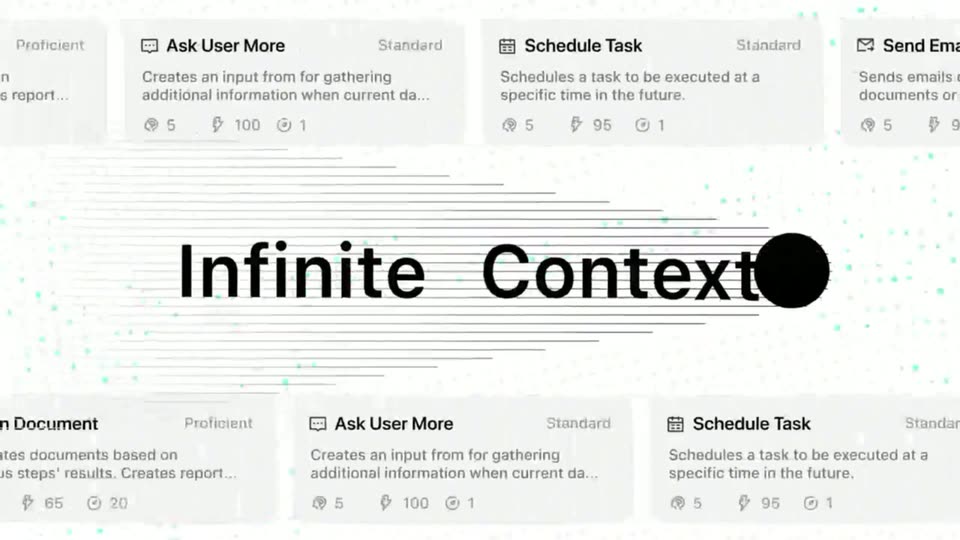
A black circle sweeps left to right across a scrolling grid of tool cards, revealing the bold headline Infinite Context as it passes. Thin horizontal lines and teal dots trail behind the circle.
On-screen text: “Infinite Context”
Techniques: Kinetic type, Masking, Parallax
Camera: Pan
A pale grid of tool cards and ruled lines with teal dots fills the frame. Large black text reads Infinite Context with a solid dot at its end; it shrinks and fades to grey while 7×24 Cloud Run scales up in black.
On-screen text: “Infinite Context”, “7×24 Cloud Run”
Techniques: Kinetic type
Camera: Push in
Black and white blocks slide and reshape over a dotted waveform line, masking the headline as 7×24HR scales and the white field collapses into a circle.
On-screen text: “7×24HR”, “Cloud Running”
Techniques: Kinetic type, Masking, Morph
Camera: Static
A black-and-white band card showing 7×24HR over Cloud Running transitions through a white blob to a 3D processor chip on a dark substrate, with AUTO scaling in across the chip and PL set large at the lower left.
On-screen text: “7×24HR”, “Cloud Running”, “AUTO”, “PL”
Techniques: Kinetic type, Masking, 3D mockup
Camera: Static
A 3D workspace render with a keyboard and a purple monitor graphic fills the center. The white words AUTO and PLANNING scale across it, then the square image zooms down to a small thumbnail as the text settles into a centered PLANNING line.
On-screen text: “AUTO”, “PLANNING”
Techniques: Kinetic type, 3D mockup
Camera: Pull out
A big white two-line headline AUTO PLANNING sits over a stack of dimmed product screens. The type scales and fades out as the tilted screens drift apart into a scattered 3D layout on black.
On-screen text: “AUTO PLANNING”
Techniques: Kinetic type, 3D mockup
Camera: Static
Dark space holds several floating interface panels in 3D perspective: a dashboard with line charts, a data list, and a news article titled Black Myth Wukong. The panels drift and blur as the camera moves, with a teal accent bar on the right.
Techniques: 3D mockup
Camera: Static
A dark void holds several blurred interface cards in 3D perspective, including a gold wedding page and a dashboard with teal bars. The camera drifts forward as a blue panel rises into soft focus while the others fall away.
Techniques: 3D mockup, Parallax
Camera: Pan
A dark workflow editor fills the frame, rows of small connected cards on a grid with a single card centered between them. A white cursor hovers mid-screen and the layout scrolls slowly upward. A text list panel sits in the bottom-left corner.
Techniques: Cursor demo
Camera: Push in
A dark automation timeline scrolls upward, centering a card with an envelope icon and a purple outline, while a step list in the lower left updates and a cursor hovers at the right edge.
Camera: Static
A dark vertical timeline of agent cards centers on a purple-outlined 'Successfully sent email' card with a green check; a stylized white cursor hovers over the recipient line. The card's text dissolves from a doubled state into its final layout as dimmed search_twitter cards sit above and below.
On-screen text: “/.flowith”
Techniques: Cursor demo
Camera: Static
A dark three-column feed in the AI Pulse Tracker interface scrolls down while a white cursor moves from the middle column to the top navigation bar, ending on the Influencers menu item.
Techniques: Cursor demo
Camera: Static
A dark AI Pulse Tracker dashboard fills the frame. A white cursor drifts over a multicolored keyword cloud listing terms like OpenAI and ChatGPT, while a panel of overlapping pink, green and blue bubbles sits to the right. The view stays static.
Techniques: Cursor demo
Camera: Static
A dark dashboard view of the AI Pulse Tracker interface shows a Trending AI Topics row: a colorful keyword cloud on the left and a panel of overlapping pink, green and blue bubbles on the right. A mouse cursor rests over the cloud while the layout stays static.
Camera: Pan
A locked-off view of a research interface shows a grid of white cards filling with text about Matrix characters; two bottom cards then load still images of Neo and green code.
Camera: Static
A locked-off view of the Flowith workspace shows a horizontal row of character description cards above a chat panel. At the bottom, four Matrix-style images load in one after another, the last frame filling the final empty slot.
Camera: Static
A bald man in round sunglasses and a green leather jacket reclines in a dark leather chair, extending his open palm with a red and a blue pill toward the camera. Green bokeh glows in the background. The frame stays locked off.
On-screen text: “.flowith”
Camera: Static
A man in a black coat and sunglasses walks slowly through a green-lit corridor, pistol in hand, as bullet casings float frozen in the air around him. Low angle, the figure fills the frame.
Camera: Static
A dim, green-lit room holds a bald man in a long dark coat standing over a younger man seated in a leather chair. The two face each other in a static medium shot, the standing man looking down and the seated man looking up toward him.
Camera: Static
A man in a black trench coat and sunglasses crouches low on a rain-soaked rooftop, pistol raised in one hand and the other arm extended in a pointing gesture. Rain streaks the air while the wet floor mirrors the surrounding city towers.
Camera: Static
A confirmation card with body text and a yes continue button fills the frame, then the view pulls back to reveal the full canvas, a left task list, storyboard thumbnails across the top, and result cards along the bottom.
Techniques: UI zoom
Camera: Push in
A light dashboard holds a grid of Matrix-themed image and video cards around a central chat panel, with the flowith logo top left. The frame stays locked off while a cursor rests at the right edge.
Camera: Static
A bald man in a black leather jacket and round sunglasses leans in a dark green chair, extending a hand toward the camera. The clip sits in the top-left quadrant on a black field, with a small .flowith mark held still.
On-screen text: “.flowith”
Camera: Static
Two green-tinted live-action clips run side by side across the top half of the frame, the bottom half black. Left, a man in round sunglasses reclines in a chair; right, a man in a dark coat stands over a seated man near a window.
Techniques: Split screen
Camera: Static
A three-panel split screen shows green-tinted live action clips: a bald man in sunglasses seated in a chair, a man standing beside a seated man, and a man walking a corridor as casings fly. The fourth panel stays black.
Techniques: Split screen
Camera: Static
A 2x2 grid shows four green-tinted action clips at once: a seated man in round sunglasses beneath falling code, a man in a dark coat over a seated man, a man walking past floating bullets, and a man crouched on a wet rooftop.
Techniques: Split screen
Camera: Pan
A light chat list fills the frame with a white message bubble describing a Minecraft-style game prop request, a smaller suggestion pill below it, and a second bubble with a lavender border entering from the bottom. The view slowly zooms in on the messages.
Techniques: UI zoom
Camera: Push in
A pale interface displays two rows of white cards, each framing a 3D block model of a city object such as a tram, bridge, taxi, and house. A document card titled Game Concept Document sits below. A cursor hovers over the tower card in the middle row.
Techniques: Cursor demo
Camera: Static
A dark node-graph interface sharpens from a blurred wide view, then zooms onto a central vertical column of generated cards. A cursor hovers over the active card while a task list fills with checked items at bottom left.
Techniques: Cursor demo, UI zoom
Camera: Pan
A dark flowchart of agent cards scrolls vertically and horizontally, each card holding a generated fantasy image, while a white cursor hovers over the center node and a task list panel stays fixed in the lower left corner.
Techniques: Cursor demo
Camera: Static
A dark interface shows a vertical feed of agent cards, each pairing a building photo with prompt text, scrolling upward while a white cursor hovers over a card. A chat panel with message rows sits in the lower-left corner.
Techniques: Cursor demo
Camera: Static
A dark node graph with a centered loading label cuts to a black page where a large gold serif title, a subtitle and a button appear. A white cursor rests at right; the flowith badge holds the bottom-left corner.
Camera: Static
A dark website screen with a gold logo and menu bar at the top. A central panel links four illustrated cards with glowing gradient bars; hand cursors and small colored labels shift from the top pair to the bottom pair while the logo brightens.
Techniques: Cursor demo
Camera: Static
A dark site displays a centered modal card titled “The Weaver’s Knot” in gold serif. The article body scrolls downward inside the card as a hand cursor hovers over the text, moving from the zone overview to flora, fauna and danger event sections.
Techniques: Cursor demo
Camera: Static
A dark webpage shows an open modal over a content page. A cursor at the top right closes the modal, revealing the heading Society, Government, and Culture, three framed illustrations, and paragraphs of text.
Techniques: Cursor demo
Camera: Static
A dark horizontal bar chart titled GAIA Benchmark animates six bars extending rightward across three levels, each ending in a percentage value, while a legend on the right lists Manus AI, OpenAI Deep Research and flowith NEO.
On-screen text: “GAIA Benchmark”, “A comprehensive benchmark for evaluating AI assistants, adopted by OpenAI. While flowith isn't positioned as a general agent, it has outperformed established ag”, “Manus AI”, “OpenAI Deep Research”, “flowith NEO”, “86.5%”, “74.3%”, “70.1%”, “69.1%”, “57.7%”
Camera: Static
A dark bar chart titled GAIA Benchmark compares three products across three levels. The purple flowith NEO bars extend rightward past the gray comparison bars, and percentage values appear at their tips.
On-screen text: “GAIA Benchmark”
Camera: Static
A black bar chart titled GAIA Benchmark compares three products across three levels. Gray bars for Manus AI and OpenAI Deep Research sit above purple gradient bars for flowith NEO, which lead each level. The frame holds static.
On-screen text: “GAIA Benchmark”, “A comprehensive benchmark for evaluating AI assistants, adopted by OpenAI. While flowith isn't positioned as a general agent, it has outperformed established ag”, “Manus AI”, “OpenAI Deep Research”, “flowith NEO”, “LEVEL 1”, “86.5%”, “74.3%”, “90.6%”, “LEVEL 2 70.1% 69.1% 75.5% LEVEL 3 57.7% 47.6% 61.5% 0.4 0.5 0.6 0.7 0.8 0.9”
Camera: Static
A dark GAIA Benchmark bar chart fills the frame. A tilted 3D phone mockup showing an image gallery fades in at the center, dims the chart, then fades out to restore the chart.
On-screen text: “GAIA Benchmark”, “A comprehensive benchmark for evaluating AI assistants, adopted by OpenAI. While flowith isn't positioned as a general agent, it has outperformed established ag”, “Manus AI”, “OpenAI Deep Research”, “flowith NEO”
Techniques: 3D mockup
Camera: Static
A dark grid of Van Gogh painting cards sits flat on a black background, then the whole interface tilts into 3D perspective and zooms forward until it fills the frame.
Techniques: 3D mockup
Camera: Push in
On a white background, the word Agent darkens from gray to black as Neo fades in beside it in light blue, while a fan of 3D phone mockups rotates up from the bottom, each screen showing different content.
On-screen text: “Agent”, “Neo”
Techniques: 3D mockup, Kinetic type
Camera: Pan
A white background holds a centered headline that swaps from Agent Neo to Open to Everyone above a fan of five tilted smartphone mockups. Each phone shows a use-case image with a small pill label, and the fan shifts slightly while the labels scale in.
On-screen text: “Agent Neo”, “Open to Everyone”, “Now”
Techniques: 3D mockup
Camera: Pan
A dark gray pill button labeled Invite Friends with a small people icon sits centered on a plain light background. A white hand cursor rests at its lower right. The button fills with teal and the label swaps to Get Credits! as the cursor holds position.
Techniques: Cursor demo
Camera: Static
A teal gradient pill button with a stacked-coins icon and the label “Get Credits!” sits centered on a plain off-white background. A mouse cursor hovers just below it at the start, then vanishes as the button holds still.
Camera: Static
A light invitation page lists three available codes with copy and download icons, above two benefit cards for inviters and invitees. The view settles from a brief dissolve, and a cursor moves to hover the copy icon of the first code.
Techniques: Cursor demo
Camera: Push in
A dark smartphone in 3D perspective, tilted, scales up against a black backdrop with soft diagonal light streaks. Its screen shows a Now Available headline, the flowith wordmark, a rounded-square app icon with a glint, and an App Store badge.
On-screen text: “Now Available”, “flowith”, “App Store”
Techniques: 3D mockup, Light sweep
Camera: Static
On a black field, the white headline “Stop Chatting” blurs into focus, then dissolves into “Start Creating.” Near the end, small “Now Available” and “App Store” lines scale in around the flowith logo.
On-screen text: “Stop Chatting”, “Start Creating”, “Now Available”, “App Store”, “flowith”
Techniques: Kinetic type
Camera: Static
A white tagline sits centered on a plain black background and holds still for the full shot, serving as a closing call to action.
On-screen text: “Start Creating”
Camera: Static
The phrase Start Creating holds centered in white on a black background, then the frame cuts to black.
On-screen text: “Start Creating”
Camera: Static
A white flowith logo with a small icon is centered on a black background. It remains locked and static for the full shot.
On-screen text: “I.flowith”
Camera: Static
A black screen holds a centered call to action. The gray phrase Try Now at sits beside the bold white URL flowith.io, and both remain static for the full shot.
On-screen text: “Try Now at flowith.io”
Camera: Static