2:05

Ego Demo Video
ego · Consumer · Mar 2024
Figma · Apr 2025 · 0:30 · Full motion · AI-annotated
Figma’s 0:30 launch film runs 13 scenes, about 2.4 s each. The product is on screen from the first frame and 3 features are revealed. There is no explicit call to action. The video is built as a numbered feature list: an indigo title card, then one segment per update, each opened by a color-coded caption pill (green, lavender, orange) and followed by a zoomed screen-recording demo, then a repeated closing card. Signature moves are hard cuts between flat 2D and 3D-perspective UI, punch-in zooms into panels, keycap chips for shortcuts, and the morphing asterisk blob that punctuates the bookends.
Is this your launch? to your site or press kit.
ego · Consumer · Mar 2024
Shopify · Business software · May 2026
On a flat indigo background, a dark red asterisk sits above a black headline “Three new” on a gray pill, with “design system updates” on a green pill below; a small yellow shape morphs in the lower left and a white loop logo rests in the corner.
On-screen text: “Three new”, “design system updates”
Techniques: Morph
Camera: Static
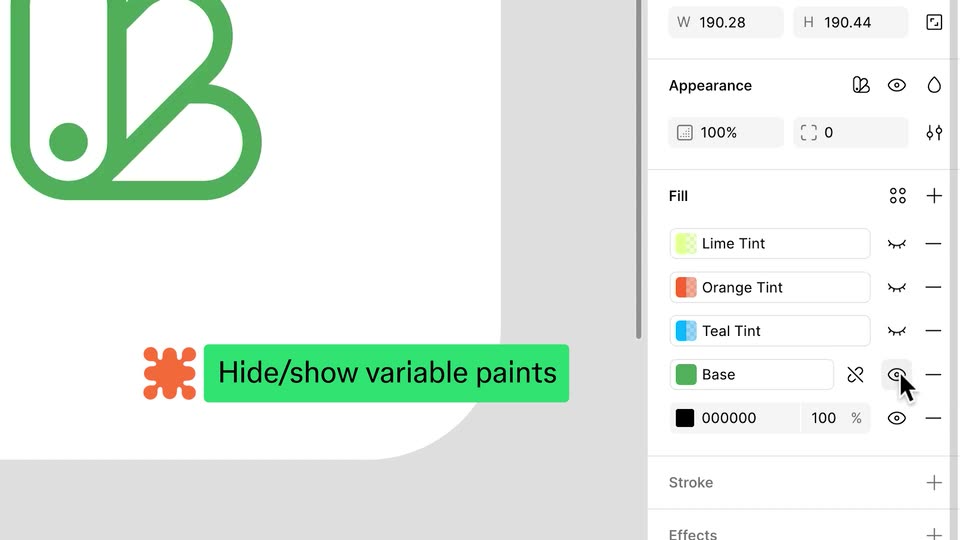
A design tool canvas shows a green JB logo beside a properties panel. The view zooms into the logo as the cursor toggles eye icons in the Fill list, and the logo recolors from olive to dark green, teal, and back. A green pill caption with an orange asterisk icon expands in the lower left.
On-screen text: “Hide/show variable paints”, “Three new”, “design system updates”, “8”
Techniques: UI zoom, Cursor demo
Camera: Push in
The cursor moves to the chain icon on the top row of a dark Library asset list, selecting it with a purple outline as the right panel switches to List Item properties. A lavender caption card with a pink link icon appears at the lower left.
On-screen text: “Jump to source & back shortcut”
Techniques: Cursor demo
Camera: Static
Screen recording of Figma: a cursor hovers a list row in a dark asset mockup, then the canvas cuts to the library screen where that row is highlighted. A lavender caption card with a magenta H logo sits in the lower left.
On-screen text: “Jump to source & back shortcut”
Techniques: Cursor demo
Camera: Static
A dark library list sits centered over a Figma canvas; a lavender callout with a pink mark reads “Jump to source & back shortcut” at lower left. The list slides up and left, revealing the component panel behind, as two black shortcut chips with arrow keys pop in on the right.
On-screen text: “Jump to source & back shortcut”, “Ctrl Alt ⌘ K”
Camera: Static
A Figma-style editor screen holds static, a list-item component selected on the canvas with red dimension guides. A pink blob and lavender callout sit lower left; two keycap boxes show the shortcut lower right; a black cursor rests mid-canvas.
On-screen text: “Jump to source & back shortcut”, “Ctrl Alt ↑ K”
Camera: Static
A dark library panel with an asset list sits centered on a light canvas. A lavender callout with a magenta icon reads 'Jump to source & back shortcut' at bottom left, and a black chip at bottom right shows the shortcut symbols and Ctrl Alt Shift K.
On-screen text: “Jump to source & back shortcut”, “⌘ ↖ ↑ K”, “Ctrl Alt ⇧ K”
Camera: Static
A static Figma editor fills the frame, with a dark mobile list component selected in the center. A purple caption and magenta logo sit lower left, and shortcut chips lower right; the white Ctrl Alt ⇧ K chip gains a black outline.
On-screen text: “Jump to source & back shortcut”, “⌘ ^ K”, “Ctrl Alt ⇧ K”
Camera: Static
A design tool interface is shown in 3D perspective, a dark Library asset list centered between angled side panels. A black keyboard shortcut badge reading Ctrl Alt K sits in the lower right corner. The frame holds still.
On-screen text: “Ctrl Alt K”
Techniques: 3D mockup
Camera: Static
The Figma workspace zooms into the central white canvas card, scaling up the placeholder header text while the right design panel slides toward the edge and the left layer panel exits left.
Techniques: UI zoom
Camera: Push in
A cursor multi-selects four text styles in the right panel and opens a dark context menu, then clicks Duplicate 4 styles as the menu fades out. An orange callout banner reading Copy, paste & duplicate styles sits on the canvas beside a small purple hourglass icon.
On-screen text: “Copy, paste & duplicate styles”
Techniques: Cursor demo
Camera: Static
A screen recording of a design tool zooms into the styles panel as the cursor switches to a second file tab, opens a context menu on a color style, and selects Paste, populating the panel with text styles. An orange caption stays at the bottom.
On-screen text: “Copy, paste & duplicate styles”
Techniques: UI zoom, Cursor demo
Camera: Static
On a flat blue background, a dark red blob in the upper left morphs into a flower shape. Two rounded bars scale in with black text: 'Three new' on a pale bar and 'design system updates' on a bright green bar. A white line logo sits bottom right.
On-screen text: “Three new”, “design system updates”
Techniques: Kinetic type
Camera: Static