
1:24
Explore
00:00:00 / 00:26:21
- Length
- 0:26
- Scenes
- 22 · 1.2 s avg
- Product on screen
- 0:00
- Features shown
- 1
- Voiceover
- No
- Views
- 1.1K on X
as of November 15, 2026
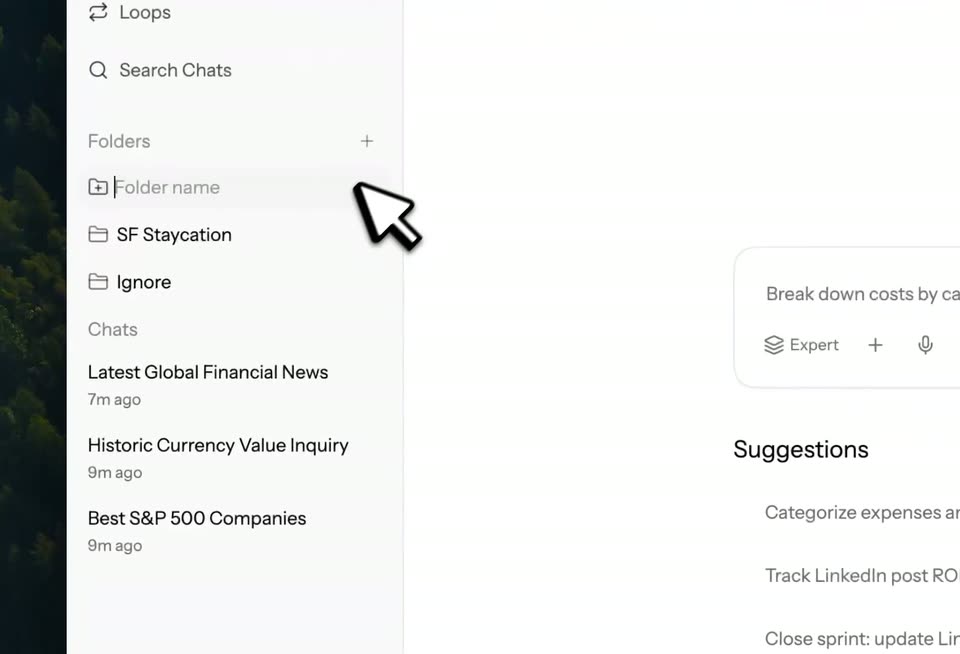
Doe’s 0:26 launch film runs 22 scenes, about 1.2 s each. The product is on screen from the first frame and 1 feature is revealed. There is no explicit call to action. Built as one unbroken cursor driven walkthrough of the Folders feature, framed by an establishing window shot and a closing result shot, with the middle cut into fast close ups of each micro interaction. The signature moves are the blur drift transitions, the oversized outlined cursor performing type and drag actions, and the cycling placeholder prompts that keep the static right panel alive.
No filming indicatedEstimated needs: 3 capture groups — your screens or recordings
Is this your launch? to your site or press kit.
More like this



doe - We're announcing folders for chat sessions and files!, scene by scene
· 22 scenes as text
01 · Product intro · 0:00–0:01
A white chat app window floats over a blurred forest backdrop. A cursor glides to the plus icon beside the Folders label and clicks it. The whole window then blurs and drifts, easing out of frame as a transition.
Techniques: Cursor demo
Camera: Push in
02 · Feature reveal · 0:01–0:02
A flat chat interface with a sidebar of folders and a right-hand suggestions panel sharpens out of blur. A hand cursor bearing a plus sign rotates and scales into place beside the Folder name row.
Techniques: Cursor demo
Camera: Push in
03 · Feature reveal · 0:02–0:03
A chat interface fills the frame, a left sidebar listing folders and recent chats next to a partial conversation panel on the right. A large black cursor with a white outline eases into position over the empty folder name field.
Techniques: Cursor demo
Camera: Static
04 · Feature reveal · 0:03–0:04
A close-up of a chat app sidebar where a large cursor types into a new folder field, spelling out Financial Rep. To the right, a message box and a Suggestions list stay static.
Techniques: Cursor demo
Camera: Static
05 · Feature reveal · 0:04–0:05
A Slack-style sidebar with folders and a chat list sits left of a white panel. A large cursor rests on the highlighted SF Staycation folder while the input box placeholder cycles between prompt phrases.
Techniques: Cursor demo
Camera: Static
06 · Feature reveal · 0:05–0:06
A close-up of a chat app sidebar lists folders and recent chats. A black cursor glides down to the Financial Reports row, highlighting it, then rests on the three-dot menu at the row's right edge.
Techniques: Cursor demo
Camera: Static
07 · Feature reveal · 0:06–0:07
A close-up of a chat app's left sidebar. A large cursor hovers over the Financial Reports folder, then moves down as the chat list scrolls, settling on Best S&P 500 Companies. The right panel holds a prompt box and a Suggestions list.
Techniques: Cursor demo
Camera: Static
08 · Feature reveal · 0:07–0:08
A white app interface with a left sidebar listing folders and chats. A black cursor moves to the Financial Reports row and clicks it, expanding the folder to reveal a nested item. The right pane holds a chat input box and a suggestions list.
Techniques: Cursor demo
Camera: Static
09 · Feature reveal · 0:08–0:09
A light product sidebar lists folders and recent chats. A cursor arrow glides between entries, pausing over Financial Reports and Historic Currency Value Inquiry, while a suggestions panel and a prompt card stay static on the right.
Techniques: Cursor demo
Camera: Static
10 · Feature reveal · 0:09–0:10
A cursor hovers over the app sidebar, then grabs the Latest Global Financial News chat and drags it up into the Financial Reports folder, the item floating as a small chip with a paper plane icon. The right panel holds a prompt field and a suggestions list.
Techniques: Cursor demo
Camera: Static
11 · Feature reveal · 0:10–0:11
A close-up of a sidebar interface. A large black cursor hovers over the Financial Reports folder and clicks it, expanding the row to reveal three dated documents. On the right, a prompt field cycles through example phrases above a Suggestions list.
Techniques: Cursor demo
Camera: Static
12 · Feature reveal · 0:11–0:12
Close-up of the product's file sidebar. A hand cursor moves to the three-dot menu beside the Financial Reports folder and clicks it, opening a small dropdown listing Rename, Add subfolder, and Delete. The right panel holds a chat prompt and a suggestions list.
Techniques: Cursor demo
Camera: Static
13 · Feature reveal · 0:12–0:13
A light inbox interface shows a folder tree on the left and a chat panel with a suggestions list on the right. A cartoon hand cursor clicks a folder, dismissing a context menu and opening a subfolder name field.
Techniques: Cursor demo
Camera: Static
14 · Feature reveal · 0:13–0:14
A white folders sidebar shows a large outlined cursor over a new subfolder field, which fills with the typed text Indi as the clip runs. A right panel holds a prompt box and a Suggestions list, all static except the typing.
Techniques: Cursor demo
Camera: Static
15 · Feature reveal · 0:14–0:15
Close-up of a white app sidebar listing folders and documents. A large cartoon cursor slides down from the Indices folder to the Best S&P 500 Compar... item and clicks it, highlighting the row. A prompt box and a Suggestions list sit at the right edge.
Techniques: Cursor demo
Camera: Static
16 · Feature reveal · 0:15–0:16
A light file sidebar lists folders; a cursor glides to the Indices row and clicks it, the row expands to show a sub-item and a count appears, while a right-hand panel with a prompt box and suggestions stays still.
Techniques: Cursor demo
Camera: Static
17 · Feature reveal · 0:16–0:17
A close-up of an app interface. A cursor clicks a folder, opening a context menu, then the folder collapses.
Techniques: Cursor demo
Camera: Static
18 · Feature reveal · 0:17–0:18
A white sidebar over a dark forest backdrop lists folders and recent files. A Rename/Delete context menu closes, and a hand cursor slides down to hover the Historic Currency row, where three dots appear.
Techniques: Cursor demo
Camera: Static
19 · Feature reveal · 0:18–0:19
A static close-up of a white interface shows a sidebar of folders and chats beside a suggestions panel. A cartoon hand cursor hovers over a list row, popping a three-dot menu, then slides down to another row before moving off the panel.
Techniques: Cursor demo
Camera: Static
20 · Feature reveal · 0:19–0:20
A product sidebar close-up. A hand cursor moves onto the Financial Reports folder and clicks it, expanding the row to reveal three dated entries. On the right, the chat input placeholder text swaps while a Suggestions list stays fixed.
Techniques: Cursor demo
Camera: Static
21 · Feature reveal · 0:20–0:21
A light product interface with a folder sidebar and a chat panel; a hand cursor hovers the Financial Reports row while the whole view pans up in a fast, motion-blurred move to reveal the top of the sidebar.
Techniques: Cursor demo
Camera: Pull out
22 · Demo · 0:21–0:26
A chat app window sits flat over a forest desktop, fading from translucent to solid. A hand cursor clicks down the sidebar list, and the main panel swaps from a text brief to a page of blue financial charts.
Techniques: Cursor demo
Camera: Pull out