
0:26
Explore
00:00:00 / 00:36:22
- Length
- 0:36
- Scenes
- 19 · 1.9 s avg
- Product on screen
- 0:00
- Call to action
- 0:29 · 79%
- Voiceover
- No
- Views
- 388K on YouTube
as of November 21, 2026
DJI’s 0:36 launch film runs 19 scenes, about 1.9 s each. The product is on screen from the first frame. The call to action lands at 0:29 (79% in). A minimalist 3D product teaser: slow beauty shots of the white gimbal on a pale gray field, a short city tracking demo, a box contents overview, then a black title card with the name and a subscribe end card. The style is defined by soft diffused lighting, slow orbital camera moves, and a hard cut to black for the brand reveal.
Footage neededEstimated needs: 1 official logo — reused across the film · 2 filmed passages — shoot, supply or replace · 14 3D passages — build or supply
Is this your launch? to your site or press kit.
More like this
0:30

Metaphor: ReFantazio – Launch Trailer – Nintendo Switch 2
Nintendo · Nov 2026
1:07

Google - Today @GoogleMaps is getting its biggest upgrade in over a decade. By
Google Maps · Mar 2026
Similar soundtrack
Films whose music sounds like this one, voice left out
1:38


Best SaaS Product Demo Video | Teamble
Teamble · EDM / Dance-Pop
0:34

Fortnite Treasure Hunters – Gameplay Trailer – Nintendo Switch 2
Epic Games · Electronic dance music
1:00

Ideogram - Introducing Ideogram 1.0: the most advanced text-to-image model, now
Ideogram · Electronic dance music (EDM), Eurodance, Trance
Meet DJI Pocket 2: Sunset White, scene by scene
· 19 scenes as text
01 · Product intro · 0:00–0:01
A white handheld gimbal camera floats centered on a pale gray backdrop, rotating slowly from its side profile to its back, casting a soft shadow on the right.
On-screen text: “1”
Techniques: 3D mockup
Camera: Static
02 · Product intro · 0:01–0:02
A white handheld gimbal camera floats at a diagonal against a pale gray backdrop with soft slanted shadows. The device turns slowly to reveal its dark screen and lens module.
Techniques: 3D mockup
Camera: Push in
03 · Product intro · 0:02–0:04
A white drone controller lies diagonally on a plain white surface, shot from above in 3D perspective. Its black screen lights up and the white DJI logo fades in at the center. The camera drifts slowly around the device.
Techniques: 3D mockup
Camera: Pan
04 · Product intro · 0:04–0:05
A glossy white sphere holding a white DJI controller floats in a bright 3D space. The sphere shrinks and drops into a circular port on a white dock, then vanishes, leaving the dark recessed ring empty.
Techniques: 3D mockup
Camera: Static
05 · Product intro · 0:05–0:06
A white camera module renders head-on, its lens a swirl of reflective chrome rings. The elements resolve into a clean concentric lens with a red square rim, then the housing darkens to a black frame as the central element scales.
Techniques: 3D mockup, Morph
Camera: Pull out
06 · Product intro · 0:06–0:09
A white gimbal camera floats on a plain light background, rotating in place to reveal its front, side and back, then the view pushes in on the back panel with its round buttons and green indicator.
On-screen text: “0”
Techniques: 3D mockup
Camera: Static
07 · Demo · 0:09–0:11
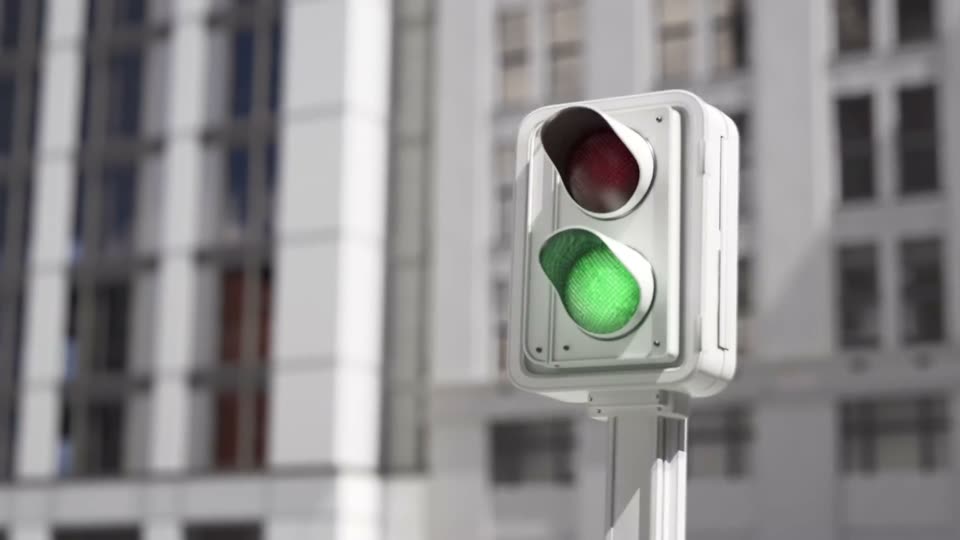
A 3D traffic light with a glowing green lamp holds focus against a soft-blurred city facade. The camera tracks sideways, the light and the buildings sliding at different speeds for a parallax depth effect.
Techniques: Parallax
Camera: Pan
08 · Demo · 0:11–0:13
A 3D rendered city street, at first blurred by bright light streaks, comes into focus as a vertical slider on the left rises from 1x to 4x. A green corner frame locks onto a white car driving down the road.
Techniques: Light sweep
Camera: Push in
09 · Demo · 0:13–0:15
A white handheld gimbal camera stands centered against a blurred city street. It fades in from a transparent overlay, its small screen showing a white car framed by a green corner-bracket tracking box. The car drives past in motion blur behind the device.
Techniques: Morph, 3D mockup
Camera: Pull out
10 · Demo · 0:15–0:16
A low-angle view of a white suspension bridge tower and its fanning cables against a pale sky tilts down and pushes in to a tight shot of the bridge railing, a horizontal cable and a lamp post, with a city skyline below.
Camera: Push in
11 · Demo · 0:16–0:17
A dark woven mesh panel with thin vertical cables sits against a soft blue sky with white clouds. The camera tracks laterally along the structure, focus tightening on the diamond weave and the horizontal beam.
Camera: Static
12 · Demo · 0:17–0:21
A white action camera hangs from a braided grey lanyard on a light grey backdrop. The shot opens on a tight macro of the woven strap, then pulls back to reveal the whole loop and the device floating in 3D perspective.
Techniques: 3D mockup
Camera: Pull out
13 · Demo · 0:21–0:22
A white packaging box is shown in 3D as the camera pulls back from a tight close-up of a small OSMO device to reveal a larger grip in the adjacent slot. Both components rest in recessed white trays against a plain light background.
Techniques: 3D mockup
Camera: Pull out
14 · Demo · 0:22–0:24
A white DJI box lies open on a pale gray surface, the pocket camera and white handle resting in the tray. The lid slides across to close the box, showing the printed top with the device image and logo.
Techniques: 3D mockup
Camera: Pull out
15 · Product intro · 0:24–0:26
A white handheld gimbal stands centered on a pale gray set, then a black version slides in from the right and both settle upright. The product name and tagline fade in behind the two devices.
On-screen text: “DJI POCKET 2”, “Cinematic At Hand.”
Techniques: 3D mockup
Camera: Static
16 · Product intro · 0:26–0:28
Two dimly lit DJI Pocket 2 gimbals, white and black, stand on a dark surface as the centered title scales in; the gimbals then fade to black, leaving the title on a black field.
On-screen text: “DJI POCKET 2”, “Magic At Hand”
Techniques: Kinetic type
Camera: Static
17 · Product intro · 0:28–0:29
A black frame holds, then the gray title “DJI POCKET 2” with the smaller tagline “Magic At Hand” scales in at center, before the frame resolves to the small gray DJI logo alone.
On-screen text: “DJI POCKET 2”, “Magic At Hand”
Techniques: Kinetic type
Camera: Static
18 · CTA · 0:29–0:30
The white DJI logo holds centered on black, then angled dark panels slide in from the left as the gray WATCH MORE text locks in at the upper left.
On-screen text: “WATCH MORE”
Techniques: Masking
Camera: Static
19 · CTA · 0:30–0:36
A near-black background with faint diagonal light streaks drifts slowly. The white text WATCH MORE holds top left and SUBSCRIBE NOW holds bottom right. Above the subscribe line, a thin white ring with a dotted orbit and small nodes rotates in place, a small triangle pointing down to the text.
On-screen text: “WATCH MORE”, “SUBSCRIBE NOW”
Camera: Static