2:54
Insta360 Luna Pro - Drawn to brilliance.
Insta360 Luna Pro · Sep 2026
DJI’s 3:09 launch film runs 57 scenes, about 3.3 s each. The product is on screen from the first frame and 4 features are revealed. The call to action lands at 2:50 (90% in), over a voiceover. A DJI GO app launch video built as a feature tour: a silent brand logo bumper, a lifestyle hook of people flying drones, then the app name reveal followed by alternating live-action and clean white-set UI demos of each feature (live view, Director editor, filters, SkyPixel), closing on a logo card and a YouTube end screen. The style is bright and minimal, cutting between sunlit outdoor footage and locked-off white studio shots of a tablet on a stand, with a steady 132 BPM pace and quick UI taps.
Is this your launch? to your site or press kit.
Films whose music sounds like this one, voice left out
Topaz Labs · Electronic Dance Music
Riverside · Modern electronic
Resolver · Modern electronic
A black screen holds, then the DJI logo appears centered as a dark blue mark with a faint blue edge glow, holds briefly, and fades back to black.
Camera: Static
A solid black screen fills the frame for the whole shot. No text, logo or graphic appears; the image stays static while the voiceover continues.
Camera: Static
A person in a striped shirt and black pants walks through a sunlit park, holding a white drone in one hand. A second figure with a backpack moves ahead in the soft-focus background as the low camera tracks alongside.
Camera: Static
Low-angle handheld shot in a sunlit forest: a person in a striped shirt holds a white drone with red accents, while a hiker with a backpack walks ahead. The camera tilts up into the sun as a bright flare floods the frame.
Techniques: Light sweep
Camera: Push in
Two women carrying backpacks and a guitar case walk across a grassy field behind a wire fence while a black quadcopter hovers in the sky. The shot cuts to an over-the-shoulder view of a man holding a white remote controller as the women stand on the roadside and wave.
Camera: Static
A man in a plaid shirt holds a white drone controller, blurred in the left foreground. Two hikers carrying backpacks and instrument cases walk down a country road toward the camera, one waves, then they turn and walk away while a small drone hovers in the sky above.
Camera: Static
A white iPad on a stand shows the lock screen over a starry wallpaper. A finger swipes up, the home screen icons scale in, then the hand taps the DJI GO app icon in the center of the grid.
Camera: Pull out
A hand taps the DJI GO icon on a mounted iPad home screen. The display dissolves from the app grid to a black splash screen, where the white DJI logo sits centered.
Techniques: Cursor demo
Camera: Push in
A white drone remote with a mounted tablet rests on a plain white surface, framed at a slight angle. The tablet screen displays a mountain landscape with a small logo at its center, the whole device held still.
Techniques: 3D mockup
Camera: Static
A white tablet on a stand is angled toward the camera on a plain white set, its screen showing an aerial view of rust-colored mountain ridges under a pale sky. The white DJI logo sits at the center of the image while the frame holds still.
Techniques: 3D mockup
Camera: Static
A white tablet on a stand, front-on against a bright blurred room, shows the DJI app. A finger swipes left across the screen, cycling the centered aircraft image and its label from Inspire 1 through Phantom 3 Professional and Advanced to Matrice 100.
Techniques: Cursor demo
Camera: Static
An aerial drone view looks down on a person standing on a dry grassy path, a white follow-me badge with a person and send icon fades in at the lower right. It cuts to two women on a wooden dock facing a wide lake and mountains.
Camera: Push in
Two women in light dresses stand on a wooden dock over a calm alpine lake, one shading her eyes, a striped towel spread behind them. The drone arcs right around the dock, revealing a red floating platform and forested mountains. A fixed corner logo sits bottom right.
On-screen text: “POINT OF INTEREST”, “FOLLOW ME”
Camera: Pull out
A flat tablet screen shows a video selection grid. The third thumbnail fills with yellow and the top counter ticks from 2 selected to 3 selected. A yellow Create Movie button sits centered in the dark bottom bar.
Camera: Static
A dark app screen titled Create Movie shows a desert canyon video preview with a circular drone reticle, a horizontal thumbnail timeline, and a row of named theme templates along the bottom.
Camera: Pan
A dark movie-editor screen fills the phone. A desert clip plays in the preview with a yellow delete ring at its center, while the filmstrip thumbnails below shuffle into a new order. A row of named template cards lines the bottom edge.
Camera: Static
A video player shows a drone over a desert above a filmstrip of clip thumbnails. The player slides up to reveal an Upload Artwork form, where a caret types the word Awesome into the title field over an on-screen keyboard.
Techniques: Cursor demo
Camera: Static
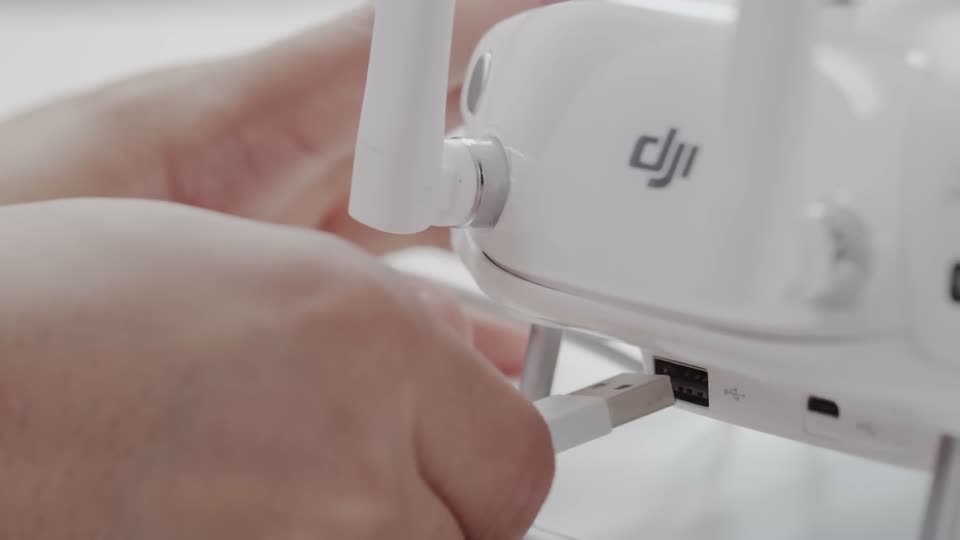
A locked-off close-up shows two hands guiding a white USB cable into the side port of a white DJI drone. The shallow depth of field keeps the connector and port in focus while the hands and bright background stay soft.
Camera: Static
Locked-off macro shot of a white DJI drone's side panel with shallow depth of field. A hand slides a white USB connector into the port while the blurred DJI logo stays out of focus in the background.
On-screen text: “2”
Camera: Static
Extreme close-up of a white DJI controller body with shallow depth of field. A hand guides a white USB cable into the side port. The blurred DJI logo sits on the upper surface. Bright, soft lighting.
Camera: Static
A white tablet mounted on a drone controller sits angled on a plain white background. Its screen shows a live aerial coastline view in the flight app, then switches to a map with a purple waypoint pin and a settings panel.
Techniques: 3D mockup
Camera: Static
A slow aerial drift over a turquoise alpine lake, steep rocky cliffs rising behind it, a small boat moving on the water. The caption HD LIVE VIEW holds in the lower right corner.
On-screen text: “HD LIVE VIEW”
Camera: Static
Over-the-shoulder framing on a calm lake: two women sit on a blue boat, one holding a white drone remote with a phone mounted, looking up and smiling; two men in caps sit in the foreground with their backs to the camera.
Camera: Static
A drone app screen frames a live aerial view of surfers on a breaking wave, with a top status bar, a left column of control buttons, a minimap in the lower left, and a right waypoints panel whose distance counter ticks down as the feed drifts along the coast.
Camera: Static
A smiling man in sunglasses holds a white drone controller with a phone mounted on it against a bright sky, then the shot cuts to a close-up of the phone screen showing a live aerial view of a vineyard in the drone app.
Camera: Static
Close-up of a white phone on a mount displaying a live aerial view of green fields. A hand enters from the right and taps the screen by the red record button, set against a bright, overexposed outdoor sky.
Camera: Static
A phone photo picker fills the frame as a third clip highlights yellow and the counter reads 3 selected. The Create Movie screen then slides up over it, revealing a desert video preview, a numbered filmstrip and a row of style thumbnails.
Camera: Pan
A tablet editor plays a desert clip in the preview over a thumbnail timeline. The bottom panel swaps filter presets for four sliders; a knob drags right and a dark tooltip pops on the preview, then the view cuts to a sand-dune clip.
Camera: Static
A desert clip plays in the Cut to Video preview window. A finger drags the timeline marker right, scrubbing the footage to a wider canyon shot. The view cuts to a tablet showing the Create Movie screen with a row of style templates.
Techniques: Cursor demo, 3D mockup
Camera: Static
A white tablet on a stand, locked off against a blurred office window, shows a video editor. The preview window plays a desert clip, a motorcycle rider, then an aerial road, while a timeline playhead advances over numbered segments. A row of album thumbnails sits below.
Camera: Static
A tablet on a white stand shows a photo selection screen. A finger taps the yellow Edit and Share button, and the screen slides into the photo editor, displaying a landscape with a hot air balloon over green fields and a bottom toolbar.
Camera: Static
A white tablet on a stand shows an editing screen with a landscape photo. A finger taps a filter icon, the slider panel swaps to a row of labeled filter thumbnails, then taps one and the photo's tones shift. The blurred window behind stays static.
Techniques: Cursor demo
Camera: Static
A tablet screen shows a photo of a palm plantation with hot air balloons above a row of filter thumbnails. A finger swipes across the thumbnails and taps Reminiscent, which gains a yellow border as the main image updates its color grade.
Techniques: Cursor demo
Camera: Static
A high aerial view looks down a dirt path lined with fan palms at dawn. Several hot air balloons drift across a hazy golden sky, one large dark balloon hangs in the upper left, and a small temple sits on the horizon.
Camera: Static
A wide aerial view holds over a palm grove at dusk, with a large green balloon in the upper left and several smaller balloons scattered across a pale sky. The shot stays steady, framing the trees, dirt paths, and distant horizon.
Camera: Static
Aerial drone view over a row of palm trees and a dirt path at dawn. Several hot air balloons drift across a cloudy sky, one dark balloon hanging large in the upper left. A small pagoda sits on the horizon to the left.
Camera: Static
A hand taps the top right corner of a tablet held in a stand, switching the photo editor view to a save screen with a small photo and Cancel buttons. The device faces the camera against a soft blurred window.
Camera: Static
A white tablet on a stand fills the frame before a blurred window. A finger taps the screen, the photo view gives way to an upload form, and the on-screen keyboard rises as the finger taps its keys.
Camera: Static
A phone screen displays the Upload Artwork view with a user profile row. In the caption field, the word balloon is typed letter by letter above a full on-screen keyboard, a thin caret trailing the text.
Camera: Static
Locked-off shot of a white tablet on a stand against a bright window. A hand enters and taps the bottom navigation; the app screen changes from a drone connect page to an Explore page with a dark store banner and product cards.
Camera: Static
A tablet screen shows the Explore page. A hand scrolls down through a grid of aerial video and photo thumbnails, the DJI Online Store banner sliding out of the top of the frame.
Camera: Pan
A real hand reaches in and taps the iPad, which sits in slight 3D perspective. The interface jumps from a list of aerial photo cards to a detail view with a blue header and a related-videos rail on the right.
Camera: Static
A flat tablet screen shows a Vimeo video player displaying an aerial coastal town at dusk, with a Related Videos list of thumbnails on the right. A finger enters from the lower left and taps the play control at the bottom of the player.
Camera: Static
A flat front view of an iPad shows a video player interface. The embedded aerial clip of a cliffside church brightens as clouds drift, the timecode ticks from 00:01 to 00:06, and a loading spinner in the related videos column fades out.
Camera: Static
A tablet shows the Explore page of the DJI Go app. The feed scrolls down past a store banner and featured product cards, revealing weekly DJI Favorites rows of photo and video thumbnails.
Camera: Pan
A portrait tablet on a black background displays the DJI Go Explore page. The feed of landscape photo and video thumbnails scrolls upward, bringing the next weekly DJI Favorites list into view.
Camera: Pan
The Explore page of the DJI Go app fills the screen as a grid of drone video and photo thumbnails scrolls upward, revealing new favorite lists. The view then cuts to a man on a beach holding the tablet, its live camera view showing his face.
Camera: Pan
A man in a gray tank top stands outdoors under a pale blue sky, gazing upward and tracking something in the air. A white tablet-mounted controller sits in the lower foreground. Low-angle framing with slight handheld drift.
Camera: Pull out
A pair of hands holds a white drone controller with a phone clipped to its mount, filmed against a blurred skate park. The shot cuts to a clean white studio view of the same controller with a tablet showing a video editing screen with sliders.
Techniques: 3D mockup
Camera: Static
A white tablet mounted on a white drone floats against a plain white backdrop. Its screen shows a video editor with a desert clip playing in the preview window and a row of labeled thumbnails below. The device tilts gently in place.
Techniques: 3D mockup
Camera: Static
A flat app screen holds still. A wide aerial photo of green sea cliffs fills the left, a Related Photos column with three thumbnails sits on the right, and a post below shows the title, a caption, an INSPIRE 1 tag and a small drone image.
Camera: Static
The Explore feed of the DJI GO app fills the screen, a grid of photo and video thumbnails scrolling upward. The view cuts to a hand holding a white tablet that displays the same feed, set against a black rope net.
Camera: Pan
Low-angle shot on a rooftop playground: a person in a blue shirt climbs a beige mound, gesturing toward a white drone hovering in the cloudy sky. The frame fades to white and the DJI logo appears centered.
Camera: Static
The blue DJI app icon fades in at the center of a white field, gaining saturation as it settles. The label DJI GO fades in beneath it, both hold for a beat, then fade out to white.
On-screen text: “DJI GO”
Camera: Static
The DJI logo, dark blue on a black background, fades in at the center of the frame, holds briefly, then fades back to black. The frame stays locked off throughout the reveal.
Camera: Static
A solid black frame holds for the full clip. No text, logo, interface, or motion appears; the screen stays uniformly dark from start to end.
Camera: Static
A defocused shot of a pilot holding a drone controller fills the frame behind a YouTube end screen. A DJI banner with the URL sits top left, a red SUBSCRIBE button top right, and two video cards on the left loop Phantom 3 clips and aerial landscapes with spec captions.
On-screen text: “FIND US”, “WWW.DJI.COM”, “SUBSCRIBE”, “DJI - Introducing the Phantom 3 Standard”, “Meet the Phantom 3 Standard: the most accessible intelligent flying camera ever built. Easy to fly and engineered to let everyone take to the sky, now you have ”, “DJI - Introducing the Phantom 3 Advanced & Professional”, “We've returned to the Phantom and have redesigned its core systems to bring you the most advanced, forward-thinking aerial videography solution the world has”, “The Phantom 3 takes the look and feel of big-budget professional image capture and puts it in the palm of your hand.”
Techniques: Split screen
Camera: Static