
1:21
Explore
DigitalCarbon Demo
DigitalCarbon · Sep 2024 · 0:32 · AI-annotated
- Length
- 0:32
- Scenes
- 10 · 3.2 s avg
- Product on screen
- 0:00
- Features shown
- 3
- Voiceover
- No
- Views
- 3.3K on YouTube
as of November 24, 2026
00:00:00 / 00:32:07
- Length
- 0:32
- Scenes
- 10 · 3.2 s avg
- Product on screen
- 0:00
- Features shown
- 3
- Voiceover
- No
- Views
- 3.3K on YouTube
as of November 24, 2026
DigitalCarbon’s 0:32 launch film runs 10 scenes, about 3.2 s each. The product is on screen from the first frame and 3 features are revealed. There is no explicit call to action. The video is a back-to-back montage of three 3D fly-throughs (apartment, garden, shoe rack) played inside a dark browser window, each segment opened by a single bold white lower-third caption that names the demo. The signature move is a steady first-person or orbital camera glide with a persistent FPS-and-controls HUD in the corners, so the rhythm is set by the scene changes rather than by cuts or music.
No filming indicatedEstimated needs: 3 capture groups — your screens or recordings · 1 official logo — reused across the film · 4 3D passages — build or supply
Is this your launch? to your site or press kit.
More like this

DigitalCarbon Demo, scene by scene
· 10 scenes as text
01 · Feature reveal · 0:00–0:01
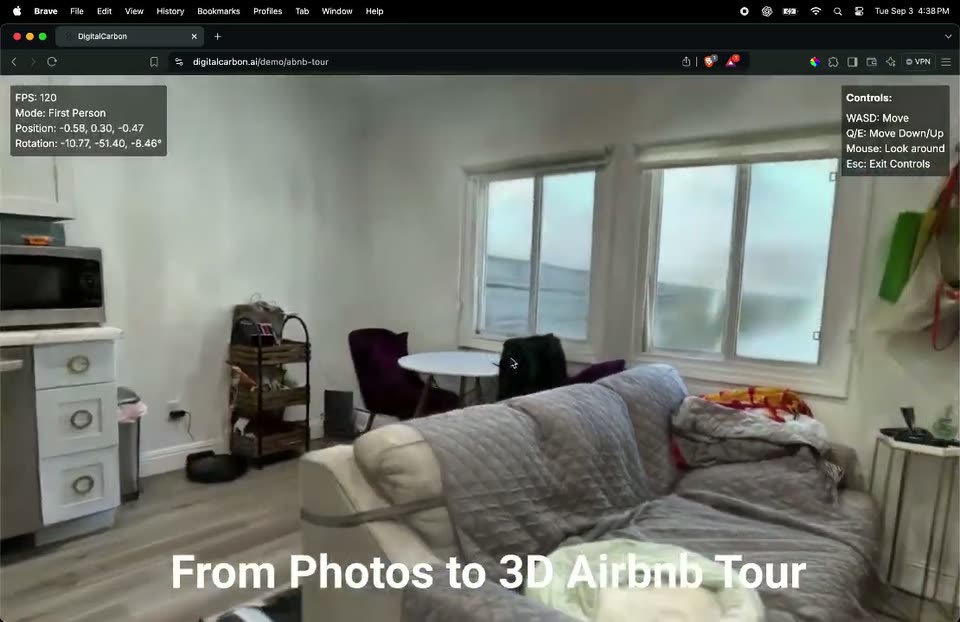
A browser window shows a 3D room tour of a kitchen and living area. The view pans right across white cabinets, a microwave and a grey sofa while a HUD lists FPS and controls in the corners. A caption sits along the bottom edge.
On-screen text: “From Photos to 3D Airbnb Tour”
Techniques: 3D mockup
Camera: Push in
02 · Feature reveal · 0:01–0:11
A first-person camera glides through a 3D apartment inside a browser window, panning from the white kitchen across a hallway into a gray bedroom and back to the living room. A white caption sits at the bottom while small HUD readouts frame the corners.
On-screen text: “From Photos to 3D Airbnb Tour”
Techniques: 3D mockup
Camera: Push in
03 · Feature reveal · 0:11–0:12
A first-person 3D view pushes forward through an iron garden gate under a leafy arch, the scene brightening as it advances. The view sits inside a browser window with small HUD readouts in the corners and a bold white caption fixed along the bottom edge.
On-screen text: “From Photos to 3D Airbnb Tour”
Techniques: 3D mockup
Camera: Pan
04 · Feature reveal · 0:12–0:14
A browser window shows a first-person 3D walkthrough of a tree-lined garden path, the view gliding forward through open green iron gates set between brick walls. A white caption names the tour across the bottom, while a HUD with FPS, position and controls sits in the corners.
On-screen text: “Golden Gate Shakespeare Garden Tour”
Camera: Push in
05 · Feature reveal · 0:14–0:14
A first-person 3D garden scene plays inside a browser window, the view panning slowly right across lawns, hedges and a curving stone path. A white title caption sits fixed along the bottom while small HUD readouts and a corner minimap frame the viewport.
On-screen text: “Golden Gate Shakespeare Garden Tour”
Camera: Static
06 · Feature reveal · 0:14–0:21
A first-person 3D view of a tree-lined garden path fills a browser window, with HUD readouts in the top corners and a minimap bottom right. The camera pans and rotates through the scene while a white caption stays fixed along the bottom edge.
On-screen text: “Golden Gate Shakespeare Garden Tour”
Camera: Push in
07 · Feature reveal · 0:21–0:22
The frame fades up from black onto a browser window showing a 3D shoe rack: sneakers line lit shelves while the camera drifts in a slow orbital pan. A large white headline holds across the bottom.
On-screen text: “Fully Immersive 3D Product Showcases”
Techniques: 3D mockup
Camera: Push in
08 · Feature reveal · 0:22–0:23
A 3D shoe rack in perspective fills the frame, lit shelves stacked with sneakers. The camera dollies forward through the rows while a white headline holds at the bottom. Browser chrome and a small debug readout sit along the top edge.
On-screen text: “Fully Immersive 3D Product Showcases”
Techniques: 3D mockup
Camera: Push in
09 · Feature reveal · 0:23–0:23
A browser window frames a 3D shoe rack, rows of sneakers on lit shelves, with a small debug HUD in the top-left corner. The orbital camera drifts a few pixels while the scene holds. A bold white caption sits across the bottom.
On-screen text: “Fully Immersive 3D Product Showcases”
Techniques: 3D mockup
Camera: Static
10 · Feature reveal · 0:23–0:32
A browser window displays a 3D rack of sneakers; the camera orbits slowly around the shelves, drifting past grey, red and white high-tops. A white caption sits at the bottom, and a small debug readout updates in the top-left corner.
On-screen text: “Fully Immersive 3D Product Showcases”
Techniques: 3D mockup, Cursor demo
Camera: Pull out