2:51

ClickUp Release 4.08: Meetings Hub, Super Agent Cloning, and more!
ClickUp · Productivity · Sep 2026
Manus · May 2025 · 1:20 · AI-annotated
Manus’s 1:20 launch film runs 48 scenes, about 1.7 s each. The product is on screen from the first frame and 4 features are revealed. There is no explicit call to action; a voiceover carries the film. The video opens on a serif title card, then runs four use-case demos (IKEA room, tea bottle, second-hand shop, storybook) as browser replays linked by quick zooms and pans. It ends on a tool summary with floating icons and a rainbow-glow logo lockup, holding about ten cuts per minute with 3D page flips as the signature move.
Is this your launch? to your site or press kit.
ClickUp · Productivity · Sep 2026
Anthropic · AI · Nov 2026
Ramp · Finance · Sep 2026
A black serif headline Introducing Manus Image Generation sits on a dotted white background beside a hand logo. To the right, a flat image card flickers between generated frames: a walking man, a hand-drawn Shanghai map, and a skull with a top hat.
On-screen text: “Introducing Manus Image Generation”
Camera: Pull out
A fanned stack of image cards sits on the right beside a left-aligned serif headline. The top card swaps through generated images, an anatomy chart, then an illustrated portrait, then an empty white room, and finally scales up to fill the whole frame.
On-screen text: “Introducing Manus Image Generation”
Camera: Static
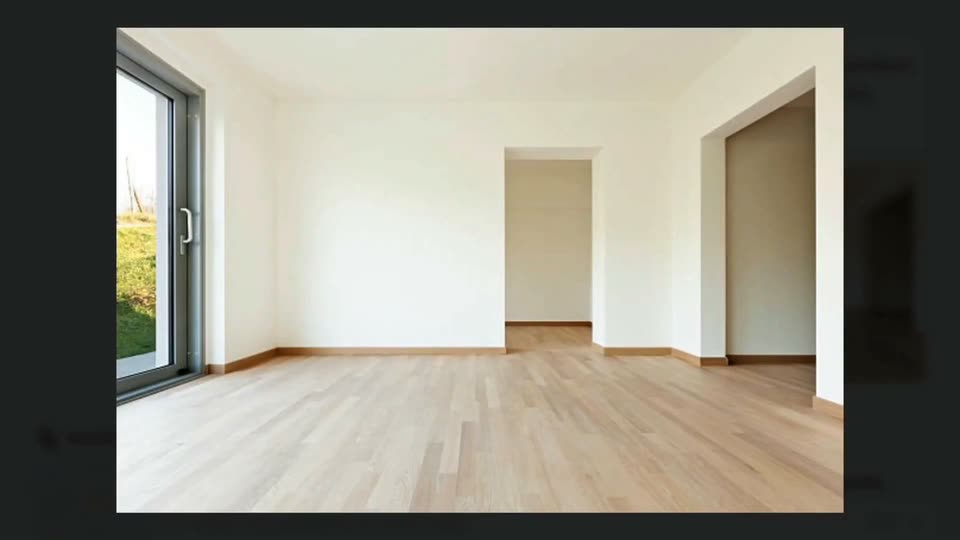
A static wide shot holds on an empty white room with pale wood flooring, framed by dark vertical bars. A glass sliding door on the left shows a green lawn, and two doorways lead to adjoining rooms. The space stays still while the voiceover introduces the home.
Camera: Static
An image viewer holding an empty-room photo, with a 100% and Download toolbar, zooms out to reveal the full browser window; the photo sits centered in a dark modal with left and right arrows.
Camera: Pull out
A locked-off screen of the Manus web app shows a chat bubble requesting IKEA room design above a photo of an empty room. A manus indicator with a hand icon and three dots fades in below. A bottom bar holds a replay status and two buttons.
Camera: Static
A browser window shows the Manus chat interface titled 'How to Design My Room with IKEA Furniture?' A user prompt with an empty-room photo sits above a Manus reply that types in, while a bottom status bar reads 'Manus is replaying the task...' with two buttons. The view scrolls slightly.
Camera: Static
A split view of the Manus app: the left activity feed scrolls up through task steps while the right panel, labeled Manus's Computer, plays back a browser navigating the IKEA site from search results to a sofa page and storage shelves, with replay controls below.
Techniques: Split screen
Camera: Pan
A light interface splits into a left task log that scrolls upward and a right panel titled Manus's Computer showing a browser open to an IKEA page with yellow shelving. The status line shifts from Scrolling down to Browsing as the list updates.
Camera: Static
A browser window shows the Manus interface in two columns. The left task log jumps from in-progress steps to a finished result with a room photo and file card, while the right editor holds the markdown file and the status bar flips to Task completed.
Camera: Static
A web app interface shows a chat panel on the left and a document panel on the right. The view then zooms into the right panel, revealing a markdown file with a room photo and furniture recommendation text.
Techniques: UI zoom
Camera: Static
A browser window shows the Manus interface, a chat panel on the left and a results document on the right. The right document scrolls up to reveal a sofa heading and paragraph, while a cursor appears over the room image on the left.
Camera: Static
A darkened browser overlay frames an annotated living room photo with white callout labels on the sofa, table and shelf. The view zooms in, then a floating browser window showing the IKEA product page and a pointing hand cursor scales in over the room.
Techniques: UI zoom, Cursor demo
Camera: Push in
A flat IKEA browser window floats over a sunlit living room set. The sofa image swaps from beige to dark gray while three white item tags with leader lines pop in around the frame.
Camera: Static
A 3D living room with a beige sofa, wood coffee table and white shelf, overlaid with three white product tags. A hand cursor taps the KALLAX tag, which turns blue and pops a small info card on the wall.
Techniques: Cursor demo
Camera: Push in
A tilted browser window showing an IKEA product page floats over a dimmed living room. The window shrinks and slides to the top right, revealing a white coffee table centered in the room, labeled HEMNES Coffee Table.
On-screen text: “HEMNES Coffee Table”
Techniques: 3D mockup
Camera: Pull out
A lightbox opens over a blurred page, showing a living-room photo with three white product tags pointing to the sofa, coffee table and shelf. A zoom toolbar with a 75% readout and a Download button sits above, and a cursor drifts to the close button at the right.
Techniques: Cursor demo
Camera: Pull out
A Chrome browser window displays the Manus app in two panels: a task chat on the left with a room photo and a green completed-task badge, and a furniture document on the right. A hand cursor hovers near the close icon at the top right.
Techniques: Cursor demo
Camera: Pull out
Three light browser windows of the Manus interface sit side by side. The frame pans right, sliding the centered IKEA room-design task left and revealing a third window on the right that opens a tea-brand bottle design document.
Techniques: Split screen
Camera: Pull out
A close-up of the Manus chat screen, with the TeaVive bottle-design prompt bubble and a replaying status bar, zooms out to reveal the full browser window and its address bar. The view then holds steady on the interface.
Techniques: UI zoom
Camera: Push in
A browser window shows the Manus interface replaying a task: the user's brief bubble sits above the agent's reply, the thinking label updates to a research step, and a 'Manus is working' card with a 1/6 progress bar appears below.
Camera: Static
A split screen pairs the Manus chat on the left with a simulated computer on the right. The chat scrolls to reveal a green TeaVive bottle render and file cards as a cursor hovers over the image. The right pane shows the editor filling the concept document beside a browser.
Techniques: Split screen, Cursor demo
Camera: Pan
A dimmed browser page frames a centered lightbox of a glass tea bottle labeled Tea Vive, with a black zoom toolbar above. A hand cursor glides to the close button in the top right corner.
Techniques: Cursor demo
Camera: Static
A two-pane product screen: the left chat scrolls up through the AI reply and a Viewing image step, while the right Manus's Computer panel switches from a task checklist to a browser window displaying a TeaVive poster.
Camera: Pan
A browser window shows the Manus interface with a chat on the left listing TeaVive poster and bottle images plus file attachments, and a marketing strategy document on the right. A cursor slides to the top right corner and hovers the close button, raising a Close tooltip.
Techniques: Cursor demo
Camera: Static
A browser window of the Manus app shows a generated marketing document with poster thumbnails and file attachments. A large gray serif headline on the right fades out while a cursor moves down to hover the black Try it yourself button.
On-screen text: “TeaVive Comprehensive Marketing Strategy”
Techniques: Cursor demo
Camera: Pan
A browser window of the app shows a poster viewer over a dimmed interface. A vibrant poster of young people holding a Tea Vive bottle cross-fades to a second poster of a woman with the Tea Vive logo, as a cursor taps the Next button on the right.
Techniques: Cursor demo
Camera: Static
A dimmed browser page frames a centered lightbox showing a TeaVive poster, a green-capped tea bottle against a leafy backdrop. A hand cursor rests on the Next arrow at the right edge as the top toolbar holds zoom and download controls.
Techniques: Cursor demo
Camera: Static
A lightbox viewer centers a TeaVive poster, four smiling young adults holding drink bottles, over a dimmed feed. A cursor glides to the top-right close button and hovers, brightening it.
On-screen text: “manus.im/share/JFzWSbvfcvZ3jdMRjvoZ7uv?replay=1”
Techniques: Cursor demo
Camera: Static
A close-up of the Manus browser window, showing a task replay for a TeaVive bottle design, zooms out to sit centered between two sibling windows on a dotted grid. A soft pink and blue glow runs along the bottom while a hand cursor rests at the top right.
Techniques: UI zoom
Camera: Pull out
Two overlapping browser windows: the left one, a Manus chat about a TeaVive bottle, slides out to the left as the right one, a chat about second-hand product images, slides in and centers, reframing the view onto that task.
Techniques: UI zoom
Camera: Push in
A light chat interface scrolls from a prompt with three product thumbnails down to a green completion badge and a deployed website link card, as a hand cursor moves over the cards.
Techniques: Cursor demo
Camera: Static
A browser window shows the Manus app finishing a task, then the view lands on the generated My Second-Hand Shop page with four product cards. A cursor hovers across the cards while the window takes on a soft gradient glow border.
Techniques: Cursor demo
Camera: Pull out
Browser mockups sit in 3D perspective over a dotted grid and a soft rainbow glow. The frame pans right, sliding the second-hand shop page out and bringing a chat-style storybook project into view, each window tagged with a small manus logo.
Techniques: 3D mockup
Camera: Pull out
A browser window on the Manus share page reframes to a tighter view of the chat column. A prompt bubble and the assistant reply fill the center as a hand cursor fades in over the text, and a bottom bar shows the replay is complete with two buttons.
Techniques: UI zoom, Cursor demo
Camera: Push in
A light browser window displays the Manus interface with a completed task report titled 'Interactive storybook about the Battle of Lexington.' A hand cursor drifts from the lower center up to the right, hovering over the deployed storybook link card.
Techniques: Cursor demo
Camera: Static
A browser window shows a two-page storybook spread on a white page. The right page holds the title text beside a 'Loading storyboard' label; an illustration of a waving flag over a village then appears above the title, the left page staying blank.
On-screen text: “fdtnytadr.manus.space”
Camera: Static
A browser window shows an open storybook rendered in 3D perspective. The book rotates from a tilted angle into a flat spread, revealing a flag and a title on the left page and a map with body text on the right.
Techniques: 3D mockup
Camera: Static
A browser window shows a two-page storybook on the American Revolution, with painted illustrations and paragraph text. A page flips in 3D from right to left, turning the spread to the next section. A Made with Manus badge sits in the top-left corner.
Techniques: 3D mockup
Camera: Static
A browser window displays a two-page document spread, each page pairing historical illustrations with body text under a serif heading. The pages drift upward a few pixels over the clip. A dark 'Made with Manus' pill badge sits in the top-left corner.
On-screen text: “Made with Manus”
Camera: Static
A browser window displays a two-page digital book spread on a historical topic. The left page scrolls vertically, replacing a grid of small illustrations with two larger images, while the right page remains static with portraits of key figures.
On-screen text: “fdmtmdr.manus.space”, “Made with Manus”
Camera: Static
A browser window shows a two-page storybook spread: a left page with a 'Learn More' panel and a book illustration, a right page reading 'The End'. The window scales down to reveal the full browser frame, tab, and a 'Made with Manus' badge in the corner.
On-screen text: “Made with Manus”
Techniques: UI zoom
Camera: Push in
A flat browser mockup of a generated webpage sits beneath a serif headline. The view pans right across the page, exposing a second column of book illustrations, while a second serif headline appears at the left edge.
On-screen text: “This isn't just image generation.”, “It's a complete AI agent.”
Camera: Pan
A dark serif headline “It's a complete AI Agent.” with a small AI icon sits left on a dotted white field. Right, a flat browser mockup of a storybook page reframes, and black and white app icons pop in above the tab bar.
On-screen text: “It's a complete AI Agent.”
Camera: Pan
A browser mockup showing a history storybook page drifts and tilts on a dotted background while rounded tool icons, an image tile, palette, globe, rocket, code and gear, float and blur around it. A large serif headline slides in from the left.
On-screen text: “It's a complete AI Agent.”
Techniques: Parallax
Camera: Static
A set of black and white app icons hovers and drifts slowly across a cream dotted background as a faint product screen with a LEARN MORE card dissolves behind them.
Techniques: Parallax
Camera: Pull out
A rounded square app icon with a hand gesture mark sits centered on a pale dotted grid. It opens with a bright rainbow neon outline and a soft colored glow, which fades as the tile settles into a flat vertical rainbow gradient with a dark gray hand mark.
Camera: Static
A hand-drawn black hand icon with motion lines sits centered on a cream dotted background. It slides slightly left as the lowercase serif word “more” fades in beside it, forming a logo lockup.
On-screen text: “designed”, “more”
Techniques: Kinetic type
Camera: Static
A cream field with a faint dotted grid holds a centered black hand glyph beside the lowercase wordmark. The lockup sits still in a locked-off frame, with a soft blurred rounded shape faintly visible below center.
On-screen text: “manus”
Camera: Static