0:52
Abhijit - Introducing Hiredmail Hiring inboxes, verified and sorted. YC compa
Hiredmail · Nov 2026
Cortex AI · Nov 2026 · 4:36 · Clip · AI-annotated
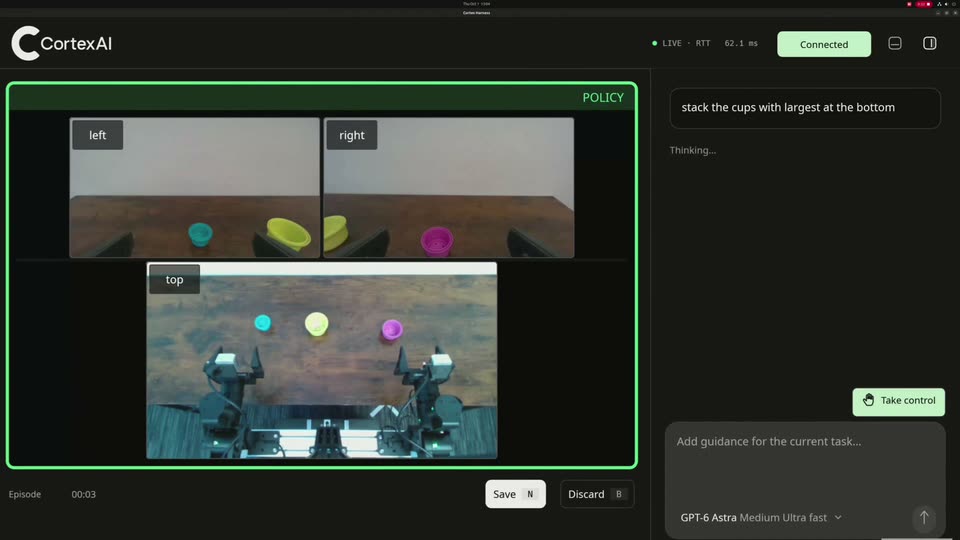
Cortex AI’s 4:36 clip runs 34 scenes, about 8.1 s each. The product is on screen from the first frame. A single uncut screen recording of the CortexAI dashboard, where a typed task triggers a streaming reasoning log beside three live robot camera feeds of arms moving colored cups. The structure is one continuous run: setup, then long stretches of scrolling analysis text while the RTT and episode timers tick, with new guidance commands typed in at intervals.
Is this your launch? to your site or press kit.
Hiredmail · Nov 2026
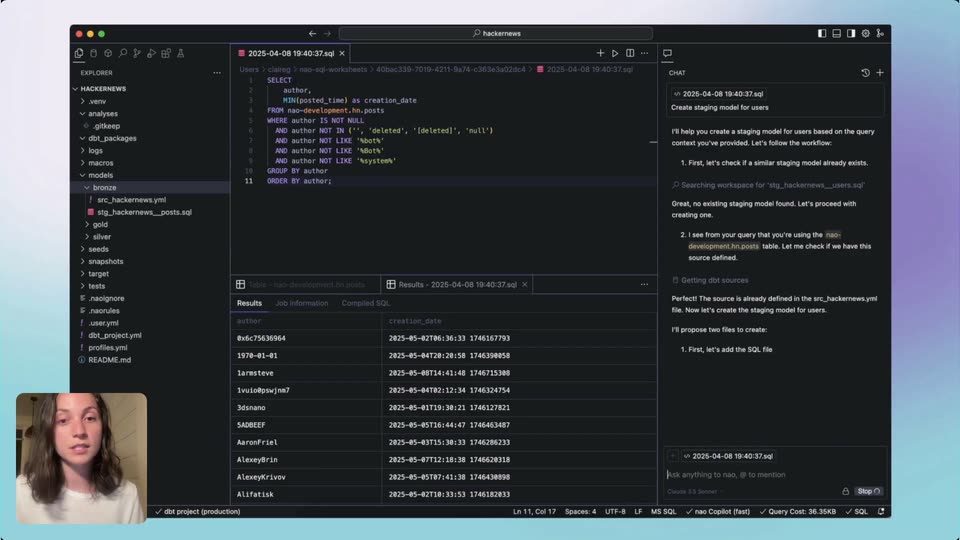
nao Labs · B2B · May 2025
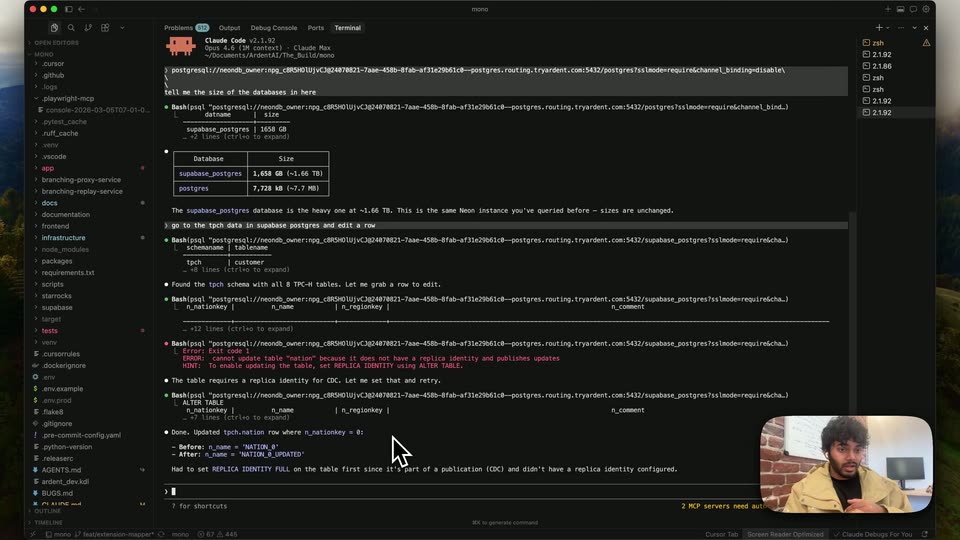
Ardent · B2B · Apr 2026
A dark CortexAI dashboard shows three live camera feeds of a table with colored cups and two robot arms. A model dropdown opens, the Ultra fast toggle turns on, then a task is typed and sent, and the panel label switches from READY to POLICY.
Camera: Static
A dark CortexAI dashboard is shown full screen. A green-outlined panel holds three live camera views of a table with colored cups and two robotic grippers. The right column holds a prompt box and a Thinking status. The RTT readout and episode timer update each second.
Camera: Static
A dark CortexAI interface fills the frame. Left, three camera feeds labeled left, right and top show a robot arm reaching for a purple cup on a table with blue and yellow cups. Right, a chat panel streams reasoning text that scrolls up as new lines appear.
Camera: Static
A dark two-panel CortexAI interface fills the screen. The left panel, outlined in green and tagged POLICY, shows three live camera feeds of a robot arm on a wooden table with colored cups. The right panel streams scrolling analysis text above a chat input, while the episode timer counts up.
Camera: Static
A dark CortexAI dashboard with a green-bordered POLICY panel shows three live camera feeds of a table with colored cups and robot arms on the left, while a reasoning transcript streams new lines on the right.
Camera: Static
A dark CortexAI dashboard fills the frame. On the left, three live camera feeds labeled left, right and top show a robotic arm reaching for colored cups on a wooden table. On the right, a reasoning log scrolls up while a caret types into the guidance box.
Techniques: Cursor demo
Camera: Static
A dark robot-control dashboard fills the frame. A green panel on the left stacks three live camera feeds of a robotic arm over colored cups; a reasoning log holds steady on the right. In the bottom prompt box, a sentence types out letter by letter.
Camera: Static
A dark CortexAI dashboard fills the frame. The left panel holds three live camera feeds of a robotic arm over a table with blue and yellow cups. On the right, a chat log scrolls and a guidance message types in, while the episode timer counts up.
Camera: Static
A dark CortexAI dashboard shows three live robot camera feeds, left, right and top, inside a green-outlined panel; the top feed's white arm nudges a pink cup. The right chat column fills with new analysis lines while the episode timer ticks up.
Camera: Static
A dark CortexAI dashboard holds a green-bordered POLICY panel with three live camera feeds of a two-arm robot moving colored cups, while the right panel streams the agent's reasoning text line by line. The RTT readout and episode timer tick as the arm repositions.
Camera: Static
A dark dashboard UI fills the frame. Left, a green POLICY panel holds three robot camera feeds of arms on a table with colored cups. Right, a reasoning log scrolls, a Thinking line appears, and the latency and episode timers tick.
Camera: Static
A dark dashboard fills the frame. A green POLICY panel on the left shows three live camera feeds of robot arms at a wooden table with colored cups. On the right, a chat panel streams analysis text above a guidance input. The RTT value and episode timer tick.
Camera: Static
A dark CortexAI interface fills the frame. A green-bordered panel on the left shows three live camera feeds of a robot arm moving cups on a table, while a log on the right scrolls upward as new lines of reasoning appear.
Camera: Static
A dark dashboard fills the frame: left, three live camera feeds labeled left, right, top show a two-armed robot on a wooden table with colored cups inside a green border; right, a reasoning log appends new lines while the RTT and episode timer tick.
Camera: Static
A static dark CortexAI dashboard fills the frame. Left: three live camera feeds (left, right, top) show a two-armed robot grasping and moving a purple cup on a wood table. Right: a reasoning log adds new lines and scrolls up, while the RTT figure in the header updates.
Camera: Static
A dark dashboard fills the frame. Left, a green-bordered panel holds three robot camera feeds labeled left, right and top, showing an arm over a table with colored cups. Right, a chat log streams text above a model selector and input box.
Camera: Static
A dark CortexAI dashboard fills the screen. On the left, three robot camera feeds labeled left, right and top show an arm lowering a purple cup into a yellow one. On the right, a log of planning steps scrolls upward while the RTT readout and episode timer tick.
Camera: Static
A dark CortexAI dashboard: three live camera feeds labeled left, right, top frame a gripper lowering a purple cup into a yellow one on a wooden table, while a reasoning log on the right scrolls up with new lines and the RTT readout flickers.
Camera: Static
A dark dashboard shows a green-outlined panel with three live camera feeds of a robot arm nesting a purple cup into a yellow one, while a log column on the right updates line by line and the episode timer counts up.
Camera: Static
A dark dashboard fills the frame. A green-bordered panel on the left holds three live camera feeds, labeled left, right and top, showing two robotic arms placing cups on a wooden table. On the right, a reasoning log scrolls new lines while a model selector sits at the bottom.
Camera: Static
A dark CortexAI dashboard fills the frame. A green-bordered POLICY panel on the left shows three live camera feeds of two robot arms on a wooden table with colored cups. On the right, a reasoning log scrolls as new lines appear, and the episode timer ticks up.
Camera: Static
A dark CortexAI dashboard fills the frame. The left panel holds three live camera feeds of a two-armed robot over a wooden table; the right panel shows a task chat and guidance input. The RTT value and episode timer tick in place.
Camera: Static
A dark dashboard fills the frame. A green-outlined panel on the left holds three live camera feeds labeled left, right, top, showing two robotic arms over a wooden table. A reasoning log and guidance input sit on the right while the episode timer counts up and the latency readout ticks.
Camera: Static
A dark CortexAI dashboard fills the frame. The green-outlined left panel shows three live camera feeds of a wooden table with two robot arms and a blue cup ringed in cyan. The right panel displays reasoning text about adjusting a coffee cup, with a Take control button.
Camera: Static
A dark CortexAI dashboard fills the frame. Three live camera feeds labeled left, right and top show a robotic arm over a wooden table with a blue cup, while a reasoning log on the right scrolls new lines into view. The RTT figure and episode timer tick upward.
Camera: Static
A dark product dashboard fills the frame. On the left, three labeled camera feeds show a robot arm over a wooden table with two cups. On the right, a reasoning log scrolls upward as new lines appear, while the RTT value and episode timer tick.
Camera: Static
A dark CortexAI screen shows three live robot camera feeds in a green-bordered left panel and a scrolling status log on the right. A command appears letter by letter in the input box, then sends as a message bubble.
Camera: Static
A dark CortexAI interface fills the frame. A green-bordered panel on the left shows three live robot camera feeds, while the right column streams the agent's planning text line by line as the arms shift on the table.
Camera: Static
A dark dashboard fills the frame. A green-bordered left panel holds three live robot camera feeds, labeled left, right and top, showing two arms over a wooden table. On the right, agent planning text streams in and a Thinking line appears, while the RTT readout and episode timer tick.
Camera: Static
A dark CortexAI console fills the frame. A green-bordered policy panel on the left stacks three live robot camera feeds labeled left, right and top over a wooden table, while a right-hand panel streams the agent's planning text. The RTT readout and episode timer tick.
Camera: Static
A dark CortexAI interface fills the frame, with three live robot camera feeds on the left and an agent chat panel on the right. The episode timer ticks up and the RTT value fluctuates while the robot arms hold still.
Camera: Static
A dark CortexAI dashboard fills the screen. A green-bordered left panel shows three live feeds of two white robot arms moving over a wooden table with teal and purple cups. On the right, the agent's reasoning text scrolls upward as new lines appear, above a green Take control button.
Camera: Static
A dark CortexAI dashboard fills the frame. A green panel on the left holds three live camera feeds of a two-armed robot on a wooden table, while a log on the right streams reasoning text. The episode timer ticks up below.
Camera: Static
A dark CortexAI dashboard fills the frame. A green-bordered panel holds three live feeds, left, right and top, showing two robotic arms and a stack of colored cups on a wooden table. A right-hand log streams white text with a Thinking indicator while the RTT and episode timers tick.
Camera: Static