0:41
Explore
ben - The AI industry has a benchmarking problem. We're letting random peo
Contra Labs · Nov 2026 · 0:39 · Full motion · AI-annotated
- Length
- 0:39
- Scenes
- 25 · 1.6 s avg
- Product on screen
- 0:34
- Voiceover
- No
- Views
- 516K on X
as of November 22, 2026
00:00:00 / 00:39:22
- Length
- 0:39
- Scenes
- 25 · 1.6 s avg
- Product on screen
- 0:34
- Voiceover
- No
- Views
- 516K on X
as of November 22, 2026
Contra Labs’s 0:39 launch film runs 25 scenes, about 1.6 s each. The product shows up at 0:34. There is no explicit call to action. A pale cream field, a high-contrast serif (Source Serif 4) for headlines, and a cobalt annotation system of boxes, tags and leader lines over classical still-life and collage imagery. The piece is built as one slow argument: word-by-word text assembly, blur-and-refocus transitions, and pixel-mosaic scatters carry the philosophy from the machine's eye to the named benchmark, ending on a locked logo card.
No filming indicatedEstimated needs: 3 capture groups — your screens or recordings · 12 graphic passages — draw or supply · 6 3D passages — build or supply
Is this your launch? to your site or press kit.
More like this

1:43

Introducing the new Google News
Google · AI · May 2018
1:03

Launch YC: Simantic (F26)
Simantic · B2B · Nov 2026
Similar soundtrack
Films whose music sounds like this one, voice left out
0:59

Prime Intellect - Introducing Model Factory. Train, deploy, and continuously improve
Prime Intellect · Electronic
0:37

Melius - Introducing Cast, a platform for anyone to make anything with AI Avat
Melius · Electronic, EDM
1:30
Bringing Mirakl’s New Brand to Life in Motion | Launch Video
Mirakl · Electronic, lo-fi hip-hop, ambient, and house
ben - The AI industry has a benchmarking problem. We're letting random peo, scene by scene
· 25 scenes as text
01 · Hook · 0:00–0:02
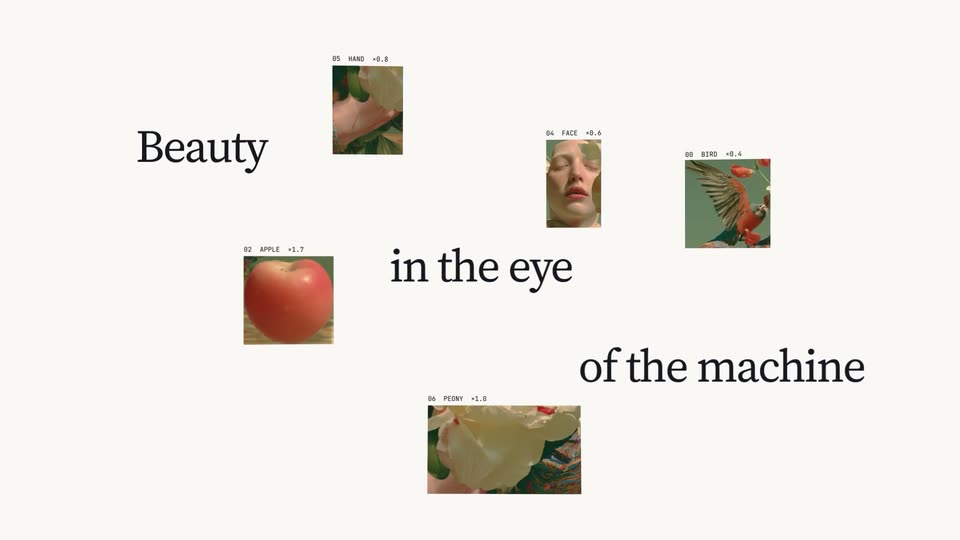
On a pale gray field, the serif phrase Beauty in the eye of the machine assembles word by word while five small labeled photo thumbnails (hand, face, bird, apple, flower) with numeric scores drift in around it, then the whole layout blurs and pulls back.
On-screen text: “in the eye”, “of the machine”, “Beauty”, “05 HAND ×0.8”, “04 FACE ×0.6”, “08 BIRD ×0.4”, “02 APPLE ×1.7”, “06 PEONY ×1.0”
Techniques: Kinetic type, Speed ramp
Camera: Static
02 · Hook · 0:02–0:03
A grayscale 3D statue of a woman with a parrot on her shoulder sits on a light background. Blue bounding boxes label the bird, face, hand, flower and apple, each linked by a thin line to a colored reference thumbnail in a right column. The bird and flower shift color as the boxes pop in.
Camera: Static
03 · Hook · 0:03–0:05
A grayscale statue photo on a pale field is overlaid with cut-out objects, a red parrot, a woman's head and an apple, each in a blue bounding box. Lines drop to a row of seven labeled thumbnails below, and the objects fade in from transparent to solid.
Camera: Static
04 · Hook · 0:05–0:06
A 3D still life of a cherub, parrot, vase and apples sits center frame on white, tagged with blue numbered labels and leader lines. A flat data list runs down the right edge under a thin header rule. The render eases from motion blur into sharp focus over the clip.
Techniques: 3D mockup
Camera: Pull out
05 · Problem · 0:06–0:08
On a cream field the serif tagline assembles from staggered words into one centered line while four small color swatches sit in the corners. The swatches gain blue index tags and the frame fills with the bouquet canvas and a right-hand asset list.
On-screen text: “Making something look finished”
Techniques: Kinetic type, Morph
Camera: Pull out
06 · Problem · 0:08–0:10
A multicolored 3D organic mass with blue code tags sits on a faint grid, beside a vertical list of codes and values. The view reframes into a bordered plate as a large serif headline fades in over the center.
On-screen text: “Isn't the”, “Making something look finished”
Techniques: 3D mockup, Kinetic type
Camera: Static
07 · Problem · 0:10–0:11
On a white background, a 2x2 grid holds two painted still-life panels and two pixel-mosaic panels, with a centered serif line between the rows. The panels shrink and the mosaic squares scatter outward into loose clouds while the headline holds still.
On-screen text: “Isn't the same as getting it right.”
Techniques: Particles
Camera: Pull out
08 · Problem · 0:11–0:12
Two horizontal strips of a still-life painting sit on a white field, captioned below the top one. The right half of each strip breaks into loose pixel squares that drift outward as the solid image shrinks leftward.
On-screen text: “Isn't the same as getting it right.”
Techniques: Particles
Camera: Pull out
09 · Problem · 0:12–0:13
On a cream background, a large black serif number counts up from 149 to 1000 inside a swirling ring of small colorful shapes. The static phrases 'Design is a' and 'decisions.' sit in opposite corners, and a thin blue rectangle outlines 'decisions.' as the count lands.
On-screen text: “Design is a”, “149”, “decisions.”, “1000”, “Isn't the same as getting it right.”
Techniques: Kinetic type, Particles
Camera: Static
10 · Problem · 0:13–0:14
A sphere of gray dots with a few blue dots on a cream background. Multicolored paper fragments at the top scatter and fade as the text resolves: “Design is a” fades at left, “decisions.” slides in from the right, and the centered line “is a thousand decisions.” settles.
On-screen text: “Design is a”, “decisions.”, “is a thousand decisions.”
Techniques: Kinetic type, Particles
Camera: Static
11 · Problem · 0:14–0:15
A black serif sentence is centered over a scattered cloud of small grey and blue dots. The text and particles blur and fade, transitioning into a soft, out-of-focus yellow shape.
On-screen text: “is a thousand decisions.”
Techniques: Particles, Morph
Camera: Static
12 · Problem · 0:15–0:16
On a pale off-white field, the serif headline “What to emphasize.” slides in, the word “emphasize.” framed by a thin blue box with an “EMPHASIS” tag above. Below, a row of small food and ornament shapes sits on a baseline; one yellow fruit is enlarged in a blue box, its “D039 FRUIT 0.58” label typing in, linked to the headline by a blue line.
On-screen text: “What to emphasize.”, “EMPHASIS”, “D039 FRUIT 0.58”
Techniques: Kinetic type
Camera: Static
13 · Problem · 0:16–0:18
A light-gray interface frame with a collage of torn shapes, a classical portrait and a pink triangle settling on the left. The serif headline reads What to leave out., a blue line strikes through out. inside a dashed selection box, and six labeled rows with small thumbnails slide in one by one beneath a LEFT OUT 6 / 39 counter.
On-screen text: “What to leave out.”, “LEFT OUT 6 / 39”, “0148 TRIANGLE 0.14”, “0151 PEONY 0.14”, “0154 PEONY 0.14”, “0143 PEONY 0.15”, “0145 CLOUD 0.15”, “0156 TRIANGLE 0.35”
Camera: Pull out
14 · Problem · 0:18–0:20
An oval ring of small photo fragments, mostly faces, assembles around the center, each linked by thin dashed lines to the middle. The serif line sits at the hub, then a blue pixel grid wipes in over the center.
On-screen text: “How it all comes together.”
Techniques: Masking
Camera: Static
15 · Problem · 0:20–0:21
A serif headline types out above a tilted website mockup while a blue pixel grid wipes away to reveal a face with labeled bounding boxes.
On-screen text: “How it all comes together.”
Techniques: Kinetic type, Masking, UI zoom
Camera: Static
16 · Problem · 0:21–0:23
A 3D-tilted webpage mockup covered in blue annotation boxes rotates flat toward the camera, then exits the frame. The black serif headline 'AI can generate the page.' holds at the top over a faint code-text background, and a second serif line 'But how' appears beneath it.
On-screen text: “AI can generate the page.”, “But how”
Techniques: 3D mockup
Camera: Pull out
17 · Problem · 0:23–0:25
A 3D-tilted browser mockup of a website with a woman's face hovers over faint code, above a large serif question with 'how well' boxed in blue and a 0-to-1 score meter below. The mockup and text whip away in a fast blur as the meter jumps to 0.91.
On-screen text: “EVALUATING”, “SCORE 2”, “But how well does it make those decisions?”
Techniques: 3D mockup, Speed ramp
Camera: Static
18 · Other · 0:25–0:26
A baroque painting in an ornate gold frame sits on a pale background, crossed by a white band holding the headline. A thin blue box surrounds the word beyond while a blue circular control with MID and MAX markers hovers at the top right. The trailing words scale gently.
On-screen text: “Look beyond the first impression.”, “BEYOND 0041 FRAME 0.49”
Camera: Pull out
19 · Other · 0:26–0:28
A surrealist collage of a face, red bird and flowers in a vase fades in, framed by blue bounding boxes with numbered labels and dashed connector lines. The serif word “Hierarchy.” sits in a blue box above, a small reading-order note stays at left, then the image fades out.
On-screen text: “beyond”, “Lookb”, “the first impression.”, “BEYOND 0041 FRAME 0.49”, “Hierarchy.”
Techniques: Kinetic type, Masking
Camera: Pull out
20 · Other · 0:28–0:29
On a cream field, the serif word Typography assembles letter by letter while thin blue metric lines for cap height, x-height, baseline and descender frame it. The p flashes blue, a KERN -24 tag sits under the first letter, and a small spec line stays fixed at the bottom.
On-screen text: “Typography”, “SOURCE SERIF 4 · REGULAR · 280 / AUTO · TRACKING -3%”
Techniques: Kinetic type
Camera: Pull out
21 · Other · 0:29–0:30
On a cream background, a teal and yellow organic blob sits on a blue grid inside a dashed box, with thin leader lines to small pixel labels. To the left, the serif headline resolves from a glitch into a clean line, the word Details held in a blue selection box linked by a dashed line.
On-screen text: “The Details.”
Techniques: Kinetic type
Camera: Static
22 · Other · 0:30–0:32
On a pale gray field framed by a thin blue line, six small collage thumbnails sit in a hexagon joined by dashed lines, each with a tiny data label. The centered serif line resolves from a blurred glitch into sharp focus as it scales in.
On-screen text: “The Details.”, “Does the whole feel considered?”
Techniques: Kinetic type
Camera: Static
23 · Other · 0:32–0:34
A 3D bar chart of thin blue lines capped with small multicolored organic shapes rotates from a skewed perspective to a flat front view. A serif caption gives way to the headline “A higher bar for AI design.” scaling in above.
On-screen text: “Does the whole feel considered?”, “A higher bar for AI design.”
Techniques: Kinetic type, 3D mockup
Camera: Static
24 · Product intro · 0:34–0:37
On a cream field, a tagline scales in, then INTRODUCING and the serif line The Frontier Design Benchmark. fade in as a blue rule draws into a box around the headline. A blue 0233 BENCHMARK 1.00 tag pops at the box's top-left, the URL fades in below, and INTRODUCING blurs at the end.
On-screen text: “A higher bar for AI design.”, “INTRODUCING”, “The Frontier Design Benchmark.”, “0233 BENCHMARK 1.00”, “CONTRALABS.COM/FRONTIERDESIGN”
Camera: Static
25 · Outro · 0:37–0:39
A locked-off end card on a cream background: a teal ribbon with a white four-point star and the contra LABS wordmark sit top center, the serif tagline is centered, and the URL is at the bottom.
On-screen text: “Building AI with creatives, for creatives.”, “CONTRALABS.COM”
Camera: Static