
0:48
Explore
Introducing Conductor
Conductor · Aug 2025 · 1:50 · Full motion · AI-annotated
- Length
- 1:50
- Scenes
- 36 · 3.1 s avg
- Product on screen
- 0:00
- Features shown
- 4
- Voiceover
- Yes
- Views
- 63K on YouTube
as of November 26, 2026
00:00:00 / 01:50:05
- Length
- 1:50
- Scenes
- 36 · 3.1 s avg
- Product on screen
- 0:00
- Features shown
- 4
- Voiceover
- Yes
- Views
- 63K on YouTube
as of November 26, 2026
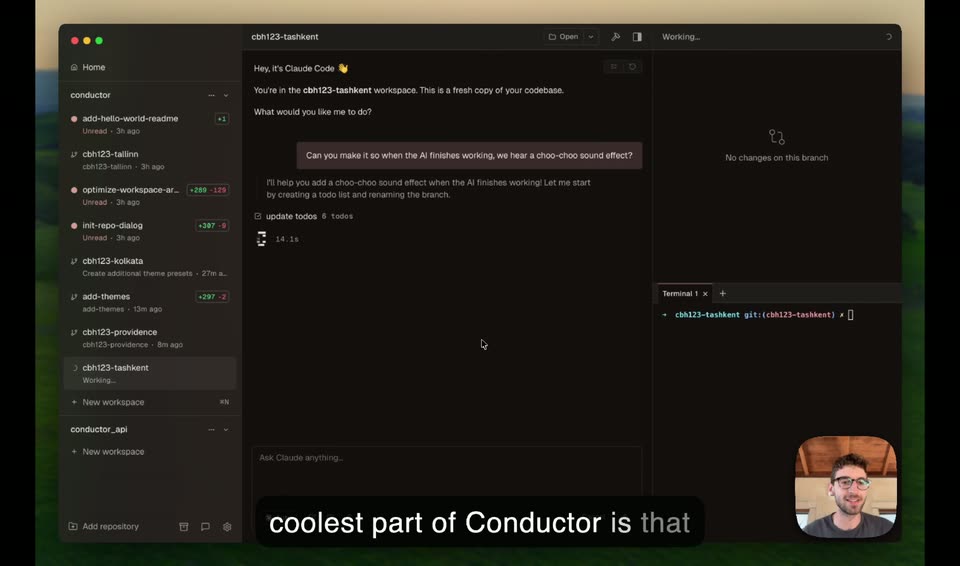
Conductor’s 1:50 launch film runs 36 scenes, about 3.1 s each. The product is on screen from the first frame and 4 features are revealed. There is no explicit call to action; a voiceover carries the film. A single continuous screen recording with a face-cam inset and a phrase-by-phrase caption bar, where slow zooms and pans move the eye across the dark interface as each feature is named and demoed. The video closes on a black brand sting in which a dot-matrix wordmark assembles and the conductor.build URL holds before fading out.
No filming indicatedEstimated needs: 7 capture groups — your screens or recordings · 1 official logo — reused across the film · 1 3D passage — build or supply
Is this your launch? to your site or press kit.
More like this

1:09

MPK Mini IV | Your Next Big Idea Starts with MPK Mini
Akai · Oct 2025
0:30

NFTs are Officially Live on Uniswap!
Uniswap · Feb 2023
Introducing Conductor, scene by scene
· 36 scenes as text
01 · Product intro · 0:00–0:04
A dark-mode screen recording of the Conductor app fills the frame, showing a workspace sidebar, a markdown document, a file-diff panel and a terminal, plus a small circular webcam of a man in the corner. A black caption bar at the bottom fades in two phrases with the voiceover.
On-screen text: “Hello, I am super excited to show”, “you Conductor, the Mac app that”
Camera: Static
02 · Product intro · 0:04–0:08
A dark Mac app window fills the frame, showing a left sidebar list, a central markdown document, a right file-diff panel and a retro terminal, with a small circular webcam of a man in the corner. A black caption bar at the bottom cycles white text phrase by phrase.
On-screen text: “you Conductor, the Mac app that”, “lets you run a bunch of Claude”, “Codes all at once. So we're using”
Techniques: Kinetic type
Camera: Static
03 · Product intro · 0:08–0:12
A dark IDE window fills the frame: a workspace sidebar, a markdown document, and a terminal panel with ASCII art. A small webcam feed of a man with glasses sits in the lower right. White subtitle lines swap across a black bar at the bottom.
On-screen text: “Codes all at once. So we're using”, “Conductor to build Conductor, so”, “I thought it'd be cool to kick”, “things off by using Conductor to”
Camera: Static
04 · Product intro · 0:12–0:15
A dark developer-tool screen fills the frame: workspace list left, markdown doc and file-diff panel right, a terminal, and a small webcam self-view in the corner. White captions run along the bottom, then a New workspace modal pops into the center beside a Command-N key badge.
On-screen text: “things off by using Conductor to”, “improve itself. So I'm going to”, “⌘ N”
Camera: Push in
05 · Demo · 0:15–0:16
A dark Conductor workspace panel sits centered, listing Linear issues, with a command+N keycap badge and a caption below it. A small circular webcam of a man anchors the bottom right as the frame pulls back to reveal the left sidebar.
On-screen text: “press Command+N and say, can”
Camera: Static
06 · Demo · 0:16–0:20
A dark app window with a workspace sidebar and a Claude Code chat greeting. The view pulls back from a close crop to the full window, a terminal panel opens on the right, and a caption bar at the bottom rolls out the spoken words. A face-cam window sits bottom-right.
On-screen text: “press Command+N and say, can”, “you make it so when the AI”
Techniques: UI zoom
Camera: Pull out
07 · Demo · 0:20–0:24
A dark IDE workspace fills the frame: a left sidebar lists repos, a center chat greets the user, a terminal sits bottom right. A small webcam of a man with glasses overlays the corner. White captions fill in across the bottom.
On-screen text: “finishes working, we hear a choo”, “choo sound effect? Now I'm”
Camera: Push in
08 · Demo · 0:24–0:28
A screen recording of the Conductor app starts dark and close on the chat input, then zooms out to the full window showing a workspace list, chat and terminal, then to the desktop with a grassy backdrop. A face cam sits bottom right and a cursor hovers over the window.
On-screen text: “choo sound effect? Now I'm”, “going to press Enter and now”, “Claude Code is going to work on”
Techniques: UI zoom
Camera: Pull out
09 · Demo · 0:28–0:32
A dark code-editor window fills the frame: a chat panel shows a greeting and a prompt, a spinner counts up in seconds, and a webcam feed of a man sits in the corner. The view zooms in on the chat as white subtitles swap in at the bottom.
On-screen text: “Claude Code is going to work on”, “my task and it's just like Claude”, “Code that we're used to in the”, “command line, except now it's in this be”
Techniques: UI zoom
Camera: Push in
10 · Demo · 0:32–0:36
A dark Mac app window shows a workspace list, a Claude Code chat, and a terminal, with a face-cam inset bottom right. The frame starts cropped and pulls back to the full window over a green desktop. White subtitles sit in a black bar at the bottom.
On-screen text: “command line except now it's in”, “this beautiful Mac app. But the”
Techniques: UI zoom
Camera: Pull out
11 · Feature reveal · 0:36–0:40
A dark Mac app window fills the locked-off frame, showing a workspace sidebar, a Claude Code chat panel and a terminal. A small rounded webcam video of a man sits bottom right. A black caption bar at the bottom cycles white subtitle text.
On-screen text: “this beautiful Mac app. But the”, “coolest part of Conductor is that”, “we can have a bunch of Cloud Codes”
Camera: Static
12 · Feature reveal · 0:40–0:48
A dark app window shows a workspace list on the left and a Claude Code chat panel. The view zooms in on the sidebar as a cursor hovers over each entry, revealing a tooltip. A small circular presenter video sits bottom right, with white captions along the bottom.
On-screen text: “we can have a bunch of Claude”, “Codes working all in parallel. So”, “we can see in the sidebar each”, “one of these workspaces is an”, “isolated copy of our code base”
Techniques: UI zoom, Cursor demo
Camera: Push in
13 · Feature reveal · 0:48–0:52
Dark app UI: a sidebar of workspace names on the left, a Claude Code chat thread on the right. The view zooms out to frame the whole window over a blurred desktop photo, while white subtitle captions change at the bottom.
On-screen text: “isolated copy of our code base”, “that Claude Code can work in”, “without interfering with other”
Techniques: UI zoom
Camera: Pull out
14 · Feature reveal · 0:52–0:55
A dark IDE screen fills the frame: a left sidebar lists workspaces, the center shows a Claude Code chat with a todo list and spinner, the right holds a branch panel and terminal. A small webcam feed of a presenter sits bottom right. White captions appear at the bottom.
On-screen text: “without interfering with other”, “Claude codes. And we can see”
Camera: Static
15 · Feature reveal · 0:55–0:56
A dark IDE window fills the frame, showing a Claude Code chat with a todo list and a terminal pane, a small webcam feed of a man sits in the lower right. A bottom caption updates as the view defocuses and scales slightly.
On-screen text: “Claude codes. And we can see”, “that we have one Claude code”
Camera: Push in
16 · Feature reveal · 0:56–1:01
A dark app interface opens through a cross-dissolve, then the frame tightens onto a workspace sidebar and a chat panel holding a todo list and markdown doc. A cursor hovers the list while a small face-cam sits in the corner and captions roll along the bottom.
On-screen text: “that we have one Claude code”, “here working on fixing some”, “bugs. This Claude code is”
Techniques: UI zoom, Cursor demo
Camera: Pull out
17 · Feature reveal · 1:01–1:02
A dark IDE screen fills the frame, showing a markdown spec, a file-change list and a terminal, while a small circular webcam of a man with glasses sits in the lower right and a black caption bar reads at the bottom. The view drifts with a slow zoom.
On-screen text: “bugs. This Claude code is”
Camera: Push in
18 · Feature reveal · 1:02–1:09
A dark app window shows a workspace list, a theme document and a terminal panel. The view zooms into the sidebar as a cursor hovers the ai-finish-choo-sound unread row, then blurs back out. A webcam circle sits bottom right and subtitles run along the bottom.
On-screen text: “working on adding themes. And”, “we can see at a glance what all”, “our Claude are working on and if”, “they need our attention. There's a”
Techniques: UI zoom, Cursor demo
Camera: Pull out
19 · Feature reveal · 1:09–1:15
A dark IDE window fills the frame, showing a repo list, a markdown spec panel, a two-file diff, and a terminal readout, with a small webcam feed of a man in the corner. A black caption bar at the bottom updates phrase by phrase as the narrator speaks.
On-screen text: “they need our attention. There's a”, “lot more to discover under the”, “hood. Like we have Git diff”
Camera: Pull out
20 · Feature reveal · 1:15–1:16
A dark app window shows a workspace list left, a spec document center, and a '2 files changed' panel with diff counts right. The frame zooms and pans right, settling on a terminal window and a round webcam feed of a bespectacled man.
On-screen text: “hood. Like we have Git diff”
Techniques: UI zoom
Camera: Push in
21 · Feature reveal · 1:16–1:19
A dark git diff viewer on a tilted screen, framed by a blurred window, displays green and red code lines while a cursor moves over the right panel. A small webcam cutout of a man sits bottom right and white captions swap at the bottom.
On-screen text: “viewer where you can review”, “Claude Codes, Claude Code's”
Techniques: 3D mockup, Cursor demo
Camera: Pull out
22 · Feature reveal · 1:19–1:22
A dark code editor fills the screen: left thread list, central markdown document, right file-changes panel, and a bottom terminal with colored ASCII art. A small webcam feed of a man sits in the corner. A white cursor drifts across the right panel as a black caption bar updates below.
On-screen text: “Claude Codes, Claude Code's”, “code. We have an integrated”
Techniques: Cursor demo
Camera: Push in
23 · Feature reveal · 1:22–1:22
A dark terminal window sits in the center of a code editor, showing an ASCII logo and a system spec panel on the right. Blurred text scrolls on the left edge, a white caption reads at the bottom, and a small webcam feed of a man fills the corner.
On-screen text: “code. We have an integrated”
Camera: Push in
24 · Feature reveal · 1:22–1:23
A dark macOS desktop shows a terminal window printing colored ASCII art and system stats beside a documentation panel. A white caption pill sits along the bottom edge, and a small circular webcam feed of a man rests in the lower right corner.
On-screen text: “terminal which supports multiple”
Techniques: Cursor demo
Camera: Static
25 · Feature reveal · 1:23–1:24
A dark terminal window fills the right side, showing multicolored ASCII art and a system spec list. A cursor hovers over a plus tab as a tooltip appears, while a subtitle bar sits at the bottom.
On-screen text: “terminal which supports multiple”
Techniques: Cursor demo
Camera: Static
26 · Feature reveal · 1:24–1:24
A dark app screen shows a terminal pane on the right with ASCII art and system details, beside a left panel of feature text. A white caption sits at the bottom and a circular webcam of the presenter in the corner. A cursor hovers by the add-terminal label.
On-screen text: “terminal which supports multiple”
Techniques: Cursor demo
Camera: Static
27 · Feature reveal · 1:24–1:27
A close-up of a code editor's terminal shows ASCII art and a cursor on the tab, then the view zooms out to the full window with file tree and markdown. A webcam overlay sits in the corner while a caption runs along the bottom.
On-screen text: “terminal pains so you can run”
Techniques: Cursor demo, UI zoom
Camera: Pull out
28 · Feature reveal · 1:27–1:31
A dark app window with a repo sidebar and a document fills the frame, then zooms into the right '2 files changed' panel. A cursor glides up to the Create PR button while a black caption bar at the bottom carries the narration.
On-screen text: “your app and test it. And we”, “integrate with your Git status so”
Techniques: UI zoom, Cursor demo
Camera: Push in
29 · Feature reveal · 1:31–1:33
A dark file list panel with two changed files slides up and fades, revealing a code diff view below as the frame pulls back. A cursor hovers over the Create PR button. A bottom caption reads “you can create a PR and merge”.
On-screen text: “you can create a PR and merge”
Techniques: Cursor demo, UI zoom
Camera: Pull out
30 · Feature reveal · 1:33–1:35
A locked-off dark code editor: workspace list left, markdown document center, file diffs and a colorful terminal right, plus a small webcam feed of the presenter lower right. A black caption bar at the bottom shows the voiceover.
On-screen text: “all from within Conductor. Super”
Camera: Pull out
31 · Other · 1:35–1:39
Dark Conductor interface fills the screen: repo list left, notes panel center, file changes and terminal right, plus a small webcam feed of a man lower right. White caption lines swap in sequence in a black bar at the bottom.
On-screen text: “all from within Conductor. Super”, “excited to hear your thoughts and”, “thanks for watching.”
Camera: Static
32 · Other · 1:39–1:39
A dark code editor fills the frame, showing a README with bullet points, a repository list on the left, and a terminal with ASCII art on the right. A small webcam feed of a man sits in the bottom right corner, and a white caption on a black pill reads thanks for watching.
On-screen text: “thanks for watching.”
Camera: Static
33 · Outro · 1:39–1:43
On a black background, white pixelated block letters assemble from left to right, spelling the wordmark with a soft glow, locking into a still frame by the end.
On-screen text: “COMMUNIC”
Techniques: Kinetic type
Camera: Static
34 · Outro · 1:43–1:46
A white dot-matrix wordmark glows at the center of a black frame, the letters built from small squares with a soft halo. The shot is locked off and the text stays still for the whole clip.
On-screen text: “COMMUNICORE”
Camera: Static
35 · Outro · 1:46–1:47
On a plain black background, the white lowercase wordmark conductor.build is centered. The text builds up, opening as conductor. and completing to conductor.build within the first half of the clip.
On-screen text: “conductor.build”
Techniques: Kinetic type
Camera: Static
36 · Outro · 1:47–1:50
The white wordmark conductor.build sits centered on a pure black background, perfectly still, then the frame goes black.
On-screen text: “conductor.build”
Camera: Static