1:23

Motion Graphics SaaS Product Launch Video | Loud
Loud · Sep 2026
Composio’s 1:34 launch film runs 11 scenes, about 8.6 s each. The product shows up at 0:32. The call to action lands at 1:29 (95% in), over a voiceover. A single-take talking-head launch video built around a chef-in-the-kitchen conceit: a fast whip-pan montage opens, then one locked-off medium shot carries the whole pitch while UI screens and title cards are composited in as insets. The style is bright, clean and playful, with a soft sage-green palette, a white serif for titles and captions, and a steady ~121 bpm pace; its signature moves are the torn-paper photo pop-ins, the floating app icons, and the split-screen that keeps the chef gesturing
Is this your launch? to your site or press kit.
Loud · Sep 2026
CrowdReply · Jul 2026
A chef in a white coat and tall hat stands behind a round table holding a closed dark laptop. He gestures with both hands and looks toward a window framed by green leaves, while a wooden bookshelf with plants and books fills the left side.
Camera: Static
A low angle shows a man in a white cap and glasses reclining beneath a glowing octagonal lamp, framed by bright windows and greenery. The camera whips around, smearing the room into streaks of white ceiling lights and foliage.
Techniques: Speed ramp
Camera: Push in
A fast, heavily motion-blurred camera sweep across a food prep set. It pans from a wooden cutting board holding a knife on the left to a pile of chopped yellow, red and green vegetables on a white surface at right, with a white bowl at the bottom edge.
Camera: Push in
A man in a white cap and glasses peers down at the camera from a tilted, sideways angle in a sunlit room with a skylight and potted plants. The shot opens overexposed and soft, then rotates and sharpens as the frame settles.
Camera: Static
A chef in a white uniform and toque stands behind a table with a closed laptop. He sets down a bowl and gestures as torn-paper photos of three newsletter authors pop in. A white serif title appears, then the frame fades to white with a Gmail icon.
On-screen text: “Apart from cooking, I”, “love reading newsletters.”, “Everything from Cal Newport to”, “Lenny's to David Perell.”, “But I hate the act”, “of going through email”, “that's full of work clutter”, “i hope this email finds you well”, “free openai credits”, “and spam, of course. which could put everything from all of my weekly newsletters into a single page that I can read at peace? So I made a recipe on Rube. Int R”
Techniques: Masking
Camera: Pan
A chef in a white uniform and tall hat stands in a bright room, gesturing and smiling. The Notion and Gmail app icons float in the upper corners. White caption text appears at the bottom of the frame.
On-screen text: “Notion”, “and a little bit of love.”
Camera: Pan
A man in a white chef's coat and tall hat stands behind a wooden table with a laptop, gesturing with both hands in a sunlit room with a bookshelf and a window. White subtitles appear at the bottom of the frame.
On-screen text: “Perfect setup for me.”, “I'm an avid Notion user,”, “and Gmail is my default inbox,”, “unfortunately.”, “But here is my recipe.”
Camera: Static
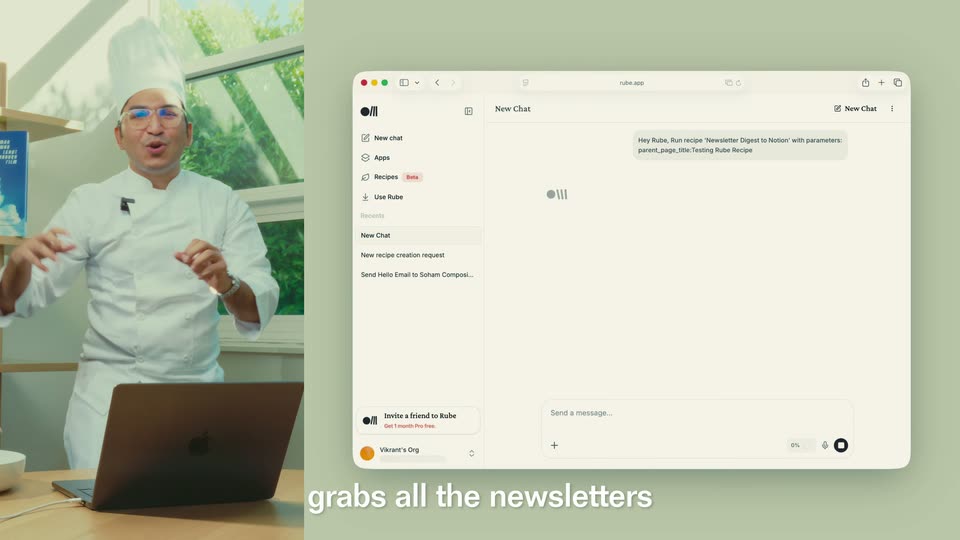
Split screen: a chef in a white hat and uniform leans over a laptop on the left; on the right, the Rube app window shows a recipe card, the cursor clicks Run Recipe, and a chat thread types a digest summary with a blue hyperlink.
On-screen text: “Once a week, whenever I”, “get time to fancy reading,”, “I just hit Run.”, “And Rube”, “goes through my Gmail,”, “grabs all the newsletters”, “from the last seven days,”, “and summarizes each one”, “adds hyperlinks and context,”, “and plates everything into a single Notion page.”
Techniques: Split screen, Cursor demo
Camera: Pan
Split screen: a chef in white gestures at a laptop on the left while a Notion page scrolls in a browser window on the right, a cursor drifting over it. White captions roll across the bottom in time with the voiceover.
On-screen text: “and plates everything”, “into a single Notion page.”, “That's it”, “No complicated setup”, “No new app,”, “just a recipe that I can run”, “whenever my brain feels”, “like it's lagging”, “behind the internet.”, “And of course, all of this is”
Techniques: Split screen, Cursor demo
Camera: Pull out
A man in a white chef's coat and tall hat stands behind a round table with a closed laptop, gesturing and talking to camera in a bright room with shelves and a leafy window. White subtitle lines swap in at the bottom of frame. The camera stays locked off throughout.
On-screen text: “And of course, all of this is”, “powered by Composio.”, “(lmao)”, “Pardon the Italian accent”, “I had to give it a try.”, “So if your inbox looks like a”, “your inbox looks, like a”, “maybe you don't need another”, “productivity hack”, “Maybe you just need a better recipe. Rube Recipes We are not cleaning your inbox, we are just letting you cook.”
Camera: Static
Glowing 3D app icons float around the edges of a dark maroon field, drifting slowly outward. Centered white serif text under a small pink logo changes its last word: something..., anything?, everything!, with Try new rube.app below.
On-screen text: “Use Rube to do something...”, “Try new”, “rube.app”, “Use Rube to do anything?”, “Use Rube to do everything!”
Techniques: Kinetic type, Parallax
Camera: Push in