3:32

Introducing Project Bloks
Google · AI · Jun 2016
Cohere’s 1:43 launch film runs 19 scenes, about 5.4 s each. The product is on screen from the first frame and 3 features are revealed, with social proof. The call to action lands at 1:32 (90% in), over a voiceover. The video alternates a locked-off talking-head intro and outro with a run of flat, pastel-gradient UI panels that build their graphics (grids, charts, timelines, result cards) element by element in step with the voiceover. Signature moves include a red accent that marks the relevant moment across the timeline and transcript, a 3D perspective tilt on the search layout, and an iridescent 3D blob that wipes into the closing logo card.
Is this your launch? to your site or press kit.
Google · AI · Jun 2016
Akon Labs · B2B · Aug 2026
Operon · Industrials
Films whose music sounds like this one, voice left out
Shadeform · Electronic
Aristotle · Electronic, Corporate
Warp · Electronic, Corporate
A man in a light gray hoodie sits in an office lounge, speaking to a static camera. A white name card with his title appears at left, then a second card with an orange underline announces Video Intelligence in Compass. Subtitles on a dark bar run along the bottom.
On-screen text: “Hi, I'm Luke Ross. I lead the Video Intelligence team here at Cohere.”, “Luke Ross”, “Manager of Technical Staff, Cohere”, “Today, we're announcing Video Intelligence in Compass.”, “ANNOUNCING”, “Video Intelligence in Compass”
Camera: Static
A man in a light blue hoodie with a purple chest logo sits facing the camera in a sunlit office lounge, gray sofa and window behind him. The frame tightens on him as a white caption box with two lines of text appears at the bottom center.
On-screen text: “It makes your video library”, “searchable for users and AI agents,”
Camera: Static
A man in a gray hoodie speaks in an office, framed right while a headline, two chips and four labeled video thumbnails build in on the left. The graphics clear, the interview fills the frame with a dark caption bar, then settles into a rounded card on a pastel gradient.
On-screen text: “Your video library, searchable”, “It makes your video library searchable for users and AI agents,”, “For users”, “For AI agents”, “from recorded meetings and training sessions to lectures and video archives.”, “Recorded meetings”, “Training sessions”, “Lectures”, “Video archives”, “Video Intelligence in Compass”
Techniques: Split screen
Camera: Pull out
A 3x3 grid of video thumbnails settles from a blurred overlapping cluster into a crisp layout, the center tile showing a man in a light blue hoodie. A dark caption bar at the bottom holds the line about finding answers.
On-screen text: “lets you find the answers you need without watching hours of irrelevant footage.”, “Illustrative examples”
Camera: Pull out
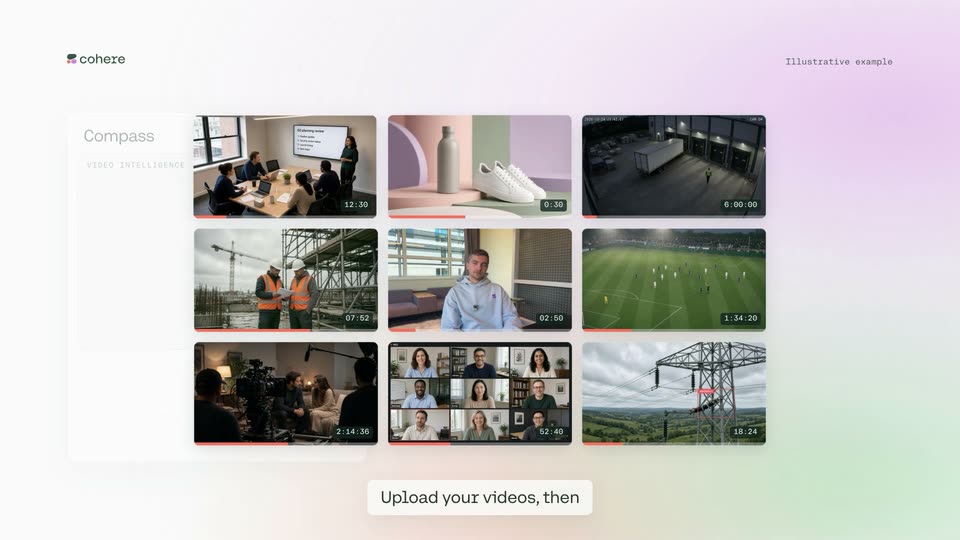
A 3x3 grid of video thumbnails on a pastel gradient slides right and shrinks as a white Compass card with a chat panel slides in from the left. The chat shows a red-car question and a three-times answer. A pill caption reads 'Upload your videos, then'.
On-screen text: “Illustrative example”, “Upload your videos, then”, “lets you find the answers you need without”, “watching hours of irrelevant footage.”
Camera: Static
A flat Compass card on the left settles video thumbnails into a grid, then file chips fade in. A search bar on the right types a question letter by letter, the Enter key tints red, the field glows. A bottom caption swaps text; the scene fades out.
On-screen text: “Illustrative example”, “Upload your videos, then”, “ask a question in natural language as you would any other file in your corpus.”
Techniques: Cursor demo, Kinetic type
Camera: Pull out
A typed question sits in a search bar beside a content library card. The query jumps to a top pill, the library dims, and a meeting video expands into a large player showing a whiteboard. A caption box explains that video intelligence searches what was said and what appeared.
On-screen text: “Illustrative example”, “Video Intelligence in Compass searches what was said and what appeared”
Techniques: Morph
Camera: Push in
A search bar holds a question over a meeting-video player. A transcript card and a frames card slide in on the right; a pink highlight marks a phrase and a pink outline marks the slide. The layout tilts into 3D perspective at the end.
On-screen text: “Illustrative example”, “Video Intelligence in Compass searches what was said and what appeared”, “on screen, then returns the relevant moment with a timestamp and a link”
Techniques: 3D mockup
Camera: Push in
A flat video player on a soft gradient background shows a recorded meeting: a presenter at a screen and four people at a table. The top-left label settles from a doubled dissolve into clean text, while a red segment labeled 08:16 to 08:39 fills in on the timeline. A white caption box sits below the player.
On-screen text: “Illustrative example”, “on screen, then returns the relevant moment with a time stamp and a link”
Camera: Static
A rounded video player on a soft gradient background shows a recorded meeting with a presenter at a whiteboard and a highlighted segment on the timeline. A search bar slides in over the top left while a white caption box sits below the player.
On-screen text: “on screen, then returns the relevant moment with a time stamp and a link”, “Illustrative example”
Camera: Pull out
A flat product UI shows a search bar, a meeting video of a presenter at a roadmap slide on the left, and result cards on the right. Cards slide in, an answer card appears, and the video highlights the matching moment in red, while a bottom caption swaps.
On-screen text: “Illustrative example”, “on screen, then returns the relevant moment with a time stamp and a link”, “to the original recording, so you can check the context and verify the answer.”
Camera: Static
A pastel gradient slide holds a white chart card. The title fades in, then eight bars grow to their values, the lead bar dark green. A dashed red line draws across the top two bars while a red +4.4 pts stat appears top right and the bottom caption swaps.
On-screen text: “Video retrieval quality”, “And it finds the right moment more often.”, “Across eleven retrieval benchmarks, Cohere Video Intelligence leads every model we tested.”, “+4.4 pts”, “vs. the best competitor”
Camera: Static
A Cohere chat window on a pastel gradient: a question about an MR rate target is typed and sent, the app searches meeting recordings, then shows a meeting video and a written answer. A serif headline 'Find a historical decision' sits left, a caption box at bottom swaps two lines.
On-screen text: “Find a historical decision”, “That means a project manager”, “can find a decision from last month's quarterly business meeting.”
Techniques: Cursor demo
Camera: Static
A flat front view of the Cohere chat window on a pastel gradient, with a dark serif headline at left. A cursor types and sends a query; the panel lists search steps, then a five-row results table and summary. A white caption box at the bottom swaps text mid-scene.
On-screen text: “Explore your media archive”, “Or, a media strategist”, “can review years of published content to inform their upcoming campaign.”
Techniques: Cursor demo
Camera: Static
A flat explainer layout fades in over a soft pastel gradient: a headline, a video file chip, and a white Compass step card on the right. A caption types out word by word in a box below the card, synced to the voiceover.
On-screen text: “Search video alongside documents”, “YOUR CONTENT”, “SharePoint : OneDrive : Google Drive”, “VIDEO”, “q3-planning.mp4”, “Compass”, “ONE GOVERNED INDEX”, “01 Parse On-screen visuals, text, tables, images”, “02 Embed Dense and sparse, across modalities”, “03 Index Files, parsed content and metadata together', '04 Retrieve Hybrid search and rerank', '05 Govern Permissions enforced', 'Your videos become discoverab”
Camera: Static
A flat three-panel diagram: a file list left, a Compass pipeline card center, a search app right. A cursor types a query, results appear, steps highlight in sequence, and the Govern row turns dark green as one result is hidden by permissions.
On-screen text: “Search video alongside documents”, “Illustrative example”, “Your videos become discoverable from your search applications alongside”, “your existing documents,”, “and people can only see the content they have permission to access.”
Techniques: Cursor demo
Camera: Static
A static headline sits left of a dark agent-session panel. A question types in, the badge flips to connected, a tool call and a scanning timeline appear, three red markers drop and spawn result cards, then an agent answer with citation chips lands.
On-screen text: “Illustrative example”, “FOR AI AGENTS”, “Connect agents to Compass through MCP”, “Agents find the relevant moments across hours of footage, with citations.”, “For agents, simply connect to Compass via the MCP and let”, “them find relevant moments across hours of footage to support their answers.”
Camera: Static
A man in a light gray hoodie with a small purple chest logo sits in a bright office room, speaking to a locked-off camera. A lavalier mic is clipped to his hoodie. White captions in a dark rounded box appear at the bottom and swap once.
On-screen text: “Video Intelligence is available today in private preview.”, “Get in touch with our search team if you'd like to get involved.”
Camera: Static
A white Compass logo and wordmark sit left of center with VIDEO INTELLIGENCE in thin caps beside it, locked off over a dark field of glossy, iridescent 3D blobs whose orange and blue edges drift slowly.
On-screen text: “Compass VIDEO INTELLIGENCE”
Camera: Static