2:08
Explore
Introducing cobl - The new way to create sales documents. Starting with proposals.
Cobl · Apr 2026 · 1:09 · Full motion · AI-annotated
- Length
- 1:09
- Scenes
- 29 · 2.4 s avg
- Product on screen
- 0:04
- Features shown
- 4
- Call to action
- 1:02 · 91%
- Voiceover
- No
- Views
- 18K on YouTube
as of November 24, 2026
00:00:00 / 01:09:05
- Length
- 1:09
- Scenes
- 29 · 2.4 s avg
- Product on screen
- 0:04
- Features shown
- 4
- Call to action
- 1:02 · 91%
- Voiceover
- No
- Views
- 18K on YouTube
as of November 24, 2026
Cobl’s 1:09 launch film runs 29 scenes, about 2.4 s each. The product shows up at 0:04 and 4 features are revealed. The call to action lands at 1:02 (91% in). The video alternates flat color fields of cobalt blue, pale grid white, and lime green, swapped with hard diagonal wipes, while text builds word by word and lime highlight boxes pop behind key phrases. Hand-drawn black line doodles and a paper mascot punctuate clean UI mockups where a cursor types prompts and steps through the product.
No filming indicatedEstimated needs: 5 capture groups — your screens or recordings · 1 official logo — reused across the film · 13 graphic passages — draw or supply
Is this your launch? to your site or press kit.
More like this

Similar soundtrack
Films whose music sounds like this one, voice left out
1:56
Milestone Analysis
Amplitude · Instrumental funk, Latin percussion, and electronic dance music.
Introducing cobl - The new way to create sales documents. Starting with proposals., scene by scene
· 29 scenes as text
01 · Problem · 0:00–0:04
On a pale grid background, a two-line statement assembles from the left with a motion-trail echo, then settles to center. A yellow highlight box wipes across “non-selling tasks,” and a small source line fades in at the bottom.
On-screen text: “Your best sales reps spend more than 60% of their time on non-selling tasks”, “Source: Salesforce, State of Sales Report, 7th Edition, 2026”
Techniques: Kinetic type
Camera: Pull out
02 · Product intro · 0:04–0:07
A browser window mockup sits on a flat blue field. The address bar types out cobl.ai letter by letter while the page body shows About and Store links. The whole window slides slowly downward, opening more blue above it.
On-screen text: “cobl.ai”
Camera: Pull out
03 · Product intro · 0:07–0:11
On a flat blue field, white words appear one by one to read “cobl gives that time back.”, then the line clears and “more time for pitching” scales in as a grumpy cartoon paper with glasses and a pencil slides in from the bottom right.
On-screen text: “cobl gives that time back.”, “more time for pitching”
Techniques: Kinetic type
Camera: Pull out
04 · Product intro · 0:11–0:12
On a flat blue field, white centered text reads 'more time for pitching' and swaps the last word to 'closing'. A cartoon paper figure in glasses and a tie gestures at a chart whiteboard, while a second suited paper figure shakes hands top right.
On-screen text: “more time for pitching”, “more time for closing”
Techniques: Kinetic type
Camera: Pan
05 · Product intro · 0:12–0:13
A flat blue field centers white text reading more time for pitching, which scales in, surrounded by cartoon paper-headed figures in suits: one presenting a bar chart, two shaking hands, one on a phone. The text then swaps to more time for your clients, held static.
On-screen text: “more time for pitching”, “more time for your clients”
Techniques: Kinetic type
Camera: Pan
06 · Product intro · 0:13–0:14
A white sentence sits centered on a flat blue field. A black-and-white cartoon of a document character in sunglasses, on a date with a woman at a candlelit table, slides in from the right and stops beside the text.
On-screen text: “more time for your clients”
Camera: Static
07 · Product intro · 0:14–0:16
On a flat blue field, black-and-white cartoon vignettes of a sunglasses-wearing paper character in life moments (candlelit dinner, graduation, baseball, wedding, holding a baby) drift across the frame while the white lowercase text scales in at the center.
On-screen text: “more”, “more time”, “more time for your clients”
Techniques: Kinetic type
Camera: Pan
08 · Product intro · 0:16–0:17
Glitchy pixel figures float around centered white text “more time” on a blue field. The figures vanish as a thick blue X wipes in, splitting the frame, while the text scales and the center triangle lightens.
On-screen text: “more time”
Techniques: Kinetic type
Camera: Pan
09 · Feature reveal · 0:17–0:20
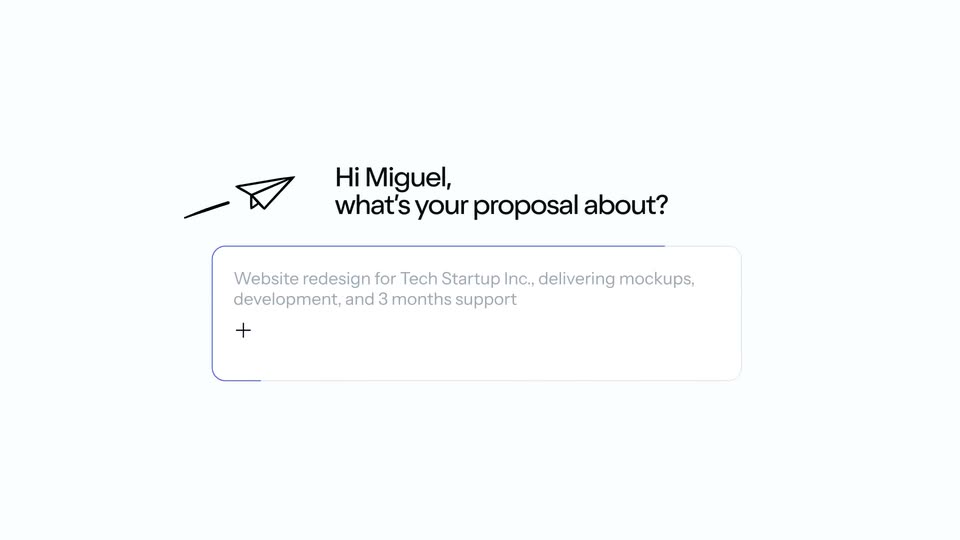
A line-drawn paper plane flies in from the left along a curved trail on a pale background. The headline builds to the right of it while a rounded input box scales in below, then gains a blue border, a blinking caret and an up-arrow button.
On-screen text: “Hi Miguel,”, “what's your proposal about?”, “more time”
Techniques: Kinetic type
Camera: Static
10 · Feature reveal · 0:20–0:21
Close-up of a chat input on a light gray background: a black hand-drawn scribble sits above the heading while a cursor types “Generate me a perfect sales p” in the white rounded field. The view zooms out to reveal the full greeting and the plus and send icons.
On-screen text: “Hi Miguel,”, “what's your proposal about?”
Techniques: UI zoom
Camera: Pan
11 · Feature reveal · 0:21–0:23
A white chat interface: a paper airplane logo sits beside the greeting 'Hi Miguel, what's your proposal about?', which slides into place above an input field. The field holds placeholder prompt text with a blinking caret, plus and send icons at its corners.
Techniques: Kinetic type
Camera: Static
12 · Feature reveal · 0:23–0:25
A white chat screen zooms into a typed prompt, then a rounded dropdown of integrations, Gmail, Notion, Slack, Hubspot, opens as two black cursors hover over the Slack row.
Techniques: UI zoom, Cursor demo
Camera: Static
13 · Feature reveal · 0:25–0:26
A blue shape wipes across the screen from left to right, covering the frame. A bright green curved line draws itself from the top left, and a small blue logo with a white letter appears above it.
On-screen text: “ate me a perfect sales proposal for my custom”, “t we shared on @”
Techniques: Masking
Camera: Static
14 · Feature reveal · 0:26–0:30
On a blue field, a yellow-green line draws a looping path that links white app icons popping in one by one. White text reads 'Pulls context from Gmail, Slack, and beyond.' A green bar sweeps in diagonally as the layout scales up.
On-screen text: “Pulls context from Gmail, Slack,”, “and beyond.”
Techniques: Masking
Camera: Push in
15 · Feature reveal · 0:30–0:31
A lime green field fills the frame while a blue triangle scales up from the top-left corner and a matching one rises from the bottom-right, squeezing the green into a tilted hexagon.
Camera: Static
16 · Feature reveal · 0:31–0:32
The lime send button with a black up-arrow fills the frame, then pulls back to a chat screen: a greeting and question sit above a prompt card, while a cursor glides to the button.
Techniques: UI zoom, Cursor demo
Camera: Pull out
17 · Feature reveal · 0:32–0:33
A paper plane icon and a two-line headline sit above a chat input box holding a typed prompt and a green send button. A cursor hovers on the button as the whole block slides down slightly.
On-screen text: “Hi Miguel, what's your proposal about?”
Techniques: Kinetic type, Cursor demo
Camera: Static
18 · Feature reveal · 0:33–0:43
A chat interface types a sales-proposal request, then a Working pill expands through four steps before a reply lists the proposal structure. The scene cuts to a blue screen where a white headline builds word by word above a tone-selection card.
On-screen text: “Your sparring partner.”, “Built for this deal, Not any deal.”
Techniques: UI zoom, Masking, Kinetic type, Cursor demo
Camera: Pull out
19 · Feature reveal · 0:43–0:45
A white brand-guidelines dialog on a blue background. The headline “Applies your brand. Exactly.” appears word by word above it, “Exactly.” boxed in lime. A cartoon wizard slides in from the left while a cursor drags a PDF page into the drop zone, which highlights blue.
On-screen text: “Applies your brand. Exactly.”
Techniques: Kinetic type, Cursor demo
Camera: Static
20 · Demo · 0:45–0:48
A product screen shows a task checklist and a brand-guidelines card listing a Style Extractor entry; a cursor hovers the green Next button, the interface fades out, and a blue caption scales in at center.
On-screen text: “Cobbling everything together...”
Techniques: Cursor demo, Kinetic type
Camera: Static
21 · Demo · 0:48–0:49
On a plain white field, a blue circular C mark sits left of a centered line that types out the phrase. The mark's gap rotates as the words fill in, shifting from light to solid blue.
On-screen text: “Cobbling everything together...”
Techniques: Kinetic type
Camera: Static
22 · Demo · 0:49–0:50
A faded chat thread scrolls up behind two large overlay lines, the black reply and the blue next-step line, which scale into view. The overlay then clears to reveal the full message list and the input box at the bottom.
On-screen text: “Perfect. Writing in craft-led voice, durability angle included.”, “Cobbling everything together...”
Techniques: Kinetic type
Camera: Pull out
23 · Demo · 0:50–0:54
The proposal document scrolls down through its slides: a wood texture captioned Smoked Ash, then a dining room photo beside a grid of wood samples. The left chat panel stays fixed, showing the conversation, checkmarks and processing steps.
Camera: Push in
24 · Demo · 0:54–0:58
The view zooms out from a close-up of a button to reveal a full document editor interface with a chat panel on the left. A cursor hovers over the Slides A4 button in the top toolbar.
Techniques: UI zoom, Cursor demo
Camera: Pull out
25 · Feature reveal · 0:58–1:01
Hand-drawn black line doodles of paper sheets and a pencil cup drift into place around the edges of a light grid background. The centered gray headline sits still while a lime-yellow highlight box pops in behind the bold black phrase below it.
On-screen text: “Export in ppt, doc, pdf”, “in a click.”
Techniques: Kinetic type
Camera: Pull out
26 · Feature reveal · 1:01–1:02
Hand-drawn sketch papers and a pen cup drift around the edges of a light gray frame while the tagline sits centered. A green highlight box snaps behind the word Handled, then a cartoon document character with arms and legs pops up below, flexing its biceps and pumping its fists.
On-screen text: “Your proposals.”, “Handled.”, “Export in ppt, doc, pdf”, “in a click.”
Camera: Pan
27 · CTA · 1:02–1:04
A sketchy document mascot with arms and legs flexes on a gridded white background while loose papers float at the edges. The gray line “Now go win the deal.” sits center, then a green highlighted “Faster.” slides in beside it as the mascot’s face pops open.
On-screen text: “Your proposals.”, “Handled.”, “Now go win the deal.”, “Faster.”
Techniques: Kinetic type
Camera: Pan
28 · CTA · 1:04–1:05
A gray headline reads “Now go win the deal. Faster.” with “Faster.” on a lime highlight, above a flexing paper character with a face and shoes. A blue panel wipes up from the bottom, leaving a small dark rectangle centered on the blue field.
On-screen text: “Now go win the deal.”, “Faster.”
Techniques: Kinetic type, Masking
Camera: Static
29 · Outro · 1:05–1:09
On a flat blue field, a white rectangle holding the blue 'cobl' wordmark, with a dark offset shadow beneath, settles into the center and holds. The small white URL 'cobl.ai' fades in at the bottom edge.
On-screen text: “cobl.ai”
Camera: Static