1:44

Replit Missions | Pursuing outcome-based results
Replit · Developer tools · Nov 2026
Cardamon’s 0:51 launch film runs 9 scenes, about 5.8 s each. The product is on screen from the first frame. The call to action lands at 0:46 (89% in), over a voiceover. The video is built as a slow glowing logo reveal, a continuous screen-recording tour that zooms in and out of the compliance table, then stacked benefit cards and a contact lockup. Its signature moves are the soft white glow on the logo, camera pushes into table rows, and blur transitions between the interface and the text cards.
Is this your launch? to your site or press kit.
Replit · Developer tools · Nov 2026
Lark · B2B · Aug 2025
Orchestrator.inc · Oct 2026
Films whose music sounds like this one, voice left out
Warp · Modern electronic
Lemlist · Modern electronic, upbeat
A locked-off dark navy frame centers the Cardamon logo as the mark and wordmark fade in and gain a soft white glow. Bottom captions change in sequence, and the final frame blurs into the glow.
On-screen text: “Mapping regulation used to take hundreds of hours”, “of manual repetitive compliance work.”, “But now with cardamon,”, “it can be done in minutes.”, “Let me show you how.”
Camera: Static
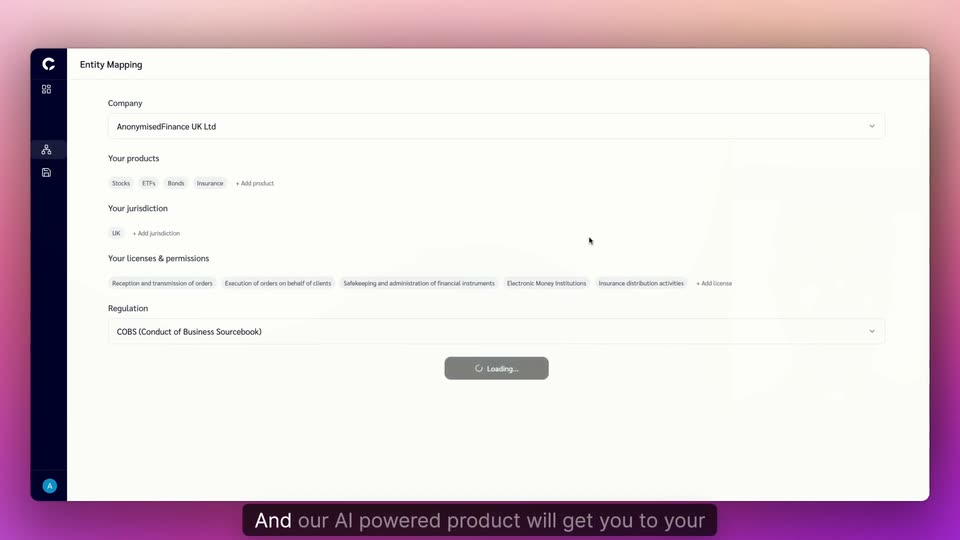
Close-up of the Entity Mapping form: the cursor picks a company from the dropdown. The view zooms out to the full app, then in on the Regulation list as the cursor selects COBS and clicks Begin Mapping. A spinner runs, then a results table of COBS items appears.
On-screen text: “Select your desired entity,”, “pick the regulation that you want mapped against”, “that”, “it and tap.”, “Begin mapping!”, “And our AI powered product will get you to your”, “obligations in moments.”, “you can see everything”
Techniques: Cursor demo, UI zoom
Camera: Pull out
A compliance mapping table fills the frame as the camera pushes into the rows. A cursor opens the Status filter, picks Applicable, then clicks Generate controls, which spins into a loading state while the view widens to show Type and Risk Tags columns.
On-screen text: “You can see everything that's applicable to you.”, “You can generate controls to see our AI suggestions based on your obligations”
Techniques: UI zoom, Cursor demo
Camera: Pan
A compliance mapping table sits on a pink-to-purple gradient. The camera zooms into the first row as a cursor clicks Edit Mapping and changes the Impact dropdown from High to Medium, then pulls back out. The table scrolls down while captions roll along the bottom.
On-screen text: “suggestions based on your obligations”, “and stay in full control by editing the output.”, “Whether you're getting ready for a new regulatory”, “launching a new product,”, “or ensuring you remain compliant,”, “we have you covered.”
Techniques: UI zoom, Cursor demo
Camera: Pull out
A document view in the product interface defocuses and blurs as the white headline 'Launch products' fades in at the center, set against a soft pink and purple gradient.
On-screen text: “Launch products”
Techniques: Kinetic type
Camera: Static
A dark navy background holds a centered stack of three bold sans-serif lines. White 'Launch products' is present from the start; magenta 'Enter new markets' and orange 'Stay compliant' fade in below it one after another.
On-screen text: “Launch products”, “Enter new markets”, “Stay compliant”
Techniques: Kinetic type
Camera: Static
White bold text “10X faster” sits centered on a dark navy field, then crossfades to the glowing Cardamon C mark and wordmark. Contact lines with globe and mail icons settle in the lower left corner as the sign-off.
On-screen text: “10X faster”, “cardamon.ai”, “[email protected]”
Camera: Static
A glowing white C mark with a leaf sits above the Cardamon wordmark on a deep navy field, contact lines pinned bottom left. The whole lockup holds still, then dims and fades to black over the clip.
On-screen text: “10X faster”, “cardamon.ai”, “[email protected]”
Camera: Static
A black screen holds as the sign-off appears: a large “C” mark, the “Cardamon” wordmark, and the email “[email protected]” below, all static on a locked-off frame.
On-screen text: “C”, “Cardamon”, “[email protected]”
Camera: Static