1:44

Replit Missions | Pursuing outcome-based results
Replit · Developer tools · Nov 2026
Lark · Aug 2025 · 0:48 · Full motion · AI-annotated
Lark’s 0:48 launch film runs 21 scenes, about 2.3 s each. The product shows up at 0:13. The call to action lands at 0:38 (79% in). Black typewriter cards state the billing pain, then 'Introducing Lark' cuts to a continuous dashboard screen-recording captioned with one-line feature claims, ending on a typed question and the logo-plus-URL card. The style is defined by a single monospace caret typing every headline letter by letter, hard cuts between black text cards and a locked light-mode UI, and a gray rounded caption bar that narrates each demo beat.
Is this your launch? to your site or press kit.
Replit · Developer tools · Nov 2026
Cardamon · B2B · Feb 2025
Resin · Nov 2026
Films whose music sounds like this one, voice left out
Penpot · Modern funk, hip-hop, and electronic dance music
Jupiter · Electronic dance music with hip-hop and funk influences
Manus · Electronic dance music
On a black background, the word Bill types in letter by letter in white, followed by a thin vertical cursor bar at the left of frame.
On-screen text: “Bill”
Techniques: Kinetic type
Camera: Static
On a black background, white text types out letter by letter behind a vertical caret. The line 'Billing your customers is complicated.' completes, the screen clears, then a second line begins typing 'Companies are drowning.'
On-screen text: “Billing your customers is complicated.”, “Companies are drowning”
Techniques: Kinetic type
Camera: Static
White bold sans-serif text types out on a black background with a blinking caret, upcoming letters dimmed gray. The first block reads Companies are drowning in operational overhead., then a second block types Endless hours lost to support emails, chargebacks, and fraud mitigation. The frame is locked.
On-screen text: “Companies are drowning in operational overhead.”, “Endless hours lost to support emails, chargebacks, and fraud mitigation.”
Techniques: Kinetic type
Camera: Static
A near-black frame holds four centered lines of white text. A thin blinking caret sits after the word fraud on the last line, then vanishes as that line reads fully solid.
On-screen text: “Endless hours lost to”, “support emails,”, “chargebacks,”, “and fraud mitigation.”
Camera: Static
White text types out on a black background with a blinking cursor, spelling a phrase before the line clears and a new word begins at the left.
On-screen text: “Endless hours lost to”, “What”
Techniques: Kinetic type
Camera: Static
A black screen holds a line of white text that types out left to right behind a vertical cursor, the untyped remainder shown in dim gray before the whole sentence brightens.
On-screen text: “What if there were a better way?”
Techniques: Kinetic type
Camera: Static
On a near-black background, a white sans-serif sentence types itself out letter by letter, a thin cursor trailing the last character. The line is then erased and a new word begins typing from the left.
On-screen text: “What if there were a better way?”, “Int”
Techniques: Kinetic type
Camera: Static
On a black background, the white word “Introducing” sits left of center with a blinking cursor. A blue rounded-square icon and the white word “Lark” then appear to its right.
On-screen text: “Introducing”, “Lark”
Camera: Static
On a black background, the white word Introducing holds still on the left while the blue Lark icon and white wordmark on the right snap from heavy motion blur into focus.
On-screen text: “Introducing”
Camera: Static
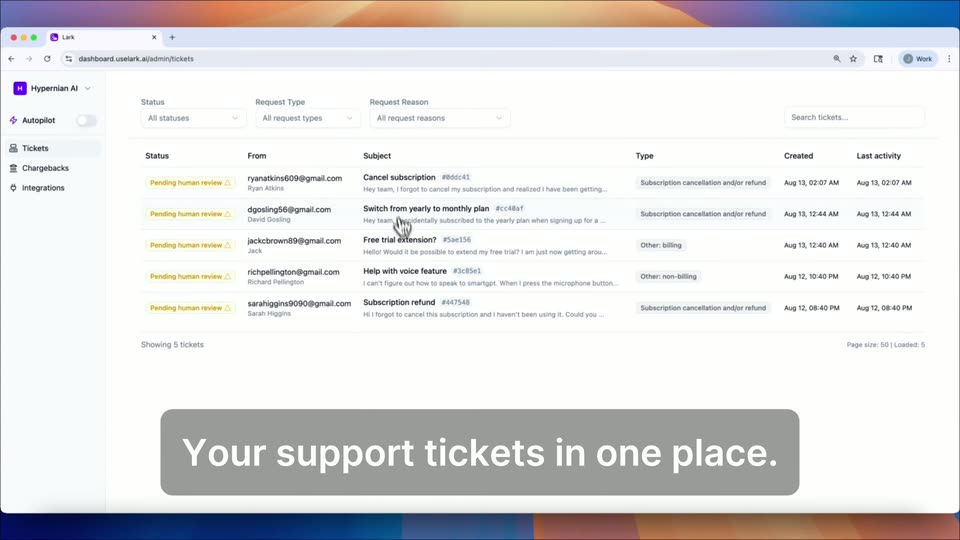
A light browser dashboard lists support tickets in a table with a left sidebar. A cursor hovers over the rows while a gray rounded caption bar with white text sits at the bottom. The frame stays locked on the interface.
On-screen text: “Introducing”, “Your support tickets in one place.”
Techniques: Cursor demo
Camera: Static
A browser window showing a ticket detail page zooms in as a cursor moves to the purple Execute action button and clicks it, the label switching to a loading spinner. Two caption lines fade in at the bottom.
On-screen text: “Prefer manual review?”, “Approve AI actions in a single click.”
Techniques: UI zoom, Cursor demo
Camera: Push in
A browser window shows a resolved support ticket. The frame zooms between the full page and the activity log, where the cursor hovers and the page scrolls to reveal the agent's reply. A gray caption bar at the bottom reads 'Agents do the work and reply to the customer.'
On-screen text: “Agents do the work and reply to the customer.”
Techniques: UI zoom, Cursor demo
Camera: Pull out
A browser window shows a ticket dashboard. A cursor clicks the Autopilot toggle as the view zooms in, and the row statuses flip from pending to Agent executing, then Closed. A gray caption bar sits at the bottom.
On-screen text: “Or let autopilot manage your inbox for you...”
Techniques: Cursor demo, UI zoom
Camera: Static
A browser window displays a dashboard. The cursor clicks Chargebacks in the left sidebar, and the main table crossfades from a populated tickets list to a chargebacks table that appears as gray skeleton loading rows.
Techniques: Cursor demo
Camera: Static
A flat browser window displays a chargebacks dashboard table. Status badges on the rows switch between Agent Executing and Under Review, simulating live updates. A dark caption bar at the bottom holds white text.
On-screen text: “and automatically contest chargebacks.”
Camera: Static
A browser window on a gradient desktop shows the Hypernarian AI chargebacks dashboard in slight 3D perspective. A cursor glides up the sidebar to select Chargebacks while the table rows settle into Under Review, and a gray caption bar sits at the bottom.
On-screen text: “and automatically contest chargebacks.”
Techniques: Cursor demo
Camera: Static
On a near-black background, a typewriter effect types the question line by line with a thin vertical cursor, the first line bright white while the rest is dim. The cursor then vanishes and the full text settles into solid white, centered on the frame.
On-screen text: “Ready to automate your billing operations?”
Techniques: Kinetic type
Camera: Static
A dark card shows a centered two-line white headline. The first line stays fixed while the second line types out behind a blinking caret, the untyped characters rendered as a dim gray ghost.
On-screen text: “Ready to automate”, “your billing operations?”
Techniques: Kinetic type
Camera: Static
A blue rounded-square icon bearing a white loop-and-dot mark sits left of the white word Lark on a near-black field. The lockup fades in from dim to full brightness over the first half second, then holds on a locked-off frame.
On-screen text: “Lark”
Camera: Static
On a near-black background, the blue Lark app icon and white wordmark sit centered, with the gray URL below. The icon's white glyph resolves from a brief stretch into its final shape, then the lockup holds still.
On-screen text: “uselark.ai”
Camera: Static
The Lark logo lockup holds centered on a near-black background with the URL uselark.ai below it. The URL is erased with a typing cursor, the lockup re-centers, and the frame fades to black.
On-screen text: “Lark”, “uselark.ai”
Techniques: Kinetic type
Camera: Static