1:37
Explore
CapCut - Your all-in-one e-comm toolkit is here. Meet the new CapCut Desktop!
CapCut · Oct 2025 · 1:46 · AI-annotated
- Length
- 1:46
- Scenes
- 90 · 1.2 s avg
- Product on screen
- 0:00
- Features shown
- 5
- Call to action
- 1:34 · 88%
- Voiceover
- Yes
00:00:00 / 01:47:00
CapCut’s 1:46 launch film runs 90 scenes, about 1.2 s each. The product is on screen from the first frame and 5 features are revealed, with social proof. The call to action lands at 1:34 (88% in), over a voiceover. The video chains short live-action shots and UI close-ups at a fast 35 cuts per minute, introducing each AI feature with a bold title card and then demoing it end to end. Signature moves include the recurring sticky note motif, 3D-tilted interface panels, floating frosted-glass product cards and confetti stings that punctuate the transitions.
Footage neededEstimated needs: 7 capture groups — your screens or recordings · 1 official logo — reused across the film · 39 filmed passages — shoot, supply or replace · 9 3D passages — build or supply
Is this your launch? to your site or press kit.
More like this
CapCut - Your all-in-one e-comm toolkit is here. Meet the new CapCut Desktop!, scene by scene
· 90 scenes as text
01 · Product intro · 0:00–0:00
A tight close-up of a bearded person's ear wearing olive-green over-ear headphones, with a teal sticky note stuck to the ear cup reading Black Friday is Coming in black script. The CapCut logo sits top left. The frame is locked-off and static against a blue sky.
On-screen text: “Black Friday is Coming”
Camera: Static
02 · Product intro · 0:00–0:01
A hand presses a pink sticky note reading Black Friday is Coming onto a beige mannequin torso, then the shot cuts to a hand writing the same phrase in black marker on a tan note pinned to a yellow boot.
Camera: Static
03 · Product intro · 0:01–0:01
A CapCut magazine in a blue basket carries a red sticky note with the tagline, then a cut to a purple note among lit candles. The handwritten text holds still in both locked-off shots, with a white CapCut logo top left.
On-screen text: “Black Friday is Coming”, “Black Friday is Coming!”
Camera: Static
04 · Product intro · 0:01–0:02
A handwritten sticky note reading 'Black Friday is Coming' is held fixed in the center as the background cuts from a close-up iced coffee cup with a leather watch band to a top-down laptop covered in stickers.
On-screen text: “Black Friday is Coming”
Camera: Static
05 · Product intro · 0:02–0:02
A purple sticky note with black script reading “Black Friday is Coming” sits on a white desk, then a hard cut to a red lamp beside a white organizer holding pink and yellow sticky notes. A small CapCut logo sits top left.
On-screen text: “Black Friday is Coming”, “CapCut”
Camera: Static
06 · Product intro · 0:02–0:04
A pink sticky note reading 'Black Friday Coming!' sits on a white keyboard, then cuts to a yellow note reading 'Let's Dooo This!!!' on a monitor as a ringed hand places it. A CapCut logo holds top left.
On-screen text: “Black Friday Coming!”, “Let's Dooo This!!!”
Camera: Static
07 · Product intro · 0:04–0:05
A white title card assembles the line Win Black Friday with CapCut Desktop. Black Friday sits in black script on a tilted cyan highlight, while a yellow tapered shape exits and the lower line scales in below.
On-screen text: “Win”, “Black Friday”, “with CapCut Desktop”
Techniques: Kinetic type
Camera: Static
08 · Product intro · 0:05–0:06
High-angle shot of a man in orange glasses and a brown cardigan seated at a desk on a blue-carpeted office floor, looking down at his hands. A three-line headline, 'Win Black Friday with CapCut Desktop', overlays the frame, the last line scaling in.
On-screen text: “Win”, “Black Friday”, “with CapCut Desktop”
Techniques: Kinetic type
Camera: Push in
09 · Product intro · 0:06–0:06
A white desktop computer sits angled on a desk in a bright office, its screen showing the CapCut interface with project cards and media thumbnails. The CapCut logo scales in the top-left corner.
On-screen text: “XCapCut”
Techniques: 3D mockup, Kinetic type
Camera: Push in
10 · Product intro · 0:06–0:07
A dark CapCut desktop interface shows a left sidebar and a right panel with an AI video maker card. A cyan cursor glides from the right panel to the sidebar and hovers over the AI design item, which highlights.
Techniques: Cursor demo
Camera: Static
11 · Product intro · 0:07–0:08
A close-up of the CapCut desktop interface. A cursor clicks the AI design item in the dark left sidebar, which lights up with a teal glow, while the right panel of cards and tools fades under a dark overlay.
Techniques: Cursor demo
Camera: Static
12 · Feature reveal · 0:08–0:09
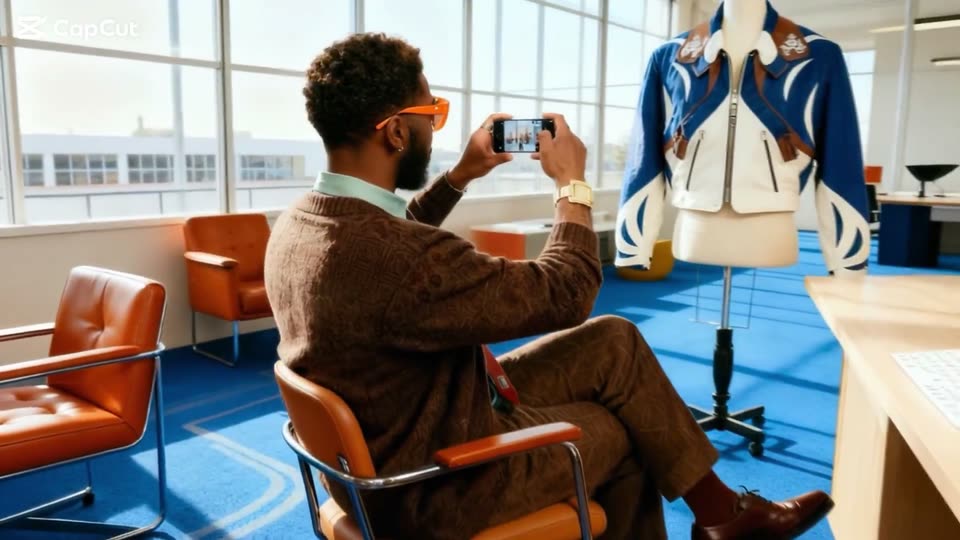
A man in a brown patterned sweater and orange glasses sits in an orange chair, holding a phone to photograph a mannequin dressed in blue and white. The camera pulls back to reveal the bright room, blue carpet and a white desk.
Camera: Pull out
13 · Feature reveal · 0:09–0:10
A jacket on a mannequin is framed by a yellow selection box in the CapCut editor, with a 0.5 to 3 speed slider at the bottom. The blurry image pulls into sharp focus, presenting the garment as a product shot in a room with orange chairs.
Camera: Static
14 · Feature reveal · 0:10–0:12
A man in orange sunglasses and a brown cardigan sits at a desk with a white keyboard, facing camera. Frosted-glass panels float around him at varying depths, each holding a jacket product shot, while a small teal arrow icon drifts across his chest.
Techniques: Parallax
Camera: Static
15 · Feature reveal · 0:12–0:14
A white card with a jacket thumbnail scales up to center as the prompt Put the jacket on a model types out, a cursor clicks Generate, then the view scrolls down to a chat panel with the same prompt and a Thinking status.
Techniques: Cursor demo
Camera: Static
16 · Feature reveal · 0:14–0:16
A light chat card tilts in 3D and straightens as the AI reply types out beneath a user prompt and jacket thumbnail, then a numbered plan list fades in below.
Techniques: 3D mockup
Camera: Pan
17 · Feature reveal · 0:16–0:16
A CapCut chat panel zooms out from the Thinking header to the full conversation. The AI plan lists two steps, then a generated photo of a blonde model in a blue jacket fades into a rounded frame above the input bar.
Techniques: UI zoom
Camera: Pan
18 · Feature reveal · 0:16–0:17
A light chat interface shows an AI reply with a numbered plan above a generated photo of a blonde model in a blue jacket on a desert ridge. The text scrolls up slowly, reframing onto the image.
Techniques: UI zoom
Camera: Push in
19 · Feature reveal · 0:17–0:18
A filmed woman in a blue-and-white jacket stands in a red-rock desert under a blue sky. A white rounded frame around her shrinks away to reveal the full shot, while a small card showing a maroon jacket floats at the right.
On-screen text: “visually engaging...”
Techniques: Masking
Camera: Push in
20 · Feature reveal · 0:18–0:19
A short-haired blonde model in a maroon-and-cream leather jacket stands against a desert canyon under a blue sky. A translucent rounded CapCut card holding a jacket thumbnail drifts down across her torso as her jacket swaps to a blue racing jacket. The CapCut logo holds the top-left corner.
Techniques: Morph
Camera: Static
21 · Feature reveal · 0:19–0:20
A blonde model in a black leather jacket poses against red desert rocks under a clear sky, then turns and walks out of frame, leaving the empty landscape. The CapCut logo holds in the top-left corner.
Camera: Pan
22 · Feature reveal · 0:20–0:21
Low-angle live-action shots of a man in a black tank top and ripped jeans standing among tan sandstone desert formations under a blue sky, then a close-up of his face looking down. The footage uses quick cuts and motion blur.
On-screen text: “CapCut”
Camera: Push in
23 · Feature reveal · 0:21–0:22
A man in a black tank and ripped jeans stands beneath a desert rock arch. White rounded cards float around him showing a plaid cardigan, leather pants and a faded item; the cardigan then appears on his torso, swapping his look.
Camera: Pull out
24 · Feature reveal · 0:22–0:24
A flat product interface shows a man posing under a desert rock arch; his outfit, the left item column and the right design-brief panel swap through several looks in rapid succession.
Camera: Push in
25 · Feature reveal · 0:24–0:24
A person in a green patterned top and black wide-leg pants stands under a desert rock arch. A green selection box with corner handles frames the figure and shrinks inward across the shot.
Camera: Static
26 · Feature reveal · 0:24–0:25
A row of fashion look cards sits beneath a marquee banner repeating 20% OFF EVERYTHING. The carousel tilts into 3D perspective, spinning the panels from front views to angled side profiles.
Techniques: 3D mockup
Camera: Pan
27 · Feature reveal · 0:25–0:27
A bearded man in orange glasses sits at a desk watching a desktop monitor. The screen shows a fashion site; its hero image of models on rocks settles as the page scrolls to the top, revealing the nav bar, while a '20% OFF EVERYTHING' strip scrolls by.
Camera: Pull out
28 · Feature reveal · 0:27–0:28
The word Photos sits large in dark gray sans-serif on a white pastel-tinted background. It shrinks as to appears, and a pink note sticker with a curled corner slides in beside it, carrying Posters in black script. The frame stays locked off.
On-screen text: “Photos”, “Photos to Posters”
Techniques: Kinetic type
Camera: Static
29 · Feature reveal · 0:28–0:29
A hand holds a purple perfume bottle with a white cap and a Black Friday label against a purple and pink circular patterned backdrop. The frame stays locked off while the bottle tilts gently, and the headline Photos to Posters sits over the shot.
On-screen text: “Photos to Posters”
Camera: Push in
30 · Feature reveal · 0:29–0:31
A woman with dark hair sits at a desk in a bright room, holding a purple perfume bottle over a laptop. White angled cards pop up around her, each displaying a 3D mockup of a perfume, eyeshadow palette, or red lipstick.
Techniques: 3D mockup
Camera: Pull out
31 · Feature reveal · 0:31–0:33
A white poster card slides in from the right on a pale blue field, holding four beauty products in a row: a purple perfume bottle, an open eyeshadow palette, a red lipstick, and a purple cream jar. A dark gray caption slides in beneath them.
On-screen text: “Show all these items in one poster”
Techniques: Kinetic type
Camera: Pan
32 · Feature reveal · 0:33–0:33
A white poster canvas pans right past a lipstick and a purple Black Friday jar, then reframes onto a teal circular up-arrow button as a gradient cursor moves in and clicks it.
On-screen text: “Show all these items in one poster”, “Black Friday”
Techniques: UI zoom, Cursor demo
Camera: Static
33 · Feature reveal · 0:33–0:37
The CapCut editor shows a Black Friday cosmetics design on a purple canvas, framed by cyan selection handles. A cyan cursor hovers over the Edit Elements button, then the view zooms into the bold headline text. An AI chat panel runs down the right edge.
On-screen text: “SECOND ITEM 50% OFF”, “BLACK FRIDAY”, “BUY 1 GET 3 FREE”
Techniques: Cursor demo, UI zoom
Camera: Push in
34 · Feature reveal · 0:37–0:38
Inside the CapCut editor, a purple promo card with a perfume bottle and a gold lamp sits inside a teal selection box. The headline text swaps from blue “BE MORE 50%” to black “BUY MORE GET MORE” while the BLACK FRIDAY tag stays fixed.
On-screen text: “BE MORE”, “50%”, “BLACK FRIDAY”, “BUY MORE”, “GET MORE”
Techniques: Kinetic type
Camera: Static
35 · Feature reveal · 0:38–0:40
The CapCut editor shows a purple Black Friday canvas with a perfume bottle, a prompt bar, and a Generate button. The view zooms into the canvas as the image becomes a 3D hand in a silver glove with an orange fur sleeve.
Techniques: UI zoom
Camera: Pull out
36 · Feature reveal · 0:40–0:41
A purple poster shows a hand holding a gold tray of beauty products while a gloved hand with a fur sleeve lifts a gold dome lid. A large black headline sits above, with a black tag and small captions at the bottom. The frame eases with a slight zoom.
On-screen text: “BUY MORE GET MORE”, “BLACK FRIDAY”, “BLACK FRIDAY. BOLD BEAUTY.”, “BUY 1 GET 3 FREE”
Camera: Pull out
37 · Feature reveal · 0:41–0:42
A woman types on a laptop at a white desk in a purple-carpeted studio as the camera trucks right to reveal a window; the white headline builds from “Model it.” to “Model it. Share it.” in the center.
On-screen text: “Model it. Share it.”
Techniques: Kinetic type
Camera: Push in
38 · Feature reveal · 0:42–0:43
A CapCut editor screen fills the frame: a checkered canvas holds a red lipstick photo while a teal cursor glides across it and a teal bounding box with corner handles snaps around the photo. A chat panel on the right lists the poster steps.
On-screen text: “Model it. Share it.”
Techniques: Cursor demo
Camera: Push in
39 · Feature reveal · 0:43–0:46
A white input card on a light gray field fades in and expands; a lipstick thumbnail drops into its corner while the prompt 'Have a model hold the lipstick' types out, and a teal cursor sweeps in to rest on the send button.
Techniques: Cursor demo
Camera: Static
40 · Feature reveal · 0:46–0:47
A close-up of a white interface card on a pale gray backdrop. A teal circular button with a white up-arrow sits center-right. A blue-to-green gradient cursor hovers at its lower edge and presses it, the circle shrinking slightly as it is clicked.
Techniques: Cursor demo
Camera: Static
41 · Feature reveal · 0:47–0:48
A white rounded panel on a pale blue background holds a gray plus icon beside a carousel of promo cards sliding in from the right. Each cyan-bordered card shows a Black Friday 50% off image of a woman applying red lipstick. The CapCut logo sits top left.
Camera: Pan
42 · Feature reveal · 0:48–0:49
A horizontal carousel of social media posts featuring a woman applying red lipstick and Black Friday discount text scrolls from right to left on a light blue background.
Camera: Pan
43 · Feature reveal · 0:49–0:50
The CapCut editor shows a Black Friday beauty ad in the main preview, its 50% OFF and BLACK FRIDAY text snapping into a clean layout, while a teal cursor taps the first template in the filmstrip of thumbnails below.
Techniques: Cursor demo
Camera: Static
44 · Feature reveal · 0:50–0:51
A CapCut template preview plays in the center, a woman in purple holding red lipstick under animated 50% OFF and Black Friday text. A horizontal row of thumbnail variations sits below on a light gray background, with a cursor resting on the selected tile.
Techniques: Cursor demo
Camera: Static
45 · Feature reveal · 0:51–0:52
The CapCut editor screen shows a Black Friday promo template in the preview: a woman applies red lipstick beside bold 50% OFF type, while a row of template thumbnails sits below, one marked with a teal play cursor. The preview photo pans and scales as the template plays.
Camera: Static
46 · Feature reveal · 0:52–0:53
Two hands hold a tablet upright over a sunlit cream shag rug. The screen shows a Black Friday design: a woman in a purple choker holding a red lipstick, with a large 50% OFF headline and a BLACK FRIDAY label. The tablet tilts gently.
On-screen text: “50% OFF”, “BLACK FRIDAY”
Camera: Push in
47 · Feature reveal · 0:53–0:53
A billboard on a concrete wall shows a Black Friday makeup ad; the scene cuts to a hand holding a phone where the same ad is resized into a social feed post.
Camera: Static
48 · Feature reveal · 0:53–0:54
Hands hold a tablet showing the CapCut editor with a Black Friday lipstick ad, then the device becomes a phone showing the same ad in a vertical feed.
Techniques: 3D mockup
Camera: Static
49 · Feature reveal · 0:54–0:56
A tablet in 3D perspective shows a Black Friday 50% off lipstick ad, then the layout expands into a grid of phones, tablets and a laptop with the same design, then zooms to a close-up where a cursor hovers the Follow button.
Techniques: 3D mockup, UI zoom, Cursor demo
Camera: Static
50 · Feature reveal · 0:56–0:56
In a dark CapCut interface, a poster card of a woman holding a lipstick, marked 50% off Black Friday, shrinks and slides to the right, exposing an AI dialogue panel with talk and react buttons.
Camera: Pull out
51 · Feature reveal · 0:56–0:58
A dark CapCut panel for the AI dialogue scene feature shows its upload box filling with a blue-to-teal gradient as a teal cursor hovers over it. The dialogue field types Give your poster a voice while a tilted promo video card fades out.
On-screen text: “AI dialogue scene”
Techniques: Cursor demo
Camera: Pan
52 · Feature reveal · 0:58–0:59
A dark voice-selection panel with four avatar cards and a teal Generate button crossfades to a black overlay, then a rounded video preview of a woman holding a red lipstick fades in. The white headline sits at the lower third while a tagline dissolves out over the panel.
On-screen text: “Give your poster a voice”
Camera: Pan
53 · Feature reveal · 0:59–1:00
A woman in a purple turtleneck holds a red lipstick to her cheek inside a rounded-rectangle frame on white. She looks at the camera as the caption sits at the bottom, the first word boxed in purple.
On-screen text: “Give your poster a voice”
Camera: Static
54 · Feature reveal · 1:00–1:01
A woman in a purple off-shoulder top holds a red lipstick near her face in a sunlit room, framed in a rounded rectangle on white. The caption 'Give your poster a voice' fades out as a 'Video Translator' pill with a sparkle-A icon appears at the bottom.
On-screen text: “Give your poster a voice”, “Video Translator”
Camera: Static
55 · Feature reveal · 1:01–1:04
A rounded video player on a white background shows a woman in a purple top holding lipstick, with a Video Translator chip and a scrolling row of language chips. English switches to Spanish as Spanish captions with purple word highlights appear, then the player shrinks and the chips clear.
On-screen text: “Y lleva tu producto al resto del mundo”, “And take your product global”
Camera: Pull out
56 · Feature reveal · 1:04–1:06
On a pale blue-to-white gradient, the dark sans-serif phrase “Link to” holds center. A bright green rectangle scales in to its right, and the word “Video” in black script lands on top of it.
On-screen text: “Link to Video”
Techniques: Kinetic type
Camera: Static
57 · Feature reveal · 1:06–1:07
A laptop rests on a wooden desk before a white wall, its screen displaying a grid of sneaker product cards with the heading NEW PREMIUM. Diagonal shafts of light cross the wall, and the CapCut logo sits in the top left corner. The frame holds steady.
Techniques: 3D mockup
Camera: Pull out
58 · Feature reveal · 1:07–1:09
A hiking-boot product page fills a laptop screen as a light beam sweeps across it. The view zooms into the address bar, a Copy button pops in and a cursor clicks it, while the right half reveals a man in an orange cardigan typing.
Techniques: Light sweep, UI zoom, Cursor demo, Split screen
Camera: Pan
59 · Feature reveal · 1:09–1:09
A CapCut interface sits on a light gray background, dark sidebar left, white panel right with a row of product photos. A cyan cursor glides in from the lower left and hovers over the Link button as the view pushes in on the panel.
Techniques: Cursor demo, UI zoom
Camera: Static
60 · Feature reveal · 1:09–1:10
On a light blue background, a white UI card shows a dark Paste tooltip above a gradient cursor. The frame settles on an input field where a long product URL fills in beside a shoe emoji, the cursor hovering below it and a Link button at the lower left.
Techniques: Cursor demo
Camera: Pan
61 · Feature reveal · 1:10–1:11
A black rounded button labeled Generate slides in from the right edge onto a white card. A blue-green gradient arrow cursor glides from the button's center to its lower-right corner, poised to click.
Techniques: Cursor demo
Camera: Static
62 · Feature reveal · 1:11–1:12
A teal cursor sits on a dark Generate button, which scales up to fill the frame as a diagonal light sweep crosses the white text. It cuts to a dark progress panel reading Generating videos... 43%, with a checklist left and a green phone mockup of a sneaker right.
Techniques: Cursor demo, UI zoom, Light sweep
Camera: Static
63 · Feature reveal · 1:12–1:13
A split-screen progress view: a checklist ticks off on the left as the counter climbs from 52 to 71 percent. On the right, an orange hiking boot spins on a green card ringed by social icons and an Export button.
Techniques: Split screen, 3D mockup
Camera: Static
64 · Feature reveal · 1:13–1:14
A green share card holding a hiking boot and Instagram, Facebook and TikTok icons slides left behind a yellow phone outline, then both dissolve into a blue-green gradient as the empty phone frame settles in the center.
Camera: Static
65 · Feature reveal · 1:14–1:16
A man in a safari hat and sleeveless vest stands in a sunlit jungle holding a hiking shoe, framed by a white rounded border. Pink hearts float upward along the right edge as the like count ticks up from 2553.0K to 2704.0K.
Camera: Static
66 · Feature reveal · 1:16–1:17
Phone-shaped cards slide left across a light gray background, each looping an outdoor clip: a green backpack, a man holding a shoe, a man pointing to a comment bubble, a woman pouring from a canteen, a hand with a green box. Bold white captions label each card.
On-screen text: “Product Display”, “Product highlights”, “Reply to”, “Pov”, “Unboxing”
Camera: Pan
67 · Feature reveal · 1:17–1:18
A horizontal carousel of vertical clips scrolls left, showing a man answering a camping comment, a woman pouring coffee, an unboxing of binoculars, and a person on rocks. White labels cap each card; the CapCut logo holds the top-left.
On-screen text: “Reply to”, “POV”, “Unboxing”, “Models show”
Camera: Pan
68 · Feature reveal · 1:18–1:20
A young man in an orange cardigan sits in a bright room with tall windows, head tilted down. Over him, a white headline starts oversized across the frame, then scales down to the full sentence centered at chest height. The CapCut logo stays in the top-left corner.
On-screen text: “Take your ads to next level”
Techniques: Kinetic type
Camera: Static
69 · Feature reveal · 1:20–1:21
A dark CapCut interface tilts in 3D perspective with shallow focus across a row of feature tiles. A teal cursor glides up from the lower right and hovers over the AI Video tile, while the CapCut logo holds the top-left corner.
On-screen text: “Take your ads to next level”
Techniques: 3D mockup, Cursor demo
Camera: Push in
70 · Feature reveal · 1:21–1:21
A man in an orange cardigan sits at a table typing on a laptop in a sunlit room, while frosted glass panels showing product photos (two bags, orange ski boots, a gray shoe) float and drift around him.
On-screen text: “CapCut”
Techniques: 3D mockup
Camera: Static
71 · Feature reveal · 1:21–1:23
A dark CapCut panel scales in beneath the AI Video title and play icon. A tilted card with orange hiking boots slides in from the right beside the upload field. A blue gradient washes over the panel, then fades back to the dark view.
Camera: Static
72 · Feature reveal · 1:23–1:23
A giant hiking boot floats in the Thames in front of Tower Bridge while a person sits cross-legged on the water. The frame is locked off as a dark caption bar at the bottom types out the line word by word.
On-screen text: “On river, giant mountain climbing shoe floating”
Techniques: Kinetic type, 3D mockup
Camera: Static
73 · Feature reveal · 1:23–1:24
A giant orange and black climbing boot with neon green laces floats in the Thames before Tower Bridge, a small man seated cross-legged on its toe. Ripples ring the boot in a locked-off wide shot.
On-screen text: “On river, giant mountain climbing shoe floating”
Techniques: 3D mockup
Camera: Static
74 · Feature reveal · 1:24–1:25
A busy city street fills the frame as a giant billboard shows a climbing shoe stepping into ocean waves. White water bursts out of the screen and cascades onto the road, where pedestrians and cars move past. A caption in a dark pill sits at the bottom.
On-screen text: “On river, giant mountain climbing shoe floating”, “City crowd amazed by giant climbing shoe ad”
Camera: Static
75 · Feature reveal · 1:25–1:26
A teal hooded jacket on a hanger, composited into the live shot, hangs from a helicopter hook above the Golden Gate Bridge as cars pass on the roadway. The CapCut logo sits in the top-left corner.
On-screen text: “City crowd amazed by giant climbing shoe ad|”
Techniques: 3D mockup
Camera: Static
76 · Feature reveal · 1:26–1:26
A giant olive-green tumbler stands upright in a snowy ski slope, its lid resting beside it, while small skiers glide past and snow-capped peaks fill the background. The white CapCut logo holds the top-left corner.
On-screen text: “CapCut”
Techniques: 3D mockup
Camera: Static
77 · Feature reveal · 1:26–1:27
Two people seen from behind in the foreground look up at an oversized green duffel bag with orange polka dots resting on a concrete elevated rail line. The CapCut logo sits in the top-left corner while the bag slowly turns.
On-screen text: “CapCut”
Camera: Pull out
78 · Feature reveal · 1:27–1:28
Over-the-shoulder shot of a person in an orange shirt watching the CapCut editor on a monitor. Inside the editing preview a green duffel bag with orange dots hovers above a street scene, and a teal cursor glides across the frame.
Techniques: Cursor demo
Camera: Static
79 · Feature reveal · 1:28–1:29
A teal Export button with an upload icon is centered on a white background. A small gradient arrow cursor glides in from the right and taps the button, which darkens with a drop shadow as it presses.
Techniques: Cursor demo
Camera: Static
80 · Social proof · 1:29–1:30
A tilted 3D view of a CapCut analytics dashboard with a line chart. A black tooltip tracking the chart's peak counts up from $21,764 to $33,167 while the camera holds a soft-focus perspective.
Techniques: 3D mockup
Camera: Push in
81 · Social proof · 1:30–1:31
A close-up of a light dashboard card on a pale background. The Total Sales figure rolls through changing dollar amounts beneath a search bar, while a blurred label sits at the bottom edge. The frame stays locked off at a slight angle.
Camera: Static
82 · Social proof · 1:31–1:32
A bright office set: a man in orange sunglasses pumps both fists over a laptop while a woman leans in laughing and a man in an orange cardigan leaps to his feet. The CapCut logo sits in the top-left corner.
On-screen text: “CapCut”
Camera: Static
83 · Social proof · 1:32–1:32
A man in an office, wearing orange sunglasses and a brown jacket, raises a fist and laughs as multicolored streamers and confetti fall around him. The CapCut logo sits in the top left corner.
On-screen text: “CapCut”
Camera: Static
84 · Social proof · 1:32–1:33
A man in a brown suit and orange sunglasses dances on a conference table as multicolored confetti falls through the office. Large white text reading This Black Friday scales in across the center of the frame.
On-screen text: “CapCut”, “This Black Friday”
Techniques: Particles, Kinetic type
Camera: Static
85 · Social proof · 1:33–1:34
A man in a blazer and orange glasses stands on an office table, arms raised, as confetti falls. The white headline This Black Friday sits centered, scaling up over outlined copies of the same text behind it, while the CapCut logo holds the top left.
On-screen text: “This Black Friday”
Techniques: Kinetic type, Particles
Camera: Static
86 · CTA · 1:34–1:36
On a white gradient background, the black headline “Win with CapCut” forms in the center as small multicolored confetti squares drift down. The CapCut logo sits top-left, and a larger “This Black Friday” line scales in. The frame stays locked off.
On-screen text: “Win with CapCut”, “This Black Friday”
Techniques: Kinetic type, Particles
Camera: Static
87 · Pricing · 1:36–1:38
On a pale white-to-blue gradient, a red highlight sticker reading 40% Off and bold black text First Month Desktop exclusive rotate and settle into place. Multicolored confetti squares burst outward and drift down, then clear away.
On-screen text: “40% Off”, “First Month”, “Desktop exclusive”, “For first-time subscribers to the monthly Pro plan only. Prices may vary by currency.”
Techniques: Kinetic type, Particles
Camera: Static
88 · Pricing · 1:38–1:42
A man in a floral shirt and sunglasses reclines on a lounge chair on a lawn by a turquoise beach. A crocodile covered in pink, yellow and green sticky notes lies in the foreground. The camera drifts right, sliding past the crocodile while palm trees and surfboards hold the left. A static price-offer text block holds on screen.
On-screen text: “40%0ff”, “First Month”, “Desktop exclusive”, “For first-time subscribers to the monthly Pro plan only. Prices may vary by currency.”
Camera: Static
89 · Outro · 1:42–1:44
A smiling man in orange sunglasses faces the camera on a tropical beach, frame locked off. The white CapCut wordmark scales in over his face, aligned with the sunglasses, while the small brand logo sits in the top-left corner.
On-screen text: “CapCut”
Techniques: Kinetic type
Camera: Static
90 · Outro · 1:44–1:46
The CapCut logo, a black ribbon icon beside the bold wordmark, holds centered on a soft white gradient background with faint pastel tints in the corners. The frame is locked off for the full duration.
Camera: Static