1:47


Sam Gorman - Today we're launching Rivet, a tool that explores dozens of interface
Rivet · B2B · Jul 2026
Flask · Apr 2026 · 1:37 · AI-annotated
Flask’s 1:37 launch film runs 46 scenes, about 2.1 s each. The product is on screen from the first frame and 8 features are revealed, with social proof. The call to action lands at 1:24 (87% in), over a voiceover. The video alternates a locked-off presenter shot with rapid screen recordings, cutting about 26 times per minute in step with a 129 bpm beat. Its signature moves are word-by-word captions, white hand-drawn strokes over the video, and device mockups tilted in 3D on a pale blue field.
Is this your launch? to your site or press kit.
Rivet · B2B · Jul 2026
Pika · AI · Oct 2026
A man in a black tee sits at a white desk with a laptop and boom mic, gesturing as he speaks. A rounded comment card with the line 'the textbox killed creative work' fades in over him, then the neon flask sign on the wall lights up. Subtitles appear below.
On-screen text: “the textbox killed creative work”, “so today”, “I'm launching Flask,”, “the first”, “collaboration tool”, “that lets you share”, “complex”, “creative feedback”
Camera: Pull out
A man with glasses and a black t-shirt sits at a white desk, gesturing while speaking into a RØDE boom-arm microphone. A laptop sits in front of him and a neon flask sign glows on the wall behind. On the left, a white caption reveals word by word as he talks.
On-screen text: “creative feedback”, “without typing a word”
Techniques: Kinetic type
Camera: Static
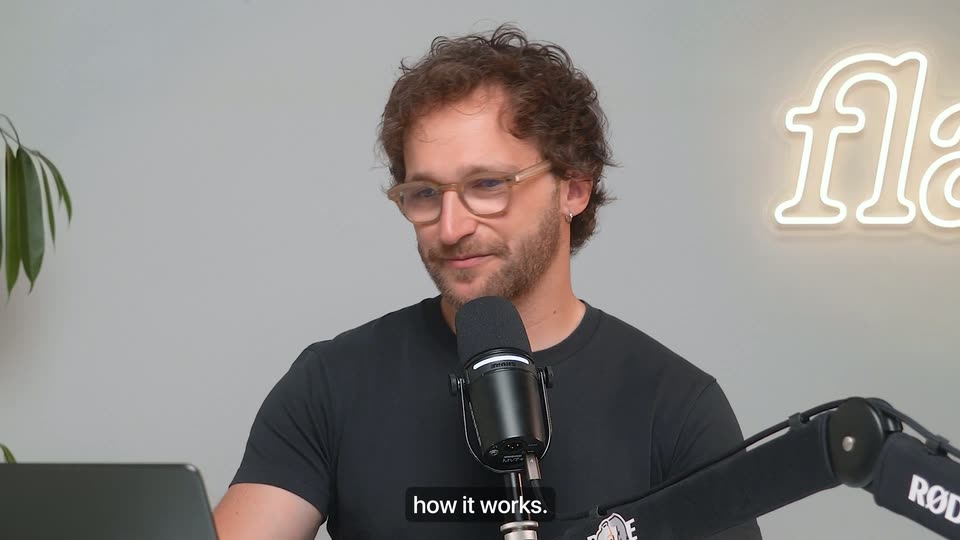
A bearded man with curly hair and glasses sits at a desk, speaking into a studio microphone on a boom arm while gesturing with his right hand. A glowing cursive neon sign and a leafy plant decorate the pale wall behind him, and subtitles caption his line.
On-screen text: “Let me show you”, “how it works.”
Camera: Static
A dark app window on a pale blue field plays a video draft that cuts from a singer at a microphone to a man in sunglasses, with a cursor on the timeline scrubber. Vertical white words 'flask' and 'ROD' frame the left and right edges.
On-screen text: “Actual screen recordings of the product”, “flask”, “Your editor”, “ROD”, “how it works.”
Techniques: Cursor demo
Camera: Static
A dark video-review interface fills the frame. A music video plays in the player while a hand cursor drags the progress-bar scrubber rightward. White caption phrases pop in at the bottom center over a dark pill, and a feedback panel sits on the right.
On-screen text: “Actual screen recordings of the product”, “just sent you”, “the latest draft”, “of your video.”
Techniques: Cursor demo, Kinetic type
Camera: Static
A dark video player fills the frame, showing a timecode and a pill-shaped Record Feedback button. A white hand cursor glides down and taps the button, which glows with a warm pink-orange gradient as a caption slides in below.
On-screen text: “Actual screen recordings of the product”, “of your video.”, “Hit record feedback”
Techniques: Cursor demo
Camera: Static
A dark product screen shows a top timer and a white hand cursor over a bottom bar. The bar expands from three centered dots into a row of icons and a round record button. Captions swap beneath the cursor.
On-screen text: “Actual screen recordings of the product”, “Hit record feedback”, “and just talk”
Techniques: Cursor demo, Morph
Camera: Static
A man in a black t-shirt sits at a white desk, gesturing as he speaks into a RØDE microphone on a boom arm. An open laptop sits before him, flanked by leafy plants, with a glowing neon flask sign on the wall behind. The locked-off frame holds one subtitle.
On-screen text: “and just talk”
Camera: Static
A bearded man in a black t-shirt sits at a desk talking into a RØDE mic on a boom arm, gesturing with one hand. A neon flash sign and plants fill the wall behind him; a laptop sits at left. White captions in a dark box appear at the bottom.
On-screen text: “through”, “your feedback.”
Camera: Static
A dark product window plays a music clip with a feedback sidebar; a cursor draws two white curved lines along the clip's edges, then the frame zooms into the video as the cursor points at its center.
On-screen text: “Actual screen recordings of the product”, “This is looking”, “pretty good.”, “Probably should have”, “a bit more vignetting”, “to focus”, “the attention”, “right here.”
Techniques: Cursor demo, UI zoom
Camera: Pull out
A video player shows a man in a white coat standing before two brick arches. White hand-drawn strokes scribble across the arches as the bottom captions change and the progress bar advances.
On-screen text: “I like what we're doing in right here.”, “Let's remove these arches”, “I think we needto frame the backdrown better”
Camera: Static
Inside a video player, a stage clip plays with a singer and two dancers; white lasso outlines draw themselves around the figures in sequence while a small cursor marker hovers above each. A gradient progress bar and timecode line the bottom edge.
Techniques: Cursor demo
Camera: Static
A dark recording control bar sits centered. A hand cursor taps the camera icon, and a circular preview opens above the bar showing a man with glasses and headphones waving. The tooltip switches from Record Screen to Record Camera as the timer counts up and the bottom caption swaps.
On-screen text: “to show things.”, “Turn on your camera”, “or share your screen”, “any reference.”
Techniques: Cursor demo, Masking
Camera: Static
A man in a black t-shirt sits at a white desk, gesturing with both hands as he speaks into a microphone mounted on a boom arm. An open laptop faces away from camera. Behind him, a neon flask sign glows on a gray wall between leafy green plants.
On-screen text: “Now watch,”
Camera: Static
A dark video-player panel fills the lower frame, its timeline reading 0:00 / 3:30 above a pill button marked Writing Feedback.. The panel slides down and out, revealing blurred footage of a person in a green jacket behind it. A bottom caption swaps from Now watch, to Flask automatically turns.
On-screen text: “Now watch,”, “Flask automatically turns”
Camera: Pull out
A dark app window shows a video player on the left and a timestamped feedback list on the right. The window reframes from a tight crop to a full view while the video focus pulls from blur to sharp. White caption pills appear phrase by phrase along the bottom.
On-screen text: “Flask automatically turns”, “all that”, “into structured”
Camera: Static
A close-up of a dark feedback panel beside a singing video, then the view pulls back to reveal the whole window as a rounded card on a light gray field. A lower-third caption swaps from “into structured” to “timestamped” as the zoom out completes.
On-screen text: “into structured”, “timestamped”, “feedback”
Techniques: UI zoom
Camera: Pull out
A man with glasses and a black shirt sits at a white desk, speaking into a microphone on a boom arm and gesturing with his hands. An open laptop sits before him, backed by a neon sign and green plants.
On-screen text: “to the exact frame”, “on your timeline,”
Camera: Static
A dark feedback panel with timestamped comments sits beside a blurred video frame. A cursor moves down the list as colored category tags pop in next to the timestamps, while white subtitles run along the bottom.
On-screen text: “on your timeline,”, “and auto-tagged exactly”, “for how your”, “You can choose”
Techniques: Cursor demo
Camera: Push in
A dark settings panel overlays a blurred video of a suited person, its Feedback style dropdown open with Transcript, Structured, Caveman and Custom Prompt rows. A cursor rests near the Record Feedback button while a bottom caption swaps between phrases.
On-screen text: “your feedback style”, “or build your own.”
Techniques: Cursor demo
Camera: Static
A dark modal titled “Custom feedback prompt” fills the center, its text box listing three bullet lines over a blurred video call and comment sidebar, while a white arrow cursor hovers in the field. A bottom caption swaps from “or build your own.” to “And yep,” on a locked-off frame.
On-screen text: “or build your own.”, “And yep,”
Techniques: Cursor demo
Camera: Static
A man with curly hair and glasses sits at a white desk, gesturing with both hands toward a microphone on a boom arm. A laptop sits open before him; a neon flask sign glows on the wall behind, framed by leafy plants. The shot is locked off.
On-screen text: “And yep,”, “Iknow”
Camera: Static
A dark options panel lists feedback styles, a large white cursor hovers over the Caveman row. The panel then fades to reveal a video player timeline behind it, while small captions appear at the bottom.
On-screen text: “you're wondering”, “there's even”
Techniques: Cursor demo
Camera: Static
A dark feedback panel lists timestamped comments with cartoon avatars and waveform icons. The list scrolls up as entries fade in, revealing an earlier comment at the top, while a small caption pill reads 'Caveman mode.' at the bottom center.
On-screen text: “Caveman mode.”, “Click on a piece”
Camera: Static
A man in a black t-shirt and glasses sits at a white desk, gesturing with one hand while speaking into a boom microphone. A neon flask sign glows on the wall behind him, framed by green plants. The locked-off shot holds while white subtitle captions appear at the bottom.
On-screen text: “Click on a piece”, “of feedback”
Camera: Static
A dark review interface: the surrounding comment list blurs and darkens while the central comment text and a green Clothing tag stay sharp. A white hand cursor hovers over the copy, and a small caption pill at the bottom swaps short phrases.
On-screen text: “and more vignetting → focus attention to center”, “visual reference”, “of feedback”, “or any”
Techniques: Cursor demo
Camera: Push in
A dark feedback app mockup floats in 3D on a pale blue backdrop. Inside, a talking-head video plays while a white pen stroke draws a line and a zigzag across the frame, and a caption line swaps at the bottom.
On-screen text: “and jump straight”, “to the recording,”, “explaining that part”, “with synced playback,”
Techniques: 3D mockup, Cursor demo
Camera: Static
A video player UI fills the frame: a man's face with white hand-drawn strokes on top, a circular avatar of a curly-haired man centered on the timeline, and a playback bar below. A gray caption pill reads at the bottom while the progress bar advances slightly.
On-screen text: “realtime drawing”
Camera: Static
A dark video editor interface fills the frame. The top preview shows a man in a beige jacket speaking, while a circular avatar of a bespectacled man points at center. The timeline playhead advances and the bottom caption swaps from realtime drawing to and any visual reference.
On-screen text: “realtime drawing”, “and any visual reference”
Camera: Static
A dark video-review interface plays a clip of a man dancing in an arched courtyard while a comment panel lists feedback on the right. A cursor draws a white arch over the clip, captions swap at the bottom, and the video frame scales up at the end.
On-screen text: “and any visual reference”, “you shared.”, “You can get”, “an overview”
Techniques: Cursor demo, UI zoom
Camera: Static
A tilted 3D tablet on a pale blue background shows a video editor with a talking-head clip on the left and a feedback list on the right that scrolls up while a cursor hovers a comment. A white caption phrase updates at the bottom.
On-screen text: “and view”, “all your feedback”
Techniques: 3D mockup, Cursor demo, Kinetic type
Camera: Static
A tilted smartphone mockup on the right holds a dark feedback list with timestamps, avatars and colored dots, which scrolls slowly. Behind it, a blurred video editor timeline with a room preview sits on the left.
On-screen text: “You. Take a look at this.”
Techniques: 3D mockup
Camera: Static
A dark feedback panel titled All feedback floats over a blurred room on the left. Its list of timestamped comments with avatars and colored dots scrolls upward by one row. A white caption and filter it sits centered along the bottom edge.
On-screen text: “and filter it”
Camera: Static
A dark-mode app screen fills the frame over a blurred desk. A white cursor moves down a dropdown list, then opens a Tag filter menu and hovers “does not contain” as the view tightens on the menu.
On-screen text: “exactly how you like.”, “with your team”
Techniques: Cursor demo, UI zoom
Camera: Push in
A dark feedback panel sits at the right over a blurred video still. A cursor taps the Share button, opening a sharing menu with access rows; the cursor then opens the Can View dropdown, revealing Can Comment, Can View and No access options. White captions read at the bottom.
On-screen text: “with your team”, “or with anyone.”, “But I'm kind of a”
Techniques: Cursor demo
Camera: Static
A curly-haired man in glasses and a black tee sits at a white desk, gesturing toward a black microphone on a boom arm. A neon flask sign glows on the wall behind him, framed by plants, with a laptop on the desk. A white caption sits at the bottom.
On-screen text: “But I'm kind of a”
Camera: Static
A man with curly hair and glasses sits at a desk, speaking into a studio microphone on a boom arm. A neon sign and leafy plants frame the gray wall behind him. White subtitles on dark boxes appear at the bottom of the locked-off shot.
On-screen text: “But I'm kind of a”, “lazy person,”
Camera: Static
A dark chat window tilts in 3D, then flattens as a hand cursor taps the plus button and opens a menu. The cursor hovers Connectors, a submenu slides in from the right, and the cursor flips the Flask toggle on. A caption reads at the bottom.
On-screen text: “lazy person,”, “just connect”, “Flask to Claude”
Techniques: 3D mockup, UI zoom, Cursor demo
Camera: Push in
A dark dropdown lists Flask with a blue toggle that a white hand cursor flips to gray, then the frame cuts to a chat window where the typed prompt reads 'catch me up on the latest feedback on my videos' beside a Sonnet 4.6 selector.
On-screen text: “or any AI tool”
Techniques: Cursor demo
Camera: Push in
Dark chat screen: a prompt sits in a rounded input bar with an orange send button, then the view cuts to the response being typed out line by line under a serif heading, marked by orange asterisk icons. Bottom captions swap with the voiceover.
On-screen text: “and let it handle”, “all the busywork.”, “This isn't a concept.”
Techniques: Kinetic type
Camera: Static
A man with curly hair and glasses sits at a desk behind a RØDE microphone, gesturing with both hands as he speaks. A neon flask sign and leafy plants fill the wall behind him. The camera stays locked off in a medium shot.
On-screen text: “This isn't a concept.”, “Flask is already”, “used by creative”
Camera: Static
Testimonial quotes cycle on a dark background, each with a small logo and name, while caption pills at the bottom follow the voiceover. The scene cuts to a creator at a desk with a laptop and RØDE mic in front of a neon flask sign.
On-screen text: “used by creative”, “Flask completely changes how I collaborate with our team. It adds a new layer to creative communication I didn't know existed”, “MKBHD / The Studio”, “Eric Villa, Producer”, “teams,large”, “and small,”, “Flask is our go-to for collaboration and never turn”, “Raycast”, “Sam Stryker, Cofounder”, “favorite creators,,Flask is fooling into video collaboration and never that I'm going back. Flask is crazy. Stacyas Feretti (1.4M followers)and you can”
Techniques: Kinetic type
Camera: Static
A bespectacled man in a black t-shirt sits at a white desk with a laptop and boom microphone, gesturing while he talks to camera. Plants and a neon flask sign fill the background, and a white flask.do URL appears over his chest.
On-screen text: “and you can”, “try it out right now”, “flask.do”, “Oh, and”
Camera: Static
A man with glasses sits at a desk before a studio mic, gesturing as he speaks. A neon flask sign glows on the wall behind him, plants flank the frame, and a large white flask.do wordmark fades out at center while captions roll along the bottom.
On-screen text: “flask.do”, “Oh, and”, “this is a”, “bootstrapped product”, “independent company.”
Camera: Static
A dark close-up of a post's engagement row: the retweet count 169 glows green, then the comment count 102 glows blue, each with a soft circular halo. It cuts to a man with glasses speaking into a studio mic beside a flask neon sign.
On-screen text: “independent company.”, “So if you want”, “to support”, “this launch,”, “you can just retweet”, “this post”, “and comment”, “down below.”
Camera: Push in
A curly-haired man with glasses and a black t-shirt sits in front of a studio microphone, smiling and talking to the camera. A glowing neon sign and a plant sit on the white wall behind him. A caption reading down below. holds at the bottom of the frame while the locked-off camera stays still.
On-screen text: “down below.”
Camera: Static