0:30

Lovable is now in Slack
Lovable · Developer tools · Sep 2026
Canva’s 1:20 clip runs 20 scenes, about 4.0 s each. The product is on screen from the first frame and 3 features are revealed. The call to action lands at 1:16 (95% in), over a voiceover. The video opens and closes on blue 3D title cards, then cuts to a green-lit keynote stage where two presenters in green suits walk through the Work Kits launch, the marketing template grid, and the app integrations. Its signature moves are the sliding name-tag pills, the rounded-window reveal that frames the live stage inside a collage, and the slow push-in on a 3D office of floating cards, all set to a steady upbeat tempo.
Is this your launch? to your site or press kit.
Lovable · Developer tools · Sep 2026
GPT-6.1 Terra · Oct 2026
The text “Canva Create” scales up in the center against a blue background with abstract 3D shapes, including a textured sphere and a smooth circle.
On-screen text: “Canva Create”
Techniques: Kinetic type
Camera: Static
Over soft blue 3D spheres, the Canva Create wordmark sits at the top while Work Kits assembles and scales in the center, a pale highlight bar and green caret flashing behind it. A lime Sonya tag slides from the bottom up to the line's right edge.
On-screen text: “Canva Create”, “Work Kits”, “Sonya”
Techniques: Kinetic type
Camera: Static
A blue title card holding “Work Kits” scales down to reveal a horizontal strip of panels: a yellow vertical “Canva Create” bar, a white card with a green X, a yellow “Maya” bar, and cutout photos of two smiling people at the edges.
On-screen text: “Canva Create”, “Work Kits”, “Sonya”, “Maya”
Camera: Pull out
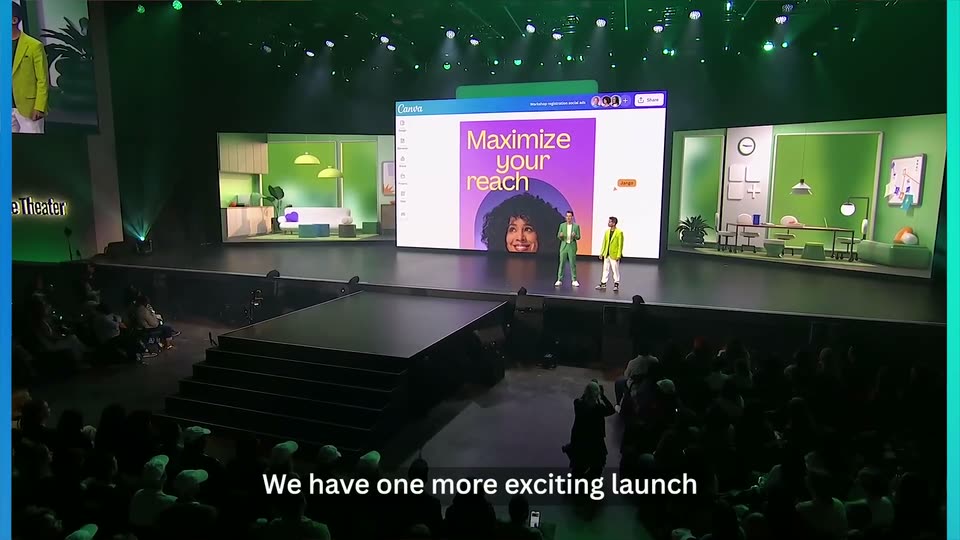
A live stage recording of two presenters and a slide reading Maximize your reach sits in a rounded window over a colorful collage of portrait circles and date panels. The window scales up so the side panels slide off frame, and a white subtitle line fades in at the bottom.
On-screen text: “We have one more exciting launch”
Camera: Push in
Two presenters in green suits stand on a stage before a pale lavender backdrop; the left speaker gestures, then the right one speaks. A name card for Zach Kitschke and a Canva Create button slide in at lower right, with captions along the bottom.
On-screen text: “Maximize your reach”, “We have one more exciting launch”, “Zach Kitschke”, “Chief Marketing Officer”, “Zach”, “that makes it easier than ever to get a jumpstart on your work.”, “Canva Create”, “100% Zach.”
Techniques: Kinetic type
Camera: Static
Wide locked-off shot of a green stage at Canva Create. Two presenters stand before a large screen showing the Canva editor with a purple 'Maximize your reach' design; a lower third names the speaker while subtitles caption the Work Kits launch.
On-screen text: “Zach Kitschke”, “Chief Marketing Officer”, “Canva Create”, “100% Zach.”, “Today we're launching Work Kits,”
Camera: Static
Two presenters stand on a green-lit stage in front of a large screen showing the Marketing Work Kit template card. A lower-third name card, a Canva Create pill, and subtitle captions slide in at the bottom as the presenters gesture.
On-screen text: “Indy Sen”, “Ecosystem Marketing Leader”, “Today we're launching Work Kits,”, “Canva Create”, “a curated set of thirty best in class templates,”, “designed to support your everyday Marketing tasks.”
Camera: Push in
Two presenters in green outfits stand on a stage before a large screen. The screen shows a green Marketing Work Kit card, then switches to a guide view with template documents. A white subtitle reads the voiceover line at the bottom.
On-screen text: “Now, when it comes to campaign strategies,”
Camera: Static
Wide shot of a green stage set where two presenters stand at the right beside a large screen. The screen pans down through Canva marketing templates, from a centered Work Kits title card to campaign management and lifecycle marketing cards.
On-screen text: “Now, when it comes to campaign strategies,”, “mapping user personas, creating content calendars, and more,”
Camera: Static
Two presenters in green suits stand on a stage while a large screen behind them scrolls through a grid of marketing template cards. White subtitles caption the bottom of the frame.
On-screen text: “mapping user personas, creating content calendars, and more,”
Camera: Static
Two presenters stand on a green stage before a large screen that scrolls up through a grid of marketing template cards, passing Go-to-market strategy, Campaign Assets, and Thought starters. Subtitles at the bottom track the narration.
On-screen text: “mapping user personas, creating content calendars, and more,”, “these templates do all the heavy lifting for you.”, “They're also easy to make and customize to make it your own.”
Camera: Static
A man in a lime green blazer over a dark green shirt stands center stage, hands clasped then opening as he speaks, in front of a green backdrop with a potted plant and a white frame. A white caption bar sits at the bottom of the frame.
On-screen text: “And now, with quick access to integrated apps like Asana or Monday.com”
Camera: Static
A man in a lime green blazer stands center stage, gesturing with both hands while speaking. A green wall with a plant silhouette and a side screen showing a hand holding an avocado fill the background. A two-line caption sits at the bottom.
On-screen text: “And now, with quick access to integrated”, “apps like Asana or Monday.com”
Camera: Static
Two presenters stand on a dark stage under green spotlights, in front of a large 3D-rendered green office backdrop with floating app-integration cards. The camera slowly pushes in toward the central Marketing panel while the presenters gesture and subtitles run along the bottom.
On-screen text: “And now, with quick access to integrated apps like Asana or Monday.com”, “for project management, workflow management,”, “as well as Binder and SharePoint to access your digital assets,”, “you'll find everything you need to kickstart any marketing project or level up your assets.”, “But Indy, it wouldn't be fair just to keep all the fun for Marketing, would it?”
Techniques: 3D mockup
Camera: Push in
Two presenters stand on a stage before a screen showing a Google Ads ad-creation mockup with a green Flash sale card. The man in the green suit gestures while the man in the lime blazer smiles and spreads his arms. White subtitles sit on a dark bar at the bottom.
On-screen text: “But Indy, it wouldn't be fair just to keep all the fun for Marketing, would it?”, “You know it, Zach.”, “So what we've done is we've also created Work Kits”
Camera: Static
Two presenters stand on a wide conference stage before a wall of floating product cards, one in a green suit, one in a yellow jacket. The dark audience fills the foreground as they gesture while speaking under green stage lighting.
On-screen text: “So what we've done is we've”, “also created Work Kits”
Camera: Static
Wide locked-off shot of a green keynote stage. Two presenters stand at right beside a large screen reading “Work Kits are available now,” with a furnished green set on either side and a dark audience in the foreground. White subtitles cycle along the bottom.
On-screen text: “Work Kits are available now”, “So what we've done is we've also created Work Kits”, “Marketing”, “for other departments as well:”, “HR, Sales, and Creative.”, “And what you have are a curated set of templates and apps to go with them as well.”
Camera: Push in
Two presenters stand on stage before a green backdrop; the man in the lime blazer gestures while speaking, the one in the green suit listens. White captions run along the bottom. A white card with black text slides in from the left as the scene ends.
On-screen text: “And what you have are a curated set of templates and apps to go with them as well.”, “But more on that later.”, “So there you have it.”, “Work Kits are available now”
Techniques: Masking
Camera: Static
Two presenters stand on a green set dotted with app icons, framed by sliding vertical panels carrying name tags and a script logo. The panels scroll sideways into a sign-off collage of portrait strips, a serif headline, and a URL.
On-screen text: “Canva Create”, “Maya”, “Work Redesigned”, “canva.com/canva-create”
Techniques: Kinetic type, Masking
Camera: Pull out
A 3D carousel of design cards on a blue stage; the camera zooms into the center card showing “Work Redesigned” with collaborator name tags, as multicolored confetti falls around it.
On-screen text: “Canva Create”, “Work Redesigned”, “canva.com/canva-create”
Techniques: UI zoom, Particles
Camera: Push in