
0:59
Explore
00:00:00 / 01:38:00
- Length
- 1:38
- Scenes
- 19 · 5.2 s avg
- Product on screen
- 0:00
- Features shown
- 3
- Call to action
- 1:34 · 96%
- Voiceover
- Yes
- Views
- 80K on YouTube
as of November 27, 2026
Canva’s 1:38 launch film runs 19 scenes, about 5.2 s each. The product is on screen from the first frame and 3 features are revealed. The call to action lands at 1:34 (96% in), over a voiceover. The video alternates animated blue title cards with a live keynote stage, where two presenters walk through the Data Autofill and Recordings demos on a giant screen before a confetti CTA card. Pacing holds near six cuts a minute, built on slow push-ins on the stage, scale-in headlines, and sliding portrait panels as the signature moves.
Footage neededEstimated needs: 1 capture group — your screens or recordings · 1 official logo — reused across the film · 15 filmed passages — shoot, supply or replace · 1 graphic passage — draw or supply
Is this your launch? to your site or press kit.
More like this

1:03


Bolna - Voice AI for India
Bolna AI · B2B · Sep 2025
0:16

See FlashDrive (YC F26)’s activity on LinkedIn
Wondersearch · B2B
Canva Create 2024: Introducing Data Autofill & Recordings, scene by scene
· 19 scenes as text
01 · Product intro · 0:00–0:01
On a field of soft blue shapes, the white Canva Create wordmark scales down and drifts to the top as the light headline Data Autofill + Recordings scales up beneath it, with a small cursor tag labeled Sonya.
On-screen text: “Canva Create”, “Data Autofill + Recordings”
Techniques: Kinetic type
Camera: Static
02 · Product intro · 0:01–0:02
A blue title card with a glossy sphere and a textured blob in the background. The white headline Data Autofill + Recordings scales in at center while a small green cursor and a yellow Sonya speech bubble plus a blue Sonya tag slide into place at the lower right.
On-screen text: “Canva Create”, “Data Autofill”, “+ Recordings”, “Sonya”
Techniques: Kinetic type
Camera: Static
03 · Product intro · 0:02–0:03
A blue Canva Create title card holding “Data Autofill + Recordings” scales down at frame center, uncovering a row of vertical panels: photo portraits of smiling people, yellow and blue strips with vertical “Canva Create” and “Maya” labels, and a green X doodle.
On-screen text: “Canva Create”, “Data Autofill”, “+ Recordings”, “Maya”, “Sonya”
Techniques: UI zoom
Camera: Pull out
04 · Problem · 0:03–0:06
A bright Canva graphic border of avatar panels and the date 23 May slides off the frame edges, revealing a wide stage shot with two presenters in orange suits. A purple lower-third names Daniela Nyarko as the subtitle rolls.
On-screen text: “Canva Create”, “Data Autofill”, “+ Recordings”, “Maya”, “23 May”, “As we know, sales professionals want to spend time closing deals, and not perfecting decks.”, “Daniela Nyarko”, “Head of Strategic Sales (EMEA)”
Techniques: Masking
Camera: Push in
05 · Feature reveal · 0:06–0:20
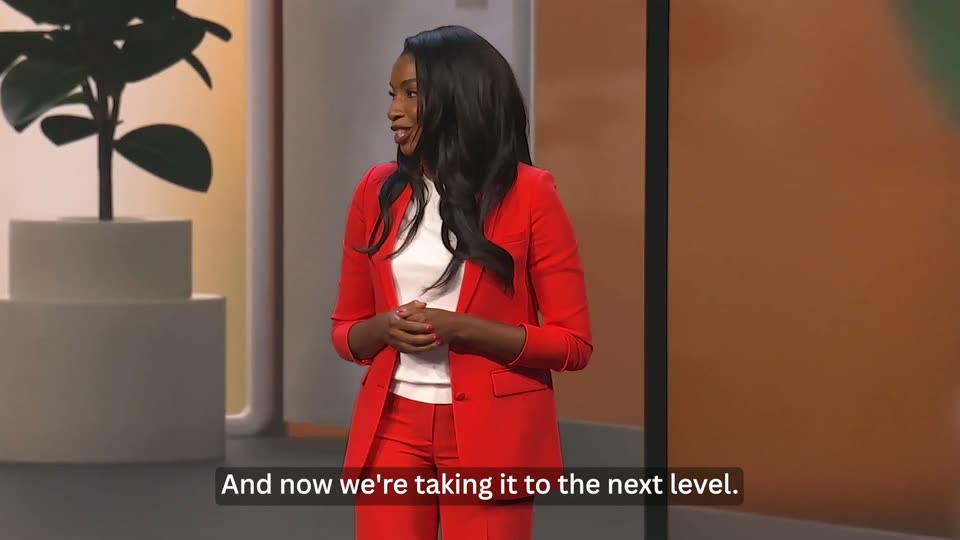
A woman in a red suit stands center stage, speaking and gesturing, with a potted plant on stacked blocks left and a tan wall right. A lower-third name card and a small interface card sit on the right, then exit, as captions run along the bottom.
On-screen text: “Daniela Nyarko”, “Head of Strategic Sales (EMEA)”, “As we know, sales professionals want to spend time closing deals, and not perfecting decks.”, “For a long time, Canva has been used across Sales teams to help scale their materials.”, “And now we're taking it to the next level.”, “Today with the launch of Data Autofill, you can wow your clients”
Camera: Static
06 · Feature reveal · 0:20–0:20
A woman in a red suit stands centered against a solid orange backdrop, speaking and gesturing with one hand raised. A two-line white caption sits in a dark translucent bar at the bottom of the frame.
On-screen text: “Today with the launch of Data Autofill,”, “you can wow your clients”
Camera: Static
07 · Feature reveal · 0:20–0:29
Two presenters in orange suits stand on either side of a large stage screen showing a Data autofill demo; placeholder numbers flip to 3.5K and 805 as a cursor taps the name field. Subtitles roll at the bottom while a name card slides in from the left.
On-screen text: “Today with the launch of Data Autofill,”, “you can wow your clients”, “Rob Giglio”, “Chief Customer Officer”, “Canva Create”, “by creating personalized,”, “data-driven sales materials in an instant.”, “We simply match data from a CRM source like Salesforce,”
Techniques: Cursor demo
Camera: Push in
08 · Feature reveal · 0:29–0:34
Two presenters in orange suits stand on a stage before a large screen showing a Canva QBR template with a bar chart and two data tiles. The camera slowly pushes in as name tags pop onto the screen's avatars and tiles. White subtitles run along the bottom.
On-screen text: “We simply match data from a CRM source like Salesforce,”, “with the corresponding fields in your design,”
Camera: Static
09 · Feature reveal · 0:34–0:44
A wide stage shot holds two presenters in orange suits flanking a large screen. The Canva interface on it cycles through Data Autofill setup panels as a named cursor clicks each step, while white subtitles run along the bottom.
On-screen text: “and Data Autofill instantly updates them to create bespoke pitches, expansion opportunities,”, “or customer success materials, quickly and at scale.”, “And one thing is for sure, a successful pitch”
Techniques: Cursor demo
Camera: Static
10 · Feature reveal · 0:44–0:55
A woman in a red blazer and trousers stands center stage before a pale lavender screen, hands clasped, then gestures and turns to point offstage as she speaks. White subtitles on a translucent dark bar run along the bottom.
On-screen text: “And one thing is for sure,”, “a successful pitch”, “needs to be as personalized as possible,”, “so to help you make an impact,”, “we are thrilled to introduce to you”
Camera: Static
11 · Feature reveal · 0:55–0:55
A wide locked-off stage shot frames two presenters, one in orange gesturing up at left and one in red before a large screen showing a Canva Q1 QBR deck with a US map and bar charts. A dark audience fills the foreground. A white caption reads Recordings. at the bottom.
On-screen text: “so to help you make an impact,”, “we are thrilled to introduce to you”, “Recordings.”
Camera: Static
12 · Feature reveal · 0:55–1:01
Two presenters in orange suits stand on a wide keynote stage; a giant screen shows the Recordings app card, whose avatar and Start recording pill slide and settle into a recording timer. Subtitles appear at the bottom. Static wide shot, audience silhouettes in the foreground.
On-screen text: “Recordings.”, “You know, with Recordings you can narrate any presentation, video, or product demo.”
Techniques: Morph
Camera: Static
13 · Feature reveal · 1:01–1:12
Locked-off wide shot of a stage: two presenters in orange outfits flank a giant screen showing the Canva recording UI, which switches from a slide to a screen-recording demo with a webcam bubble, then a 3-2-1 countdown. White subtitles run along the bottom; the audience sits in the dark foreground.
On-screen text: “You know, with Recordings you can narrate any presentation, video, or product demo.”, “Record your entire screen, and add voice overs to your designs.”, “Conflicting schedules and time zones are no longer an obstacle”
Camera: Push in
14 · Feature reveal · 1:12–1:18
Two presenters in orange suits stand on a wide stage flanked by office set pieces. The central screen plays the Canva editor, scrolling from the Strategic plan cover to the landscape table as the camera slowly pushes in. White subtitles run along the bottom edge.
On-screen text: “Conflicting schedules and time zones are no longer an obstacle”, “when you can reach customers exactly where, when, and how they like.”, “And guess what?”
Techniques: UI zoom
Camera: Push in
15 · Feature reveal · 1:18–1:25
A man in an orange suit and a woman in a red suit stand on a dark stage before a large screen showing a Canva presentation. A 'Jason' comment bubble drifts across the on-screen document. White subtitles caption the voiceover along the bottom.
On-screen text: “You do not have to wonder whether your proposals have been opened, read, or shared.”, “Our Insights & Analytics feature provides all the information within Canva,”
Camera: Static
16 · Feature reveal · 1:25–1:32
Two presenters in orange and red suits stand on a stage before a large screen showing the Canva Insights & Analytics dashboard. The screen zooms into a line-graph insights panel, then pulls back to reveal the full dashboard. White subtitles run along the bottom.
On-screen text: “Our Insights & Analytics feature provides all the information within Canva,”, “so you know exactly how to optimize your content and manage your opportunities to seal the deal.”
Techniques: UI zoom
Camera: Static
17 · Feature reveal · 1:32–1:34
A locked-off wide stage shot holds two presenters in orange and red before a large central screen showing a Canva insight dashboard with a 3.5K sign-up card; side screens display warm office mockups while overhead spotlights beam down.
Camera: Pull out
18 · CTA · 1:34–1:35
A horizontal strip of vertical panels slides left inside a blue and purple gradient frame. One panel holds a stage with a presenter and a dashboard screen, while the others show portrait photos of smiling people with name tags and bold vertical headlines.
On-screen text: “Canva Create”, “Maya”, “23 May”, “Work Redesigned”, “Jamie”, “Wei”
Techniques: Split screen, Masking
Camera: Pan
19 · CTA · 1:35–1:38
Confetti falls over a blue 3D backdrop as the camera zooms into the central Canva card. “Work Redesigned” sits inside a selection box with comment bubbles and a URL pill; the side cards exit the frame and the confetti fades out.
On-screen text: “Canva Create”, “Work”, “Redesigned”, “canva.com/canva-create”
Techniques: UI zoom, Particles
Camera: Push in