1:47

Luca IQ (YC S26) Launch
Luca IQ · B2B · Jul 2026
Caeser · Nov 2026 · 1:29 · Full motion · AI-annotated
Caeser’s 1:29 launch film runs 32 scenes, about 2.8 s each. The product shows up at 0:07 and 5 features are revealed, with social proof. The call to action lands at 0:43 (49% in). A near-silent, scroll-driven walkthrough of a developer landing page, its documentation, and a real GitHub repository, built on a flat off-white field with black grotesque headlines and monospace body type. The signature moves are the code-glyph hands that assemble and dissolve into particles, the line-art isometric engine diagram, and the slow vertical scroll that threads dashed flow lines between flat cards and 3D-tilted device mockups, all cut at a deliberately slow pace.
Is this your launch? to your site or press kit.
Luca IQ · B2B · Jul 2026
Meridian · Jun 2026
A pale web page scrolls down under a black nav bar. Two hands built from tiny text reach toward each other beneath bold headlines, then break apart into drifting letter particles. A row of feature labels scrolls along the bottom.
Techniques: Particles
Camera: Push in
A pale landing page scrolls downward past a right-aligned headline reading 'Follow the evidence.' with two pill buttons beneath it. A row of small icon-and-label features sits lower, and a new headline 'Start with the failed CI run.' rises from the bottom edge.
Camera: Pan
A pale landing page drifts upward in a slow scroll. A large dark headline 'Follow the evidence.' sits over two pill buttons and a row of monospace feature tags. Below, an eyebrow and the headline 'Start with the failed CI run.' appear above the top of a card.
Camera: Static
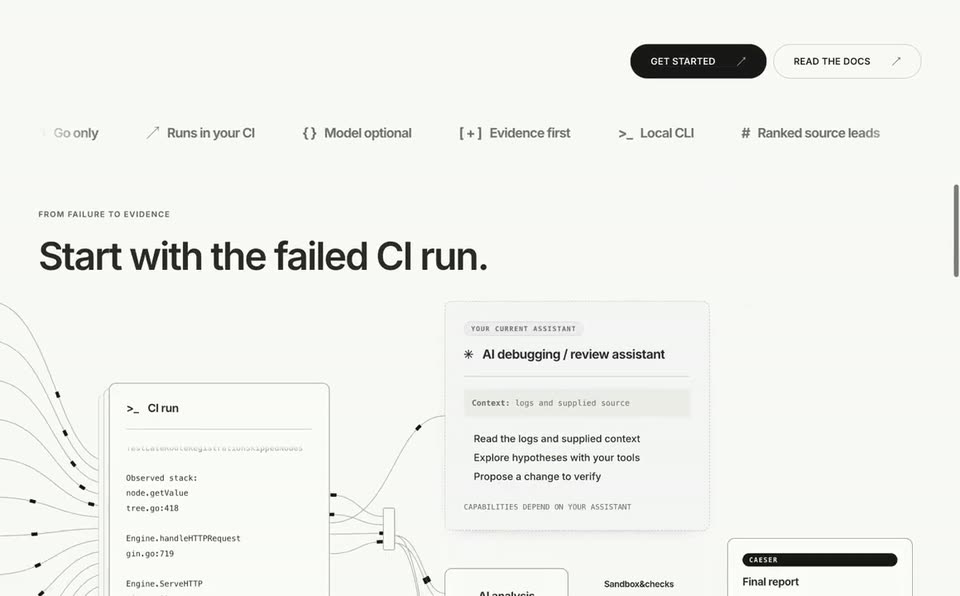
A light landing page scrolls up, the headline and two pill buttons leaving the top edge, then a row of six feature labels and the section “Start with the failed CI run.” with two cards, a CI log and an assistant card, come into view.
Camera: Pan
A light landing page scrolls upward, bringing a large headline and a three-panel diagram into view. Dashed lines link the panels, and the right card reveals a final report block as the page moves.
Camera: Pan
A white schematic of connected cards drifts slowly downward under a large headline. Thin flowing lines with moving dashes link a CI run terminal, an assistant panel, an analysis card, a sandbox box, and a final report card.
On-screen text: “REPLAY FAILURE AS EVIDENCE”, “Start with the failed CI run.”, “Continue in your assistant with the exported investigation brief.”, “Read about reports”
Camera: Static
A white line-art schematic of a debugging workflow (CI run card, AI analysis, debug and trace, sandbox checks cube, final report card) sits above a bottom caption. The view then reframes up into the documentation page, revealing a left navigation tree and a Reports and investigation briefs heading over a three-column comparison table.
On-screen text: “Continue in your assistant with the exported investigation brief.”
Techniques: UI zoom
Camera: Static
A documentation screen with a fixed left navigation and right table of contents scrolls down; the body text dissolves through itself as it moves, settling on the If the brief is missing and Read the evidence sections.
Camera: Pan
A caesar documentation page sits static, framed with a left navigation sidebar, a central article headed 'If the brief is missing', and a right table of contents. A mouse cursor hovers over the caesar logo in the top bar.
Techniques: Cursor demo
Camera: Static
A light landing page scrolls up slowly. Two hands rendered from dense monospace code glyphs reach toward each other, the left fingers dissolving into scattered particles. Bold black headlines sit top-left and mid-right above pill buttons and a footer row of feature labels.
Techniques: Particles
Camera: Push in
A pale landing page holds two static black headlines while dense swarms of tiny dots at the left and right edges shrink and fade. Pill buttons sit bottom right and a row of small code-style labels scrolls left along the bottom as a cursor drifts.
Techniques: Particles
Camera: Pan
A light landing page scrolls vertically downward. The top section with the heading and two buttons slides out, revealing a three-column flow diagram of stacked cards linked by dashed lines and small dot cubes, then a new heading enters at the bottom.
On-screen text: “Follow the evidence.”, “Start with the failed CI run.”, “Continue in your assistant with the exported investigation brief.”
Camera: Pan
A product page scrolls upward, bringing a row of feature cards and two isometric illustrations into frame. The heading Evidence rises into the lower left corner as the page pans.
Camera: Static
The page scrolls down past a flowchart to an isometric diagram of an investigation engine. Six labeled platforms, including AI harness, publication, CI evidence and source revision, connect to a central engine of small nodes, while a bold black headline and an outlined button sit on the left.
On-screen text: “Continue in your assistant with the exported investigation brief.”, “Evidence through the engine.”
Techniques: 3D mockup
Camera: Pan
A caesar documentation page scrolls down past an isometric line-art architecture diagram with dark callout labels, then a component table and numbered section headings. A cursor flickers at the left margin. The left navigation and right table of contents stay fixed.
Camera: Pan
A light landing page hero shows two hands built from a dense field of tiny text reaching toward each other, like the Creation of Adam. The headline sits top left and a second line floats center right above two pill buttons, while a row of small feature labels along the bottom edge scrambles and re-forms.
On-screen text: “Investigate failure.”, “Follow the evidence.”
Techniques: Particles
Camera: Static
A landing page scrolls downward past the headline “Follow the evidence.” and a row of feature labels, settling on the section “Start with the failed CI run.” that pairs a CI run terminal card with an assistant card linked by dotted lines.
Camera: Pan
A long white infographic scrolls down past a headline and a connected diagram of CI run, AI assistant and final report cards, then settles on a caption above two isometric laptop illustrations.
On-screen text: “Start with the failed CI run.”, “FROM FAILURE TO EVIDENCE”, “Continue in your assistant with the exported investigation brief.”, “Evidence”
Camera: Pan
A marketing page scrolls down past a code block and report panel, revealing an isometric 3D diagram of an investigation engine with three floating platforms. The dark headline Evidence through the engine sits at left as the diagram settles into full view.
On-screen text: “Evidence through the engine.”
Techniques: 3D mockup
Camera: Pan
A product webpage scrolls down. The left column heading and body copy drift up and out of frame while the isometric investigation-engine diagram with labeled nodes stays centered. A dark terminal window showing a Caesar diagnosis slides up from the bottom edge.
Camera: Pan
The page scrolls down, pushing the isometric engine diagram up out of frame and centering a dark interface card stacked over a white backing card. On the right, the DEMO label and the heading See Caeser in action with a two-line caption come into view.
On-screen text: “DEMO”, “See Caeser in action”, “A short walkthrough of a real failed run,”, “the investigation, and the final report.”
Techniques: 3D mockup
Camera: Pan
A light stage with curved dashed flow lines and two isometric diagrams at top. A 3D-tilted dark device on the left plays a recorded UI walkthrough, its cursor clicking and scrolling through a pull request and a diagnosis panel. On the right, a small DEMO label sits above the heading, which slides in, with two static subtext lines below.
On-screen text: “DEMO”, “See Caeser in action”, “A short walkthrough of a real failed run,”, “the investigation, and the final report.”
Techniques: 3D mockup, Cursor demo
Camera: Pan
A light landing page scrolls down past a tilted dark device mockup of a CI interface and a DEMO headline, then settles on a centered headline with two pill buttons and a setup prompt row.
On-screen text: “See Caeser in action”, “A short walkthrough of a real failed run, the investigation, and the final report.”, “Start with your next failed Go CI run.”, “Connect the failure to its source. Inspect the evidence, ranked function leads, and the questions still open.”, “START BUILDING”, “READ THE DOCS”, “COPY SETUP PROMPT”, “BYOK for model analysis: bring your own model provider credentials. The default investigation runs without a model.”
Techniques: 3D mockup, Parallax
Camera: Pan
A light caesar landing page settles into frame, showing a headline, two pill buttons, and a footer. A cursor glides to the copy setup prompt bar and clicks it, the text flipping to prompt copied.
Techniques: Cursor demo
Camera: Static
A light documentation interface for caesar scrolls steadily down past the Overview heading, several linked tables, and the Core concepts section. Near the end it cuts to a dark GitHub repository page listing the project files.
Camera: Pan
A GitHub repository page for the Caeser project scrolls slowly downward, moving from the file tree and commit list into the rendered README. In the first second the right sidebar fills in with a release tag, two contributors, and a Go language bar.
Camera: Pan
A GitHub repository page for the caesar project settles into frame, zooming in from a dimmed, wider view to a bright close-up of the file list and commit history on a dark background.
Techniques: UI zoom
Camera: Pan
A dark code-repository file list with a right sidebar sits still; a cursor hovers the top-left breadcrumb, then the view dissolves into the repo overview showing a logo, a greeting headline and pinned cards.
Techniques: Cursor demo
Camera: Static
A dark GitHub-style organization page for caesar sits static while a cursor drifts across the pinned repository cards, hovers over each, then clicks caesar-demo. The view cuts to that repository's file tree and about panel.
Techniques: Cursor demo
Camera: Static
A dark GitHub repository page for caesar-demo fills the frame, file list on the left and an About sidebar on the right. The sidebar sections load from gray skeleton bars into text and a Go language bar. A cursor rests near the top navigation.
Camera: Static
A dark pull request list with one open entry holds, then the whole view slides and morphs into the pull request detail page, settling on its title, a status card and an empty comment box.
Techniques: Morph
Camera: Static
A dark GitHub pull request page scrolls down through a long bot comment titled Caesar diagnosis, listing failure, hypothesis and next checks. A cursor clicks the collapsed Diagnosis details row, which expands to reveal more text, then the view scrolls back up.
Techniques: Cursor demo
Camera: Pan