1:55
Explore
00:00:00 / 00:31:09
- Length
- 0:31
- Scenes
- 22 · 1.4 s avg
- Product on screen
- 0:04
- Features shown
- 1
- Call to action
- 0:27 · 87%
- Voiceover
- Yes
- Views
- 309K on X
as of November 22, 2026
Bygga’s 0:31 launch film runs 22 scenes, about 1.4 s each. The product shows up at 0:04 and 1 feature is revealed. The call to action lands at 0:27 (87% in), over a voiceover. The video is built as a three-act flow: a locked-off live-action setup on a sunlit floor, a UI walkthrough of the site, and a time-lapsed build intercut with the app as a floating window, then flat yellow type cards. Signature moves are the overhead locked-off framing, striped window shadows, UI panels that shrink into floating windows, and hard cuts to bold yellow cards.
Footage neededEstimated needs: 2 capture groups — your screens or recordings · 1 official logo — reused across the film · 11 filmed passages — shoot, supply or replace · 4 3D passages — build or supply
Is this your launch? to your site or press kit.
More like this




Hassan - Introducing Bygga! It walks you through assembling IKEA furniture st, scene by scene
· 22 scenes as text
01 · Hook · 0:00–0:00
A long cardboard box marked BILLY lies on a sunlit oak floor beside a sofa. The box blends into a wider PAX box with a wardrobe line drawing, the camera locked off.
Techniques: Morph
Camera: Static
02 · Hook · 0:00–0:02
A flat-pack box rests on a sunlit wooden floor between a grey sofa and a round side table. The box rotates upright then settles flat as its printed name switches from HEMNES to POÄNG. Striped window shadows fall across the scene.
Techniques: 3D mockup
Camera: Static
03 · Hook · 0:02–0:02
High locked-off angle on a sunlit wooden floor. A cardboard box rotates from a tilted position to flat, its printed label changing from BRIMNES with a dresser drawing to KALLAX with a shelving unit drawing. A sofa edge and a side table with a cup frame the scene.
Techniques: Morph
Camera: Static
04 · Hook · 0:02–0:04
Overhead locked-off shot of a person in a grey shirt sitting cross-legged on a sunlit wood floor, facing a flat cardboard box printed with a shelf diagram. A sofa edge and a round side table with a mug frame the scene; window shadows stripe the floor.
Camera: Static
05 · Product intro · 0:04–0:05
Top-down shot of a person cross-legged on a sunlit wood floor typing on a laptop beside a KALLAX box, then a cut to a close-up of the screen where usebygga.com slides into the address bar above a blue result card.
On-screen text: “usebygga.com”
Camera: Static
06 · Product intro · 0:05–0:06
Close-up of hands typing on a laptop at a wooden desk in warm light. The captions 'New Tab' and 'usebygga.com' slide in over the locked-off shot.
On-screen text: “New Tab”, “usebygga.com”
Techniques: Kinetic type
Camera: Static
07 · Product intro · 0:06–0:06
A close-up of a laptop screen showing a browser open to the Bygga site. The shot starts out of focus on the tab and address bar, then racks into sharp focus, revealing the page header and a yellow illustration card on the right.
On-screen text: “Bygga: IKEA assembly, step by step”, “usebygga.com”
Camera: Pull out
08 · Demo · 0:06–0:08
A browser window mockup of the Byggja site fills the frame; the camera zooms in as a cursor types K into the search field and the 3D wireframe shelving model on the right updates to a fuller view.
Techniques: UI zoom, Cursor demo
Camera: Push in
09 · Demo · 0:08–0:09
A split web app view: left side holds the headline and a search field where “kalax” is typed, the suggestion chips fade out and a filtered KALLAX results list slides in with the first row highlighted. Right side shows a rotating 3D wireframe of the KALLAX shelf with dimension arrows.
On-screen text: “IKEA assembly, step by step.”
Techniques: Cursor demo, Split screen
Camera: Static
10 · Feature reveal · 0:09–0:12
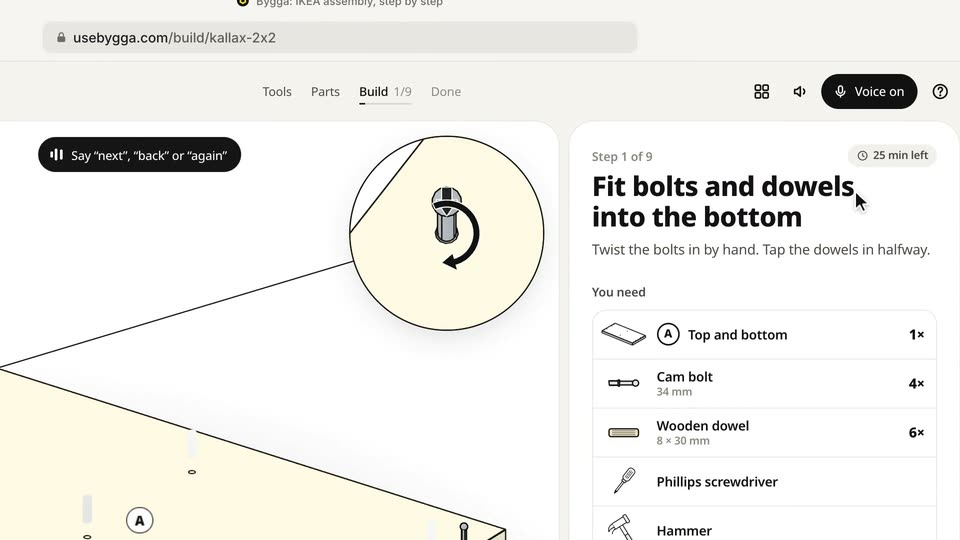
A browser mockup of an IKEA assembly app sits tilted in 3D, then eases flat to a front view. The isometric bottom panel with bolts rotates in place, a circular inset magnifies one bolt with a turn arrow, and a small voice tooltip pops in at the top right.
Techniques: 3D mockup
Camera: Pull out
11 · Feature reveal · 0:12–0:13
Overhead shot of a person on a sunlit wood floor assembling white shelf panels. A large instruction card with a 3D diagram and parts list shrinks into a small floating window at top right as the caption bar holds at the bottom.
On-screen text: “Step one. Fit bolts and dowels into the bottom.”, “Step 1 of 9”
Techniques: 3D mockup, Morph
Camera: Pull out
12 · Feature reveal · 0:13–0:15
Overhead locked-off shot of a person on a sunlit wooden floor assembling white flat-pack panels. A floating tablet on the right shows an AR assembly guide with a panel diagram and step counter. The person lays a panel flat and reaches for hardware.
On-screen text: “Step one. Fit bolts and dowels into the bottom.”, “Step 1 of 9”
Techniques: 3D mockup
Camera: Static
13 · Feature reveal · 0:15–0:16
High-angle shot of a person cross-legged on a sunlit wood floor, assembling flat panels beside a laptop. A 3D browser mockup floats top right showing a furniture diagram and a step pill, while a bottom caption swaps from the instruction line to a mic-bubble quote.
On-screen text: “Step one. Fit bolts and dowels into the bottom.”, “Okay, what's next?”
Techniques: 3D mockup
Camera: Static
14 · Feature reveal · 0:16–0:17
Overhead live-action of a person kneeling on a sunlit wooden floor assembling flat-pack panels beside a laptop. A floating browser window in the top right switches from step 1 to step 2 with a 3D diagram, while a bottom caption updates to match.
On-screen text: “Okay, what's next?”, “Step two. Stand the dividers on the dowels.”
Camera: Static
15 · Feature reveal · 0:17–0:18
Overhead live-action shot of a person on a wood floor standing dividers into a white cabinet frame. A black time badge top left ticks from 9 to 25 minutes later while a browser window with an exploded assembly diagram floats top right. A bottom caption reads the step instruction as the hands finish the move.
On-screen text: “9 minutes later”, “Step two. Stand the dividers on the dowels.”, “25 minutes later”
Camera: Static
16 · Feature reveal · 0:18–0:19
Overhead live-action of a person on a sunlit wood floor assembling a white shelf, with a 3D instruction app window pinned top right and a clock badge counting from 15 to 25 minutes later. A caption pill at the bottom reads the step as the app's 3D model advances from step 3 to 8.
On-screen text: “15 minutes later”, “21 minutes later”, “25 minutes later”, “Step two. Stand the dividers on the dowels.”
Techniques: 3D mockup
Camera: Static
17 · Feature reveal · 0:19–0:22
Top-down shot of a person on a sunlit wood floor raising both arms before a finished white shelf frame, then relaxing. A product UI panel floats top right; a “25 minutes later” badge sits top left and a yellow “Built in 25 min” pill slides in below the panel.
On-screen text: “25 minutes later”, “Built in 25 min”, “And that's it. Your KALLAX is built. Well done.”
Techniques: Particles
Camera: Static
18 · Feature reveal · 0:22–0:23
A top-down locked-off shot shows a person cross-legged on a sunlit wood floor, hands steadying a white KALLAX shelf. A black caption bar at the bottom carries the completion line.
On-screen text: “And that's it. Your KALLAX is built. Well done.”
Camera: Pan
19 · Other · 0:23–0:24
A flat yellow panel wipes across a live-action shot of a person crouched on a wood floor by white shelves. The yellow fills the frame as bold black text scales in at the center and holds.
On-screen text: “Building IKEA furniture”
Techniques: Masking, Kinetic type
Camera: Static
20 · Other · 0:24–0:25
A two-line black headline, “Building IKEA furniture just got easy,” sits centered on a flat yellow background. The frame is locked off and the text stays static for the full duration.
On-screen text: “Building IKEA furniture”, “just got easy.”
Camera: Static
21 · Pricing · 0:25–0:27
On a flat yellow field, the stretched black line 'just got easy.' squashes and fades out below center as the GitHub mark and the bold black line 'Free and Open Source' scale in. Locked-off frame, quick transition.
On-screen text: “just got easy.”, “Free and Open Source”
Techniques: Kinetic type
Camera: Static
22 · CTA · 0:27–0:31
On a flat yellow field, a white tool draws a black nut-and-circle mark, then the bold wordmark bygga locks in beside it. A white address pill with the URL slides up, and a small powered-by line plus a disclaimer fade in at the bottom.
On-screen text: “usebygga.com”, “Powered by together.ai”, “Not affiliated with IKEA. Product names are trademarks of Inter IKEA Systems B.V.”
Camera: Pull out