0:54

Introducing Perplexity Pages
Perplexity · AI · May 2024
Sonos · Apr 2024 · 0:47 · AI-annotated
Sonos’s 0:47 launch film runs 28 scenes, about 1.7 s each. The product is on screen from the first frame and 4 features are revealed. The call to action lands at 0:35 (74% in). The film is a feature walk-through: a logo sting and a Meet the redesigned Sonos app title open it, then four features (Home, search, system control, Message Center) each get a split-screen demo with the phone mockup on one side and a white headline on the other, interleaved with warm lifestyle shots. Cuts land near nine per minute with letter-scramble, slide and wipe transitions, and the close runs through a Coming soon card, an app-store Update button and the static Sonos wordmark.
Is this your launch? to your site or press kit.
Perplexity · AI · May 2024
OpenAI · AI · Sep 2026
A tan rounded square bearing the SONOS wordmark sits centered on a dark gray field with a thin progress bar beneath. The square inverts to black with white lettering as the bar fills and a faint circular ring blooms around it.
Camera: Static
The black SONOS squircle sits centered on a dark gray field while faint concentric rings expand outward from behind it, growing larger and fading toward the edges. The frame stays locked off throughout the short clip.
On-screen text: “SONOS”
Camera: Static
The white SONOS wordmark sits small at the center of a dark concentric tunnel, then scales up to fill the frame. It settles as the gray tagline fades in beneath it on a black background.
On-screen text: “Meet the redesigned Sonos app”
Camera: Static
A two-line white headline sits centered on a flat black field. The first line holds still while the second line, Sonos app, glides in from the right to its centered position.
On-screen text: “Meet the redesigned”, “Sonos app”
Techniques: Kinetic type
Camera: Static
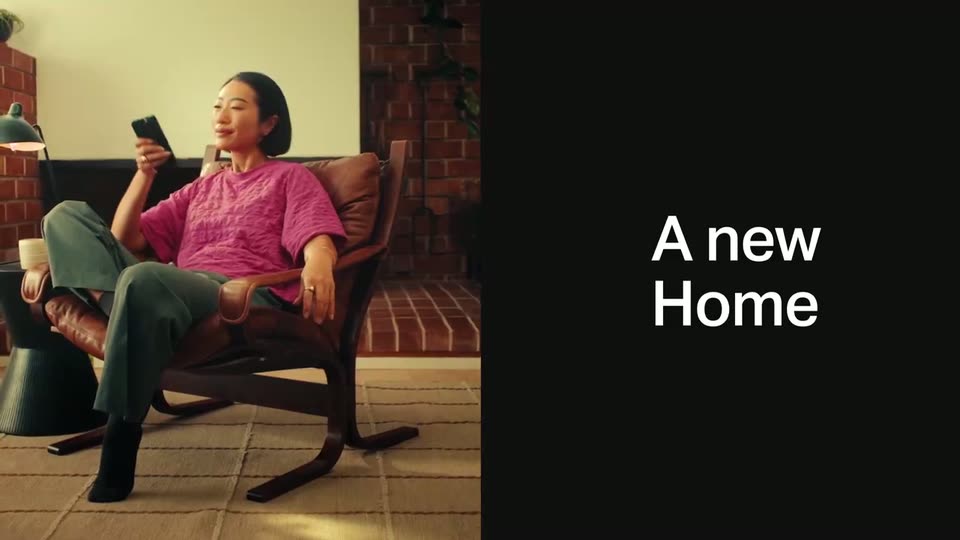
Left half shows a woman in a pink shirt seated in a leather armchair by a brick fireplace, raising a phone. Right half is solid black with the white words 'A new Home' that settle from a letter-scramble into place.
On-screen text: “A new Home”
Techniques: Split screen, Kinetic type
Camera: Static
A woman sits on a leather sofa at left as a phone mockup of the Sonos app floats on black. The camera zooms into the screen, the Recently Played row scrolls sideways, and the headline changes from A new Home to for all your favorite sounds.
On-screen text: “A new Home”, “for all your favorite sounds”
Techniques: Split screen, Kinetic type, UI zoom
Camera: Push in
A black screen holds a cluster of circular music-service icons on the left that fade in one by one, while a white stacked headline on the right swaps its words from “for all your favorite sources” to “from all your favorite services.”
On-screen text: “for all your favorite sources”, “from all your favorite services”
Techniques: Kinetic type
Camera: Static
A grid of colorful circular service logos fills the left of a black screen beside a white headline. The logos fade out to reveal a man in a green shirt on a wooden deck holding a phone, a few logos lingering over the footage.
On-screen text: “from all your favorite services”
Camera: Static
A high-angle shot frames a man in a green sweater seated on a wooden deck beside a pool. He holds a phone showing a white control screen with a green toggle and looks down at it. A black speaker sits on a wooden bench with a potted plant behind him.
Camera: Static
A man in a green sweater sits on a wooden deck by a pool, holding a phone and a coffee cup. A phone app panel with music services wipes in from the left as a white headline appears over the darkened footage.
On-screen text: “Now faster than ever to search”
Techniques: Masking, Split screen, Kinetic type
Camera: Static
A phone mockup on the left transitions from a system page to a search screen, revealing a keyboard and a history list, while a white headline holds still on the right over a black background.
On-screen text: “Now faster than ever to search”
Camera: Push in
A phone search field types the word Vagabon over an on-screen keyboard, then the view reframes to a Sonos search history list with Spotify and Apple Music tabs. A white headline sits static on the right throughout.
On-screen text: “Now faster than ever to search”
Techniques: UI zoom
Camera: Pan
A black Sonos speaker sits on a wooden shelf in a sunlit room. A person in a yellow shirt moves their hands at the left edge while a dark title panel with white text slides out to the right, revealing the full shot.
On-screen text: “ster”, “er”, “ch”
Techniques: Masking
Camera: Static
A woman with a dark afro in a mustard quilted top stands in profile, eyes closed, then opens her mouth as if singing. At 0.6s the frame splits and the right half shows a phone app screen with a Recently Played list and music service icons.
Techniques: Split screen
Camera: Static
A white headline slides in from the left over a black field, settling beside a front-facing phone mockup of the Sonos app. The app shows the Your System page with recently played covers and a row of service icons.
On-screen text: “And easier to control your system”
Techniques: Kinetic type
Camera: Static
A white three-line headline holds on the left of a black frame while an iPhone screen on the right shows the 'Your System' view; its room cards and playback rows fade and slide into a settled layout.
On-screen text: “And easier to control your system”
Camera: Static
A white headline holds left of a tilted phone mockup on black. Inside the smart home app, the system sheet slides away to reveal room sliders, the Kitchen value drops to 25, then the sheet slides back up as the phone rotates slightly.
On-screen text: “And easier to control your system”
Techniques: 3D mockup
Camera: Static
A white headline sits left of a dark phone interface on black. Inside the app, a bright music card labeled Carpenter slides upward over a dimmed card, while the Home section and group chips remain below.
On-screen text: “And easier to control your system”
Camera: Static
White headline reads “And easier to control your system” on the left of a black background while a 3D iPhone mockup slides in from the right, showing a music app with a now-playing card and room sliders.
On-screen text: “And easier to control your system”
Techniques: 3D mockup
Camera: Pull out
A flat phone mockup on the left shows the Sonos app, its screen switching from a home view with album art and service icons to a two-item Messages list. On the right, a large white headline decodes into place against the black background.
On-screen text: “New Message Center”
Techniques: Kinetic type
Camera: Static
A flat phone mockup of the SONOS Messages screen sits left on black while the bold white headline New Message Center fades out as the line with tips to help you listen better fades in on the right.
On-screen text: “New Message Center”, “with tips to help you listen better”
Techniques: Kinetic type
Camera: Static
A flat phone mockup on the left shows the Sonos app, where a Tips card settles as its headline and Watch Now button resolve out of an overlapping crossfade. On the right, a static white headline on black reads with tips to help you listen better.
On-screen text: “with tips to help you listen better”
Camera: Static
White “Coming soon” text sits centered on a black background, locked off and still. The frame then cuts to a man and woman reclining on a couch, the man pointing at the phone screen in the woman's hands.
On-screen text: “Coming soon”
Camera: Static
A man in a lavender sweater points at a smartphone held by a smiling woman as they sit close on a green couch in a warm living room. A thin white line-drawn rounded rectangle outline appears over the right side of the frame.
Camera: Static
A white panel wipes in over a live-action shot, revealing an app-store row for Sonos with an Update button. A gray dot taps the button, the tan icon gains a progress ring and morphs to black, and the button fills black with a checkmark.
Techniques: Masking, Morph
Camera: Static
A white panel bearing a black 'Update' pill with a checkmark slides left across the frame, wiping open a dim dinner scene. A group of people sit around a candlelit table; one holds up a phone with a glowing blue screen while others laugh and serve food.
On-screen text: “Update”
Techniques: Masking
Camera: Static
A group of friends gathers around a candlelit dinner table; a woman in a pink top stands holding a glass while a person in green raises a phone, and the white letters OS fade in at the center of the frame.
On-screen text: “OS”
Camera: Static
A black panel wipes in from the right, covering a thin sliver of live action at the left edge, until the frame is fully black. The white SONOS wordmark sits centered and static for the remainder.
On-screen text: “SONOS”
Techniques: Masking
Camera: Static