
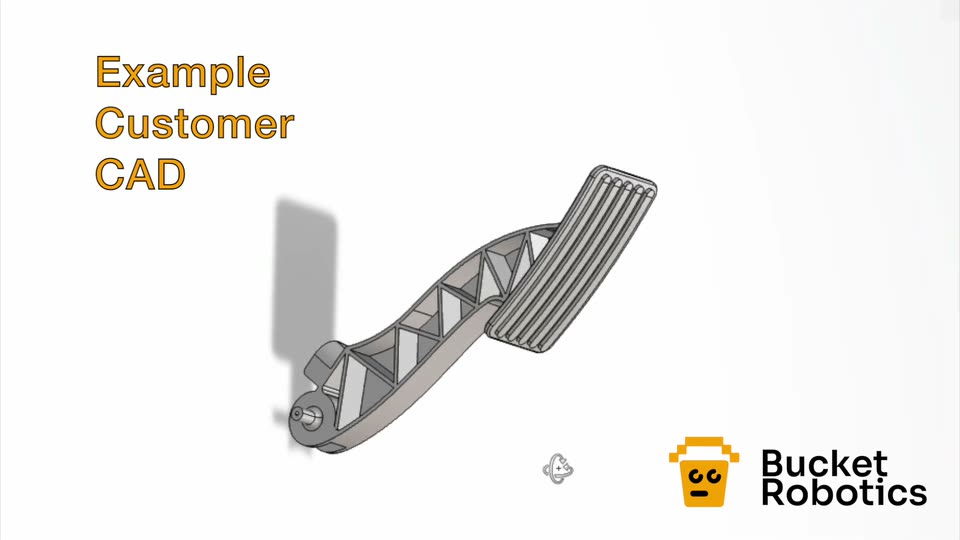
0:21
Explore
Bucket Robotics (YC S24) | Defect Detection
Bucket Robotics · Aug 2024 · 0:28 · Full motion · AI-annotated
- Length
- 0:28
- Scenes
- 12 · 2.4 s avg
- Product on screen
- 0:00
- Features shown
- 2
- Call to action
- 0:24 · 86%
- Voiceover
- Yes
- Views
- 1.2K on YouTube
as of November 26, 2026
00:00:00 / 00:28:22
- Length
- 0:28
- Scenes
- 12 · 2.4 s avg
- Product on screen
- 0:00
- Features shown
- 2
- Call to action
- 0:24 · 86%
- Voiceover
- Yes
- Views
- 1.2K on YouTube
as of November 26, 2026
Bucket Robotics’s 0:28 launch film runs 12 scenes, about 2.4 s each. The product is on screen from the first frame and 2 features are revealed. The call to action lands at 0:24 (86% in), over a voiceover. The video alternates flat brand cards with bold questions and 3D renders of one CAD part, walking from simulation to live inspection in short beats. Signature moves are hard orange-to-black color flips, scaling headlines, and the same bracket transforming from gray CAD to a dark finished piece on chipboard.
No filming indicatedEstimated needs: 1 official logo — reused across the film · 7 3D passages — build or supply
Is this your launch? to your site or press kit.
More like this





Similar soundtrack
Films whose music sounds like this one, voice left out
1:14

Airtable: introducing interface designer
Airtable · Upbeat electronic pop
1:36
Resin: A new electronics firm
Resin · Upbeat electronic
0:41


Meet the new Google Finance
Google · Upbeat electronic
Bucket Robotics (YC S24) | Defect Detection, scene by scene
· 12 scenes as text
01 · Product intro · 0:00–0:01
A flat orange background holds a bold black headline Got CAD? on the left and a small Bucket Robotics logo top left. On the right, a white three-diamond shape sits beside a matching black outline shape. The logo scales in while the headline stays locked.
On-screen text: “Got CAD?”
Camera: Static
02 · Product intro · 0:01–0:03
Black card with the Bucket Robotics logo top left. A large orange headline reads Want to Spot Defects? on the left while a white stacked-diamond mark and an orange outline zigzag sit on the right. The headline scales up and the whole composition drifts right as the outline shape exits the frame.
On-screen text: “Got CAD?”, “Want to Spot Defects?”
Techniques: Kinetic type
Camera: Push in
03 · Product intro · 0:03–0:03
On a black background, the Bucket Robotics logo anchors the top left corner. Large orange words 'Want to Spot Defects?' scale in on the left, stacked on three lines. A vertical white diamond chain and thin orange zigzag lines frame the right edge.
On-screen text: “Want to Spot Defects?”
Techniques: Kinetic type
Camera: Push in
04 · Feature reveal · 0:03–0:10
A gray CAD part with a truss arm and ribbed fin rotates in 3D on a light gray backdrop while a mouse cursor drags it. Orange caption 'Example Customer CAD' sits top left, the Bucket Robotics logo anchors the bottom right.
On-screen text: “Example Customer CAD”, “Want to Spot Defects?”
Techniques: 3D mockup, Cursor demo
Camera: Static
05 · Feature reveal · 0:10–0:11
A small CAD bracket sits centered on a textured backdrop that shifts from gray concrete to warm brown, rotating to a new angle with a hard shadow as the caption swaps from Example Customer CAD to Simulating Orientation & Lighting.
On-screen text: “Example Customer CAD”, “Simulating Orientation & Lighting”
Techniques: 3D mockup
Camera: Static
06 · Feature reveal · 0:11–0:11
A dark gray 3D mechanical part tumbles from horizontal to vertical against a scratched light gray metal backdrop. The orange headline holds top right and the brand logo sits bottom right while the part rotates to show orientation.
On-screen text: “Simulating Orientation & Lighting”, “Bucket Robotics”
Techniques: 3D mockup
Camera: Static
07 · Feature reveal · 0:11–0:12
A dark CAD bracket holding a pale panel tumbles in 3D over a backdrop that crossfades from brushed gray to brown stone. An orange outlined headline sits top-right while the Bucket Robotics logo stays bottom-right.
On-screen text: “Simulating”, “Orientation”, “& Lighting”, “Bucket”, “Robotics”
Techniques: 3D mockup
Camera: Static
08 · Feature reveal · 0:12–0:16
A dark gray 3D part with a flat plate and curved body rests on a chipboard surface, casting a soft shadow. The caption 'Simulating Orientation & Lighting' fades out top right as 'Adding Manufacturing Defects' fades in top left; the Bucket Robotics logo holds in the bottom corner.
On-screen text: “Simulating Orientation & Lighting”, “Adding Manufacturing Defects”
Techniques: 3D mockup
Camera: Static
09 · Feature reveal · 0:16–0:17
A locked-off black frame holds a large orange headline reading Your Detector is Ready on the left, balanced by a white stepped bracket on the right. A small orange bucket icon and white Bucket Robotics wordmark sit in the top-left corner. The composition stays static for the full clip.
On-screen text: “Your Detector is Ready”
Camera: Static
10 · Feature reveal · 0:17–0:23
Top-down flat lay on a wood chip panel. A white and blue 3D robot arm lifts a black bracket into frame as the caption cycles from 'Inspecting Part...' to a green 'No Defects' check, then to a red 'Defect Detected' warning while the orange part in the corner glows.
On-screen text: “Inspecting Part...”, “No Defects”, “Defect Detected”
Techniques: 3D mockup
Camera: Static
11 · Feature reveal · 0:23–0:24
Top-down view of a wood chip surface. A white robotic arm with blue joints and a black tool sits at lower right, with red 'Defect Detected' text and a warning triangle on the left. The arm and label then vanish, leaving the surface and the Bucket Robotics logo.
On-screen text: “Defect Detected”
Camera: Static
12 · CTA · 0:24–0:28
A static end card on black. A bold white headline sits top left above contact and social text, with two QR codes below. An orange staircase shape of three rounded squares fills the right, and the Bucket Robotics logo locks the top right corner. The frame holds still.
On-screen text: “Robotic Vision For Manufacturing”, “Email us at [email protected] to learn partner with us.”, “Follow us on LinkedIn and X to watch us grow.”
Camera: Static