1:41

Introducing Extensions ✨ | Bard
Google · AI · Sep 2023
Broccoli.com · Nov 2026 · 2:56 · Code only · AI-annotated
Broccoli.com’s 2:56 launch film runs 32 scenes, about 5.5 s each. The product shows up at 0:25 and 8 features are revealed. There is no explicit call to action; a voiceover carries the film. Tone is calm, precise and slightly playful, with a confident product-launch register that never gets loud. The look is a flat, soft UI on a pale lavender field with faint diagonal hatching, rounded white cards, near-black type, a single purple accent and a green success color. Type is a clean geometric sans in heavy weight for headlines and a monospace for labels, timestamps and pills. There is no music bed, only a dry voiceover and tiny UI ticks, so the pacing is driven by the typing, ticking,
Is this your launch? to your site or press kit.
Google · AI · Sep 2023
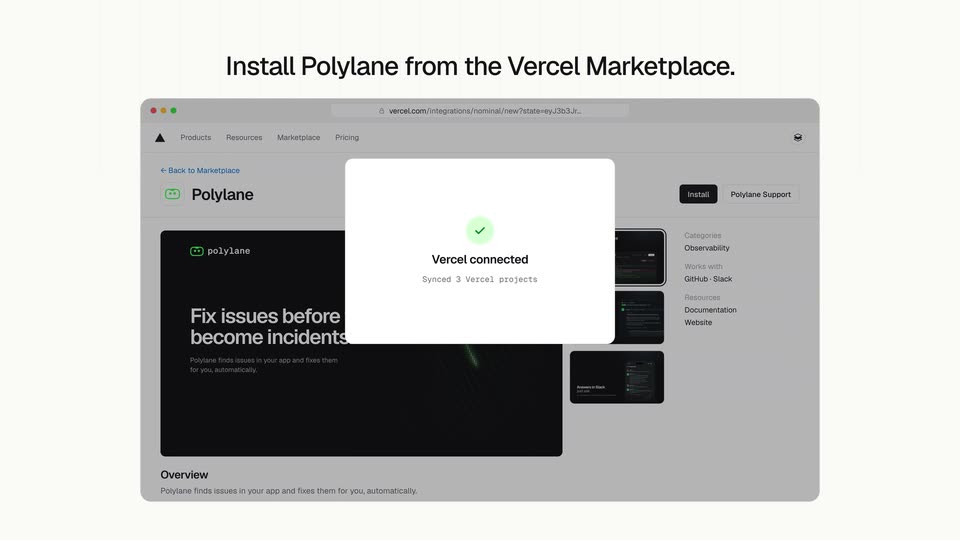
Polylane
Films whose music sounds like this one, voice left out
ClaimKit · Upbeat electronic
Kita · Upbeat electronic
Enrich Labs · Upbeat electronic
A pale clock card sits on a pink hatched background. The minute digit rolls from 1 to 2, ticking the time to 2:42 AM. Three small pills then fade in below: a location pin, a temperature, and a power-on toggle.
On-screen text: “01 Live · Minneapolis, MN”, “A winter storm, in the middle of the night.”
Techniques: Kinetic type
Camera: Static
A dashboard shows a 2:42 AM clock with location and Power out pills. A Blizzard warning card slides in at right, then a Furnace card appears below, its temperature ticking down from 58 to 51 F as a line graph draws. The panel blurs out, a phone icon pops in.
On-screen text: “01 Live · Minneapolis, MN A winter storm, in the middle of the night.”, “02 Inbound call The business line is ringing.”
Camera: Static
A flat incoming-call card on a pale panel: a white circle with a phone icon above a row showing the caller number and a Ringing badge. Two pills pop in below, then purple rings pulse from the icon as the card crossfades to the next state.
On-screen text: “02 Inbound call The business line is ringing.”, “03 Answered and booked The business line is ringing.”
Camera: Static
On a pale lavender background, a call panel plays out: a live transcript types a furnace-repair conversation on the left, task rows with green checks stack on the right, a timer counts up, and the card fades out at the end.
On-screen text: “03 Answered and booked”, “Your agent takes the call and books the job.”
Techniques: Kinetic type
Camera: Static
On a pale lavender field with faint diagonal hatching, a bold black sentence assembles line by line. New words blur into focus in sequence, and a rounded purple highlight bar settles behind “community” as the final word lands.
On-screen text: “But what if it sounded like a voice your community already knows?”
Techniques: Kinetic type
Camera: Static
On a pale lavender field with faint diagonal hatching, a small gray “Introducing” fades in above the large black headline “Voice Studio.”, which builds word by word. A purple underline draws in beneath “Studio”, then the Broccoli logo and wordmark fade in below.
On-screen text: “Introducing”, “Voice Studio.”, “Broccoli”
Techniques: Kinetic type
Camera: Static
On a pale lavender background, the faint title “Introducing Voice Studio.” fades out as the large headline “Your callers” builds word by word from the left with motion blur. A small caption sits at the top left and the Broccoli logo anchors the bottom corner.
On-screen text: “Introducing”, “Voice Studio.”, “02 Your CSR A voice your callers already trust.”, “Your callers”
Techniques: Kinetic type
Camera: Static
On a light lavender field, a bold 'Your callers' headline holds center-left while 'already love a voice.' and 'The CSR who's known them for years.' blur in word by word below a dashed line, 'The CSR' on a purple highlight box. The frame blurs into a product UI card.
On-screen text: “02 Your CSR A voice your callers already trust.”, “Your callers”, “already love a voice.”, “The CSR who's known them for years.”
Techniques: Kinetic type
Camera: Static
A 'Create a voice' panel sits on a pale grid. The voice name types out, a file chip flies in from the right and drops into the upload card, the option cards collapse into an audio player with waveform, and a 'Listening' modal with transcript appears over the dimmed form.
On-screen text: “03 Synthesize your best CSR From a call or a short script.”
Techniques: Morph
Camera: Push in
A light product window shows a Listening panel where a call script is transcribed. The timer counts up and the progress bar fills while purple highlight boxes pop over the emotion tags. The framing zooms in on the panel.
On-screen text: “03 Synthesize your best CSR From a call or a short script.”
Techniques: UI zoom
Camera: Push in
A CSR voice card plays a two-line dialogue, words darkening one by one. The scene cuts to a voice-creation form where 'Santa · December' and 'Witch · October' are typed in, each spawning a new list row with small star sparks.
On-screen text: “03 Synthesize your best CSR”, “Maria, on every call.”, “04 Endless voices”, “One for every season.”
Techniques: Kinetic type, Particles
Camera: Static
A grid of voice cards fills in under the 04 Endless voices heading, then dissolves into a Choose a voice modal as the heading swaps to 05 Background builds. Processing labels flip to Ready and three rows gain green Completed checks while a cursor moves to the Platform voices tab.
On-screen text: “04 Endless voices One for every season.”, “05 Background builds Processing turns to Ready on its own.”
Techniques: Cursor demo
Camera: Static
On a pale lavender card, the black headline 'Not ready to make your own?' resolves word by word from a soft blur, while the small Broccoli logo stays fixed in the lower-left corner.
On-screen text: “Not ready to make your own?”
Techniques: Kinetic type
Camera: Static
A large gray headline fades out and drifts right while a small section label at the top fades in. The word “Hit” begins to appear at left as the next line starts. The Broccoli logo stays fixed in the bottom-left corner.
On-screen text: “Not ready to make your own?”, “06 30+ voices The platform library, ready to use.”, “Hit the ground running with our curated platform voices.”
Techniques: Kinetic type
Camera: Static
A pale lavender card shows a bold black headline whose words sharpen in one by one, then a purple highlight box fills behind the last phrase as a flat voice-library interface mockup fades in below.
On-screen text: “06 30+ voices The platform library, ready to use.”, “Hit the ground running”, “with our curated platform voices.”
Techniques: Kinetic type
Camera: Static
A flat voice-library UI sits below a headline that builds word by word, each word boxed in a color tied to the active voice. The list scrolls and highlights rows as the badge cycles Adam, Chloe, Grace, Emily, while a second line adds “My name is” with a swapping name.
On-screen text: “06 30+ voices The platform library, ready to use.”, “Thanks for calling Martian Plumbing.”, “My name is Emily.”, “My name is Victoria.”, “My name is Adrian.”, “My name is Noah.”, “My name is Stephanie.”, “Hit the ground running”, “with our curated platform voices.”
Techniques: Kinetic type
Camera: Static
A purple highlight slides in behind the black “30+ voices” headline, and a green “Call-ready” badge pops in beside it. Below, a flat voice-picker dialog fades in, its voice list scrolls, then the whole panel fades to white.
On-screen text: “06 30+ voices The platform library, ready to use.”, “30+ voices”, “Call-ready”
Techniques: Kinetic type
Camera: Pull out
A white profile card on a lavender field shows a split waveform under two circular play buttons. Toggle pills fade in, then a cursor clicks each button, swapping which voice is emphasized as the circles trade size.
On-screen text: “07 Compare Same call, side by side.”
Techniques: Cursor demo
Camera: Static
A flat flow-builder screen shows an Incoming calls node wired to a Dane voice card. A cursor clicks Switch to Steph, the connector reroutes to the Steph card, and a call bubble types out a greeting while a counter ticks up.
On-screen text: “08 Switch”, “Live calls route to the voice you pick.”
Techniques: UI zoom, Cursor demo, Morph
Camera: Static
A light product dashboard cuts from the Switch feature to Expressive mode, with the headline changing and a large Oh fading in above sample-call waveform cards.
On-screen text: “08 Switch Live calls route to the voice you pick.”, “09 Expressive mode Pauses, emphasis and emotion on every call.”, “Oh”
Camera: Static
Two product cards sit on a light page while the headline types out “Oh no, your furnace is out? In this cold?” and the sample call timer ticks. The frame zooms into the left card as a cursor flips the Expressive mode toggle on, revealing a style instructions list.
On-screen text: “09 Expressive mode”, “Pauses, emphasis and emotion on every call.”, “Oh no, your furnace is out? In this cold?”
Techniques: Kinetic type, UI zoom, Cursor demo
Camera: Pull out
A flat UI screen shows a voice-profile card beside an expressive-mode panel. A cursor clicks play; the right waveform animates and a purple highlight moves down the instruction list. The top headline turns bold as a purple emotion tag pops in, then swaps to a laughing line.
On-screen text: “09 Expressive mode”, “Pauses, emphasis and emotion on every call.”, “Oh no, your furnace is out? In this cold?”, “[sympathetic]”, “[laughs]”, “Okay, okay.”
Techniques: Cursor demo, Kinetic type
Camera: Static
The Expressive mode panel dissolves out as a Regions panel fades in, its headline switching to 10 Every community. Three dashed cards sit in a row; the first fills with a US flag and United States while the others stay empty.
On-screen text: “Expressive mode”, “10 Every community”
Camera: Static
A flat product UI shows a Regions panel; three flag cards for United States, Latin America and Australia fade in left to right with city names, then a white greeting card with sample call text fades in over the first card and out again.
On-screen text: “Every community”, “A familiar voice in every community.”
Camera: Push in
A flat white card on a lavender field shows a US region row whose label fades in, a voice player with an animated waveform, and a pulsing green circle. A transcript fills in line by line. A bold heading reads Every community above the card.
On-screen text: “10”, “Every community”, “A familiar voice in every community.”
Camera: Static
A white region card crossfades from a US entry to a Mexican one, showing a flag, the name Latin America - Monterrey, MX and a voice player for Paola. The waveform pulses as the Spanish greeting plays, and the second line of the transcript darkens.
On-screen text: “10 Every community A familiar voice in every community.”
Camera: Pan
A product UI card shows the Australia greeting with a flag, a voice row for Paul, and a pink audio orb on the right. The region crossfades in from Latin America, then the orb squishes and the waveform plays to the voiceover.
On-screen text: “10 Every community”, “A familiar voice in every community.”
Techniques: Morph
Camera: Static
A product UI panel titled Regions shows three region cards, United States, Latin America and Australia, each with a flag and a voice sample. A centered Greeting detail card with an Australia flag and waveform sits over them, then fades out to reveal the three cards.
On-screen text: “10 Every community”, “A familiar voice in every community.”
Camera: Pull out
A flat feature grid builds on a pale lavender field under the bold heading Voice Studio. White rounded cards pop in one by one, each pairing a small interface snippet with a bold caption, while a typed pill and a counting number fill in, and a soft purple bar slides behind the word Studio.
On-screen text: “Voice Studio”, “Everything your agent can sound like.”, “Your own voice”, “Synthesize your best CSR”, “Describe any voice”, “30+”, “voices”, “Compare side by side”, “Switch in one click”, “Expressive mode”
Techniques: Kinetic type
Camera: Static
A call row in a pale panel flips from Ringing to a green check with an answered-by-agent pill, while a live transcript types the agent's greeting. A large black headline then builds word by word below, ending on know. with a lavender highlight.
On-screen text: “12 Same call, new voice Minneapolis, MN. The storm hasn't let up.”, “A voice they already know.”
Techniques: Kinetic type
Camera: Static
A flat dashboard panel on a lavender hatched background shows a Voice Settings row. The breadcrumb pill expands to highlight Change voice, then a cursor glides down and clicks the Change voice button, which gains a purple outline.
On-screen text: “12 Where to find it Agent settings, in your dashboard.”
Techniques: Cursor demo
Camera: Static
On a black background, a white broccoli icon and the bold wordmark Broccoli fade in at center, with the smaller tagline Voice Studio appearing beneath. The lockup then holds still on a locked-off frame.
On-screen text: “Broccoli”, “Voice Studio”
Camera: Static